
- Getting Started
- Creating Your First Funnel
- CartFlows Funnel Step Types
- Starting a Funnel from a Product Page
- How to Edit and Customise Funnel Steps
- Using CartFlows with or without Store Checkout
- How to Add /Assign Products to a Checkout Step
- How to Create One-Click Upsell and Downsell Offers
- How to Use Canvas Mode to Visualize Your Sales Funnel
- Hiding Fields on the Checkout Page
- Installing WooCommerce
- Using WooCommerce
- Adding Products in WooCommerce
- Using Your Theme's Header & Footer in a Step
- Embedding a Checkout Form on the Checkout Page
- Hiding WooCommerce Pages and Products
- Using Pricing Tables
- Adding an Affiliate Program
- Setting a Funnel as the Homepage
- Dynamic Offers aka Rule Engine
- Instant Layout for Checkout and Thank You Step
- Adding Products from the URL to the Checkout Page
- Deleting Plugin Data During Uninstallation
- Importing Ready-Made Templates for Funnels and Steps
- Importing and Exporting Funnels and Step
- URL Parameters
- Replacing the Main Checkout Order with an Upsell or Downsell
- Rolling back to a Previous Version
- Using the "Order Custom Field" Rule of Dynamic Offers with Custom Field Editor
- Google Address Autocomplete
- Flatsome UX Builder
- ActiveCampaign
- Paypal Reference Transactions
- How PaypPal/Stripe Works
- Enabling Enfold Avia Layout Builder
- Setting Up Authorize.net for Upsell & Downsell
- Supported Payment Gateways
- Setting Quantity and Discount for Products on the Checkout Page
- Adding Custom Payment Gateway Support for One-Click Upsell and Downsell
- Funnel in Test Mode
- Troubleshooting Plugin and Theme Conflicts
- Resolving the "Please Select a Simple, Virtual, and Free Product" Error
- Fixing Endless Loading on the Checkout Page
- Fixing the "We can't seem to find an order for you." Error on the Thank You Page
- Troubleshooting License Activation Issues
- Fixing the "Checkout ID Not Found" Error
- Fixing the "Session Expired" Error Message
- Resolving "Order Does Not Exist" Error on Upsell/Downsell Page
- Fixing the "Sorry, This Product Cannot Be Purchased" Error
- Disabling Auto-fill of Address Fields Based on Zip Code
- Enabling Theme's Scripts & Styles Without Changing Page Template
- Disabling Auto-fill of Checkout Fields
- Allowing Cache Plugins to Cache CartFlows Pages
- Changing the "Choose a Variation" Text
- VAT Field Not Displaying for WooCommerce EU/UK VAT Compliance Plugin
- Enabling the Product Tab on Store Checkout
- Displaying the Order Summary Open on Mobile Devices
- Refreshing the Checkout Page After CartFlows AJAX Calls
- Overview
- Installing Modern Cart Starter
- Installing Modern Cart Pro
- Activating License Key
- Customizing General Settings
- Customizing Cart Tray Labels
- Customizing Cart Icon Settings
- Customizing Cart Tray Styling
- Understanding the Product Recommendations Feature
- Controlling Product Recommendation Source for Empty Cart
- Controlling When the Cart Opens After Adding Products
- Enabling Free Shipping in WooCommerce
- Configuring Upsell and Cross-Sell Products in WooCommerce
- Using a Custom Image for the Floating Cart Icon
- Setting Custom Product Recommendations in the Cart
- Opening the Cart Using a Custom Button or Link
- Floating Icon Styling
- Cart Opening Direction
- Popup Cart Feature
- Using the In-Cart Coupon Field
- Free Shipping Progress Bar
- Enabling AJAX Add to Cart
- Compatibility with Popular Themes and Page Builders
- How to Enable/Disable Modern Cart on Specific Pages
- RTL Language Support in Modern Cart
- How to Show / Hide Product Images in the Cart Tray
- How to Add a Modern Cart Trigger to a WordPress Menu
- How to Display Shipping Costs Inside the Cart Tray
- How to Show Taxes / Tax-Inclusive Prices in the Cart
- Common Issues and Fixes
Enable AJAX Add to Cart (Site-wide)
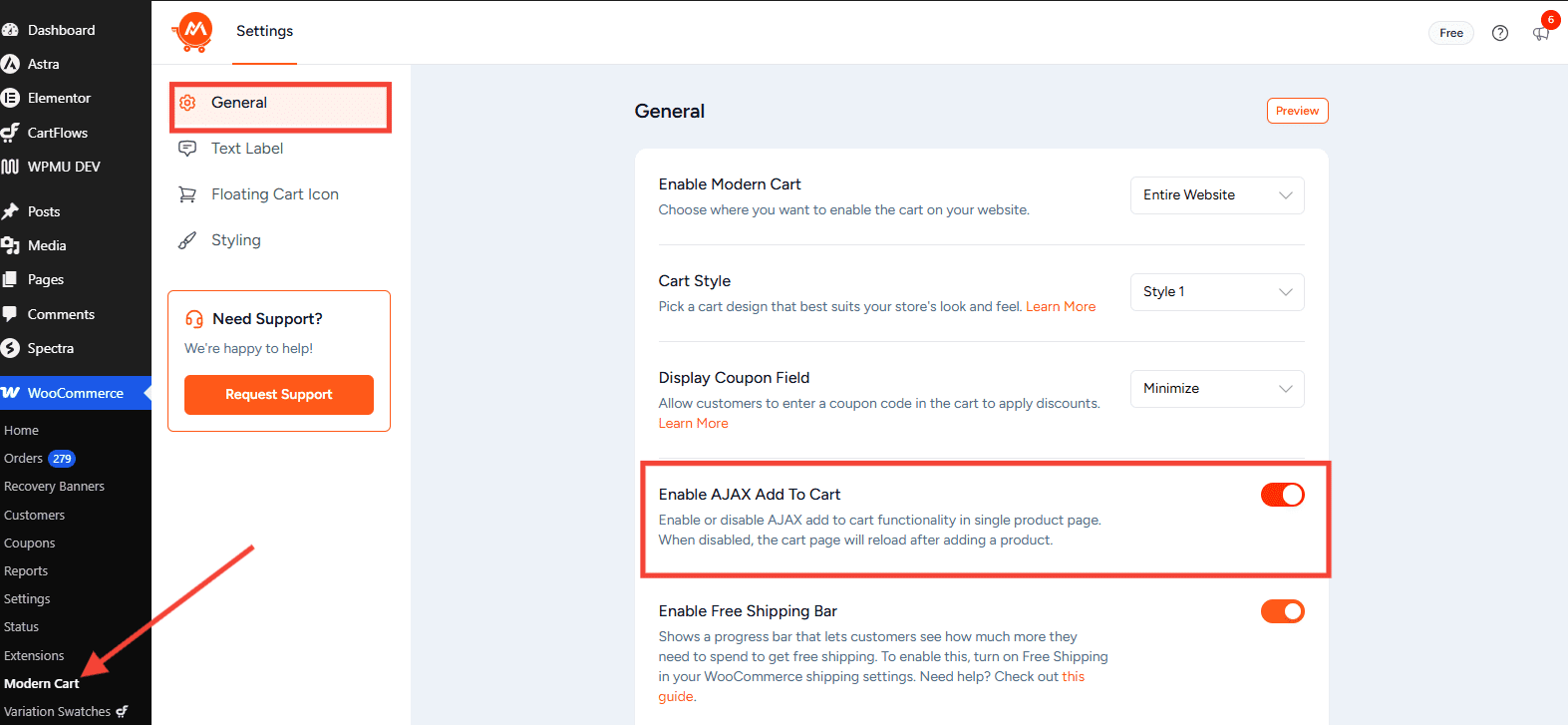
By default, Modern Cart enables AJAX Add to Cart on single product pages. This means when a customer clicks “Add to Cart”, the product is added and the cart updates instantly — without reloading the page. You can enable or disable this behavior from the plugin settings.
How to Enable or Disable AJAX Add to Cart
- Go to WooCommerce > Modern Cart in your WordPress dashboard.
- Click the General tab.
- Find the Enable AJAX Add To Cart toggle.
- Turn it on to enable AJAX behavior, or turn it off to revert to the default WooCommerce page-reload behavior.
What Each Setting Does
- Enabled (Default) — When a customer clicks Add to Cart on a product page, the item is added silently and the Modern Cart slide-out opens automatically. The page does not reload.
- Disabled — Clicking Add to Cart reloads the page, following the default WooCommerce behavior. The Modern Cart slide-out still works, but it will not open automatically on add-to-cart.
Note
AJAX Add to Cart applies to single product pages. Shop/Archive pages use WooCommerce’s own AJAX behavior, which is controlled separately in WooCommerce > Settings > Products.
Was this doc helpful?
What went wrong?
We don't respond to the article feedback, we use it to improve our support content.