
- Getting Started
- Creating Your First Funnel
- CartFlows Funnel Step Types
- Starting a Funnel from a Product Page
- How to Edit and Customise Funnel Steps
- Using CartFlows with or without Store Checkout
- How to Add /Assign Products to a Checkout Step
- How to Create One-Click Upsell and Downsell Offers
- How to Use Canvas Mode to Visualize Your Sales Funnel
- Hiding Fields on the Checkout Page
- Installing WooCommerce
- Using WooCommerce
- Adding Products in WooCommerce
- Using Your Theme's Header & Footer in a Step
- Embedding a Checkout Form on the Checkout Page
- Hiding WooCommerce Pages and Products
- Using Pricing Tables
- Adding an Affiliate Program
- Setting a Funnel as the Homepage
- Dynamic Offers aka Rule Engine
- Instant Layout for Checkout and Thank You Step
- Adding Products from the URL to the Checkout Page
- Deleting Plugin Data During Uninstallation
- Importing Ready-Made Templates for Funnels and Steps
- Importing and Exporting Funnels and Step
- URL Parameters
- Replacing the Main Checkout Order with an Upsell or Downsell
- Rolling back to a Previous Version
- Using the "Order Custom Field" Rule of Dynamic Offers with Custom Field Editor
- Google Address Autocomplete
- Flatsome UX Builder
- ActiveCampaign
- Paypal Reference Transactions
- How PaypPal/Stripe Works
- Enabling Enfold Avia Layout Builder
- Setting Up Authorize.net for Upsell & Downsell
- Supported Payment Gateways
- Setting Quantity and Discount for Products on the Checkout Page
- Adding Custom Payment Gateway Support for One-Click Upsell and Downsell
- Funnel in Test Mode
- Troubleshooting Plugin and Theme Conflicts
- Resolving the "Please Select a Simple, Virtual, and Free Product" Error
- Fixing Endless Loading on the Checkout Page
- Fixing the "We can't seem to find an order for you." Error on the Thank You Page
- Troubleshooting License Activation Issues
- Fixing the "Checkout ID Not Found" Error
- Fixing the "Session Expired" Error Message
- Resolving "Order Does Not Exist" Error on Upsell/Downsell Page
- Fixing the "Sorry, This Product Cannot Be Purchased" Error
- Resolving "No Product is Selected" Error
- Fixing Order Status Stuck at MainOrderAccepted
- Fixing the "Your Cart is Empty" Error Message
- Fixing "The Following Required Query String Data is Missing: Instance" Error
- Fixing "Page Not Found" on Checkout During Payment
- Fixing Checkout Page Redirection to Homepage
- Why Upsell/Downsell is Not Working or Being Skipped
- Enabling CartFlows Step Post Types for Page Builders
- How to Fix the "Sorry, the Content Area Was Not Found in Your Page" Error in Elementor
- Refreshing / Flushing WordPress Permalinks
- Fixing Request Timeout Errors When Importing Funnel or Step Templates
- Fixing "API Key Already Activated with Same Instance ID" Error
- Viewing CartFlows Logs
- Fixing 5XX Error When Importing Funnel / Step Templates
- Fixing Blank Page Issue when Importing CartFlows Elementor Templates
- Why is Step Editing Disabled When I Try to Edit the CartFlows Checkout or Thank You Page?
- Resolving Large Stripe Payment Icons and Uneditable Credit Card Fields
- Disabling Auto-fill of Address Fields Based on Zip Code
- Enabling Theme's Scripts & Styles Without Changing Page Template
- Disabling Auto-fill of Checkout Fields
- Allowing Cache Plugins to Cache CartFlows Pages
- Changing the "Choose a Variation" Text
- VAT Field Not Displaying for WooCommerce EU/UK VAT Compliance Plugin
- Enabling the Product Tab on Store Checkout
- Displaying the Order Summary Open on Mobile Devices
- Refreshing the Checkout Page After CartFlows AJAX Calls
- Overview
- Installing Modern Cart Starter
- Installing Modern Cart Pro
- Activating License Key
- Customizing General Settings
- Customizing Cart Tray Labels
- Customizing Cart Icon Settings
- Customizing Cart Tray Styling
- Understanding the Product Recommendations Feature
- Controlling Product Recommendation Source for Empty Cart
How to Resolve the “Please select a Simple, Virtual and Free product” Error
Do you notice an Error Message – Please select a Simple, Virtual and Free product.
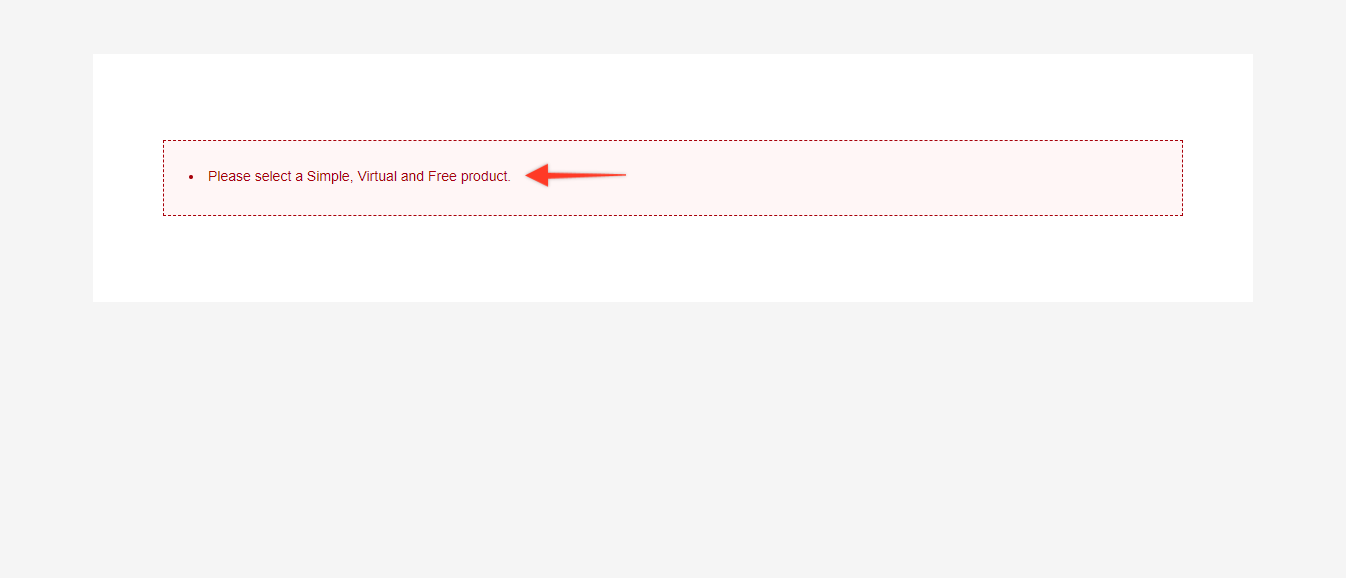
Solution:
Following are the steps using which you can select the free Simple and Virtual product on the optin page of the CartFlows.
Step 1: Go to CartFlows > Funnels and edit the funnel.
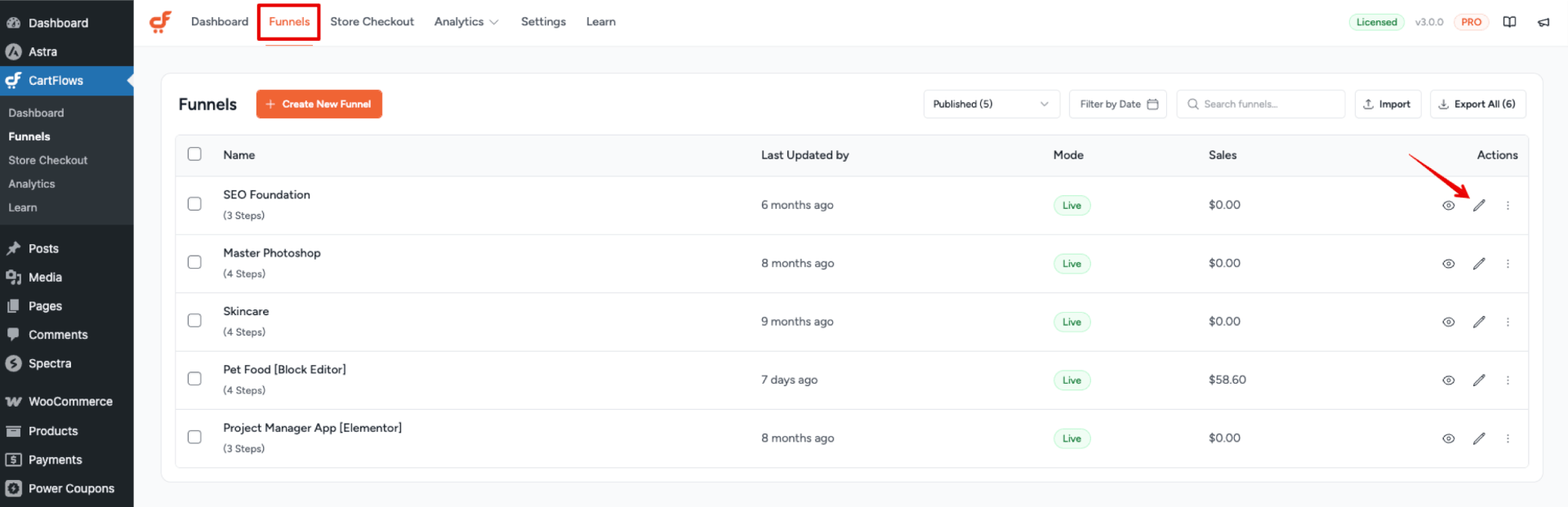
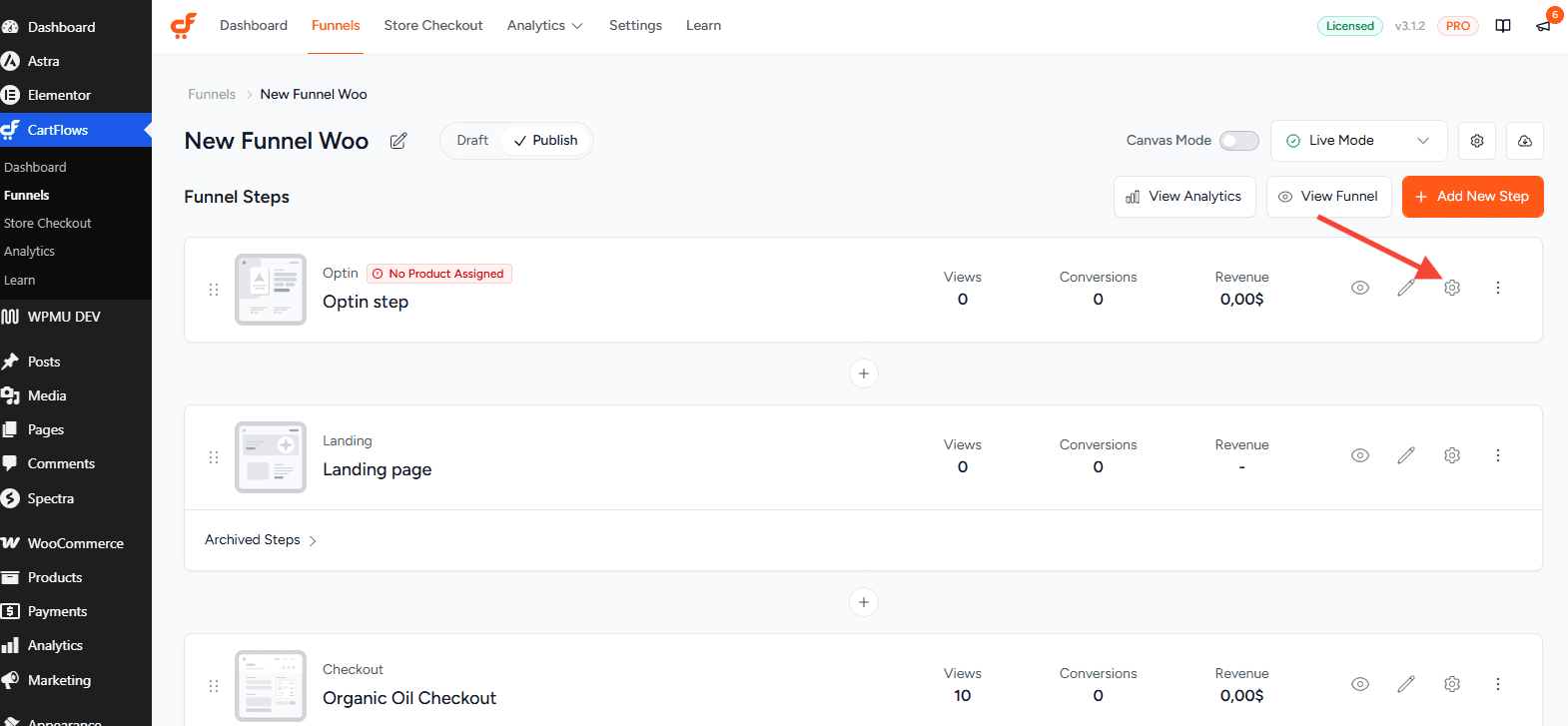
Step 2: Click the Settings icon (cog icon) on the Optin step.
Step 3: Navigate to the Products Tab and Search and select your free simple or virtual product for the optin page. Add and save the settings.
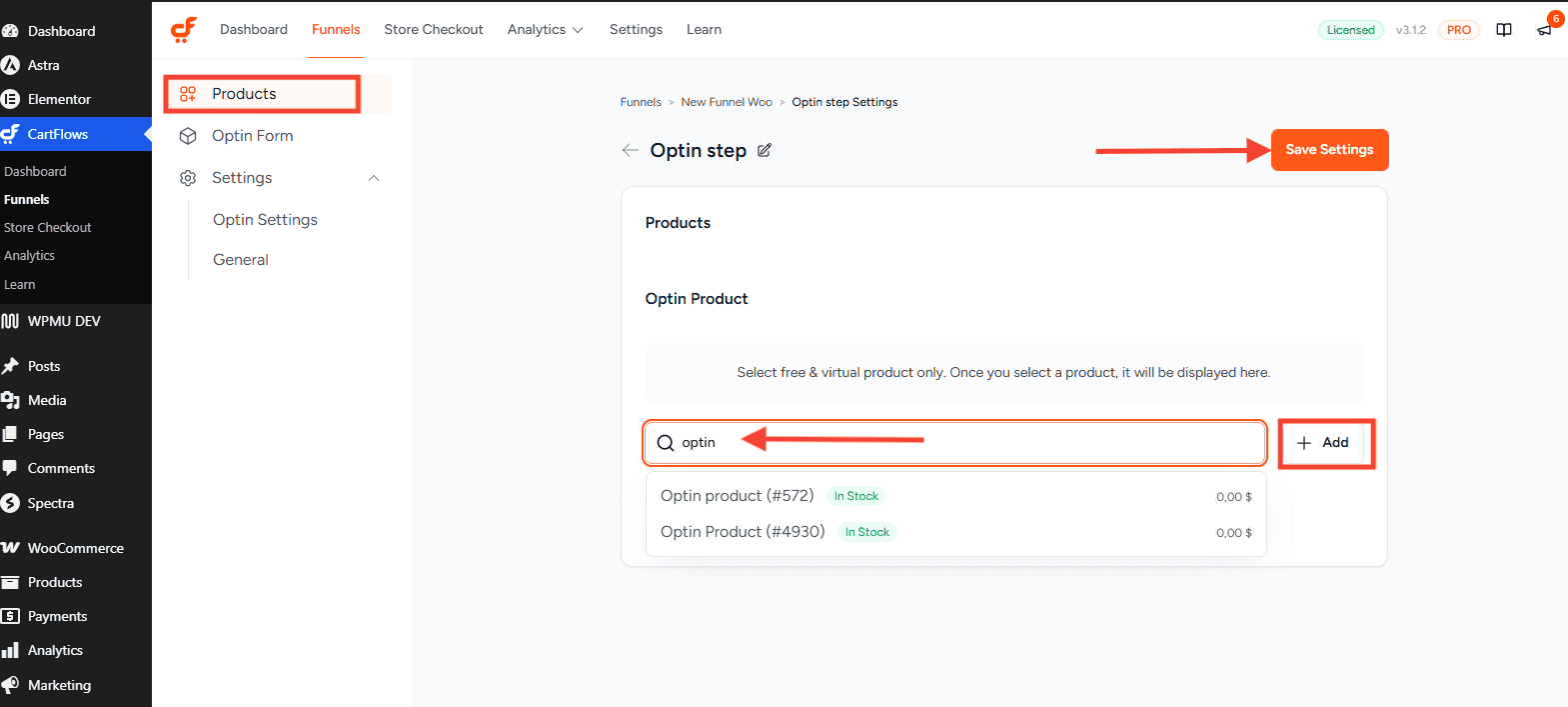
In a nutshell, to resolve this issue, you will need to select Simple and Virtual Product.
The Optin Step type only allows selling the above-mentioned type of products. This Step Type provides only three fields such as First Name, Last Name, Email ID.
So the user cannot make a payment in this scenario, this is the reason you need to set the zero price value Simple / Virtual product.
If you need to add more custom fields in the Optin Type you will need the CartFlows Pro version.
We don't respond to the article feedback, we use it to improve our support content.