
- Getting Started
- Creating Your First Funnel
- CartFlows Funnel Step Types
- Starting a Funnel from a Product Page
- How to Edit and Customise Funnel Steps
- Using CartFlows with or without Store Checkout
- How to Add /Assign Products to a Checkout Step
- How to Create One-Click Upsell and Downsell Offers
- How to Use Canvas Mode to Visualize Your Sales Funnel
- Hiding Fields on the Checkout Page
- Installing WooCommerce
- Using WooCommerce
- Adding Products in WooCommerce
- Using Your Theme's Header & Footer in a Step
- Embedding a Checkout Form on the Checkout Page
- Hiding WooCommerce Pages and Products
- Using Pricing Tables
- Adding an Affiliate Program
- Setting a Funnel as the Homepage
- Dynamic Offers aka Rule Engine
- Instant Layout for Checkout and Thank You Step
- Adding Products from the URL to the Checkout Page
- Deleting Plugin Data During Uninstallation
- Importing Ready-Made Templates for Funnels and Steps
- Importing and Exporting Funnels and Step
- URL Parameters
- Replacing the Main Checkout Order with an Upsell or Downsell
- Rolling back to a Previous Version
- Using the "Order Custom Field" Rule of Dynamic Offers with Custom Field Editor
- Google Address Autocomplete
- Flatsome UX Builder
- ActiveCampaign
- Paypal Reference Transactions
- How PaypPal/Stripe Works
- Enabling Enfold Avia Layout Builder
- Setting Up Authorize.net for Upsell & Downsell
- Supported Payment Gateways
- Setting Quantity and Discount for Products on the Checkout Page
- Adding Custom Payment Gateway Support for One-Click Upsell and Downsell
- Funnel in Test Mode
- Troubleshooting Plugin and Theme Conflicts
- Resolving the "Please Select a Simple, Virtual, and Free Product" Error
- Fixing Endless Loading on the Checkout Page
- Fixing the "We can't seem to find an order for you." Error on the Thank You Page
- Troubleshooting License Activation Issues
- Fixing the "Checkout ID Not Found" Error
- Fixing the "Session Expired" Error Message
- Resolving "Order Does Not Exist" Error on Upsell/Downsell Page
- Fixing the "Sorry, This Product Cannot Be Purchased" Error
- Disabling Auto-fill of Address Fields Based on Zip Code
- Enabling Theme's Scripts & Styles Without Changing Page Template
- Disabling Auto-fill of Checkout Fields
- Allowing Cache Plugins to Cache CartFlows Pages
- Changing the "Choose a Variation" Text
- VAT Field Not Displaying for WooCommerce EU/UK VAT Compliance Plugin
- Enabling the Product Tab on Store Checkout
- Displaying the Order Summary Open on Mobile Devices
- Refreshing the Checkout Page After CartFlows AJAX Calls
- Overview
- Installing Modern Cart Starter
- Installing Modern Cart Pro
- Activating License Key
- Customizing General Settings
- Customizing Cart Tray Labels
- Customizing Cart Icon Settings
- Customizing Cart Tray Styling
- Understanding the Product Recommendations Feature
- Controlling Product Recommendation Source for Empty Cart
- Installing Free Version
- Installing Pro Version
- Activating License Key
- Configuring the Settings
- Enabling Webhooks
- Product Reports
- SMS Integration
- WhatsApp Integration
- Email/Domain Blacklist
- Shortcode Reference for Email Fields
- Filters to Customize Product Table
- Recovery Email Going to Spam
- Cookies/GDPR Compliance
- Emails not Sending
- Orders Not Capturing
- Dynamic Email Rules
- Excluding Products from Coupon
- Rolling Back to a Previous Version
- Setting Up Abandoned Cart Email Sequences
- How Cart Abandonment Tracking Works
- Creating and Customizing Email Templates
- Using Unique Recovery Links / One-Click Cart Recovery
- Adding Coupon Incentives to Recovery Emails
- Setting Up Abandoned Cart Recovery for Guest vs Registered Users
- Analytics & Reporting Overview
- Recovering Unpaid / Failed Orders
- Configuring Abandonment Timeout / Cart Cut-Off Time
- Admin Copy of Recovery Emails (CC/BCC)
- A/B Testing Recovery Emails and Coupons
- Segmenting Abandonment Recovery by Cart Value
- Recovery Email Deliverability Best Practices
- Viewing and Managing the Abandoned Carts
- Unsubscribe / Opt-Out Handling for Recovery Emails
- GDPR / Privacy Compliance
- Testing Cart Abandonment Recovery Emails
- On-Site Reminder Banner
- Pausing or Disabling Cart Abandonment for Specific Products or Categories
Recovering Unpaid / Failed Orders
Not every unfinished sale is an abandoned cart — sometimes a customer reaches the final step, clicks “Place Order”, but the payment fails, stays pending, or times out. These orders still represent interested buyers who can be recovered with the right follow-up.
This guide explains how Cart Abandonment Recovery handles orders with Pending and Failed statuses, and how to configure the plugin to either recover them or exclude them from recovery emails.
Understanding Order Statuses in WooCommerce
| Status | Meaning |
| Pending payment | Order placed, but payment not yet received (e.g., bank transfer, cash on delivery) |
| Failed | Payment attempt failed (wrong card, declined, gateway timeout) |
| On hold | Awaiting manual confirmation or review |
| Processing | Payment received, order being prepared |
| Completed | Fulfilled order |
By default, Cart Abandonment Recovery treats orders as “completed” when they move to Processing or Completed — meaning the cart stops receiving recovery emails.
For Pending, Failed, or On hold orders, you have control over whether recovery emails continue.
Prerequisites
- WooCommerce checkout configured with at least one payment gateway
- Email templates set up under the Follow Up Templates tab
How Pending / Failed Orders Are Handled
- Customer fills out the checkout form — cart is tracked.
- Customer clicks “Place Order” — WooCommerce creates an order with status Pending or Failed (depending on gateway response).
- The plugin checks the status against the “Exclude email sending for” setting.
- If the status is not excluded, recovery emails are sent based on your templates.
- When the order eventually reaches Processing or Completed, the cart is marked as Recovered.
Step-by-Step: Configuring Recovery for Pending / Failed Orders
Step 1 — Open Settings
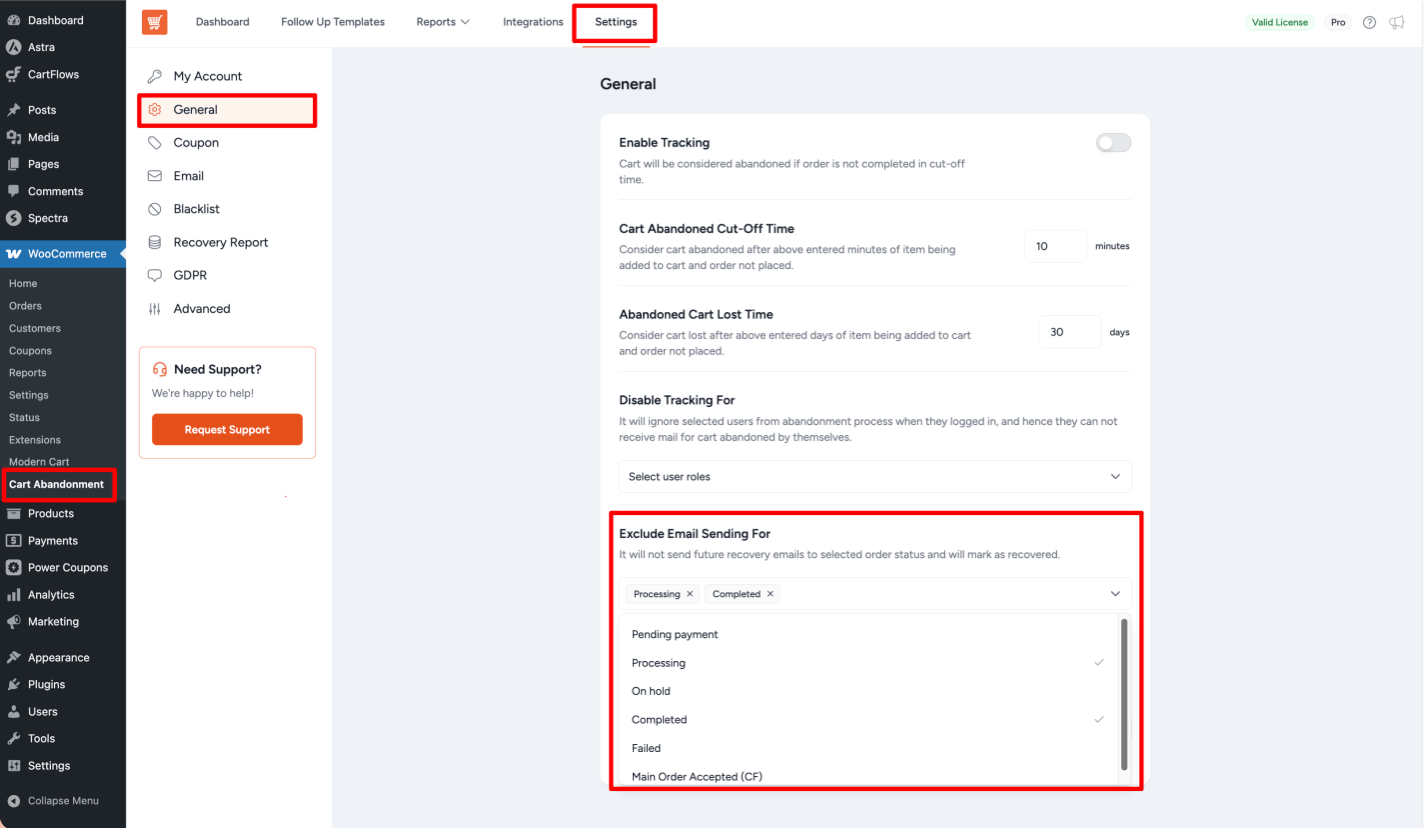
Navigate to WooCommerce > Cart Abandonment > Settings > General.
Step 2 — Find the “Exclude Email Sending For” Option
Scroll down to find the Exclude Email Sending For multi-select dropdown.
This multi-select field lets you choose which order statuses should NOT receive recovery emails.
Step 3 — Choose Your Strategy
Option A — Recover Pending/Failed Orders (Recommended)
Do NOT add “Pending payment” or “Failed” to the excluded list. The plugin will continue sending recovery emails encouraging the customer to complete payment.
Option B — Skip Pending Orders
If you prefer not to chase pending payments (e.g., bank transfer orders you trust will arrive), add “Pending payment” to the excluded list.
Option C — Skip Failed Orders
If your checkout allows automatic retries or you have a separate flow for failed payments, add “Failed” to the excluded list.
Writing Effective Recovery Emails for Pending / Failed Orders
For unpaid orders, your messaging should be different from standard cart abandonment. Try these patterns in your email templates:
- Subject: “Your order is just one step away — complete your payment”
- Subject: “We couldn’t process your payment — let’s fix that”
- Include a clear call-to-action linking to the checkout
- Offer alternative payment methods if available
- Use
{{cart.abandoned_date}}to reference when they last tried
Tips & Best Practices
- Split your templates — create separate templates for “abandoned at checkout” vs. “pending payment” with different tone.
- Shorter follow-up times for failed payments — a 15–30 minute delay is often more effective than hours.
- For high-value orders, consider a manual phone follow-up alongside the email.
- Monitor your payment gateway — a surge in failed orders may indicate gateway issues.
FAQs
We don't respond to the article feedback, we use it to improve our support content.