
- Hiding Fields on the Checkout Page
- Installing WooCommerce
- Using WooCommerce
- Adding Products in WooCommerce
- Using Your Theme's Header & Footer in a Step
- Embedding a Checkout Form on the Checkout Page
- Hiding WooCommerce Pages and Products
- Using Pricing Tables
- Adding an Affiliate Program
- Setting a Funnel as the Homepage
- Dynamic Offers aka Rule Engine
- Instant Layout for Checkout and Thank You Step
- Adding Products from the URL to the Checkout Page
- Setting Up Split Testing for Steps
- Deleting Plugin Data During Uninstallation
- Importing Ready-Made Templates for Funnels and Steps
- Importing and Exporting Funnels and Step
- URL Parameters
- Replacing the Main Checkout Order with an Upsell or Downsell
- Rolling back to a Previous Version
- Google Address Autocomplete
- Flatsome UX Builder
- ActiveCampaign
- Paypal Reference Transactions
- How PaypPal/Stripe Works
- Enabling Enfold Avia Layout Builder
- Setting Up Authorize.net for Upsell & Downsell
- Supported Payment Gateways
- Setting Quantity and Discount for Products on the Checkout Page
- Adding Custom Payment Gateway Support for One-Click Upsell and Downsell
- Funnel in Test Mode
- Troubleshooting Plugin and Theme Conflicts
- Resolving the "Please Select a Simple, Virtual, and Free Product" Error
- Fixing Endless Loading on the Checkout Page
- Fixing the "We can't seem to find an order for you." Error on the Thank You Page
- Troubleshooting License Activation Issues
- Fixing the "Checkout ID Not Found" Error
- Fixing the "Session Expired" Error Message
- Resolving "Order Does Not Exist" Error on Upsell/Downsell Page
- Fixing the "Sorry, This Product Cannot Be Purchased" Error
- Disabling Auto-fill of Address Fields Based on Zip Code
- Enabling Theme's Scripts & Styles Without Changing Page Template
- Disabling Auto-fill of Checkout Fields
- Allowing Cache Plugins to Cache CartFlows Pages
- Changing the "Choose a Variation" Text
- VAT Field Not Displaying for WooCommerce EU/UK VAT Compliance Plugin
- Enabling the Product Tab on Store Checkout
- Displaying the Order Summary Open on Mobile Devices
- Refreshing the Checkout Page After CartFlows AJAX Calls
- Overview
- Installing Modern Cart Starter
- Installing Modern Cart Pro
- Activating License Key
- Customizing General Settings
- Customizing Cart Tray Labels
- Customizing Cart Icon Settings
- Customizing Cart Tray Styling
- Understanding the Product Recommendations Feature
- Controlling Product Recommendation Source for Empty Cart
Upsell Downsell Shortcodes
Upsell and Downsell shortcodes give you more flexibility and control over how product details are displayed on your offer pages, especially when working with Variable Products.
Using these shortcodes, you can customize your upsell and downsell pages by displaying product information, adjusting layouts, and creating more engaging offers that match your design and marketing needs.
Note
Shortcodes for Upsell and Downsell are available only when the Page Builder setting is set to Other.
What Can You Display Using These Shortcodes?
You can now add and display the following product details dynamically on your Upsell and Downsell pages:
- Product Variation
- Product Quantity
- Product Title
- Product Description (Long)
- Product Short Description
- Product Price
- Product Image
These shortcodes ensure your customers know exactly what they’re buying and help boost conversions by presenting clear product information.
Note
These shortcodes only work on Upsell and Downsell pages within CartFlows. Using them on other pages (e.g., regular WordPress or WooCommerce pages) can result in errors or unexpected content display.
Where to Find the Shortcodes
You can find these shortcodes by navigating to:
Upsell / Downsell Settings → Shortcodes section
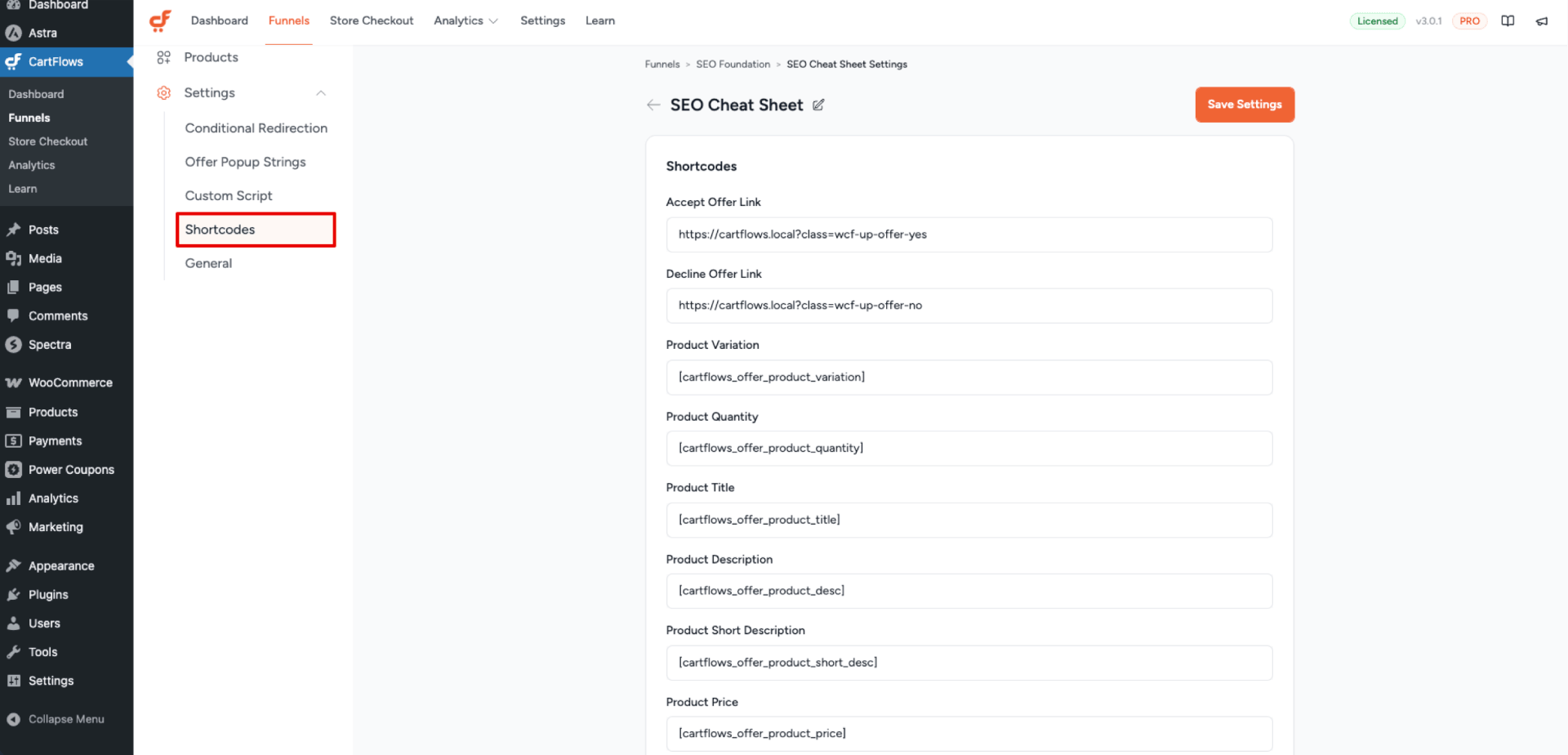
Available Shortcodes and Usage
Accept Offer Link
Use this link to allow users to accept the offer. When clicked, the funnel moves to the next step with the offer accepted.
- Usage: Add this link to a button,
<a>tag, or image. - Recommended Element: Button or anchor.
Decline Offer Link
A link to decline the offer and continue to the next step in the funnel without accepting it.
- Usage: Add to a button,
<a>tag, or image. - Recommended Element: Button or anchor.
Product Variation
[cartflows_offer_product_variation]
Displays variation options (dropdown style) for variable products.
- Use on: Shortcode widget or text editor.
Product Quantity
[cartflows_offer_product_quantity]
Allows customers to select product quantity.
- Use on: Shortcode widget or text editor.
Product Title
[cartflows_offer_product_title]
Shows the product title.
- Use on: Heading, shortcode widget, or text editor.
Product Description
[cartflows_offer_product_desc]
Displays the full (long) description of the selected product.
- Use on: Shortcode widget or text editor.
Product Short Description
[cartflows_offer_product_short_desc]
Displays the excerpt or short description of the selected product.
- Use on: Shortcode widget or text editor.
Product Price
[cartflows_offer_product_price]
Shows the product price. If a discount is applied, the discounted price is shown.
- Use on: Shortcode widget, text editor, or heading.
Product Image
[cartflows_offer_product_image]
Displays product images. For variable products, the image updates based on selected variation.
- Use on: Shortcode widget or text editor.
We don't respond to the article feedback, we use it to improve our support content.