
- Hiding Fields on the Checkout Page
- Installing WooCommerce
- Using WooCommerce
- Adding Products in WooCommerce
- Using Your Theme's Header & Footer in a Step
- Embedding a Checkout Form on the CartFlows Checkout Page
- Hiding WooCommerce Pages and Products
- Using Pricing Tables
- Adding an Affiliate Program
- Setting a Funnel as the Homepage
- Dynamic Offers aka Rule Engine
- Instant Layout for Checkout and Thank You Step
- Adding Products from the URL to the Checkout Page
- Setting Up Split Testing for Steps
- Deleting Plugin Data During Uninstallation
- Importing Ready-Made Templates for Funnels and Steps
- Importing and Exporting Funnels and Step
- URL Parameters
- Replacing the Main Checkout Order with an Upsell or Downsell
- Rolling back to a Previous Version
- Google Address Autocomplete
- Flatsome UX Builder
- ActiveCampaign
- Paypal Reference Transactions
- How PaypPal/Stripe Works
- Enabling Enfold Avia Layout Builder
- Setting Up Authorize.net for Upsell & Downsell
- Supported Payment Gateways
- Setting Quantity and Discount for Products on the Checkout Page
- Adding Custom Payment Gateway Support for One-Click Upsell and Downsell
- Funnel in Test Mode
- Troubleshooting Plugin and Theme Conflicts
- Resolving the "Please Select a Simple, Virtual, and Free Product" Error
- Fixing Endless Loading on the Checkout Page
- Fixing the "We can't seem to find an order for you." Error on the Thank You Page
- Troubleshooting License Activation Issues
- Fixing the "Checkout ID Not Found" Error
- Fixing the "Session Expired" Error Message
- Resolving "Order Does Not Exist" Error on Upsell/Downsell Page
- Fixing the "Sorry, This Product Cannot Be Purchased" Error
- Disabling Auto-fill of Address Fields Based on Zip Code
- Enabling Theme's Scripts & Styles Without Changing Page Template
- Disabling Auto-fill of Checkout Fields
- Allowing Cache Plugins to Cache CartFlows Pages
- Changing the "Choose a Variation" Text
- VAT Field Not Displaying for WooCommerce EU/UK VAT Compliance Plugin
- Enabling the Product Tab on Store Checkout
- Displaying the Order Summary Open on Mobile Devices
- Refreshing the Checkout Page After CartFlows AJAX Calls
- Overview
- Installing Modern Cart Starter
- Installing Modern Cart Pro
- Activating License Key
- Customizing General Settings
- Customizing Cart Tray Labels
- Customizing Cart Icon Settings
- Customizing Cart Tray Styling
- Understanding the Product Recommendations Feature
- Controlling Product Recommendation Source for Empty Cart
CartFlows Advanced Analytics
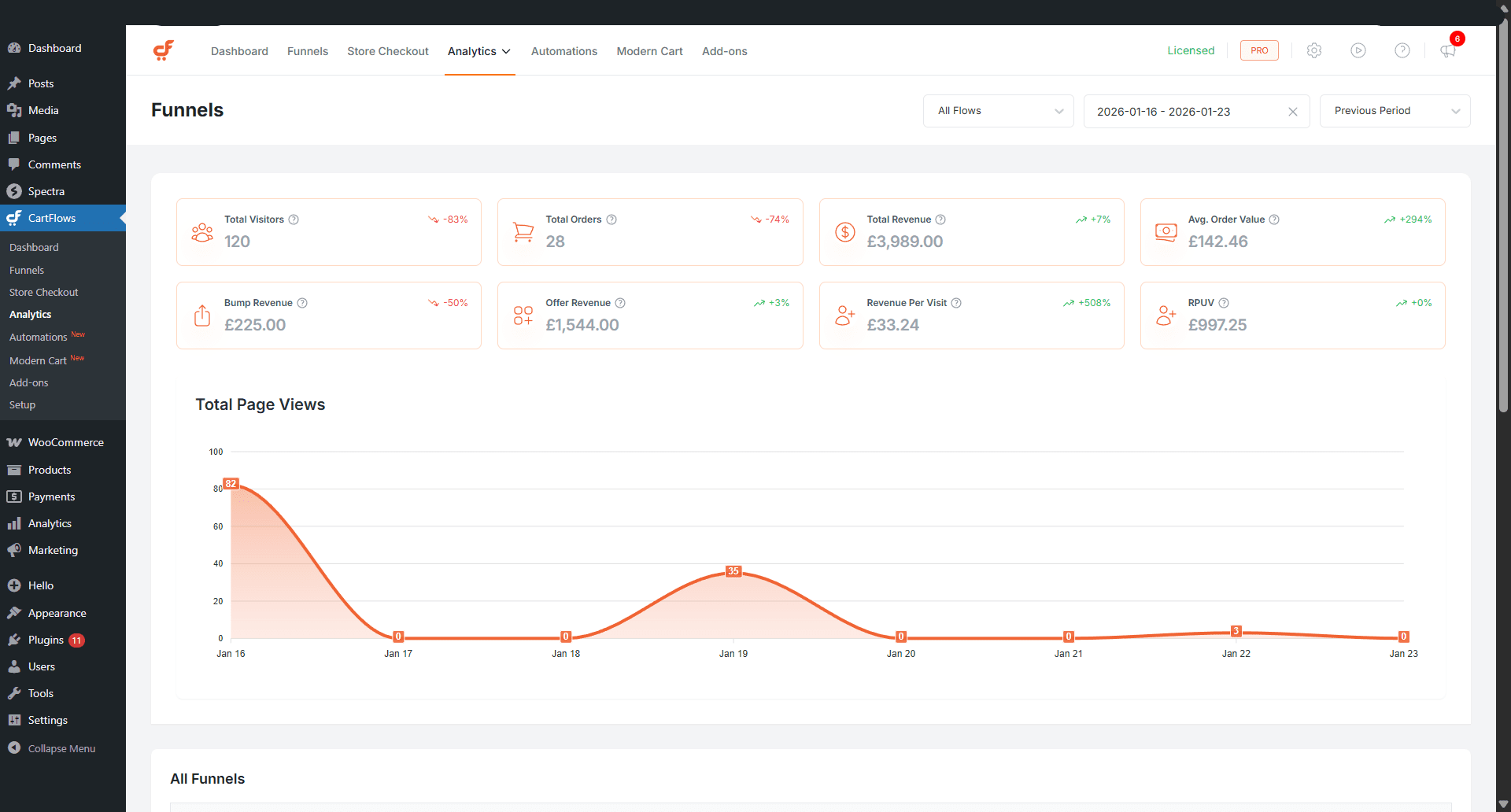
CartFlows Advanced Analytics provides detailed insights into how your funnels perform by tracking visitors, conversions, revenue, and opt-ins. It presents this data through key performance indicators (KPIs), visual charts, and structured tables, making it easier to understand funnel performance and identify areas for improvement.
The Analytics Dashboard is organised into dedicated sections that focus on different aspects of funnel performance, including Funnels, Conversions, and Opt-ins.
Note
Advanced Analytics requires version 2.2.0 or higher of both CartFlows Free and Pro.
How CartFlows Advanced Analytics Works
CartFlows Advanced Analytics automatically collects and organises performance data across your funnels. This data is displayed in dashboards that combine KPIs, trend charts, and detailed tables so you can review performance at both a high level and a detailed level.
You can use these insights to evaluate funnel effectiveness, understand user behaviour, and make informed decisions based on real data.
Analytics Overview
The Analytics section includes three reporting pages, each focused on a specific area of funnel performance.
- Funnel Analytics
- Conversions Analytics
- Opt-in Analytics
Together, these pages provide a complete view of how visitors interact with your funnels and where conversions and revenue are generated.
Available KPIs
Total Visitors
Total number of visitors across all steps in the funnel
Total Orders
Total number of successful orders generated by the funnel
Total Revenue
Combined revenue generated across all funnel steps
Average Order Value
Average revenue generated per order
Order Bump Revenue
Total revenue generated from order bump offers
Offer Revenue
Combined revenue generated from upsell and downsell offers
Revenue Per Visit
Average revenue generated per visit
Revenue Per Unique Visitor
Average revenue generated per unique visitor
Each KPI includes a visual chart that helps you track performance trends over time.
Additional Funnel Data
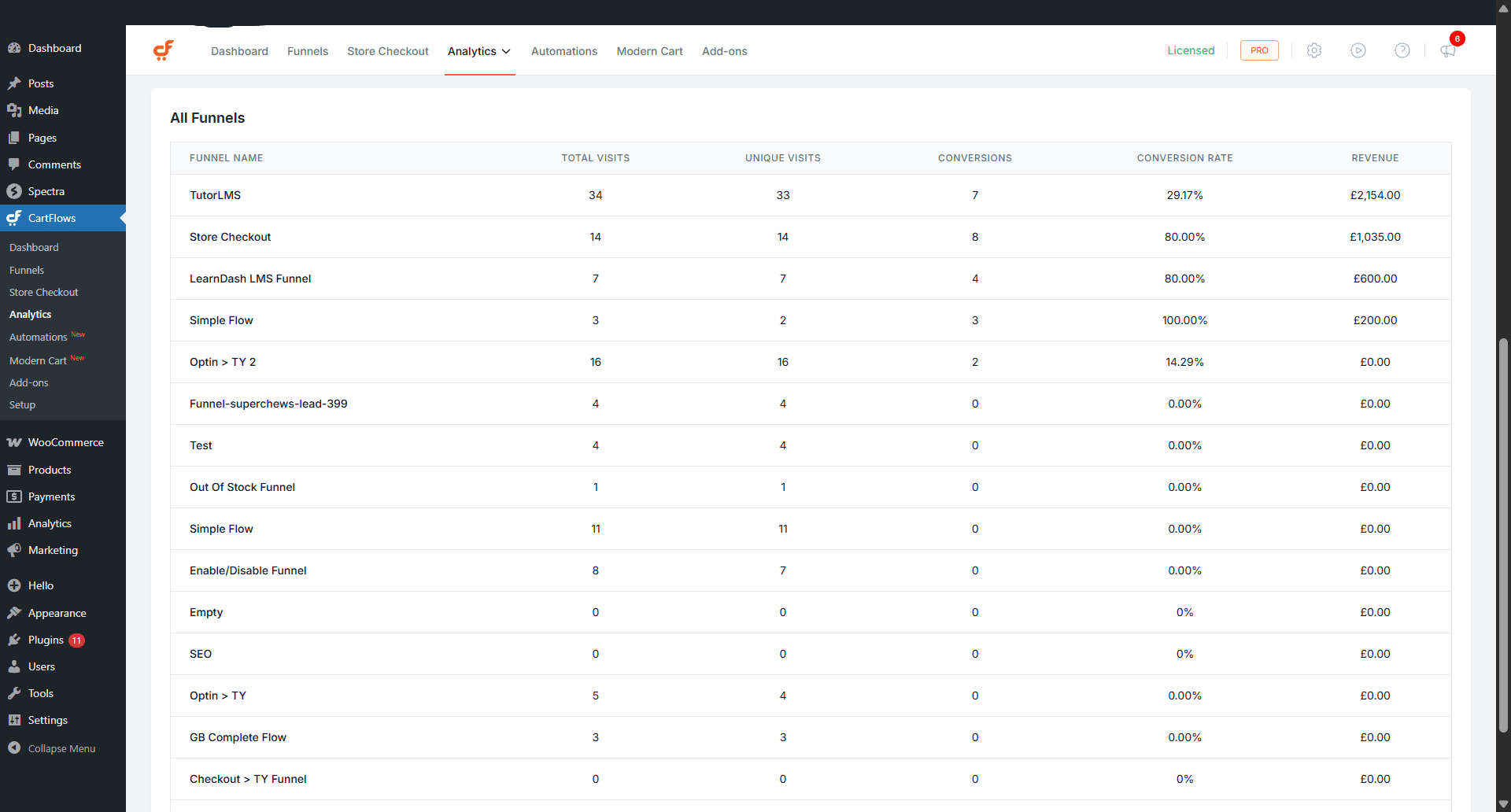
The Funnel Analytics page also includes a table that displays funnel level metrics such as visits, conversions, conversion rate, and revenue across all funnels.
Conversions Analytics
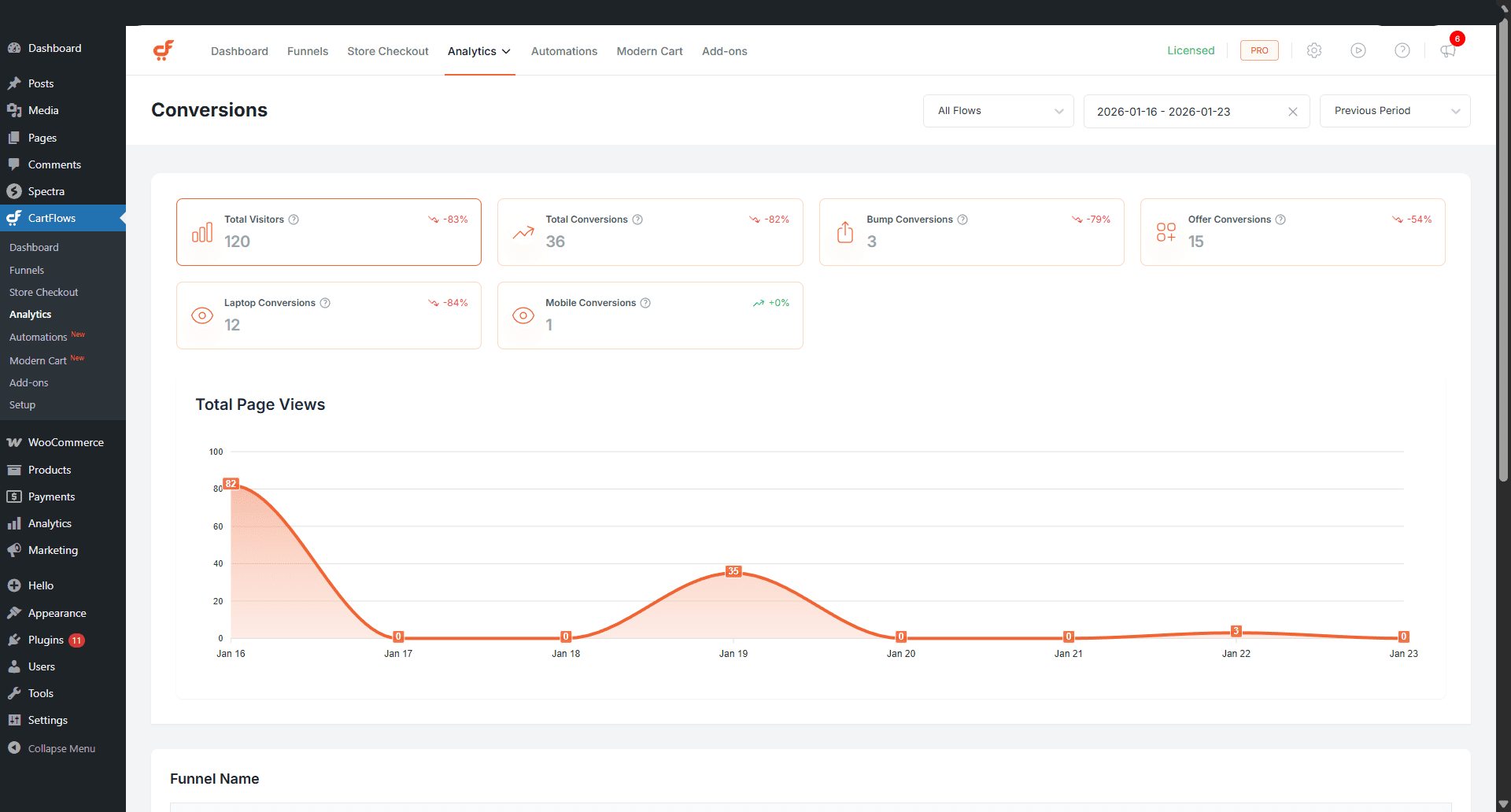
The Conversions Analytics page focuses on how users convert across funnel steps, offers, and devices.
Available KPIs
Total Visitors
Total number of visitors across all steps in the selected funnel or funnels
Total Conversions
Total number of successful conversions across all steps
Order Bump Conversions
Number of successful order bump purchases
Offer Conversions
Total number of successful upsell and downsell conversions
Laptop Conversions
Conversions completed on laptop and desktop devices
Mobile Conversions
Conversions completed on mobile devices
Each KPI includes a chart that allows you to analyse conversion trends over time.
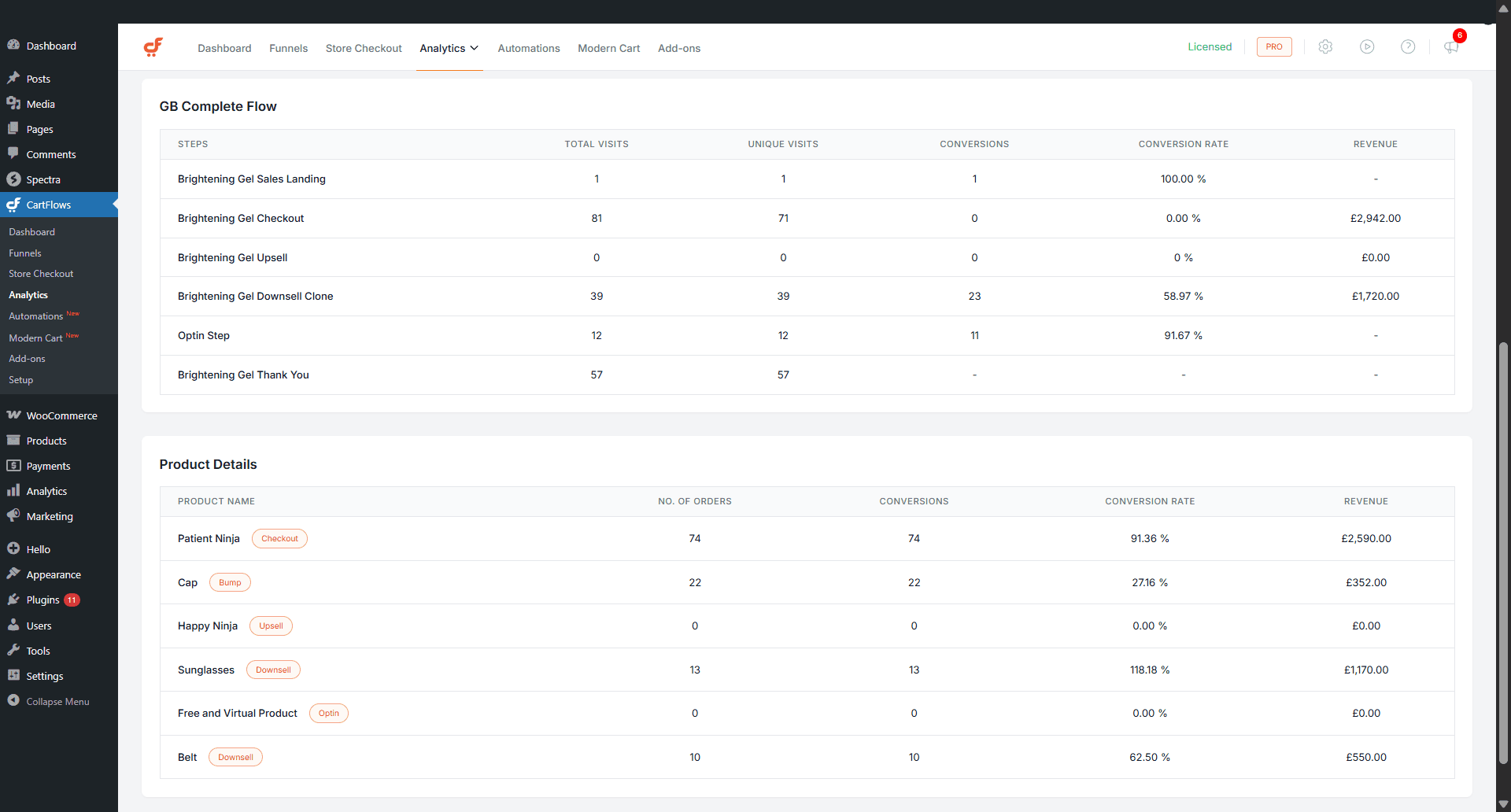
Additional Conversion Data
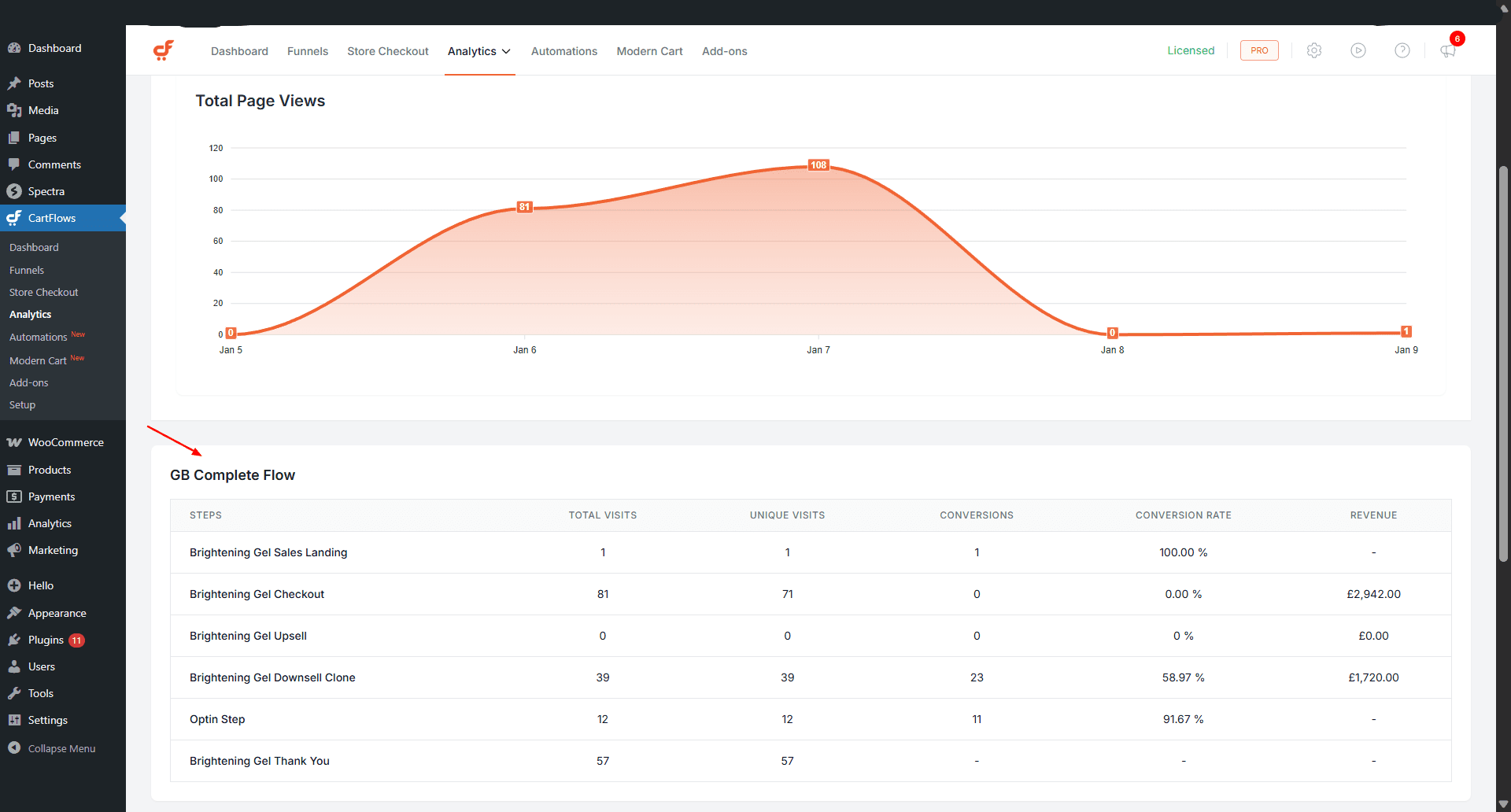
This page includes two tables for deeper analysis.
Step-level analytics table for the selected funnel
Product-level analytics table for products associated with funnel steps
Opt-in Analytics
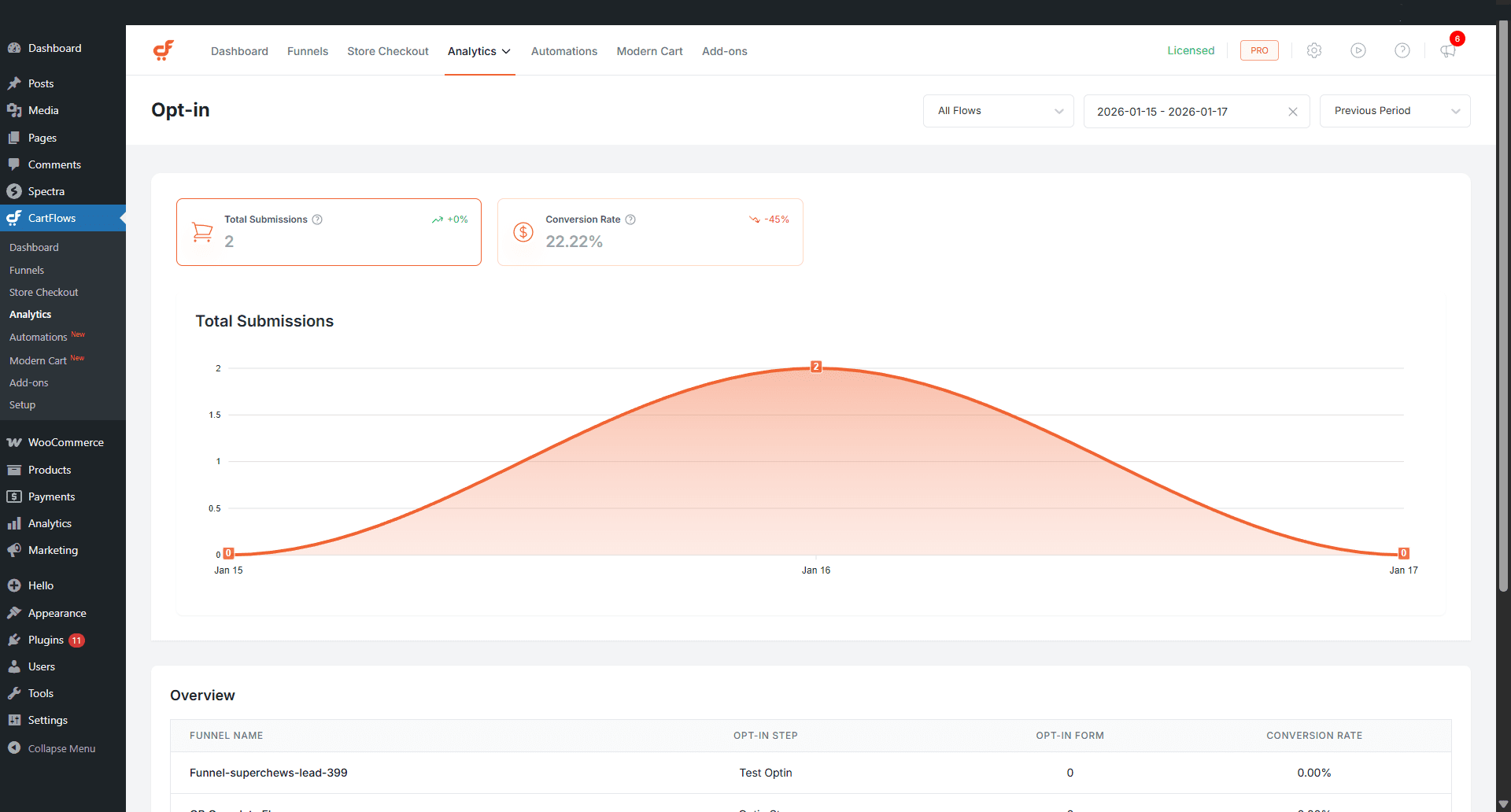
The Opt-in Analytics page provides insights into opt-in form performance across your funnels.
Available KPIs
Total Submissions
Total number of successful opt-in form submissions
Conversion Rate
Percentage of visitors who successfully submitted the opt-in form
Each KPI is supported by visual charts to help identify trends.
Additional Opt-in Data
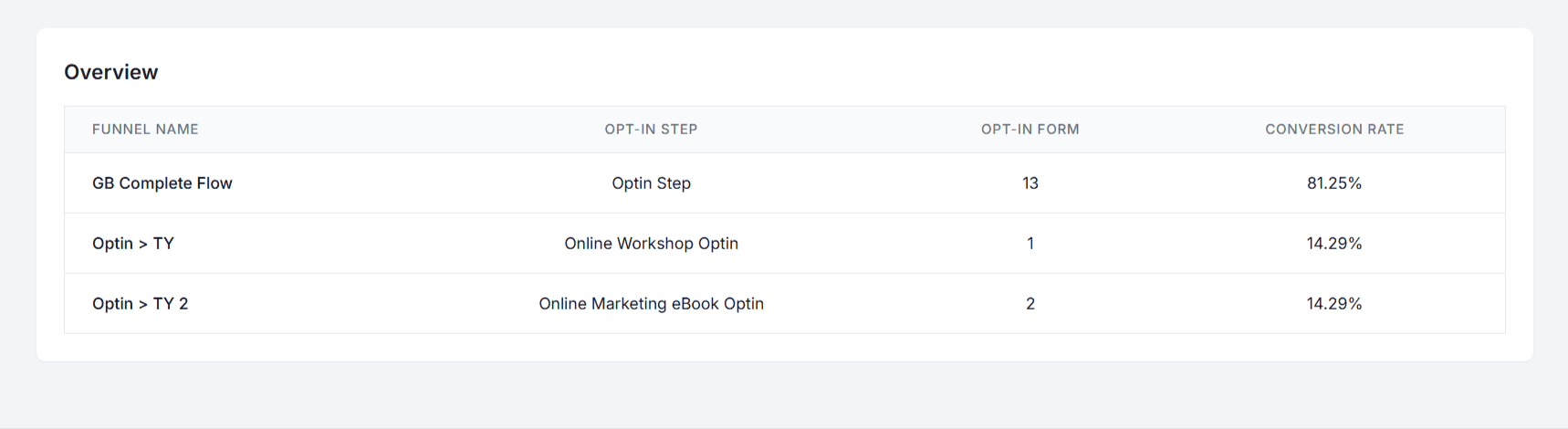
The Opt-in Analytics table displays funnel name, opt-in step, total submissions, and conversion rate.
Filters and Comparison Options
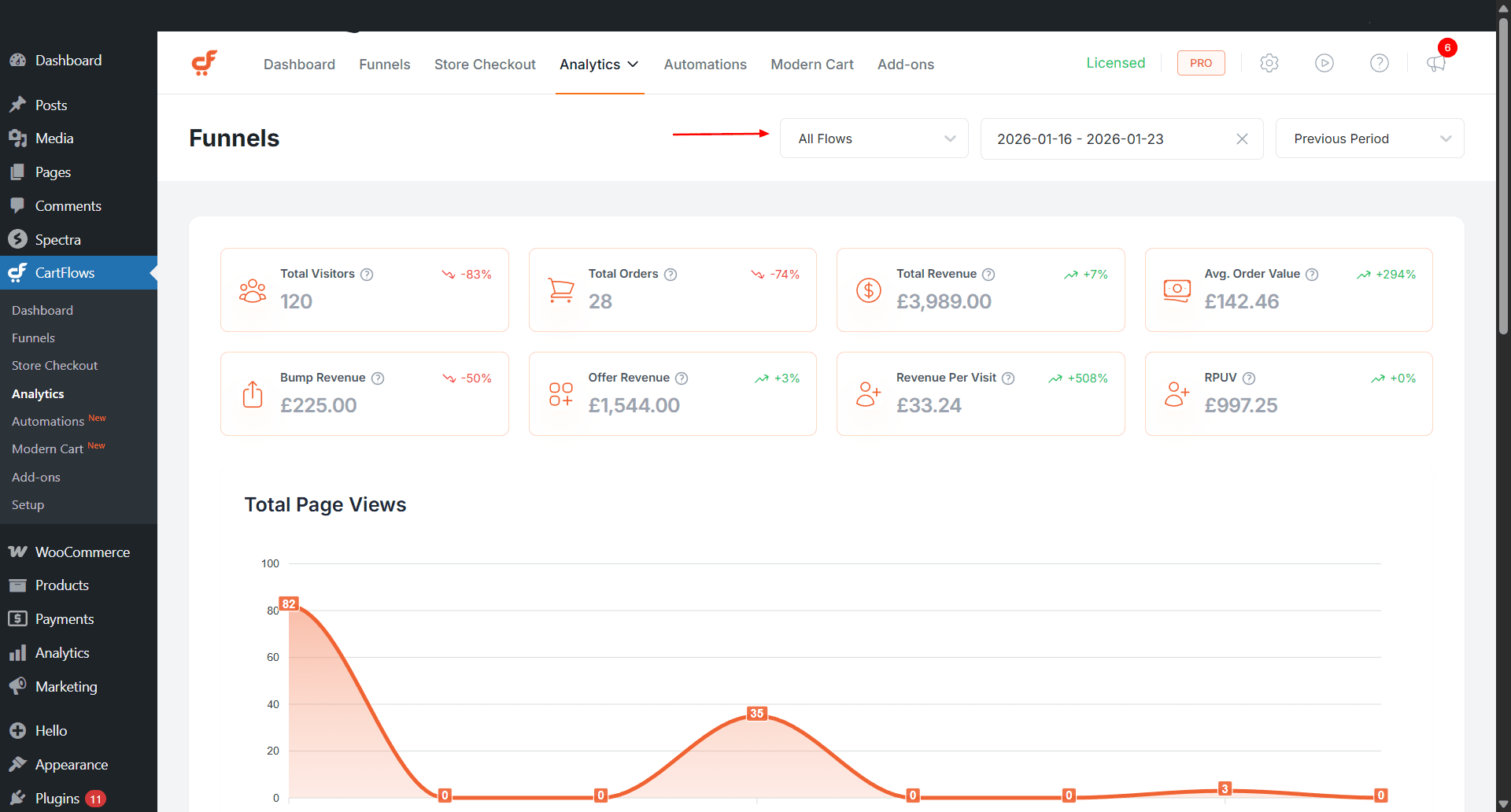
Each Analytics page includes filtering and comparison options to help refine your analysis.
Timeframe filter
View data for predefined ranges such as Today, Yesterday, Last 7 Days, This Month, or a custom date range
Funnel selector
View analytics for all funnels or a specific funnel
Trend comparison
Compare the selected timeframe with the previous period or the same period in the previous year
Trend Indicators
Each KPI includes a trend indicator that shows how performance has changed over time.
Trend indicators compare the current data with:
- the previous period
- the same period from the previous year
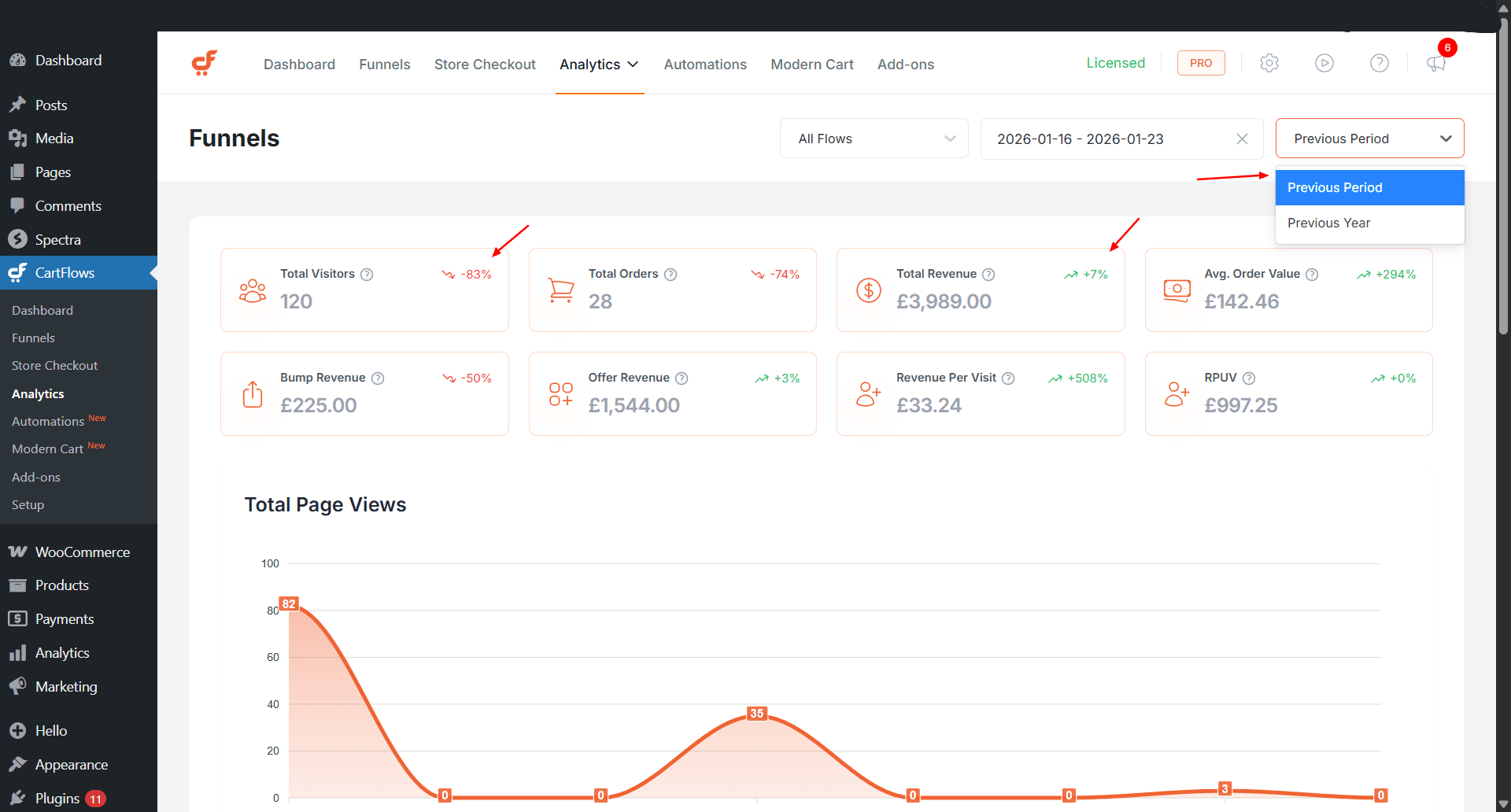
This makes it easier to identify growth, declines, and performance shifts at a glance.
Top Performing Funnels (Dashboard Overview)
The Analytics Dashboard includes a Top Performing Funnels table that highlights the top five funnels based on revenue. This provides a quick overview of which funnels contribute most to overall performance.
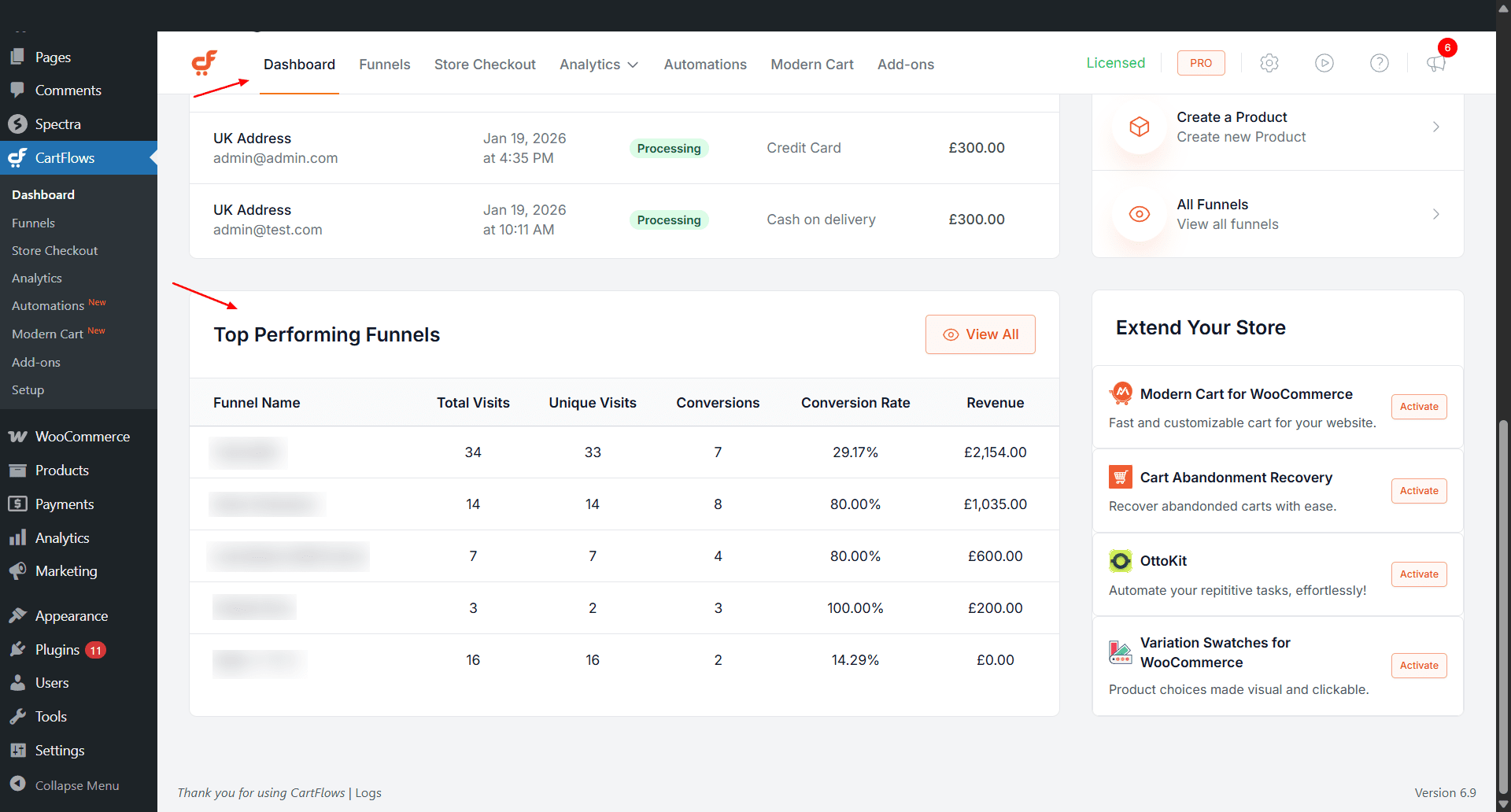
Funnel Editor KPIs
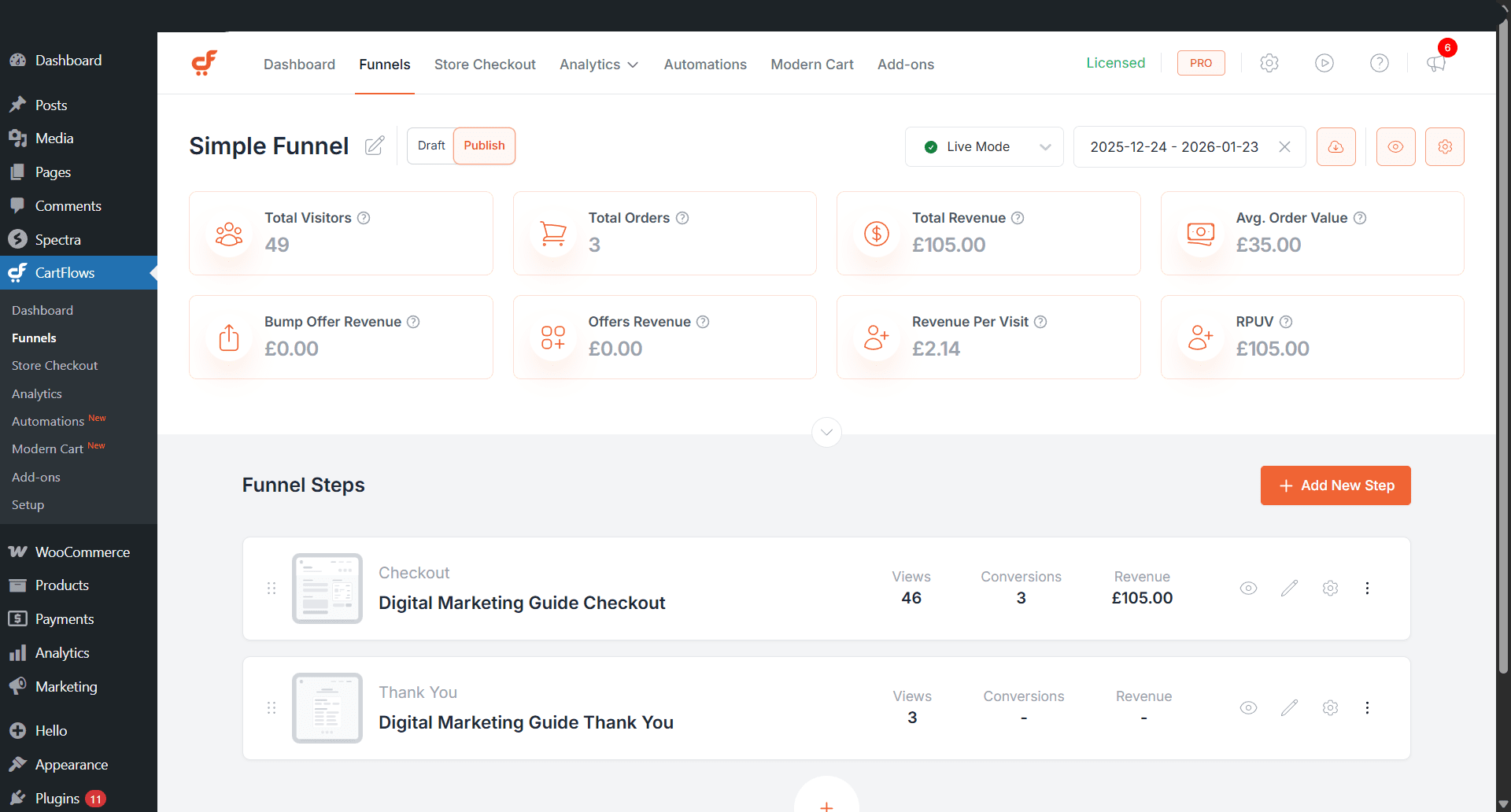
Key performance indicators are also available directly in the Funnel Editor. This allows you to review funnel performance while building or editing funnels, without switching to the Analytics pages.
Available KPIs in the Funnel Editor
- Total Visitors
- Total Orders
- Total Revenue
- Average Order Value (AOV)
- Order Bump Revenue
- Offer Revenue
- Revenue Per Visit (RPV)
- Revenue Per Unique Visitor (RPUV)
These KPIs help you quickly assess funnel performance and make optimisation decisions during funnel creation.
We don't respond to the article feedback, we use it to improve our support content.