Your Shopify plan costs $39 a month. Your real bill doesn’t.
Apps for reviews, upsells and bundles each add their own subscription. If you use a payment provider other than Shopify Payments, Shopify can also charge an additional transaction fee of up to 2% on every sale. Checkout customization is another limitation: custom fields, layouts, and pre-purchase offers require Shopify Plus, which starts at $2,300 per month.
That’s usually when store owners start comparing Shopify alternatives.
We compared 10 Shopify competitors on the four things that change your margin: the real yearly cost, any fee on sales, how much of the checkout you control, and whether you own the store. Every price below was checked on each platform’s live pricing page in October 2026.
We also answer the question most comparison posts skip. Can you leave Shopify without giving up a high-converting checkout? Yes, and we show you the numbers.
- What Are the Top Shopify Alternatives in 2026?
- Why Store Owners Look for Shopify Alternatives
- 10 Shopify Alternatives Worth Considering in 2026
- The Real Yearly Cost of a Shopify Alternative
- Free Shopify Alternatives
- Shopify Plus Alternatives
- Which Shopify Alternative Fits Your Store?
- How to Move From Shopify to WooCommerce
- Keep Your Checkout When You Leave Shopify
- Frequently Asked Questions
What Are the Top Shopify Alternatives in 2026?
The top Shopify alternatives in 2026 are WooCommerce (with CartFlows for the checkout), BigCommerce, Wix, Squarespace, Square Online, Ecwid, Big Cartel, PrestaShop, Sellfy and Adobe Commerce. WooCommerce suits store owners who want ownership and no platform fee on sales. BigCommerce is the closest hosted match to Shopify. The other eight alternatives to Shopify each fit a specific kind of store, from first-time sellers to enterprise catalogs.
Here’s the short version.
- WooCommerce with CartFlows: you own the store, pay no platform fee on sales and control the full checkout.
- BigCommerce: hosted like Shopify, with no added fee when you use one of its built-in payment providers.
- Wix: a drag-and-drop builder for a first store.
- Squarespace: polished templates for brands where looks sell.
- Square Online: online and in-person sales in one system.
- Ecwid: adds a store to a website you already have.
- Big Cartel: a simple store for artists and makers.
- PrestaShop: free, open-source software for teams with a developer.
- Sellfy: built for digital products, courses and subscriptions.
- Adobe Commerce: built for enterprise catalogs and B2B selling.
The table below puts them side by side, with Shopify as the benchmark.
| Platform | Starting price | Platform fees on sales | Checkout control | Best for |
|---|---|---|---|---|
| Shopify (benchmark) | $29/mo yearly ($39 monthly) | 0% with Shopify Payments; 0.2%–2% with third-party providers | Shopify Plus only ($2,300/mo+) | Managed stores |
| WooCommerce + CartFlows | Free; CartFlows Pro $199 first year | None | Full, with CartFlows | Ownership and custom checkout |
| BigCommerce | $29/mo yearly ($39 monthly), Core | None with embedded providers; 0.6%–2% with others | Partial | Growing hosted stores |
| Wix | $29/mo yearly, Core | No platform fee; card fees apply | No | First-time sellers |
| Squarespace | $19/mo yearly ($25 monthly), Basic | 2% Basic; 0% Core+ | No | Design-led brands |
| Square Online | Free plan | No platform fee; card fees apply | No | In-person sellers |
| Ecwid | $5/mo, up to 10 products | None | No | Existing websites |
| Big Cartel | Free (5 products); Platinum $15/mo | None | No | Artists and makers |
| PrestaShop | Free software; hosting extra | None | Yes, with development | Developer-led teams |
| Sellfy | $22/mo yearly ($29 monthly), Starter | None | No | Digital products |
| Adobe Commerce | Custom quote | Contract-based | Yes, with development | Enterprise and B2B |
Why Store Owners Look for Shopify Alternatives
Store owners usually leave Shopify for four reasons: the real monthly bill grows with apps, Shopify adds a fee on sales when you use another payment provider, full checkout customization sits on Shopify Plus, and the store runs on a platform you rent.
None of this makes Shopify a bad platform. It’s polished, fully hosted and quick to launch, and for many stores it’s the right call. These are simply the trade-offs we hear about most.
The Plan Price Isn’t the Real Price
Shopify’s plans cost $39 a month for Basic, $105 for Grow and $399 for Advanced, or $29, $79 and $299 a month billed yearly, per Shopify’s live pricing page.
Most stores add paid third-party apps on top: reviews, bundles, upsells and cross-sells, subscriptions. Each app bills on its own cycle. Store owners on Reddit describe app bills that rival the plan itself (example thread).
A Fee on Sales if You Use Another Payment Provider
With Shopify Payments, Shopify charges no third-party transaction fee. With another provider, it adds 2% on Basic, 1% on Grow, 0.6% on Advanced and 0.2% on Plus. That’s on top of what your payment provider already charges.
This matters most where Shopify Payments isn’t available, since Shopify offers it only in certain countries. Shopify’s Help Center also notes that for stores created on or after May 12, 2025, the store credit or gift card portion of an order is charged third-party transaction fees even with Shopify Payments.
Full Checkout Customization Starts at $2,300 a Month
Your checkout is where the money changes hands, and it’s where many store owners want the most control. Shopify’s plan comparison lists checkout customization as “Limited” on Basic, Grow and Advanced, and “Full” only on Plus. Shopify’s Help Center is more specific: apps that customize the information, shipping and payment pages of the checkout are available only to Shopify Plus.
That’s $27,600 a year before a single sale. On WooCommerce, you can build a Shopify-style checkout with free settings.
You Rent the Store
On a hosted platform, the platform sets the rules for your theme, your apps, your checkout and your payouts. Shopify Payments can hold back part of your payouts as a reserve for a set period, for reasons such as a rise in chargebacks or a sudden jump in sales volume, and Shopify notes that some reserves can’t be appealed (Shopify on reserves). Leaving later means a migration project.
Some store owners want the opposite: their own host, their own code, their own payment provider and their own customer data.
10 Shopify Alternatives Worth Considering in 2026
The right Shopify alternative depends on what you want to change. WooCommerce gives you ownership and full checkout control, BigCommerce keeps hosting handled, Wix and Squarespace keep things simple, and the rest fit specific kinds of stores.
Each entry below covers pricing, fees on sales, checkout control, strengths, trade-offs and who it fits.
How We Compared These Platforms
We scored every platform on six questions, using each platform’s live pricing page in October 2026 and our own experience building WooCommerce checkouts since 2018. If you’re only weighing the two biggest names, our WooCommerce vs Shopify comparison goes deeper.
- Real yearly cost: plan, apps or plugins, hosting and any fee on sales.
- Fees on sales: does the platform add its own percentage on top of card processing?
- Checkout control: can you change fields, layout and offers without code or a top-tier plan?
- Ease of use: can you run the store day to day without a developer?
- Ownership: can you change hosts, export everything and keep your customer data?
- Migration effort: how much work is it to move products, customers and orders?
A note on bias: we make CartFlows, a WooCommerce checkout plugin, so WooCommerce is our first pick. We’ve kept every other entry fair and listed where Shopify is still the stronger choice.
1. WooCommerce With CartFlows
WooCommerce is a free, open-source eCommerce platform that runs as a plugin on WordPress. You choose the host, you own the site and the customer data, and WooCommerce takes no cut of your sales. You still pay your payment provider’s normal payment processing fee.
Your WordPress theme shapes the storefront, and WooCommerce extensions add integrations for payments, shipping and marketing. That flexibility is the main reason store owners pick it.
The weak spot has always been the checkout. The default WooCommerce checkout works, but changing it usually means custom code. That’s the gap CartFlows fills.
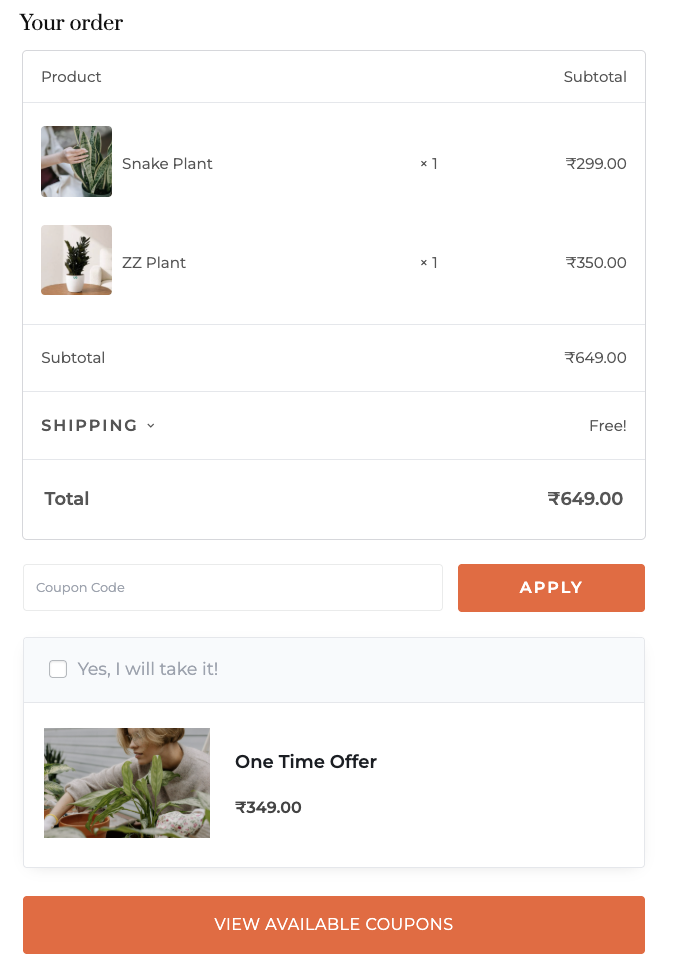
What the free CartFlows plugin does: replaces the default checkout with a modern one- or two-column layout, lets you reorder the checkout fields, edit their labels, hide fields you don’t need and change their width, and adds Google address autocomplete. Our free vs Pro comparison lists every feature by plan.
What CartFlows Pro adds:
- Order bumps: a one-click add-on offer inside the checkout, with conditions based on cart contents, order value and location.
- One-click upsells and downsells: offers after payment that the customer accepts without re-entering card details.
- A/B split testing: test checkout, landing and offer pages against each other.
- Instant Checkout (new in October 2026): adds a Buy Now button next to Add to Cart. It opens the checkout in a popup over the product page, so a shopper who has already decided skips the cart page. Here’s how it compares with other ways to skip the cart.
- Custom checkout fields, multistep checkout and the premium funnel template library.
Frequently Bought Together comes with the free plugin, so you can pick companion products for any product page. CartFlows Pro adds Auto Suggest, which proposes companions from your own order history for you to approve.
Pricing: WooCommerce and CartFlows are free. You pay for hosting, a domain and any paid extensions. CartFlows Pro is $199 for the first year on up to 3 sites and renews at $299 a year, with a 14-day money-back guarantee.
Fee on sales: none.
What works well:
- You own the store, the code and the customer data.
- Any WordPress theme can style your storefront.
- No platform fee on sales, with any payment provider WooCommerce supports.
- A modern checkout, order bumps and one-click upsells without code.
Trade-offs:
- You handle hosting, updates and backups, or pay a managed host to do it.
- Paid plugins add up, so budget for the ones your store needs.
Who it fits: store owners who want control of their checkout, already use WordPress, or are tired of a fee on every sale.
2. BigCommerce
BigCommerce is a hosted eCommerce platform and the closest match to Shopify. Hosting, security and updates are handled for you, and it’s built for scalability, with B2B tools, multiple storefronts and over 1,200 apps and integrations.
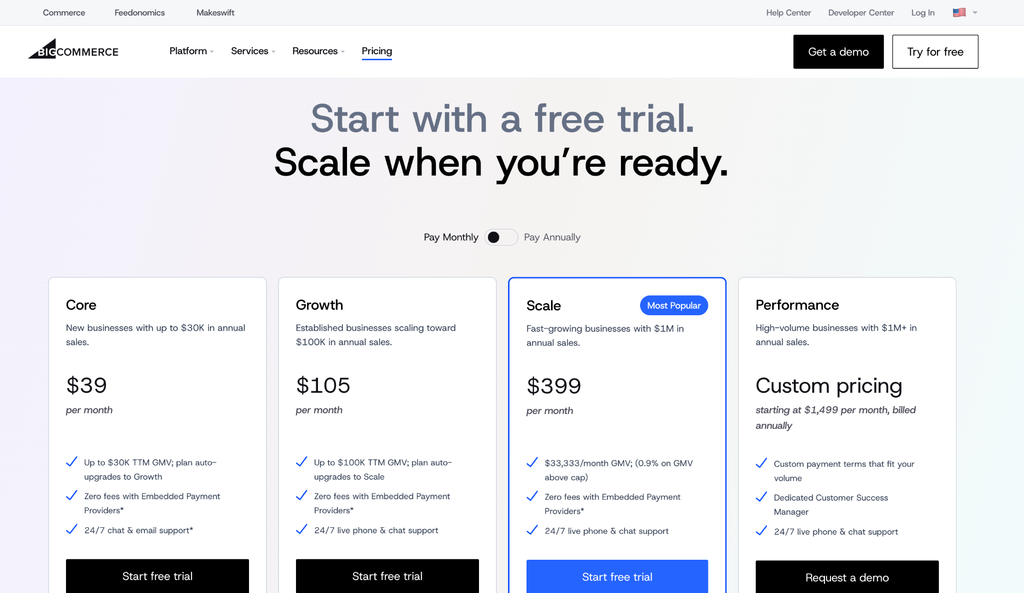
Pricing: Core is $39/month ($29 billed yearly), Growth is $105 ($79 billed yearly) and Scale is $399 ($299 billed yearly). Performance starts at $1,499 a month billed yearly, per BigCommerce pricing. Each plan has a sales cap: up to $30,000 in trailing 12-month sales on Core and up to $100,000 on Growth, after which BigCommerce moves you up a plan.
Fee on sales: none when you use one of BigCommerce’s embedded payment providers, which include BigCommerce Payments, Stripe and PayPal. Other providers add an Open Payment Provider Fee of 2% on Core, 1% on Growth and 0.6% on Scale.
What works well:
- Hosted convenience with no added fee through its embedded providers.
- Strong built-in catalog and B2B features, plus integrations for most sales channels.
Trade-offs:
- Sales caps move you to pricier plans as you grow.
- It’s still a platform you rent.
Who it fits: growing stores that want hosting handled and a Shopify-like setup.
3. Wix
Wix is an all-in-one, drag-and-drop website builder with store features built in. Its plans include marketing tools such as email marketing, SEO tools and website analytics, which makes it one of the easiest ways for small businesses and first-time entrepreneurs to sell online.
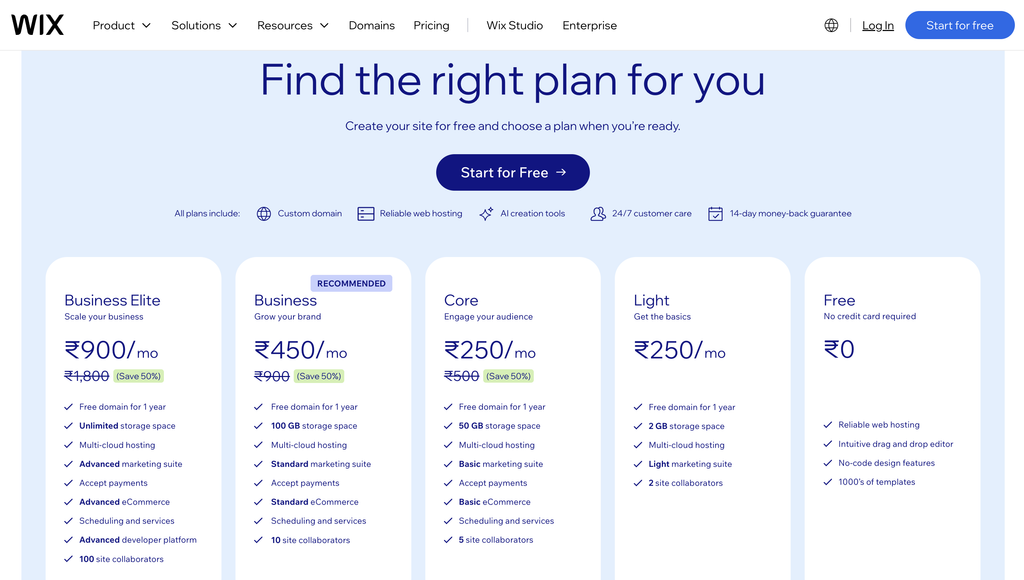
Pricing: selling starts on the Core plan at $29 a month billed yearly (Wix plans). The Light plan doesn’t accept payments.
Fee on sales: Wix doesn’t add a platform fee. Wix Payments charges 2.9% + 30¢ per US card sale.
What works well:
- A beginner-friendly visual editor.
- Hosting and security are handled.
Trade-offs:
- A Wix site can’t be moved to another host (Wix explains why), so leaving later means rebuilding.
- Fewer advanced store tools than dedicated eCommerce platforms.
Who it fits: first-time sellers with a small catalog.
4. Squarespace
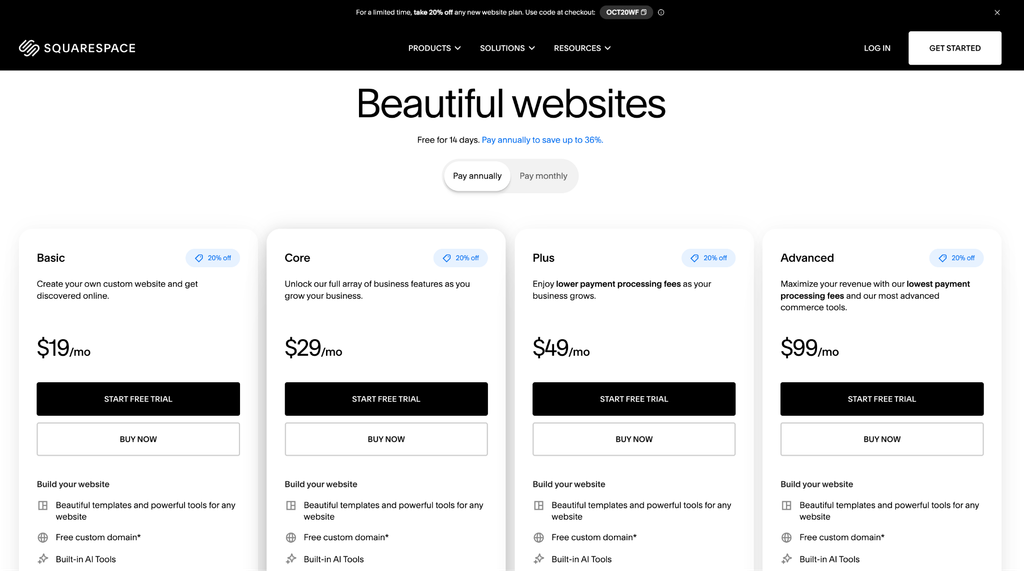
Squarespace is known for polished templates, which suits brands where presentation drives the sale. Its plans also come with marketing tools, SEO tools and analytics.
Pricing: Basic is $19/month billed yearly ($25 monthly), Core is $29/month billed yearly ($39 monthly), Plus is $49/month billed yearly ($65 monthly) and Advanced is $99/month billed yearly ($139 monthly), per Squarespace pricing. An annual commitment automatically lowers your monthly rate, and you can often secure an additional Squarespace discount to further reduce your upfront startup costs.
Fee on sales: 2% on Basic, 0% on Core and above.
What works well:
- Templates that look good with little effort.
- An all-in-one setup with hosting included.
Trade-offs:
- A smaller extension library than Shopify or WooCommerce.
- Little room for custom checkout flows or offers after payment.
Who it fits: design-led brands selling a focused catalog.
5. Square Online
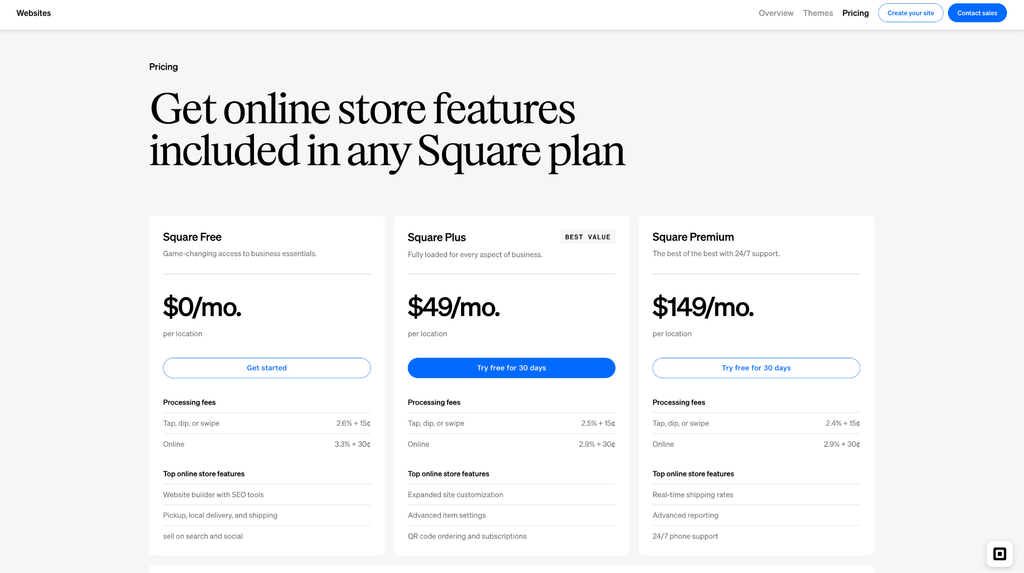
Square Online comes with a Square account and ties your online store to Square’s point of sale (POS), so stock and payments for online and in-person sales stay in one place.
Pricing: Square Free is $0 a month. Square Plus costs $49 a month per location, and Square Premium costs $149 (Square Online plans).
Fee on sales: no separate platform fee. Online card processing is 3.3% + 30¢ on Square Free and 2.9% + 30¢ on Plus and Premium.
What works well:
- A free plan to start selling.
- Online and in-person sales in one POS system.
Trade-offs:
- Payments run through Square.
- Fewer design and checkout options than full eCommerce platforms.
Who it fits: cafes, shops and local businesses already using Square.
6. Ecwid by Lightspeed
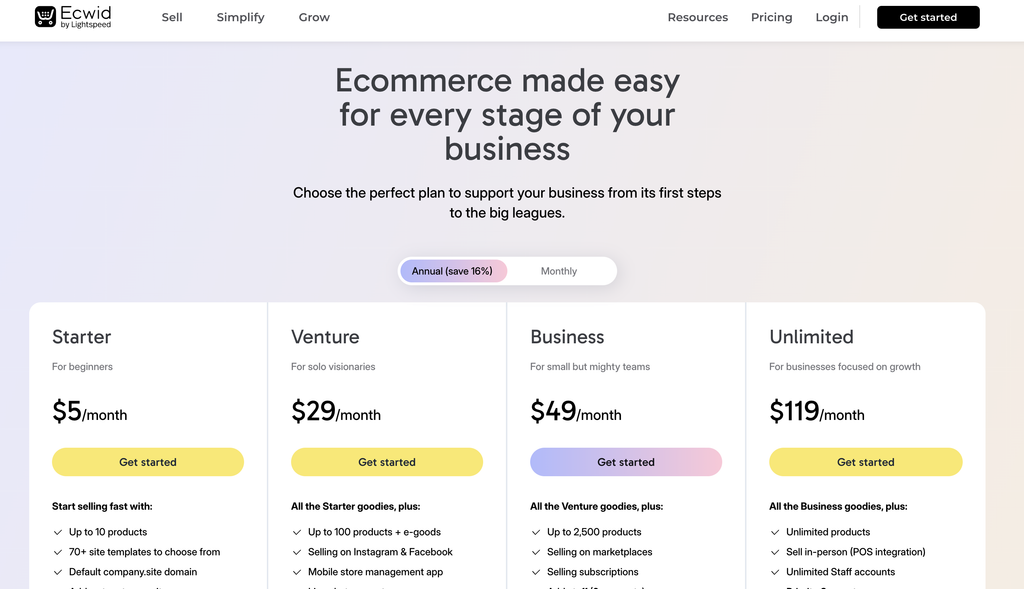
Ecwid adds an online store to a website you already have, including WordPress and Wix sites, as an embedded widget.
Pricing: Starter is $5 a month for up to 10 products. Venture is $29/month billed yearly ($35 monthly), Business is $49/month billed yearly ($65 monthly) and Unlimited is $119/month billed yearly ($149 monthly), per Ecwid pricing. Ecwid no longer lists a free plan.
Fee on sales: none on any plan.
What works well:
- Quick to add to a site you already run.
- A low entry price.
Trade-offs:
- Product limits on the lower plans.
- Less control than a store built into your site.
Who it fits: owners who want to add a small store to an existing site.
7. Big Cartel
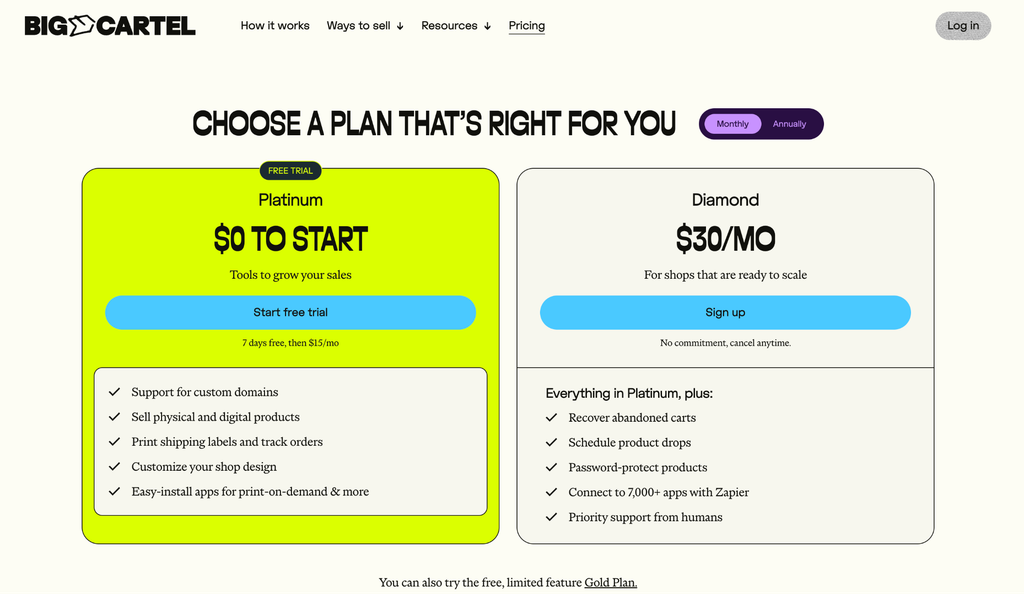
Big Cartel is a simple hosted online store built for artists, makers and small brands. It keeps things deliberately small.
Pricing: Gold is free for up to 5 products. Platinum is $15 a month for up to 50 products and Diamond is $30 a month for up to 500, per Big Cartel pricing and its plan limits.
Fee on sales: none. Big Cartel says it never takes a cut. Your payment processor’s fees still apply.
What works well:
- A genuinely free plan to start.
- Very little to set up or maintain.
Trade-offs:
- A 500-product ceiling on the top plan.
- Few marketing, checkout or offer tools.
Who it fits: artists, makers and solo entrepreneurs with a small catalog.
8. PrestaShop
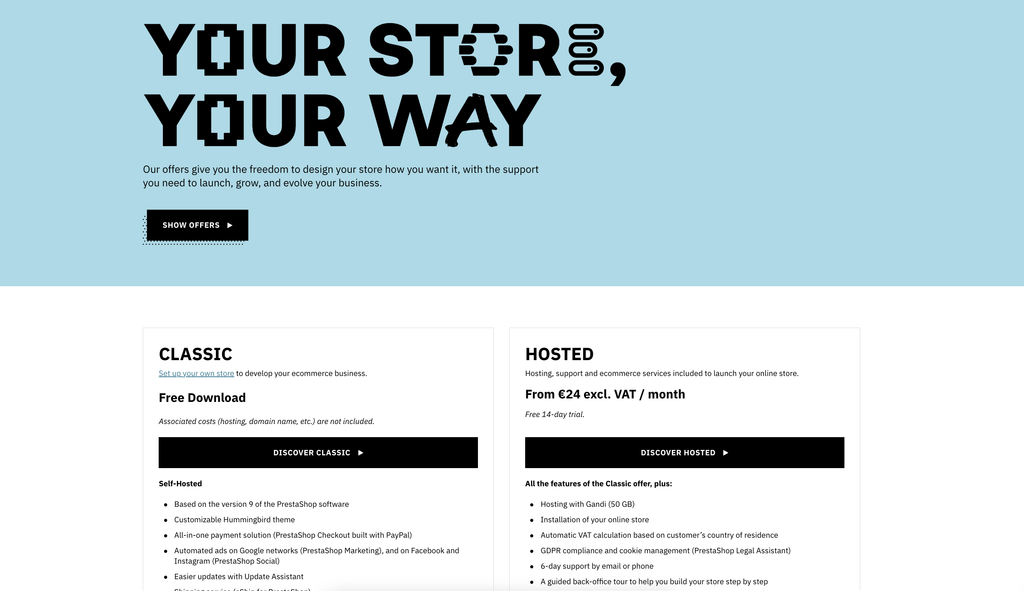
PrestaShop is a free, open-source eCommerce platform, popular in Europe. Like WooCommerce, you host it yourself and own everything, but it’s a standalone platform rather than part of WordPress.
Pricing: the Classic edition is a free download you host yourself. PrestaShop Hosted starts at €24 a month before VAT when billed yearly, or €29 with no commitment.
Fee on sales: none.
What works well:
- Free software with full ownership.
- Strong multi-language and multi-currency support.
Trade-offs:
- Needs a developer for most customization.
- Many useful modules are paid.
Who it fits: technical teams, especially selling across European markets.
9. Sellfy
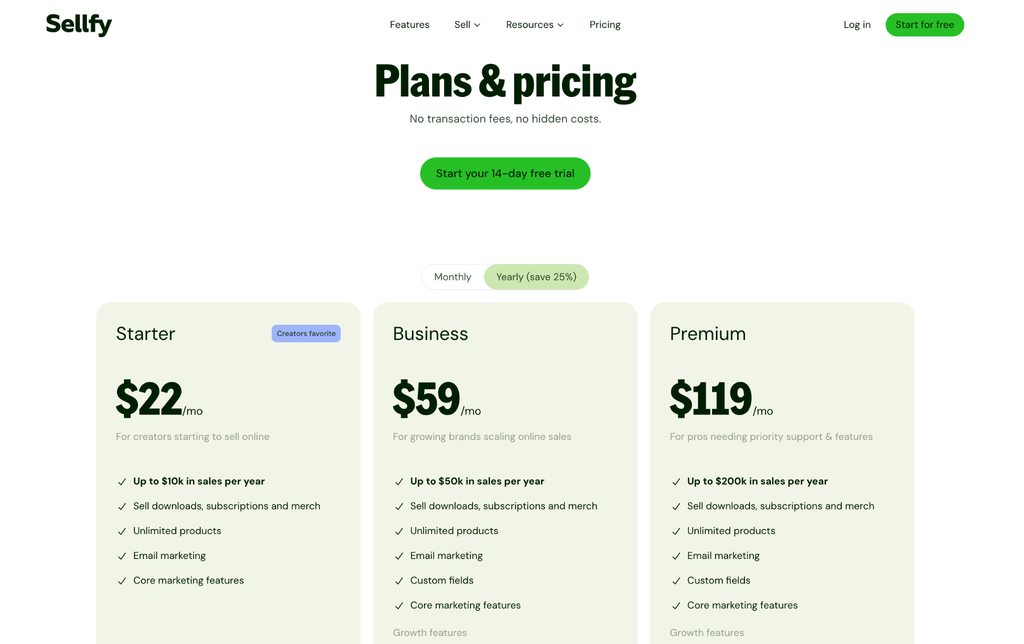
Sellfy is a hosted store built for creators who sell digital products, subscriptions and merch.
Pricing: Starter is $22/month billed yearly ($29 monthly), Business is $59/month billed yearly ($79 monthly) and Premium is ($159 monthly), per Sellfy pricing. Each plan caps yearly sales: up to $10,000, $50,000 and $200,000.
Fee on sales: none.
What works well:
- Digital delivery, subscriptions and print-on-demand built in.
- Quick to set up for a creator catalog.
Trade-offs:
- Yearly sales caps push you up the plans.
- Not built for large physical-product catalogs.
Who it fits: creators selling digital products, courses or subscriptions.
10. Adobe Commerce
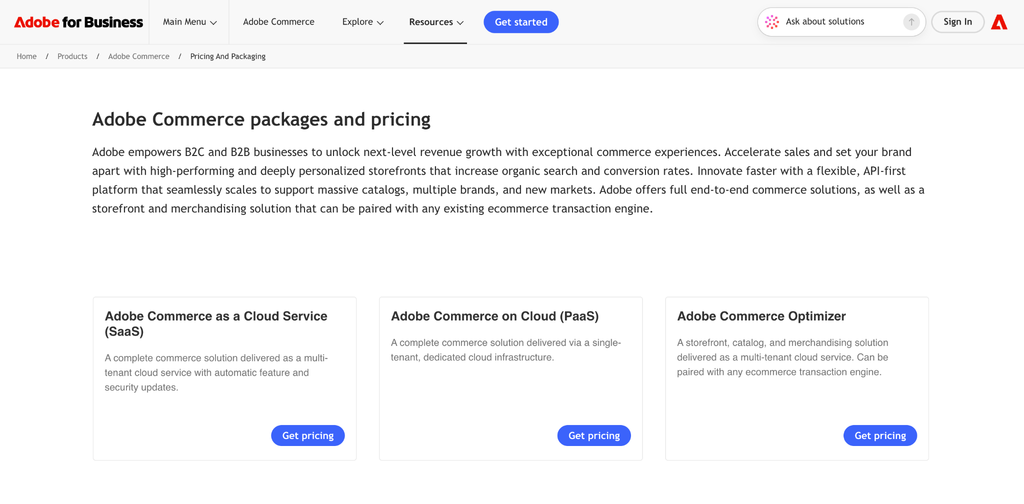
Adobe Commerce, formerly Magento, is built for large catalogs, B2B selling and heavy customization. The free, self-hosted Magento Open Source edition also exists.
Pricing: Adobe sets the price by custom quote.
Fee on sales: set by your contract.
What works well:
- Deep customization and B2B features.
- Scales to very large catalogs.
Trade-offs:
- Needs a development team to build and maintain.
- A high total cost for small stores.
Who it fits: enterprise brands with in-house or agency developers.
The Real Yearly Cost of a Shopify Alternative
For a store selling $10,000 a month, Shopify Basic costs about $1,068 a year with Shopify Payments, or about $3,468 with another payment provider, once three paid apps are included. The same store on WooCommerce with CartFlows Pro costs about $600 in its first year. Card processing is left out of both, because you pay it on every platform.
Here’s the worked example. It’s a demonstration, not a customer result, and your app and hosting costs will differ.
| Year-one cost, demo store selling $10,000/month | Shopify Basic (yearly billing) | WooCommerce + CartFlows Pro |
|---|---|---|
| Plan or software | 348(29 × 12) | $0 (WooCommerce and CartFlows are free plugins) |
| Checkout, order bumps and upsells | Paid apps, assumed 3 × $20/mo = $720 | CartFlows Pro: 199firstyear(299 renewal) |
| Hosting and domain | Included | Assumed managed hosting at $25/mo plus a domain: about $315 |
| Migration tool | n/a | Migrate and Import Shopify to WooCommerce: $79 (1-year plan) |
| Fee on sales, Shopify Payments | $0 | $0 |
| Fee on sales, third-party provider (2% of $120,000) | $2,400 | $0 |
| Total, Shopify Payments | about $1,068 | about $593 |
| Total, third-party provider | about $3,468 | about $593 |
Two honest caveats. First, WooCommerce asks for your time: updates, backups and plugin checks, or a managed host that handles them. Second, Shopify’s price buys you a lot of convenience. The gap is widest for stores that can’t use Shopify Payments or that need checkout changes Shopify reserves for Plus.
Free Shopify Alternatives
The free Shopify alternatives worth a look are WooCommerce, PrestaShop, Square Online’s free plan and Big Cartel’s free plan. “Free” means different things on each: WooCommerce and PrestaShop are free software you host yourself, while Square Online’s free plan is hosted but charges higher card fees.
- WooCommerce: free plugin, no fee on sales. You pay for hosting and a domain. Pair it with the free CartFlows plugin for a modern checkout layout at no cost.
- PrestaShop: free, open-source software, though most stores will need a developer.
- Square Online: $0 a month, with 3.3% + 30¢ on online card sales.
- Big Cartel: a free plan for up to 5 products, with no cut of your sales.
Ecwid used to have a free plan and now starts at $5 a month.
Shopify Plus Alternatives
If you’re considering Shopify Plus mainly for checkout control, WooCommerce with CartFlows Pro offers an alternative with customizable checkout layouts, order bumps, one-click upsells, and A/B split testing for $199 in the first year. BigCommerce Performance and Adobe Commerce are other options for businesses that need hosted or enterprise-level capabilities.
Shopify Plus starts at $2,300 a month, or $27,600 a year. It also includes B2B features, multi-store capabilities, and enterprise support. But if checkout customization is your main reason for considering Plus, it’s worth comparing the cost of those specific capabilities.
| What you want to change | Shopify | WooCommerce with CartFlows Pro |
|---|---|---|
| Checkout layout and fields | Limited customization below Plus; full checkout customization on Plus | Modern checkout layouts and field editing free; custom fields and multistep checkout in Pro |
| Fast checkout from the product page | Dynamic checkout buttons for accelerated checkout | Instant Checkout Buy Now popup that lets shoppers skip the cart page |
| Order bumps | Typically requires a third-party app | Built in with Pro, with cart, order value, and location conditions |
| One-click upsells after payment | Typically requires a third-party app | Built in with Pro |
| A/B testing checkout and offer pages | Typically requires a third-party app or tool | Built in with Pro |
| Hosting and maintenance | Managed by Shopify | You manage hosting or use a managed host |
| Store ownership | Runs on Shopify’s platform | You control your WordPress site and store data |
| Annual cost | Shopify Plus starts at $27,600 | CartFlows Pro: $199 first year, $299 renewal, plus hosting and other store costs |
Can WooCommerce Match Shopify’s Checkout?
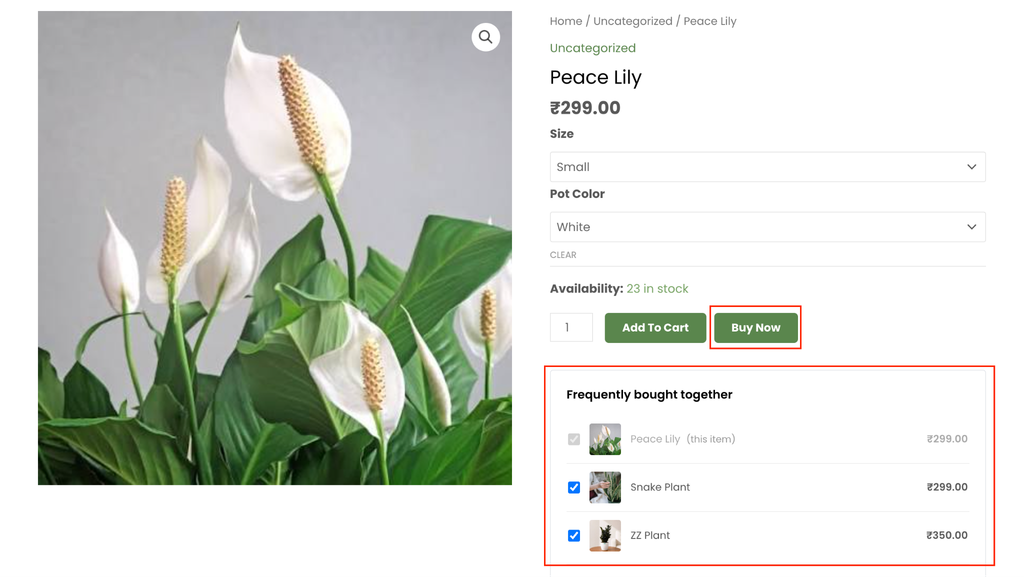
Yes. With CartFlows, WooCommerce supports customizable checkout layouts, order bumps, one-click upsells, and Instant Checkout. The key difference is that Instant Checkout can let shoppers skip the cart page without giving up the opportunity to add more products to their order.
Shopify’s dynamic checkout buttons offer a fast way to buy, but Shopify’s help documentation notes that they can only be used to buy a single product variant and don’t support cart attributes such as gift notes or delivery dates. Shopify also cautions that these buttons might not benefit every store.
CartFlows Instant Checkout takes a different approach. When shoppers select Frequently Bought Together products and click Buy Now, the main product and selected extras can be included in the same order through a checkout popup. An order bump can also appear in the popup, with its configured conditions.
That means shoppers can skip the cart page while still having the opportunity to add relevant products before completing their purchase.
For more ways to improve the shopping and checkout experience, see our WooCommerce checkout optimization guide.
Which Shopify Alternative Fits Your Store?
Pick the one thing you most want to change.
| If you want… | Choose |
|---|---|
| Ownership, no fee on sales and full checkout control | WooCommerce with CartFlows |
| Hosted, Shopify-like and built to scale | BigCommerce |
| The easiest first store | Wix |
| A design-led brand site | Squarespace |
| One system for online and in-person sales | Square Online |
| A store inside your current website | Ecwid |
| A simple shop for art or handmade goods | Big Cartel |
| Free, open-source software and a developer | PrestaShop |
| Digital products, courses or subscriptions | Sellfy |
| Enterprise catalogs and B2B | Adobe Commerce |
When Shopify Is Still the Better Choice
Shopify is still the better choice if you want zero maintenance, can use Shopify Payments, and are happy with Shopify’s checkout as it is. Its app store is huge, its hosting is reliable and its checkout is well tested.
WooCommerce asks more of you. Store owners who leave WooCommerce for Shopify usually cite updates, plugin conflicts and speed. A managed WooCommerce host, a short update routine and fewer, better plugins solve most of that, but it’s a real cost in time. We’d rather you pick the platform you’ll enjoy running.
How to Move From Shopify to WooCommerce
Moving from Shopify to WooCommerce takes four steps: build the new store on a staging site, import your data, rebuild and test the checkout, then redirect your old URLs and switch the domain. Keep Shopify running until the new store is live.
- Build the new store. Install WordPress and WooCommerce with a host of your choice, on a staging site or temporary domain.
- Import your data. WooCommerce’s own Shopify migration guide covers CSV exports. For a fuller move, the third-party extension Migrate & Import Shopify to WooCommerce ($79 for a 1-year plan) moves products, customers, orders, pages, blog posts and coupons using an API key from a Shopify custom app. Passwords can’t be moved, so customers set a new one on first login.
- Rebuild and test the checkout. Install CartFlows and turn on a modern checkout layout. With CartFlows Pro, add order bumps, one-click upsells and Instant Checkout. Place test orders to check payments, shipping, taxes and emails.
- Redirect and launch. Shopify product URLs use /products/ and WooCommerce uses /product/ by default, so map every old URL to its new page with 301 redirects. That protects your SEO and stops broken links. Then point your domain to the new store.
Don’t cancel Shopify until payments work, orders arrive and your redirects are checked.
Keep Your Checkout When You Leave Shopify
Of all the Shopify alternatives here, WooCommerce gives you the most control, and CartFlows fills the gap that usually holds store owners back: the checkout. You get a modern checkout for free, and CartFlows Pro adds order bumps, one-click upsells and Instant Checkout, on a store you own. Our support team is there when you need a hand.
Every paid CartFlows plan comes with a 14-day money-back guarantee.
Ready to build a checkout that does more?
Frequently Asked Questions
Here are quick answers to the questions store owners ask most about Shopify alternatives.