



Your online store has a big decision to make before you sell your first product: which platform will you build it on? WooCommerce and Shopify power more online stores between them than every other ecommerce platform combined, so the choice often comes down to one question: do you want to own your store, or rent it?
As of May 2026, Store Leads tracks 4.34 million live WooCommerce stores against 2.84 million live Shopify stores. WooCommerce still leads by raw store count. Shopify pulls ahead among the highest-traffic, highest-revenue brands.
This guide compares both platforms on cost, ease of use, hosting, customization, global selling, and SEO. Then it does the math most comparisons skip: what Shopify’s transaction fees and paid apps actually cost you over a few years, next to a flat-fee WooCommerce setup.
TL;DR:
- WooCommerce is typically cheaper long-term and gives you full ownership of your store, but you handle hosting, updates, and security yourself.
- Shopify costs more as you scale. Its subscription, transaction fees, and paid apps add up fast, but it launches in hours with no technical maintenance.
- Choose WooCommerce (paired with a checkout and funnel tool like CartFlows) if cost control and content-driven growth matter most.
- Choose Shopify if you want the fastest path to selling with zero setup.
- What Is the Difference Between WooCommerce and Shopify?
- WooCommerce vs. Shopify: At a Glance
- 1. How Much Does WooCommerce Cost Compared to Shopify?
- 2. Which Is Easier to Set Up: WooCommerce or Shopify?
- 3. Which Platform Offers More Customization: WooCommerce or Shopify?
- 4. Which Platform Is Better for International Selling?
- 5. Which Platform Is Better for B2B and Wholesale Ecommerce?
- 6. Which Platform Is Easier to Migrate?
- 7. Which Platform Has Better Performance?
- 8. Which Is More Secure: WooCommerce or Shopify?
- 9. Which Has Better Payment Processing and Lower Transaction Fees?
- 10. Which Is Better for SEO: WooCommerce or Shopify?
- How Does WooCommerce vs Shopify Differ by Business Type?
- WooCommerce vs. Shopify: The Decision Framework
- Choosing Your Ecommerce Future
- How Can You Optimize WooCommerce Checkout Without Building Everything From Scratch?
- WooCommerce vs. Shopify Frequently Asked Questions
What Is the Difference Between WooCommerce and Shopify?
The core difference between Shopify and WooCommerce is who owns and runs the store’s infrastructure. WooCommerce is a free WordPress plugin you install on hosting you choose. You own your code, your data, and your store outright, but you handle hosting, security, and updates yourself. Shopify is a fully hosted subscription platform. It manages hosting, security, and updates for you, and you pay a recurring bill that grows as your store does. A smooth checkout also supports better customer communication, and a BIN lookup API can help businesses validate card details and reduce payment-related friction during transactions.
Cost, customization, scaling, and SEO all trace back to this one split.
WooCommerce: You Own the Whole Stack
WooCommerce turns your existing WordPress website into a store. It’s free to install, and you control the platform and your data.
You get:
- Direct code and database access
- Unlimited third-party integrations
- The freedom to use any payment processor you like
You handle:
- Hosting
- Security updates
- Ongoing maintenance
A tool like CartFlows fills the gap this creates. It gives WooCommerce stores the Shopify-style checkout flows, upsells, and order bumps you’d otherwise have to build from scratch.
Shopify: Someone Else Runs the Stack
Shopify handles the infrastructure so you can focus on selling.
You get:
- Managed hosting with no server setup
- Automatic security updates and patching
- Support on every plan
You give up:
- Direct code access (customization runs through themes and the app store)
- Control over your payment processor (using one outside Shopify Payments adds a fee)
- A flat cost, since bills climb with higher-tier plans and paid apps
WooCommerce vs. Shopify: At a Glance
Here’s what actually matters for your business:
| What You Need | WooCommerce | Shopify |
|---|---|---|
| Type | WordPress plugin (you own it) | Hosted platform (you rent it) |
| Starting cost | Free plugin + hosting ($6-$50/month) | $29/month (3 months for $1) |
| Transaction fees | Only what your payment gateway charges | 2.9% + 30¢ (plus 2% extra if you don’t use Shopify Payments) |
| Hosting | You choose and manage | Included and managed for you |
| Customization | Unlimited (you have full control) | Limited (depends on available apps) |
| International selling | Sell anywhere in the world | Max 50 countries (costs extra for more) |
| Support | Community forums and documentation | 24/7 professional support |
Understanding these core differences sets the stage for examining what each platform means for your business in practice.
1. How Much Does WooCommerce Cost Compared to Shopify?
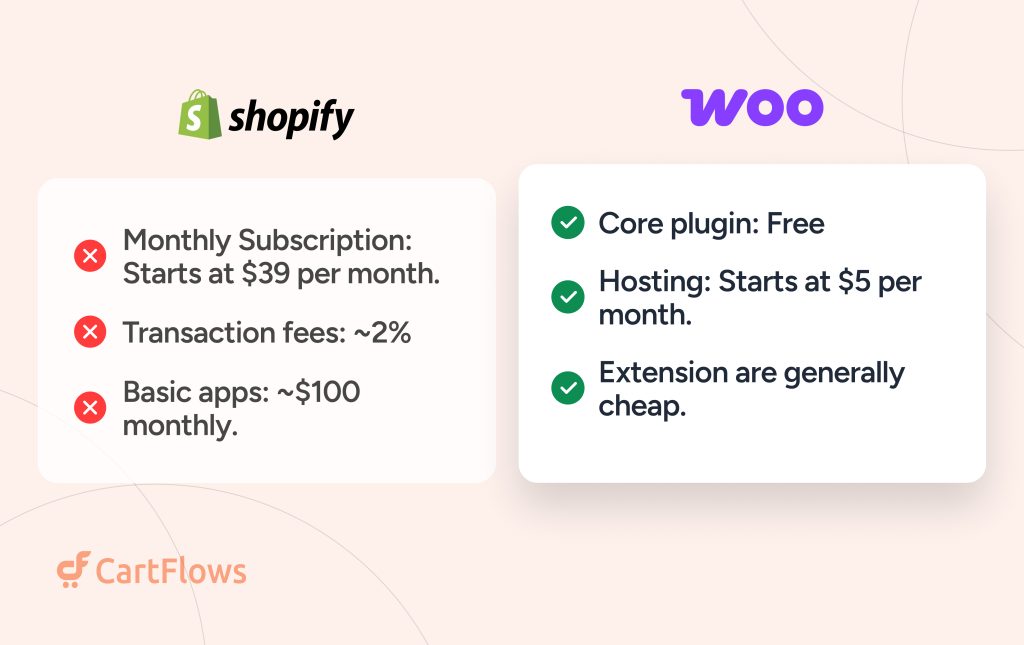
WooCommerce can cost less than Shopify when you need extensive customization without paying for several separate apps. However, the cheaper option depends on your hosting, extensions, payment fees, and the amount of technical help your store requires.
The most useful comparison is not just the base subscription. It’s the total cost of the features your business actually needs.
Card processing is close to a wash too. Both land around 2.9% + 30¢ per transaction once you count Stripe, PayPal, or Shopify Payments.
The real gap is in what you pay to get checkout customization, upsells, order bumps, and cart recovery working.
WooCommerce
- Core plugin: Free
- Quality hosting: $15–$50/month for most stores
- CartFlows Suite (checkout, upsells, order bumps, product-page bundles, cart recovery, coupons): $199/year flat
- Optional extras: developer help at $50–$150/hour, if you need it
One flat-fee plugin covers checkout, upsells, order bumps, and cart recovery. The price doesn’t change no matter how much the store sells.
Shopify
- Basic plan: $348/year (billed annually)
- Checkout customization, upsells, order bumps, AI product recommendations, frequently-bought-together bundles, cart recovery: separate apps, each with its own subscription
- Extra 2% per transaction if you skip Shopify Payments (1% on Grow, 0.6% on Advanced)
- App costs typically scale with order volume or subscriber count, so they climb as the store grows
Shopify charges for each of those features separately through its App Store, and the subscriptions stack.
Three-year total, small store:
| WooCommerce + CartFlows | Shopify Basic + apps | |
|---|---|---|
| Platform / hosting | $240/yr | $348/yr |
| Checkout, upsells, cart recovery, coupons | $199/yr | ~$1,200/yr |
| Year 1 | $439 | $1,548 |
| 3-year total | $1,317 | $4,644 |
App costs above are based on published 2026 starting tiers for one upsell app and one cart-recovery app on the Shopify App Store. Most of those apps price by volume, so this gap widens as sales grow. CartFlows Suite stays flat at $199/year regardless.
Building on WooCommerce without CartFlows? Expect $500 to $5,000/year in hosting, extensions, and occasional developer help, still typically less than a comparable Shopify app stack.
2. Which Is Easier to Set Up: WooCommerce or Shopify?
Shopify is generally easier to set up because hosting, the core platform, and much of the technical infrastructure are managed for you. WooCommerce offers more flexibility, but its setup involves more decisions.
WooCommerce Setup
- Choose and configure hosting
- Install WordPress and WooCommerce
- Pick and customize a theme
- Harden security and set up backups
Setup takes an afternoon to a couple of days, depending on experience level.
Shopify Setup
- Guided setup wizard, live in hours
- Hosting and security pre-configured
- Payment processing built in
- Updates and maintenance handled automatically
Shopify’s speed comes from removing decisions, not from being simpler to run long-term.
Maintenance is where that trade shows up.
WooCommerce needs ongoing attention: updates, compatibility checks, security monitoring. That’s on you, or someone on your team.
Shopify handles all of that automatically. You pay for it through the subscription, and through a ceiling on how far you can customize.
For a first store or a fast market test, Shopify’s setup speed is a real advantage.
For a store planning to grow past the basics, that speed comes from limits you’ll likely want to remove later.
3. Which Platform Offers More Customization: WooCommerce or Shopify?
WooCommerce offers more direct control over the underlying website, while Shopify provides customization through themes, apps, platform settings, and supported development tools.
WooCommerce Customization Advantages
WordPress is the reason WooCommerce customization has no real ceiling.
- Unlimited theme modifications and custom development
- Custom checkout flows with sophisticated pricing logic
- Direct database and code access
- Any third-party integration you want
- Full control over the user experience
Shopify’s Structured Limitations
Shopify customization runs through its own templating system, Liquid, with real limits attached.
- Theme-based customization with guardrails
- New functionality mostly comes through apps
- Advanced changes require Shopify Plus, starting at $2,300+/month
- Liquid has a learning curve for developers new to it
When a store requires functionality beyond what themes and standard apps can provide, businesses may hire Shopify developers to build and implement more specialized customizations within the platform.
Guardrails cut both ways. They stop you from breaking your own store, but they also stop you from building past what Shopify allows.
That’s the real trade-off here. WooCommerce wins on raw capability. Shopify wins if you’d rather not need that capability in the first place.
4. Which Platform Is Better for International Selling?
Both WooCommerce and Shopify can support international ecommerce. The right choice depends on your target markets, payment providers, currencies, taxes, shipping needs, and the level of control you require
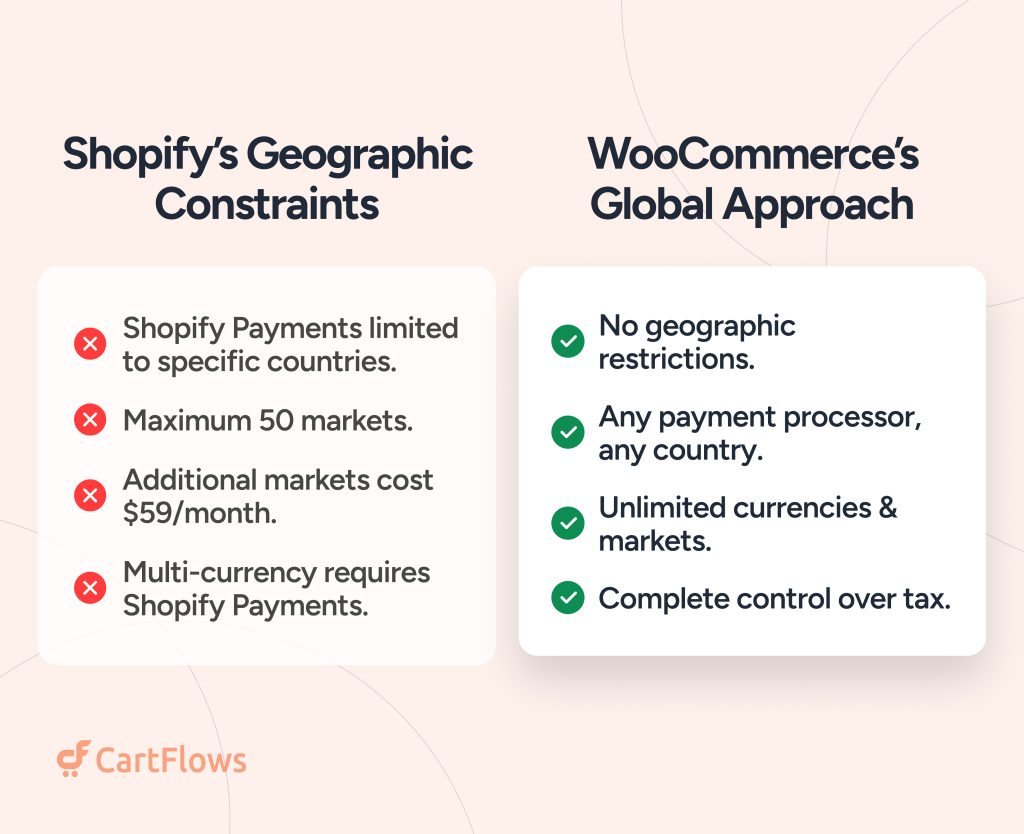
WooCommerce’s Global Approach
- No geographic restrictions
- Any payment processor in any country
- Unlimited currency and market combinations
- Full control over international tax logic
WooCommerce treats the whole world as one market. Any payment processor, any country, any currency combination.
Shopify’s Global Approach
- Shopify Markets is built into every plan, no separate monthly fee per country
- Shopify Payments still isn’t available in every country
- Currency conversion costs 1.5% per transaction
- Duty and tax calculation costs 0.85% to 1.5% per transaction, depending on payment method
Shopify’s model shifted in 2026. International selling is now built in everywhere, but it runs on per-transaction fees instead of a flat cost.
That’s the trade to weigh: WooCommerce charges nothing extra to sell anywhere, Shopify charges a small percentage on every international sale for the convenience.
5. Which Platform Is Better for B2B and Wholesale Ecommerce?
WooCommerce and Shopify can both support B2B selling, but their strengths differ when wholesale pricing, customer-specific catalogs, payment terms, and complex ordering rules become important.
Shopify closed a lot of ground here in April 2026. Native B2B features moved from Plus-only to every paid plan, so this section needs an update most competing comparisons haven’t made yet.
WooCommerce’s B2B Strengths
- Unlimited pricing catalogs and customer-specific pricing tiers
- WooCommerce Subscriptions for advanced recurring billing
- No plan-based caps on catalogs, company accounts, or discount rules
- Full code access if you need a workflow no plugin covers
Shopify’s B2B Features (as of April 2026)
- Company accounts, net payment terms, and self-serve buyer ordering, now on Basic, Grow, and Advanced, not just Plus
- Up to 3 active pricing catalogs on non-Plus plans
- Unlimited catalogs, direct catalog-to-company assignment, and partial payments still require Plus
For straightforward wholesale, a handful of buyer tiers, net terms, self-serve ordering, Shopify’s non-Plus plans now cover it. Once you need more than 3 pricing catalogs, deposits, or partial payments, you’re back to needing Plus at $2,300+/month, or building around the limit with a third-party app.
WooCommerce still wins for complex or unusual B2B setups, since there’s no catalog cap or tier ceiling to hit. Shopify wins if your B2B needs are simple and you’d rather not manage another plugin.
6. Which Platform Is Easier to Migrate?
Neither WooCommerce nor Shopify guarantees a completely effortless migration. The difficulty depends on the size of your catalog, order history, customer data, URL structure, reviews, and connected systems.
Moving WooCommerce to Shopify
- Shopify caps every product at 3 options and 100 variants, non-negotiable outside Plus. Store owners planning a WooCommerce to Shopify Migration need to map their catalog against this limit before committing, since products with more complex variant structures may need restructuring.
- Products with more than 3 attributes need restructuring before import
- Orders, coupons, and reviews don’t move with a basic import, they need a dedicated migration app
- Customer passwords never transfer, so returning customers reset theirs on first login
Moving Shopify to WooCommerce
- No product option or variant cap to design around
- Third-party migration plugins handle products, orders, customers, and coupons
- Reviews and SEO URLs need their own import pass, same as the WooCommerce-to-Shopify direction
- More flexibility once you land, but the same upfront data-mapping work either way
Neither direction is a one-click move. Budget real time for data cleanup and testing before switching either way, and expect to lose something small (a password, a review thread, a URL structure) no matter which direction you’re going.
7. Which Platform Has Better Performance?
Shopify generally requires less hands-on performance management because hosting and core infrastructure are managed by the platform. WooCommerce offers more control over performance, but the results depend heavily on hosting, plugins, themes, and configuration.
WooCommerce Performance
- Hosting quality is the single biggest factor
- Plugin count and quality affect speed directly
- Ongoing optimization takes real expertise, or a managed host that handles it for you
- The ceiling is higher than Shopify’s, but you have to build toward it
Shopify Performance
- Hosting and scaling are handled automatically
- Speed stays consistent during traffic spikes, including Black Friday
- No optimization knowledge required to get solid performance
- The ceiling is lower, since you can’t touch server-level configuration
Shopify wins by default. WooCommerce can outperform it, but only with the hosting and plugin discipline most stores never bother with. Managed WooCommerce hosts (WP Engine, Kinsta, Cloudways) close most of that gap for stores that don’t want to manage it themselves.
8. Which Is More Secure: WooCommerce or Shopify?
Shopify manages core platform infrastructure and security updates, while WooCommerce store owners have more responsibility for the security of their WordPress installation, hosting, and extensions.
WooCommerce Security Requirements
- WordPress and plugin update management
- Hosting security configuration
- SSL certificates, plus your own PCI compliance paperwork
- Backup and disaster recovery planning
Shopify’s Managed Security
- Automatic platform updates and patches
- PCI DSS Level 1 certified infrastructure and hosted checkout
- Platform-level security monitoring included
- 99.99% average uptime over the past 90 days, per Shopify’s own reporting, though only Shopify Plus carries a binding uptime SLA
Neither platform makes PCI compliance fully hands-off. Shopify covers its hosted checkout and infrastructure, but you’re still responsible for your own compliance paperwork (the SAQ) and for any third-party scripts or apps running on your storefront. WooCommerce puts more of that work on you from the start, hosting, SSL, backups, but also gives you full control over how it’s done.
Control appeals to businesses that want to own their security decisions. Managed protection appeals to businesses that would rather not make them.
9. Which Has Better Payment Processing and Lower Transaction Fees?
WooCommerce gives you flexibility to choose from compatible payment gateways. Shopify offers integrated payment processing in supported countries, but additional platform transaction fees may apply when you use an external provider.
WooCommerce’s Payment Freedom
- No platform fees beyond whatever your gateway charges
- Any payment processor, in any country, no restrictions
- Regional payment methods integrate directly, Stripe in the US, iDEAL in the Netherlands, Alipay in China
- Full control over payment optimization
Shopify’s Payment Setup
- Shopify Payments works seamlessly in supported countries
- Skip Shopify Payments, and you pay an extra fee on every transaction: 2% on Basic, 1% on Grow, 0.6% on Advanced
- Payment options narrow outside Shopify Payments’ supported countries
That extra fee is the real cost of using your own gateway on Shopify. It shrinks as you move up plan tiers, but it never disappears unless you use Shopify Payments.
WooCommerce never charges you for choosing your own processor. Shopify makes the choice easy in supported countries and expensive everywhere else.
10. Which Is Better for SEO: WooCommerce or Shopify?
WooCommerce offers greater flexibility over site architecture and content management because it runs on WordPress. Shopify also includes essential SEO features and can support effective organic growth.
The platform itself is only one part of SEO performance. Content quality, technical implementation, site speed, internal links, backlinks, and how well your pages answer search intent all matter.
WooCommerce Content Advantages
- Unlimited blogging and content creation in the same system as the store
- Yoast, Rank Math, and other advanced SEO plugins
- Full control over site architecture and URL structure
- Content and commerce live in one system, no separate blog platform to sync
Shopify’s Content Setup
- Native blog that works well technically: clean URLs, structured data, included sitemap
- URL structure is fixed: blog posts sit under
/blogs/, collections under/collections/, with no way to remove either - No custom SEO plugins, Shopify’s SEO tooling lives in the theme and a smaller set of apps
- The real limitation isn’t the platform, it’s that most Shopify blogs get four posts and then get abandoned
WooCommerce wins on flexibility: no URL restrictions, no plugin ceiling, no separate system to maintain. Shopify’s blog is more capable than it gets credit for, the bigger reason Shopify stores lose content-driven traffic is usually that nobody keeps publishing, not that the platform holds them back.
How Does WooCommerce vs Shopify Differ by Business Type?
WooCommerce is generally better for businesses that need flexibility, content integration, or complex pricing, while Shopify suits businesses that want a simpler, all-in-one ecommerce setup. The right choice depends on your business model, from fashion and wholesale to digital products and international sales.
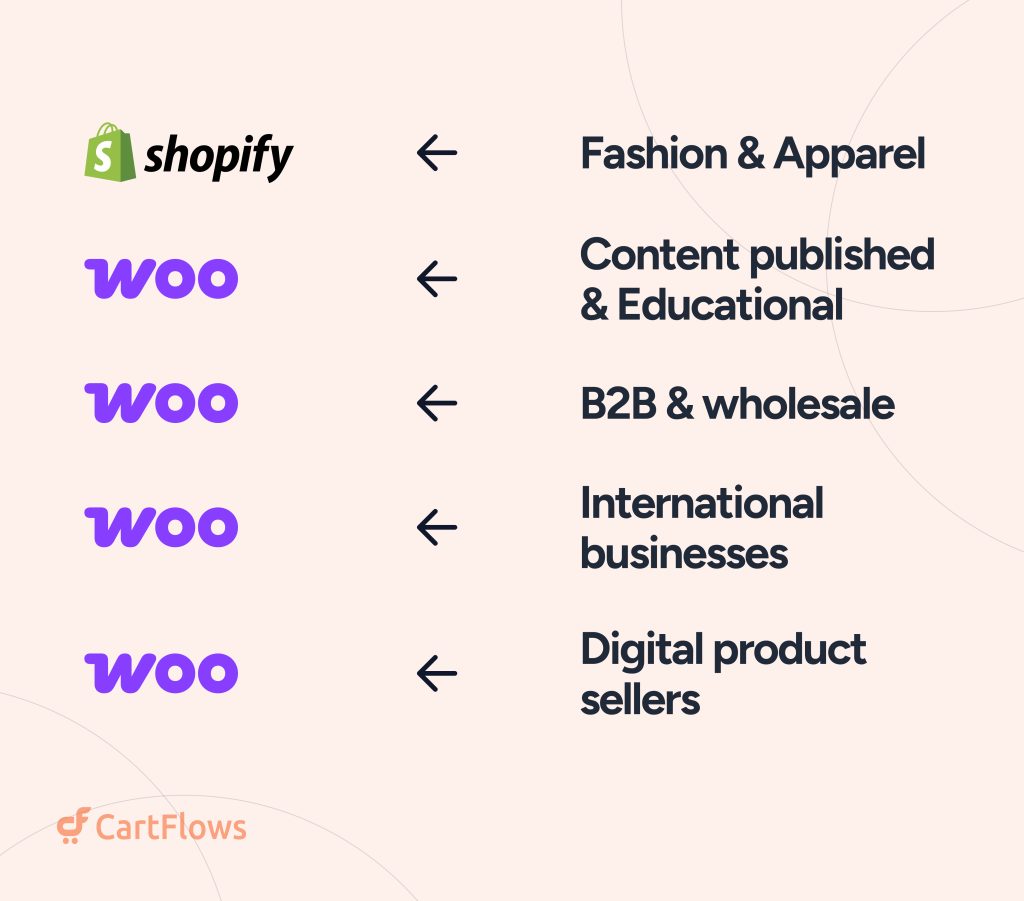
Fashion and apparel brands tend to gravitate toward Shopify.
The platform is built around product photography, seasonal drops, and influencer-driven marketing, and most fashion-focused apps are built for Shopify first.
Independent labels lean into exactly that playbook Drama Call hoodies and denim, for example, are marketed through the same mix of product photography, seasonal drops, and limited releases that fashion brands thrive on.
Content publishers and course creators tend to prefer WooCommerce.
Blogging, membership sites, and content-heavy stores benefit from running everything inside WordPress instead of syncing a separate blog platform to the store.
B2B and wholesale businesses have more real options than they used to.
Shopify added native company accounts, custom pricing catalogs, and net payment terms to every paid plan in April 2026, so simple wholesale setups now work fine on standard Shopify. WooCommerce still wins for complex pricing structures, since it has no catalog caps or plan-based limits to run into.
International businesses should check per-transaction costs, not just market caps.
Shopify Markets now ships on every plan with no per-country limit, but currency conversion and duty calculation carry their own fees. WooCommerce charges nothing extra to sell into any country.
Digital product sellers face a genuine trade-off.
WooCommerce’s subscription and membership plugins handle complex recurring billing well. Shopify’s digital product tools are simpler to set up but cover less ground once the business gets complicated.
WooCommerce vs. Shopify: The Decision Framework
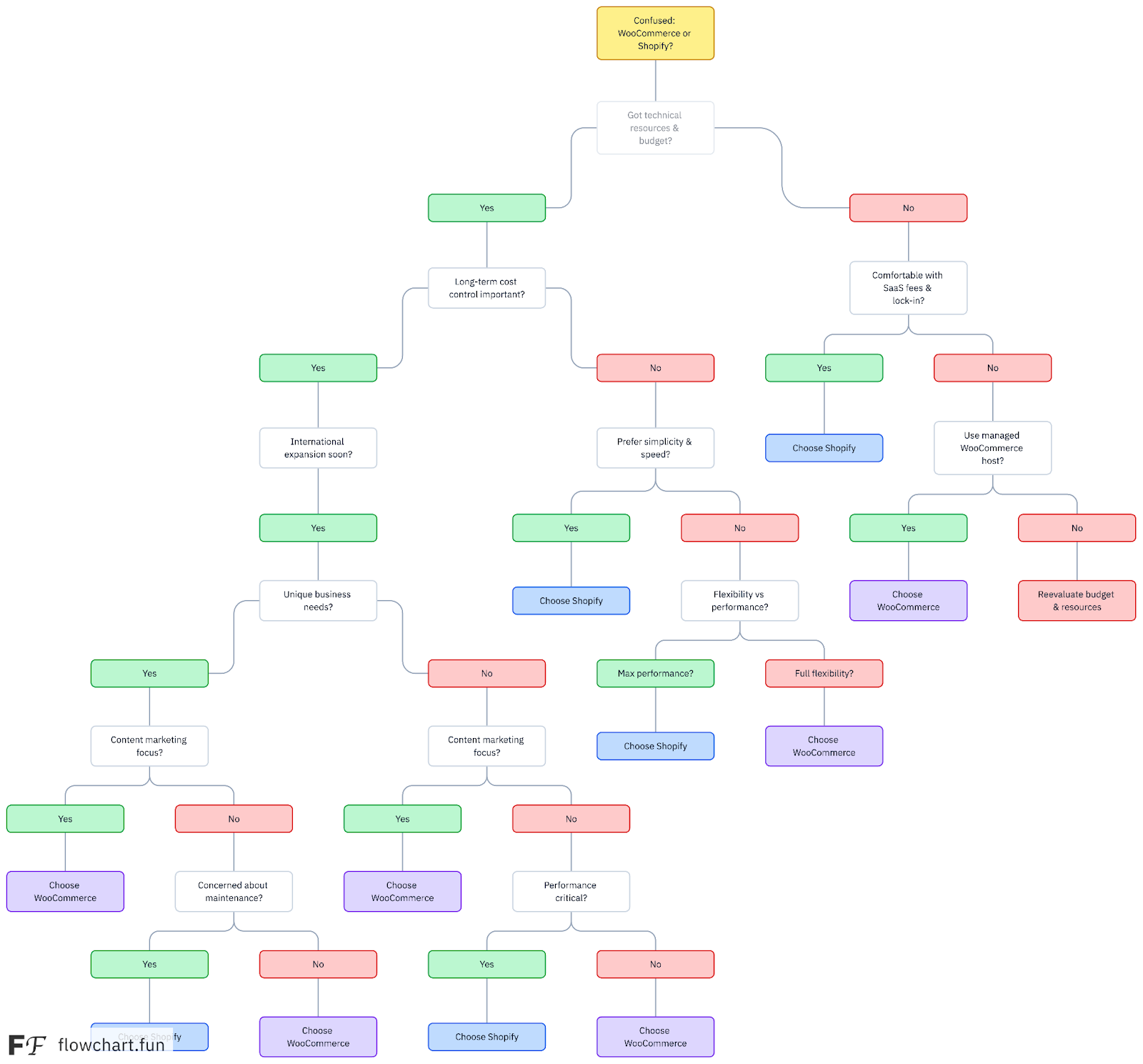
These industry considerations lead to a simple decision framework based on your business realities:
(Here’s the full decision tree based on what we’ve covered in the article)
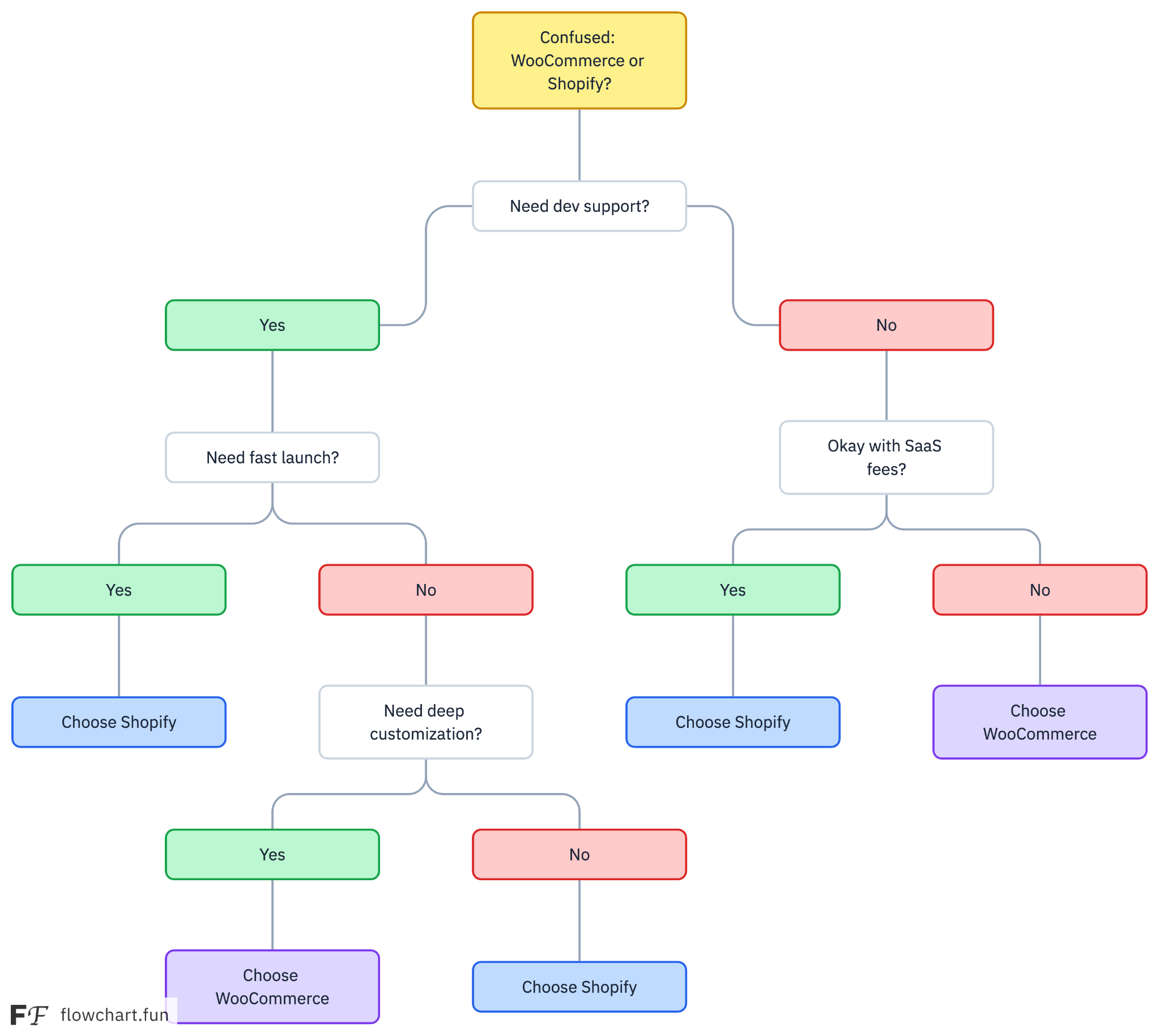
Here’s a simpler one
Choosing Your Ecommerce Future
Your choice is yours alone, but here’s the shorthand version of everything above:
Choose WooCommerce if:
– You want ownership and control over your website.
– You need extensive customization or specialized integrations.
– You want to manage content and ecommerce in WordPress.
– You want flexibility in choosing hosting and payment providers.
– You can manage maintenance yourself or have someone handle it.
Choose Shopify if:
– You want to get a store running with less technical setup.
– You prefer managed hosting and core platform maintenance.
– Your store’s requirements fit Shopify’s built-in features and apps.
– You want a centralized platform for products, orders, and store operations.
– You prefer a predictable platform subscription and are comfortable budgeting for additional apps where needed.
If both platforms fit your needs, calculate the total cost for the next 12 months using your actual requirements. Include hosting, apps, payment processing, maintenance, and the time your team will spend managing the store.
How Can You Optimize WooCommerce Checkout Without Building Everything From Scratch?
WooCommerce gives you control over your store, but that doesn’t mean you have to develop every checkout feature yourself.
The default WooCommerce checkout can be extended with tools designed to improve the shopping experience and create additional purchase opportunities.
CartFlows helps WooCommerce store owners build checkout flows and sales funnels with features such as:
- Checkout customization: Adapt checkout layouts and fields to your store’s needs.
- Instant Checkout: Let customers go directly from a product page to a checkout popup without navigating through the standard cart page.
- Order bumps: Offer relevant add-ons during checkout.
- One-click upsells and downsells: Present additional offers after the initial purchase.
- Frequently Bought Together bundles: Recommend products that make sense alongside the item being purchased.
- Cart abandonment recovery: Follow up with customers who leave without completing an order.
- Conversion testing and analytics: Evaluate funnel performance where supported by your plan.
The CartFlows Suite bundles multiple tools under one license, including CartFlows Pro, Cart Abandonment Recovery, Modern Cart, and Power Coupons. Review the CartFlows features and pricing to confirm which plan includes the functionality you need.
The goal isn’t to add every possible feature. It’s to remove unnecessary friction, make relevant offers, and measure whether those changes improve conversion rate or average order value.
If you’re choosing WooCommerce because you want more control, CartFlows can help you extend that control to checkout and the rest of the buying journey.