WooCommerce powers a huge share of the web’s online stores. Yet its built-in coupons stop at plain percentage and fixed discounts. So we installed and ran the most-recommended coupon plugins on a staging store to see which ones actually earn their spot. Our top pick for most stores is Power Coupons, for the best all-in-one value. Here’s the tested field, what each one is genuinely best at, and the honest tradeoffs.
The best WooCommerce coupon plugins at a glance
Short on time? Here’s the field at a glance. Which one actually fits your store? That’s what the rest of this guide sorts out, with a feature table and a by-store-type answer at the end.
| Plugin | Best for | Free tier? | Price |
|---|---|---|---|
| Power Coupons (Our pick) | Best all-in-one value | Yes | Pro from $49/yr (single site); $99/yr first yr for 10 sites; $249 lifetime (30 sites) |
| WebToffee Smart Coupons | Best free feature breadth | Yes | Free; premium from $89/yr |
| Smart Coupons (StoreApps) | Most comprehensive (paid) | No | $129/yr (1 site) |
| Advanced Coupons | Best cart-condition rules | Yes | Premium from $99.50/yr; bundle $249/yr |
| Discount Rules (Flycart) | Best for dynamic pricing | Yes | Free; Pro from $85/yr |
| Coupons Pro (Flintop) | Best for triggered coupons | No | $79/yr |
| Coupon Referral Program (WP Swings) | Best for referral coupons | No | $49/yr |
Do you even need a coupon plugin?
Maybe not. If all you want is a simple percentage-off or free-shipping code with an expiry date and a spend threshold, WooCommerce already does that. No plugin required. Most stores that “need a coupon plugin” actually just need to learn what core coupons can do first.
Here’s the clean split.
What WooCommerce core CAN do (no plugin): percentage, fixed-cart, and fixed-product discounts, plus minimum and maximum spend limits. It handles individual-use-only coupons, sale-item exclusions, product and category include/exclude rules, and email restrictions with wildcards. It also covers total, per-user, and per-item usage caps, expiry dates, a free-shipping toggle, and manual application to orders. That covers the everyday promo work most small stores run all year.
What WooCommerce core CANNOT do (needs a plugin): auto-apply codes, BOGO deals, bulk generation of unique codes, and scheduling beyond a single expiry date. It also can’t email codes automatically, run loyalty or store credit, issue gift cards, or handle cart-condition rules beyond min or max spend. WooCommerce’s own documentation is blunt about the first one.
According to WooCommerce’s coupon management documentation, “There is no functionality in WooCommerce core to automatically apply coupon codes.” woocommerce.com/document/coupon-management
So think about the actual job. Take our running example: a coffee-gear store running a Black Friday BOGO plus a first-order code that applies itself at checkout. Core can’t do either of those. The BOGO isn’t a discount type it offers, and there’s no auto-apply. That store needs a plugin.
The honest gatekeeping line: you don’t need a plugin if a plain code with an expiry and a spend rule covers you. You need one the moment you want auto-apply, BOGO, bulk codes, scheduling, store credit or gift cards, or cart-reactive discounts. Everything below is for stores that crossed that line.
How we tested and picked
We started with the real field, not a vendor’s favorites. We started with the coupon plugins WooCommerce store owners and the major roundups actually recommend, pulled from the wordpress.org directory and WooCommerce’s marketplace. We installed the most-cited ones on a WooCommerce staging site, ran real coupon jobs through each, and kept the 8 that earned a spot.
We judged each plugin on five things:
- Real coupon jobs. Could it actually do auto-apply, BOGO, scheduling, and cart-condition rules, or just claim to?
- Free vs paid honesty. What you get free, what’s locked behind Pro, and whether “free” is genuinely usable.
- Active maintenance. Recent updates and current WooCommerce and HPOS compatibility.
- Ratings and installs. Real wordpress.org numbers, weighted by review volume.
- Ease of setup. How fast a non-developer gets a working coupon live.
Full disclosure: Power Coupons is made by our team, the people behind CartFlows. We’ve ranked it on features and value, credited competitors where they win, and flagged our own tradeoffs. Judge it against the table and decide for yourself.
1. Power Coupons: best all-in-one value (Our pick)
Power Coupons is the best pick if you want auto-apply, cart-condition rules, BOGO, loyalty, store credit, gift cards, and scheduling in one plugin. One Pro plan covers it all, instead of a stack of add-ons.
Full disclosure: Power Coupons is our plugin, so here’s the honest version. It’s a new plugin from the same team behind CartFlows, so it’s young in the field but built on years of WooCommerce experience.
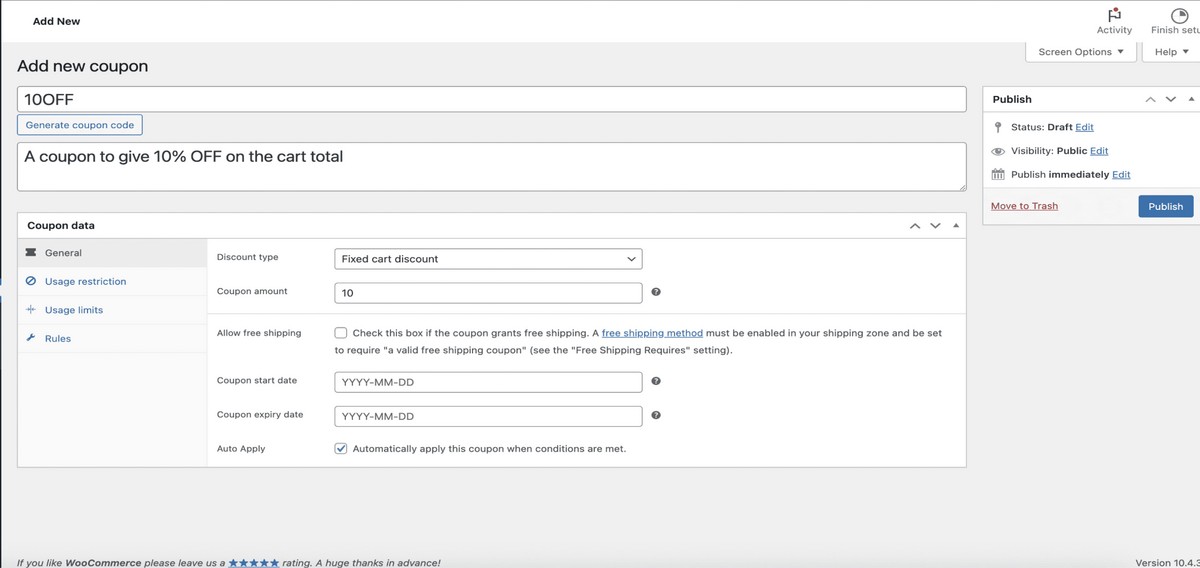
Here’s what it actually does. The free tier gives you auto-apply coupons and cart-condition rules, two things WooCommerce core can’t do on its own. The Pro plan then bundles BOGO, loyalty and store credit, gift cards, and advanced scheduling together, so you’re not buying features one at a time.
That bundling is the whole argument for the #1 spot. Advanced Coupons splits loyalty and gift cards into separate paid add-ons, and StoreApps Smart Coupons has no free tier at all. Power Coupons keeps the advanced jobs under a single roof.
Take our running example, the coffee-gear store running a Black Friday BOGO plus a first-order auto-apply code. You’d set the auto-apply code free, so first-time buyers see the discount land in their cart without typing anything. Then you’d schedule the buy-one-get-one grinder deal to switch on Friday and off Monday. Store credit rewards the repeat buyers who came back for beans.
Our favorite feature is the two-tier support, including the “Skip the Row” VIP option. Store owners with a live promo on the line aren’t stuck waiting in a general queue.
Now the honest con. Power Coupons is the newest plugin in this roundup, so it doesn’t have the years-long track record that StoreApps or Advanced Coupons can point to. In our testing it performs well, but it hasn’t yet been battle-tested across as many stores and edge cases as the veterans have.
If you want the advanced coupon toolkit without assembling it from parts, this is the one we reach for first.
Price: Free tier. Pro from $49/yr (single site); $99/yr first year for 10 sites (renews $129/yr); $249 lifetime (30 sites).
2. WebToffee Smart Coupons: best free feature breadth
WebToffee Smart Coupons is the best free option when you want the widest set of coupon features without paying. That includes BOGO, auto-apply, and store credit, features most free plugins lock behind an upgrade.
It’s a well-established plugin with a 4.7 rating from 132 reviews and more than 30,000 active installs on WordPress.org. Plenty of stores already run it in production.
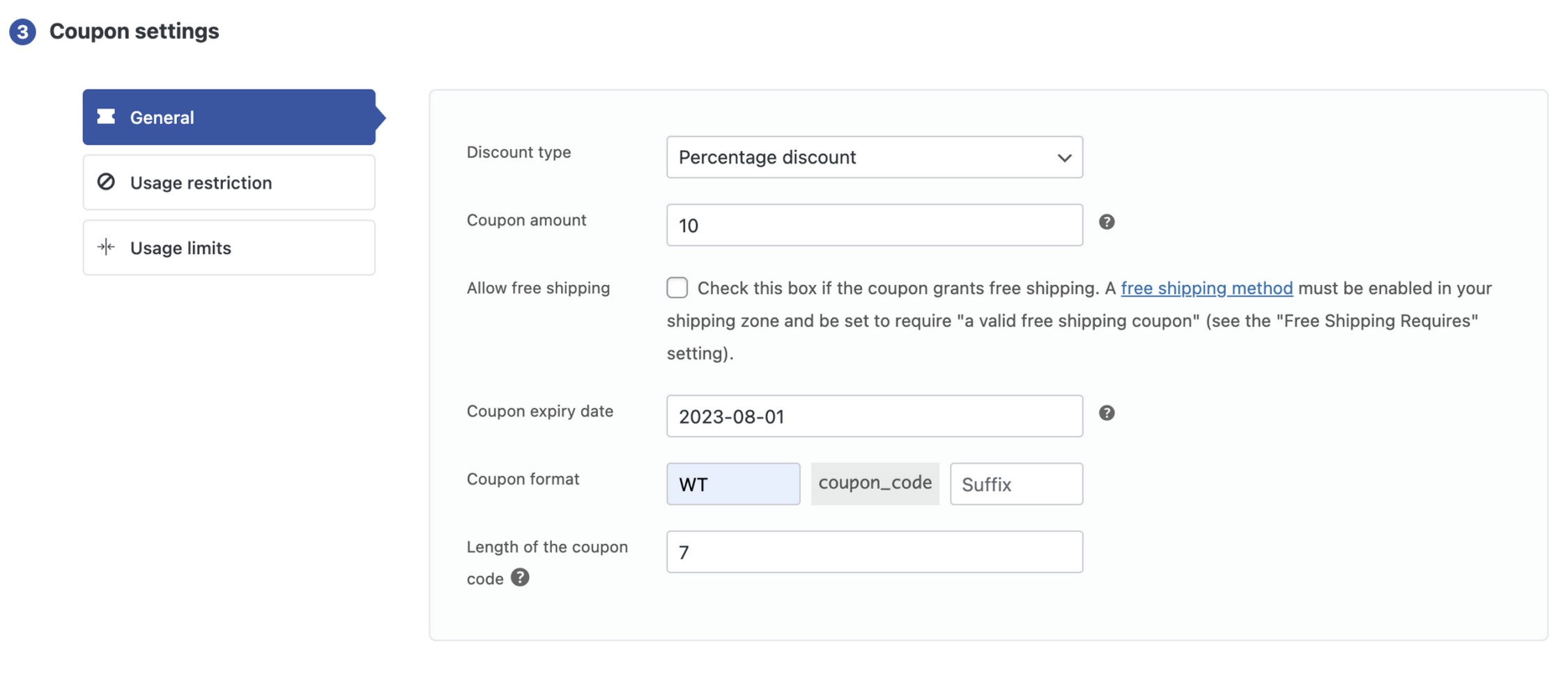
The free tier is the whole story here. It covers BOGO deals, auto-apply coupons, URL coupons, scheduling, a bulk coupon generator, store credit, and gift cards. WooCommerce core can’t do a single one of those natively.
For the coffee-gear store, this means you could run the Black Friday BOGO and the first-order auto-apply code entirely on the free plan. You’d generate a batch of unique codes for an email blast. Then you’d send a URL coupon that applies the discount the moment a subscriber clicks through.
Our favorite feature is that BOGO and store credit both ship free. A small store can run credit-based promotions without spending a cent up front.
The honest con: the settings screens won’t win any design awards, and the deepest features still sit in the paid version. You get breadth for free. Polish costs extra.
If budget is tight and you want maximum capability for zero dollars, start here.
Price: Free tier; premium from $89/yr (single site), $129/yr for up to 5 sites, $249/yr for up to 25 sites.
3. Smart Coupons (StoreApps): most comprehensive (paid)
Smart Coupons by StoreApps is the most comprehensive coupon plugin here. It’s the pick when you want the broadest feature coverage in one product and don’t mind that there’s no free tier.
It carries a 4.4 rating from 233 reviews and a track record dating back to 2012, so it’s one of the most mature tools in this category.
What it does is cover more coupon jobs than almost anything else. You get gift cards, store credit, bulk coupon creation, and CSV import and export, all under one plugin. The breadth is the selling point: if a coupon feature exists, StoreApps probably supports it.
For the coffee-gear store, that CSV workflow matters. You could import a spreadsheet of pre-generated codes from a partner promotion. Then issue store credit to loyal customers and sell gift cards ahead of the holiday rush, all without stitching together multiple tools.
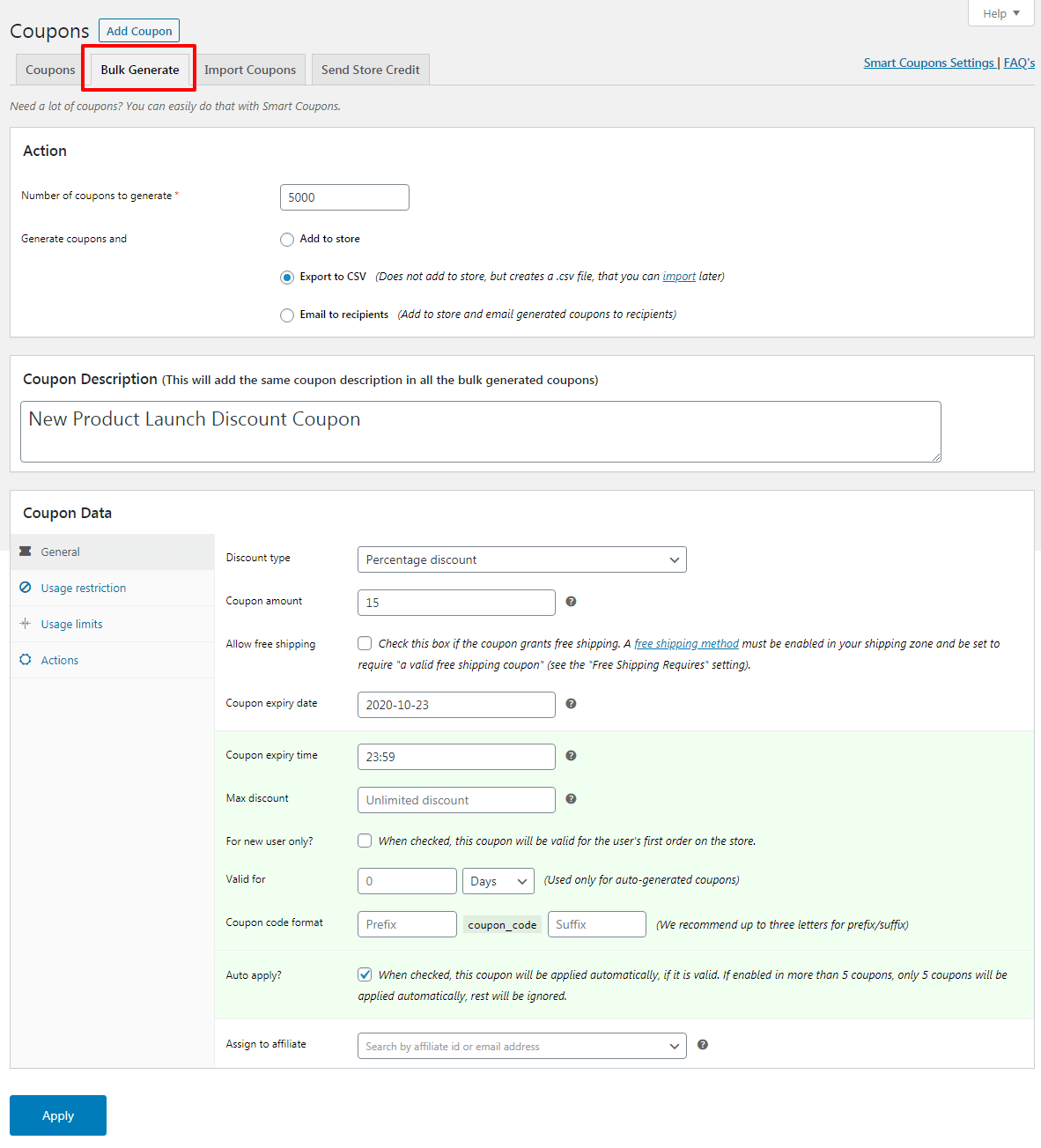
The CSV import and export is the bit we’d miss most. Anyone who has hand-created two hundred coupon codes one at a time knows exactly why.
The tradeoff is simple: there’s no free version at all. You commit to a license before you get hands-on, which is a harder ask when half this list lets you start at zero.
If you want one mature tool that does nearly everything, this is the comprehensive choice.
Price: $129/yr for a single site (enterprise pricing on request). Paid-only, no free tier.
4. Advanced Coupons: best cart-condition rules
Advanced Coupons is the best choice for cart-condition rules and free BOGO. It’s the plugin to reach for when your promotions depend on what’s actually in the customer’s cart.
It’s a well-regarded plugin, with a 4.4 rating from 178 reviews and 20,000+ active installs on WordPress.org.
Here’s what it does. The free tier delivers BOGO deals, URL coupons, and cart-condition rules with a genuinely strong rules engine. You can trigger discounts based on cart contents, quantities, and combinations, which goes well beyond what WooCommerce core allows.
For the coffee-gear store, the cart conditions shine. You could set the Black Friday BOGO to fire only when a customer adds two bags of beans. The first-order auto-apply code runs through a URL coupon, all on the free plan.
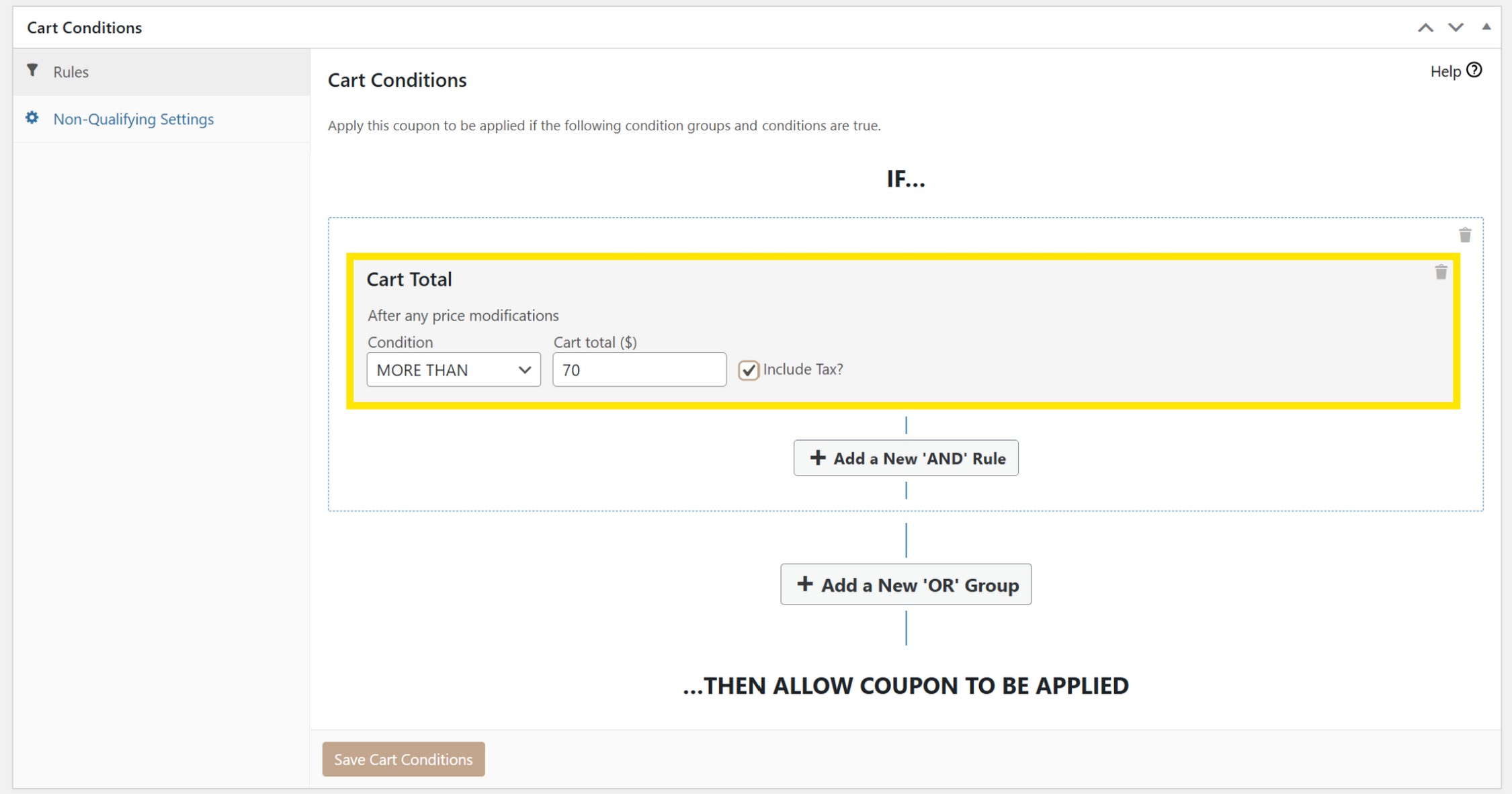
Our favorite feature is the cart-conditions engine, which gives you precise control over exactly when a discount applies without any custom code.
Where it loses: loyalty and gift cards aren’t in the core plugin. They’re separate paid products (Advanced Loyalty Program and Advanced Gift Cards), and the full suite means the All Access bundle at $249 per year. That adds up fast if you want everything under one roof.
If your promotions live and die by cart logic, this is the specialist we’d pick.
Price: Free tier; Premium (Growth, single site) $99.50/yr; Business (unlimited sites) $199.50/yr; or the All Access bundle (unlimited sites, adds loyalty + gift cards) at $249/yr.
5. Discount Rules for WooCommerce: best for dynamic pricing
Discount Rules for WooCommerce is the pick when you want automatic, condition-based pricing rather than codes customers type at checkout. It applies storewide, tiered, and bulk discounts on its own, no coupon field required. With 100,000+ active installs and a 4.8 rating across 1,323 reviews on WordPress.org, it’s the most-loved tool in this roundup by community score.
Here’s what it does well. You set a rule like “20% off when the cart hits 5 items” or a “buy 3 bags, get the 4th at half price” deal. The plugin does the math automatically. Tiered pricing, bulk pricing, and storewide sales all live in one rules engine. Shoppers see the adjusted price without lifting a finger.
Back to our coffee-gear store. Say you want espresso beans to drop in price as customers stack them. Price it at $18 each for 1 to 2 bags, $16 for 3 to 5, and $14 for 6 or more. Discount Rules handles that tiered structure cleanly, and the discount fires the moment the cart qualifies. That’s a job WooCommerce core can’t do on its own.
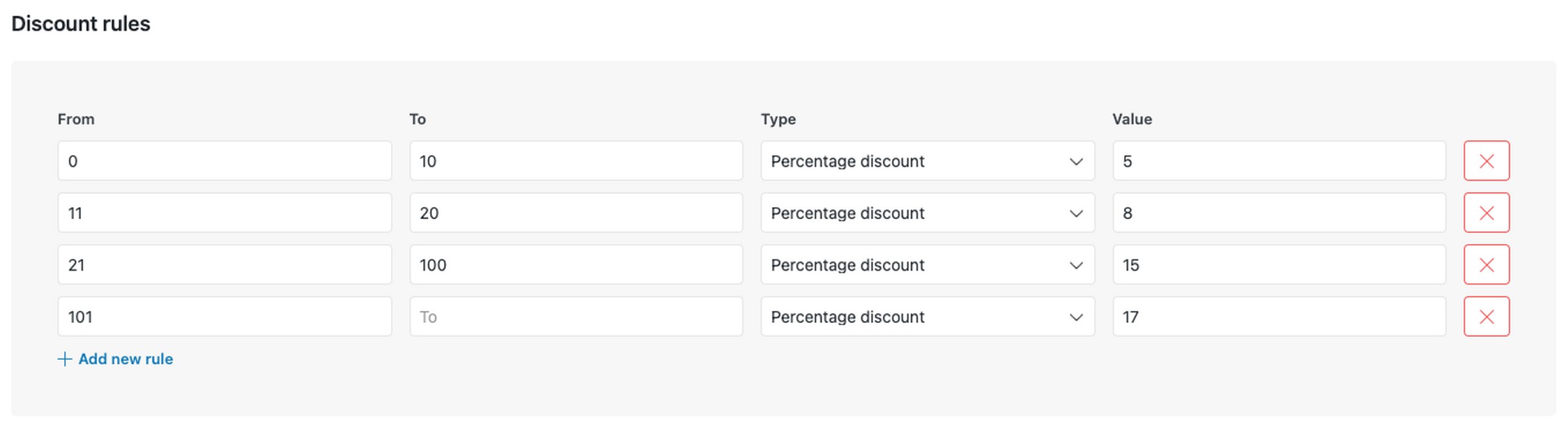
Our take: if your promotions are about automatic price drops rather than shareable codes, this is the cleanest engine here.
Now the honest tradeoff. Discount Rules is a pricing-rules engine, not a coupon-code manager. It doesn’t generate code-based coupons your customers can enter or share. So the Black Friday BOGO code and the first-order auto-apply code our store wanted aren’t really its lane. Pair it with a code-focused plugin if you need both. It does offer its own import/export feature, but that’s for discount-rule configurations (useful for backing up or copying rules to another store), not for bulk-generating or exporting individual coupon codes.
Price: Free on wordpress.org; Pro from $85/yr (single site), $135/yr for 5 sites, $295/yr for 25 sites.
6. Coupons Pro: best for triggered and lifecycle coupons
Coupons Pro by Flintop is built for coupons that fire on customer behavior and lifecycle events rather than static, one-size-fits-all codes. Think birthday coupons, re-engagement offers for lapsed buyers, first-purchase incentives, and product-page coupons, spread across 11 modules. It’s HPOS-ready, so it works with WooCommerce’s High-Performance Order Storage.
What it does is automate the “right coupon, right moment” problem. Instead of blasting one code to everyone, you set triggers. A coupon on a shopper’s birthday, a win-back offer when someone hasn’t ordered in a while, or a first-purchase nudge for new accounts. Each module targets a specific moment in the customer relationship.
For our coffee-gear store, that first-order auto-apply code becomes a real workflow. A new visitor lands, and Coupons Pro can serve a first-purchase discount automatically. Later, if that customer goes quiet for a few months, the re-engagement module can send a fresh code to pull them back for more beans. That’s lifecycle coverage core coupons don’t offer.
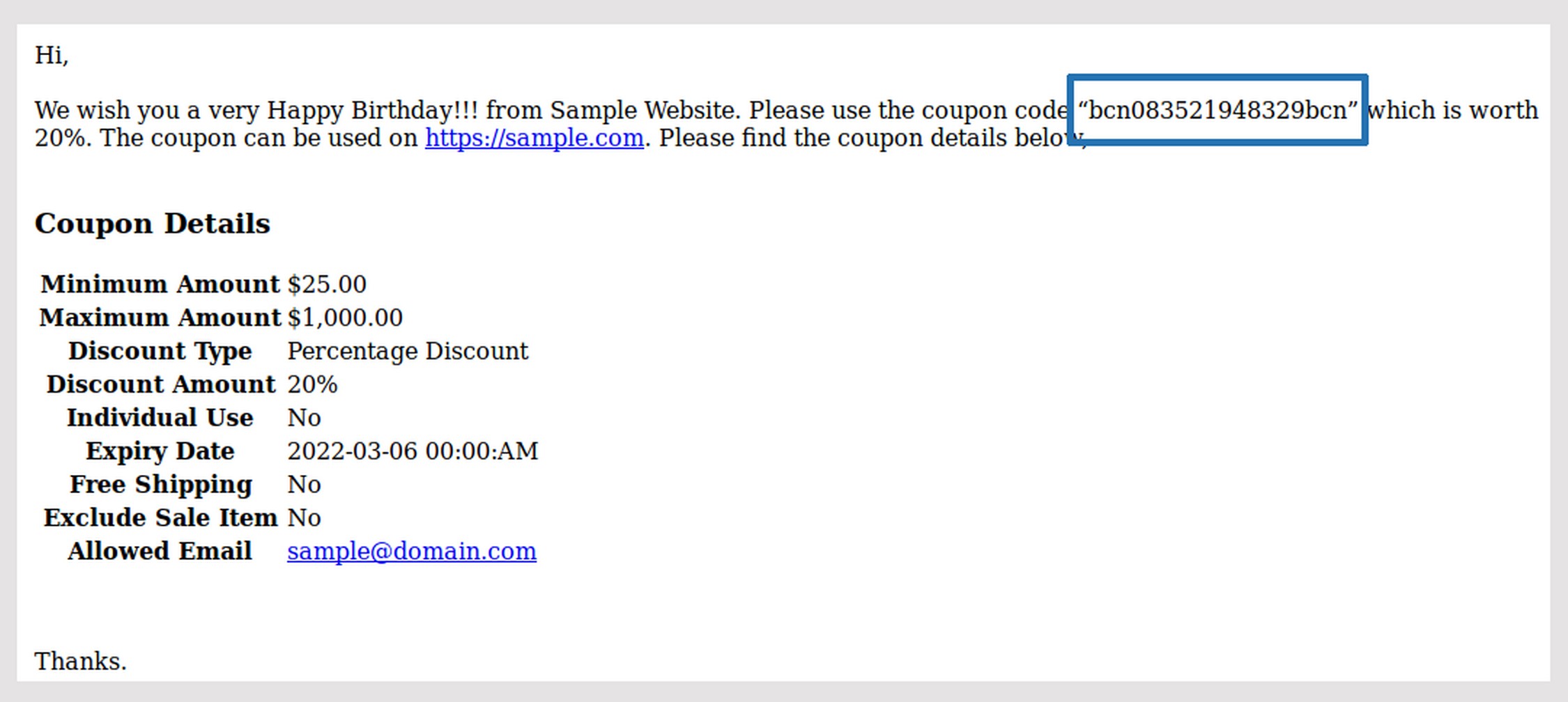
Our take: for stores that think in customer lifecycle instead of flat sitewide sales, the triggered modules are genuinely useful.
The honest catch: Coupons Pro has no public rating yet on the official WooCommerce Marketplace listing, so you’re buying without the social proof the other tools here carry. It’s also paid-only, with no free tier to test-drive first. Weigh that against the automation you’re getting.
Price: $79/yr for a 1-year license, or $158 for 2 years ($126.40 with the multi-year discount). Sold on the official WooCommerce Marketplace.
7. Coupon Referral Program: best for referral coupons
Coupon Referral Program by WP Swings is the specialist pick when your growth plan is word of mouth. It turns existing customers into referrers, rewarding both sides with coupons, points, or free products, and it can tie into CRM and SMS tools. It holds a 4.5 rating across 23 reviews on the official WooCommerce Marketplace.
What it does is run the whole referral loop for you. A customer shares a link or code, their friend buys, and both earn a reward you define. You choose whether that reward is a discount coupon, loyalty points, or a free product, and the plugin tracks who referred whom.
Picture our coffee-gear store rewarding loyal buyers. A regular customer refers a friend, the friend orders a pour-over kit, and both get a coupon toward their next bag of beans. The referrer keeps sharing because the rewards stack, and you acquire new customers at the cost of a discount instead of ad spend.
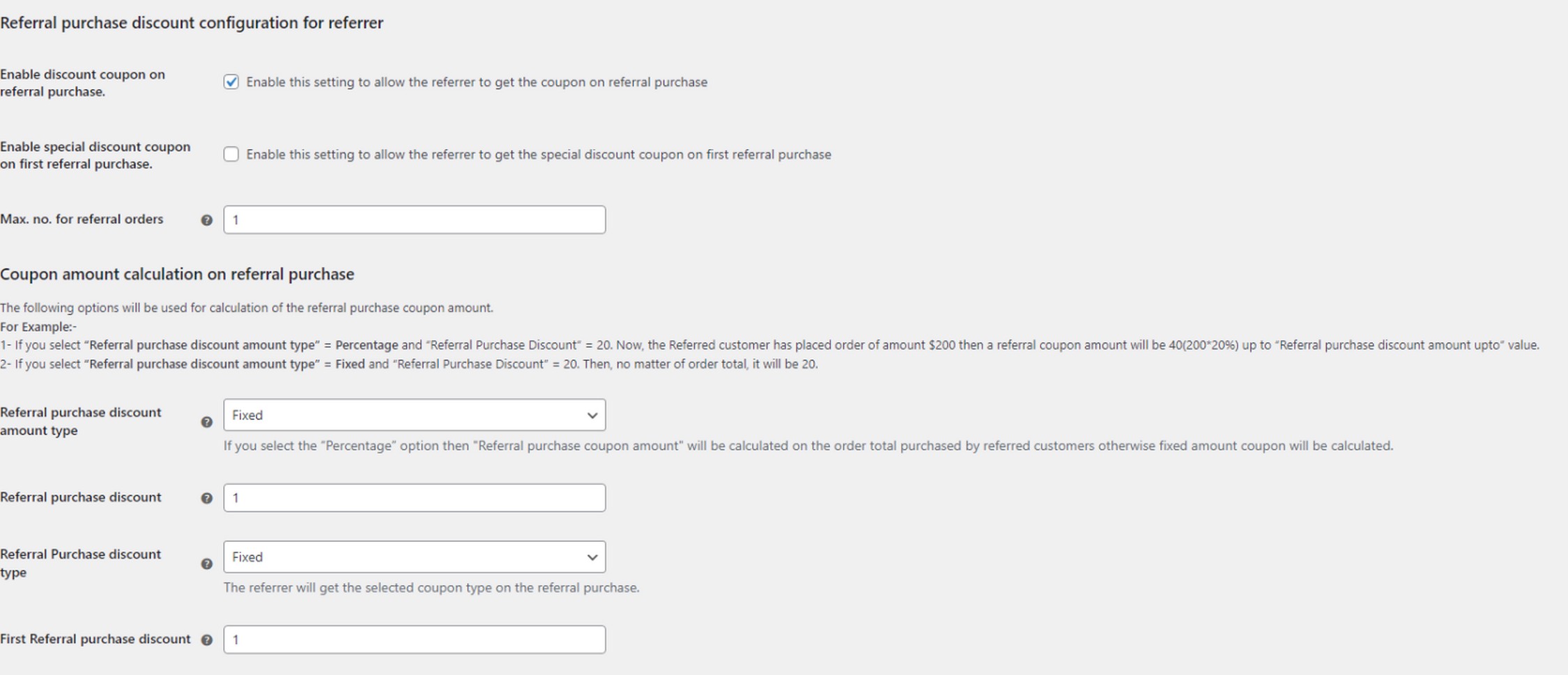
Our take: if referrals are a real channel for you, a purpose-built loop beats bolting referral logic onto a generic coupon plugin.
The honest limit: this tool is narrow. It’s referral-focused, not a general coupon manager. It has no BOGO, no cart-condition auto-apply, no promo scheduling, and no coupon-code CSV export (only performance reporting export). Gift cards are a separate WP Swings product entirely. Treat this as a bolt-on for one growth channel, not your main coupon engine.
Price: $49/yr for a 1-year license, or $98 for 2 years ($78.40 with the multi-year discount). Sold on the official WooCommerce Marketplace.
8. ELEX WooCommerce Dynamic Pricing and Discounts Plugin
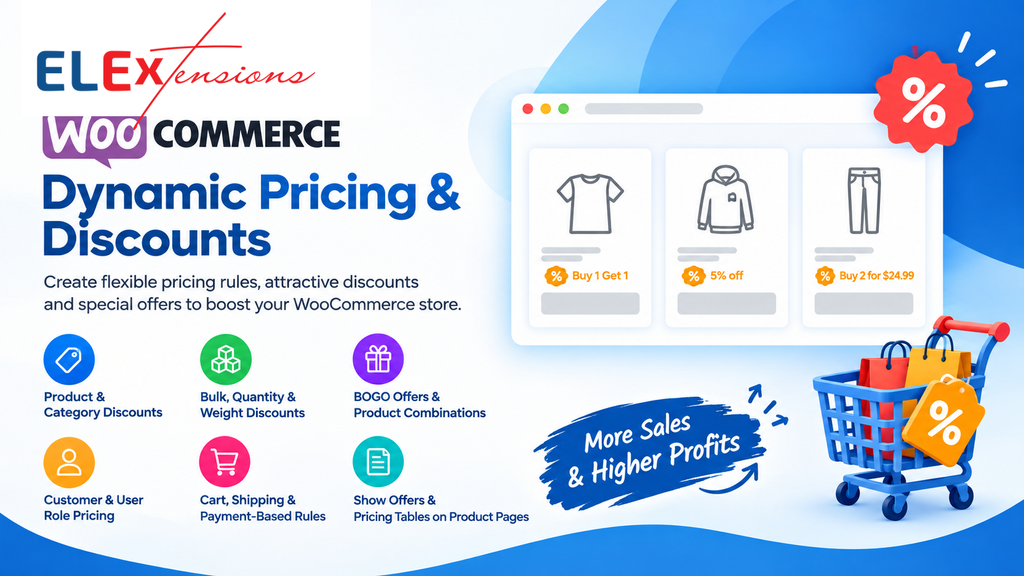
ELEX WooCommerce Dynamic Pricing and Discounts Plugin is designed for stores that want more control over product pricing and discounts. You can create percentage discounts, fixed-price offers, bulk discounts, BOGO deals, and other pricing rules based on products, quantities, customers, and cart conditions.
The plugin has a free version for basic pricing and discount rules, while the Premium version adds more advanced options for creating and managing complex offers.
Here’s what it can do. You can create discounts based on quantity, price, weight, product category, user role, customer email, previous orders, shipping methods, and payment methods. You can also set maximum discount limits and display pricing tables on product pages so customers can see available offers.
For example, a store selling coffee products could offer a quantity discount when customers buy multiple bags, create a BOGO offer for selected products, or give returning customers a special discount. The rules can be customized based on the type of promotion you want to run.
The plugin also supports automatic free-product additions for BOGO offers, so customers can receive the free product when they meet the required conditions.
One useful feature is the ability to show pricing and offer tables directly on product pages. This makes it easier for customers to understand how much they can save when they purchase more products.
Now the honest con. The plugin offers many pricing conditions, so setting up more advanced discount rules can take some time. Some of the more advanced options are also available only in the Premium version.
If you want to create more flexible discounts than the basic WooCommerce coupon options, ELEX gives you a range of pricing and discount rules in one plugin.
Price: Free version available. Premium starts at $99/year for a Single Site license. The Premium plan includes 1 year of updates and support and a 30-day money-back guarantee.
WooCommerce coupon plugins compared
Here’s the whole field on one screen. The short version: no single free plugin does everything, and the “all-in-one” question comes down to how features are bundled and priced. Smart Coupons (StoreApps) covers nearly every job but every one of those cells is paid, since it has no free version. Advanced Coupons splits loyalty and gift cards into separate paid plugins. Power Coupons gives you auto-apply and cart conditions free, then bundles BOGO, loyalty, store credit, gift cards, and scheduling into one Pro plan. That bundling is the all-in-one evidence to weigh.
How to read this table: Free = included in that plugin’s free version. Pro = needs that plugin’s paid plan. Paid = the plugin has no free version at all. No = not offered.
| Plugin | BOGO | Auto-apply | Scheduling | CSV import/export | Loyalty / store credit | Gift cards | Cart-condition rules |
|---|---|---|---|---|---|---|---|
| Power Coupons – Our pick | Pro | Free | Pro (rule-based) | No | Pro | Pro | Free |
| WebToffee Smart Coupons | Free | Free | Free | Free (export) | Free | Free | Free |
| Smart Coupons (StoreApps) | Paid | Paid | Paid | Paid | Paid | Paid | Paid |
| Advanced Coupons | Free (basic)/Pro (adv.) | Pro | Pro | No | Store credit Free | Separate paid plugin | Free |
| Discount Rules (Flycart) | Pro | Pro | No | Rules only (no coupon-code CSV) | No | No | Pro |
| Coupons Pro (Flintop) | No | No | Paid | No | No | No | |
| Coupon Referral Program (WP Swings) | No | No | No | No (reporting only) | Paid (points) | No | Basic (min/max spend) |
Which coupon plugin should you use? (by store type)
Match the plugin to your store, not to a leaderboard. The right pick for a two-product side hustle is the wrong one for a flash-sale machine. Paying for gift cards you’ll never issue is money down the drain. So here’s the honest map.
New or small store on a budget. Start with Power Coupons’ free tier or Advanced Coupons’ free tier. Power Coupons gives you auto-apply plus cart-condition rules free, which covers the two jobs small stores hit first. Advanced Coupons adds free basic BOGO and URL coupons if that’s your priority. Either one gets you off core without spending a cent.
High-volume, promo-heavy store (flash sales, BOGO). Go with Power Coupons Pro. It bundles multiple BOGO types plus rule-based scheduling in one plan. Your Black Friday BOGO and your timed flash sale live under one roof instead of two plugins. If you want BOGO specifically in a free tier first, Advanced Coupons is the fallback.
Store that wants loyalty and gift cards without juggling plugins. Power Coupons Pro or Smart Coupons (StoreApps). Both put store credit and gift cards in a single product, where Advanced Coupons splits them into separate paid add-ons. One plugin, one bill, one support desk beats stitching three together.
Subscription or membership store. Smart Coupons (StoreApps) is the safe pick here. It’s the broadest, most established paid set, dating back to 2012 and with documented subscription-coupon support. Most rule-engine plugins don’t touch recurring billing at all.
Store that runs referral promos. Coupon Referral Program (WP Swings) is the specialist. It handles referral rewards, points, and free-product incentives with CRM and SMS hooks, which general coupon plugins skip.
Store that just needs simple percentage codes. Maybe no plugin at all. If a plain code with an expiry and a spend rule is your whole use case, WooCommerce core already handles it. Installing anything is overhead you don’t need.
Frequently asked questions
Final Thoughts
If you want one plugin that grows with your store, Power Coupons is where we’d start. It keeps auto-apply and cart rules free and bundles the advanced jobs into a single Pro plan. If you’d rather pay nothing, WebToffee Smart Coupons gives you the deepest free toolkit, and Advanced Coupons wins if your promotions hinge on cart logic. The real lesson from testing all eight: pick for the coupon jobs your store actually runs, not the longest feature list. Match the tool to the promotion, and your discounts start paying for themselves.