Most stores pour money into new traffic and ignore the easiest revenue they have: the customer already at the checkout. That’s a costly habit. A 2024 HubSpot report found 91% of sales teams upsell and 87% cross-sell, with each tactic contributing an average of 21% of company revenue on its own (HubSpot).
The main difference between upselling and cross-selling is that upselling persuades a customer to buy a more expensive or upgraded version of what they’re already choosing, whereas cross-selling adds related products to the order.
This guide breaks down both, when to use each, and exactly where they fit in your store’s funnel.
- Upsell vs Cross-Sell at a Glance
- What Is Upselling?
- What Is Cross-Selling?
- Key Differences Between Upselling and Cross-Selling
- What Upselling and Cross-Selling Have in Common
- Upsell or Cross-Sell? When to Use Each
- Where Each Fits in Your Funnel
- How to Set Up Upsells and Cross-Sells in Your Store
- Common Mistakes That Kill Conversions
- Alternatives to Upselling and Cross-Selling
- Frequently Asked Questions
- Final Thoughts
Upsell vs Cross-Sell at a Glance
| Dimension | Upselling | Cross-selling |
|---|---|---|
| Definition | Buy a better version of the chosen item | Buy related items alongside it |
| Goal | Raise the value of one product | Widen the basket with more products |
| What changes | The item gets upgraded | The order gets bigger |
| Classic example | “Get the 512GB model instead of 128GB” | “Add a case and screen protector” |
| Best timing | Before the buyer commits | After the buyer commits |
| Price guideline | Keep the jump under 30-50% | Keep add-ons near 25% of the main item |
| Difficulty | Easier (they already want it) | Harder (needs relevant matches) |
| Where it lives | Product page, post-purchase | Cart, checkout, thank-you page |
| Best for | Tiered or upgradable products | Products with natural companions |
What Is Upselling?
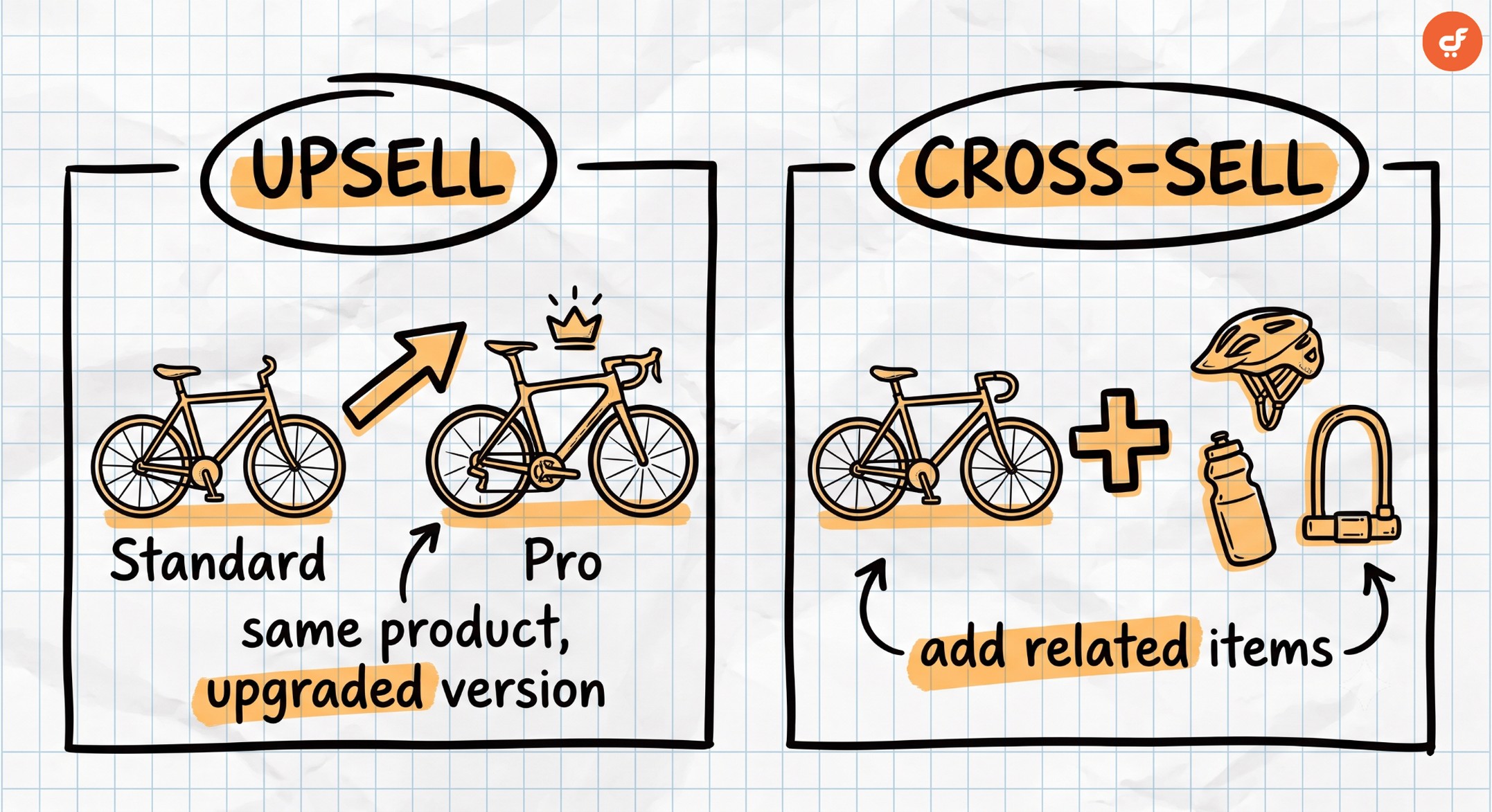
Upselling is a sales technique that encourages a customer to buy a higher-value version of the product they’re already considering. It raises the value of a single item rather than adding new ones.
The mechanic is simple. You offer an upgrade: more storage, a larger size, a premium tier, or extra features. The shopper still wants the same thing. You’re just showing them a better version of it.
Take a laptop. A shopper picks the base model, and you suggest the version with double the storage and a faster chip. That’s an upsell. Or think of software plans, where a basic tier nudges up to pro for a few dollars more. Coffee shops do it too: “make it a large for 50 cents?” is textbook upselling.
Upselling works because the buyer has already decided they want the product. Trust is there. In fact, Investopedia notes companies are 60-70% more likely to sell to an existing customer, versus 5-20% for a new one (Investopedia). You’re not convincing someone to buy. You’re helping someone who’s already buying choose the better option.
Upsells land best in two spots: on the product page while the shopper is still choosing, and right after purchase as a one-click upsell offer. Both moments share one trait: the shopper is focused on that single product, so a better version of it feels timely rather than random.
What Is Cross-Selling?
Cross-selling is a sales technique that recommends related or complementary products alongside what the customer is buying. It widens the basket instead of upgrading one item.
The mechanic here is relevance. You suggest things that genuinely go with the main purchase. A phone gets a case and a screen protector. A camera gets a memory card and a cleaning kit. Amazon built a feature around this with its “frequently bought together” block, which pairs an item with the things other buyers grabbed alongside it.
The goal is a bigger order, not a pricier single product. So a customer buying one thing leaves with three, because the extras made the purchase more complete. Nobody upgraded their original choice. They just added to it.
Cross-selling is a little harder than upselling. You have to know what actually complements the product, whereas an upsell only needs a clearer better version. Suggest something random and the offer falls flat, or worse, it reads as a cash grab.
Cross-sells work best once the shopper has committed: in the cart, at the checkout as an add-on, or on the thank-you page after they’ve paid. By that point the main decision is settled, so a helpful companion product feels like good service rather than a hard sell,” explains Michael Salvaggio, founder of SEO Brand.
Key Differences Between Upselling and Cross-Selling
Both tactics grow revenue per order, but they differ on five axes: what changes in the order, the goal, the timing, the difficulty, and how much you can safely add. Get these straight and the “which should you use” question mostly answers itself.
1. Upselling upgrades one product, cross-selling adds more products
Upselling changes the single item the customer chose. They wanted a product; you help them pick a better version of that same product. The cart still holds one thing, just a nicer one.
Cross-selling, by contrast, increases the number of items in the order. The original choice stays the same, and you add companions around it. One product becomes a small set.
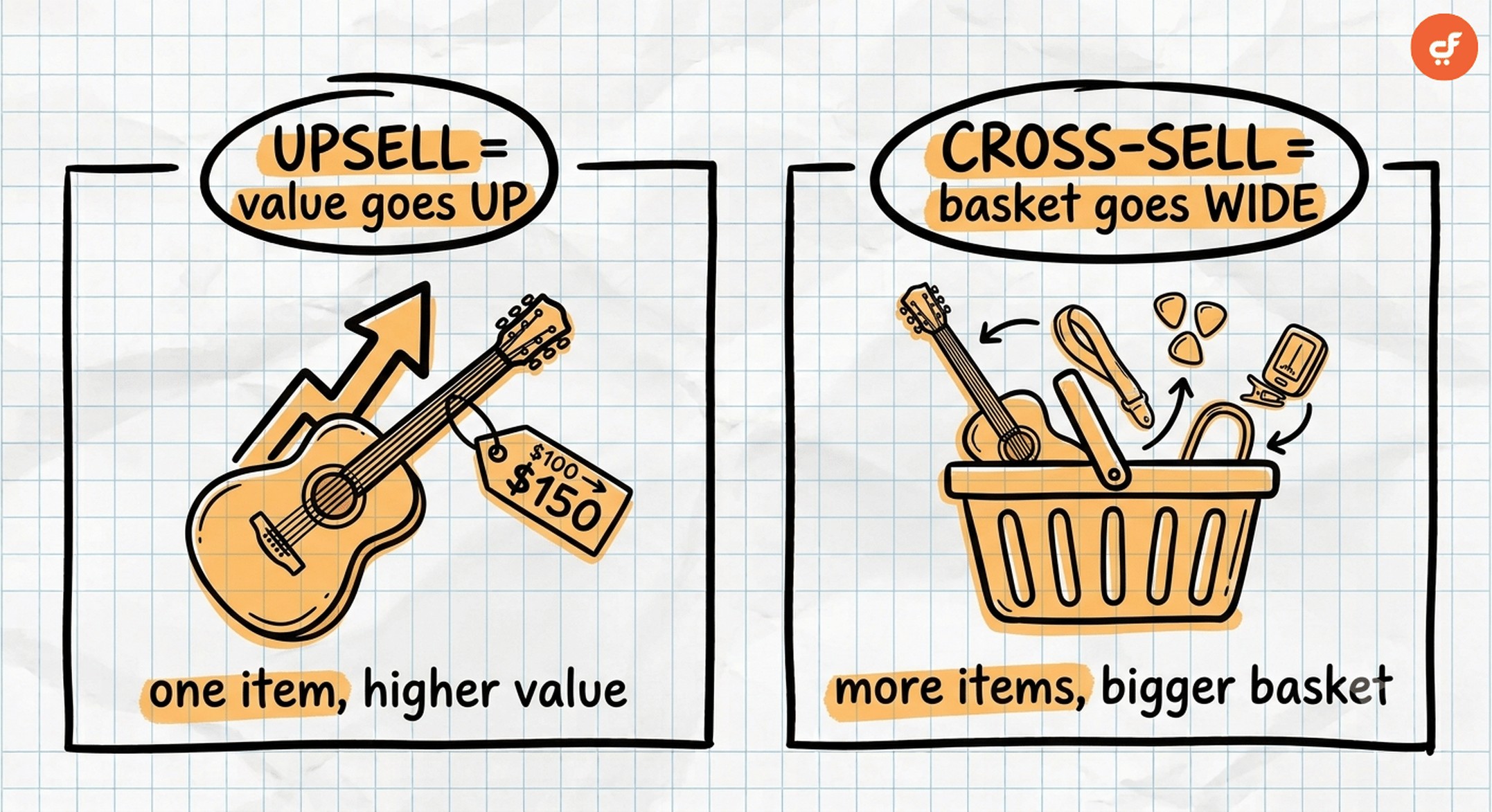
This is the cleanest way to remember the two. Upsell goes up. Cross-sell goes wide.
2. Upselling raises the value of a purchase, cross-selling widens the basket
With upselling, the order total climbs because one item costs more. You’ve moved the customer from a $40 pick to a $60 pick, and the basket count never changed.
Cross-selling grows the total a different way. The item price holds steady, whereas the basket fills with extras that each add a little. Three $15 add-ons can matter as much as one upgrade, and sometimes more.
Both roll up to the same business metric: average order value, or AOV. That shared goal is why the two get confused so often. But knowing how each lifts AOV tells you where to place it, which is the whole point.
3. Upselling works before the decision, cross-selling works after it
Timing is where most stores get this wrong. Upselling lands best while the shopper is still choosing, on the product page, before they’ve locked in. That’s when they’re open to a better option.
Cross-selling works best after the decision is made. Once someone has committed to the main product, complementary add-ons feel helpful, not pushy. That’s why the cart, checkout, and thank-you page are cross-sell territory.
From our experience building WooCommerce funnels, an upsell shoved into the checkout usually backfires. The buyer wants to finish paying, not reconsider the whole product.
4. Upselling is usually easier to land, cross-selling needs product knowledge
Upselling is the easier win. The customer already wants the item, so a clear upgrade is a simple yes. You mostly need to show why the better version is worth it.
Cross-selling asks more of you. You have to know which products genuinely pair together, whereas a weak match (“laptop plus office chair”) gets ignored. Good cross-sells come from understanding how customers actually use what they buy.
That’s why cross-sell suggestions improve with data. The more you learn about what sells together, the sharper your recommendations get. Start with the obvious pairings, then let real purchase patterns tell you the rest.
5. Cross-sells stay cheap, upsells can jump higher
There’s an unofficial ceiling on each. Cross-sell add-ons convert best when they cost no more than about 25% of the main product, often called the 25% rule. Keep them in the 10-20% range and they feel like an easy impulse buy.
Upsells can climb higher, whereas a cross-sell cannot. But even upsells have a limit. Push the upgrade past a 30-50% price jump and the shopper starts to scrutinize, and the easy yes turns into a hard maybe.
Here’s the thing most guides miss: bigger offers do not mean bigger revenue. Relevance and a sensible price gap matter far more than ambition.
What Upselling and Cross-Selling Have in Common
Despite the differences, the two share more than they don’t. Both grow AOV from customers you already have, which is the cheapest revenue around. Per Harvard Business Review, acquiring a new customer costs anywhere from five to 25 times more than keeping an existing one (Harvard Business Review, 2014).
Both also live or die on relevance and timing. An offer that fits the moment helps the shopper; one that doesn’t just adds friction. And both get better with testing and personalization, so the more you refine them, the more they earn.
This is where the right tool does the heavy lifting. With CartFlows, you can A/B test your order bumps and upsell offers at every funnel stage, so you keep the offers that lift AOV and quietly retire the ones that don’t. You’re refining with data instead of guessing.
Upsell or Cross-Sell? When to Use Each
You don’t pick one. You use both, sequenced to where the buyer’s head is at. So which should you reach for first? It depends on the moment, and here’s the simple rule set.
Use upselling when there’s a clear better version, the upgrade solves the job more completely, and the shopper hasn’t committed yet. Tiered products and anything with a “good, better, best” ladder are prime upsell candidates.
Use cross-selling when the product has natural companions, the buyer has already decided, and you can keep the add-on cheap and relevant. Accessories, consumables, and “you’ll need this too” items are cross-sell gold.
We recommend running the upsell first and the cross-sell second, because that order matches how shoppers actually make decisions in your store.
The winning move is to sequence them: an upsell on the product page, then a complementary add-on at checkout, then a post-purchase offer once payment clears. Each fires at the moment it fits, so no single step feels crowded.
Picture a shopper buying a $50 pair of running shoes. On the product page, you upsell the premium version with better cushioning at $70. At checkout, you cross-sell running socks as a low-cost order bump. After they pay, a one-click upsell offers a shoe-care kit. One visit, three natural asks, none of them pushy.
If you only build one thing first, build the post-purchase upsell. From our experience, it’s the lowest-risk way to lift revenue per order, because it never touches the checkout that’s already converting. You’re adding a step after the sale, not adding friction before it.
And when a shopper clearly cares only about price? Skip the upsell. A cheaper cross-sell or a small add-on respects their budget and still grows the order.
Bottom line: it’s not upsell vs cross-sell, it’s upsell then cross-sell, matched to the buyer’s mindset at each step.
Where Each Fits in Your Funnel
Every tactic has a home in your store’s funnel. Map them to the right stage and they feel helpful; put them in the wrong spot and they cost you sales. And this map holds no matter where your store lives: WooCommerce, Shopify, or a standalone checkout.
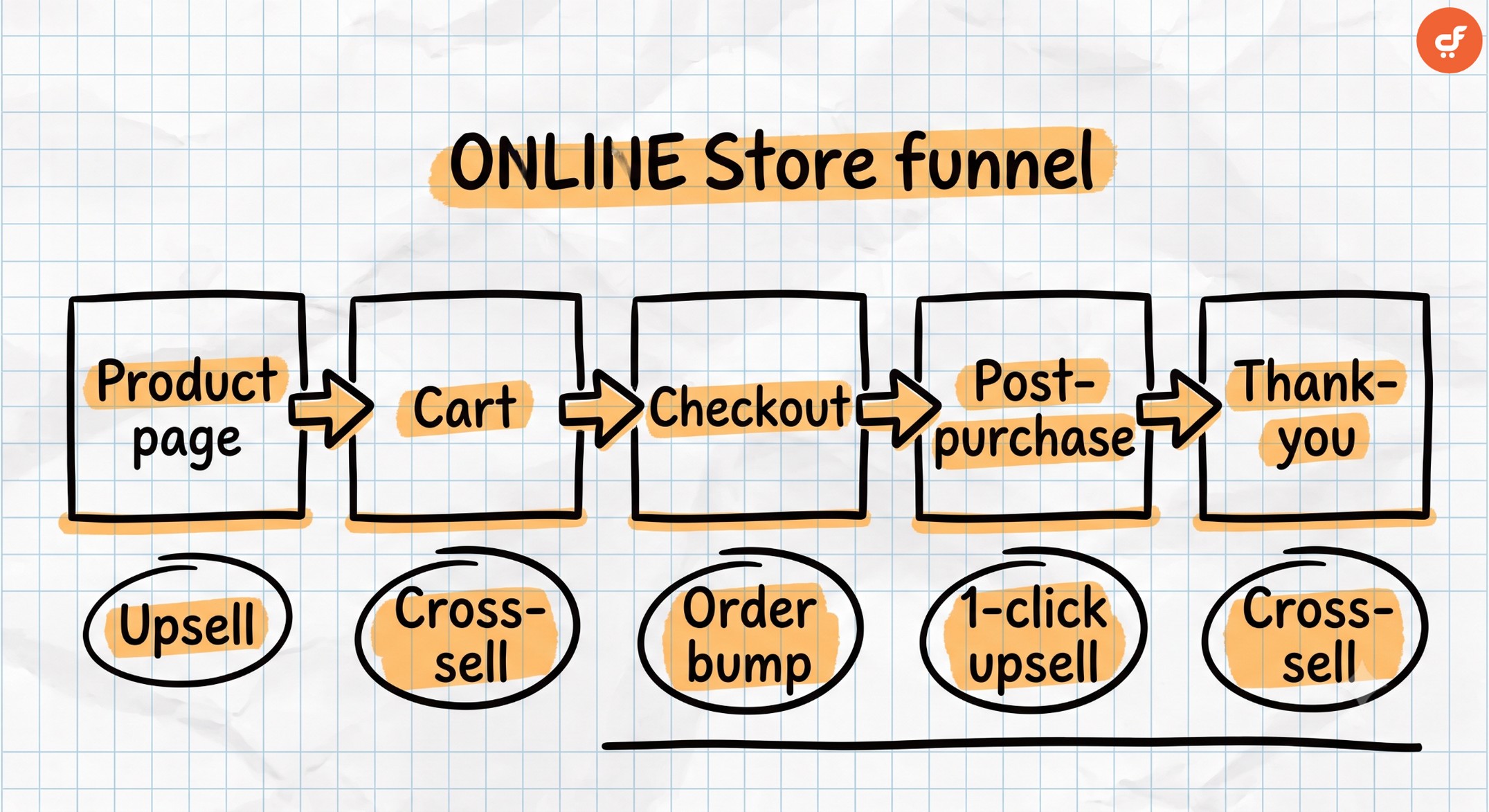
- Product page: the upsell stage. Show the upgraded tier while the shopper is still weighing options, so the better version is part of the decision, not an afterthought.
- Cart: a soft cross-sell stage. Suggest a small companion item before they head to checkout, when they’re reviewing what they’ve picked.
- Checkout: the order bump stage. A checkbox add-on placed right on the checkout, usually a low-cost cross-sell or minor upgrade the shopper can accept in one tap.
- Post-purchase: the one-click upsell stage. After payment, offer an upgrade the buyer accepts without re-entering card details, which is why acceptance rates here are so strong.
- Thank-you page: a final cross-sell or replenishment nudge, or a prompt to come back for the next purchase.
Match the tactic to the stage and the offer reads as service. Put an upsell at checkout instead, and you interrupt someone who just wants to pay.
One thing that trips people up: an order bump is a placement, not a mechanic. It sits at checkout, and it can carry either a small cross-sell or a modest upsell. So don’t think of “order bump” as a third strategy. Think of it as where an offer shows up, while upsell and cross-sell describe what the offer is.
How to Set Up Upsells and Cross-Sells in Your Store
The good news: every major ecommerce platform supports these offers in some form. Hosted platforms like Shopify handle them through built-in features or app add-ons, and most SaaS checkout tools have their own offer settings. The placements stay the same everywhere; only the setup screen changes.
We’ll demonstrate with WordPress and WooCommerce, since that’s the stack we build for. Default WooCommerce doesn’t do order bumps or post-purchase upsells on its own. To add all three placements without leaving WordPress, you can use a funnel builder like CartFlows, which layers upsells, order bumps, and cross-sells onto your existing WooCommerce checkout.
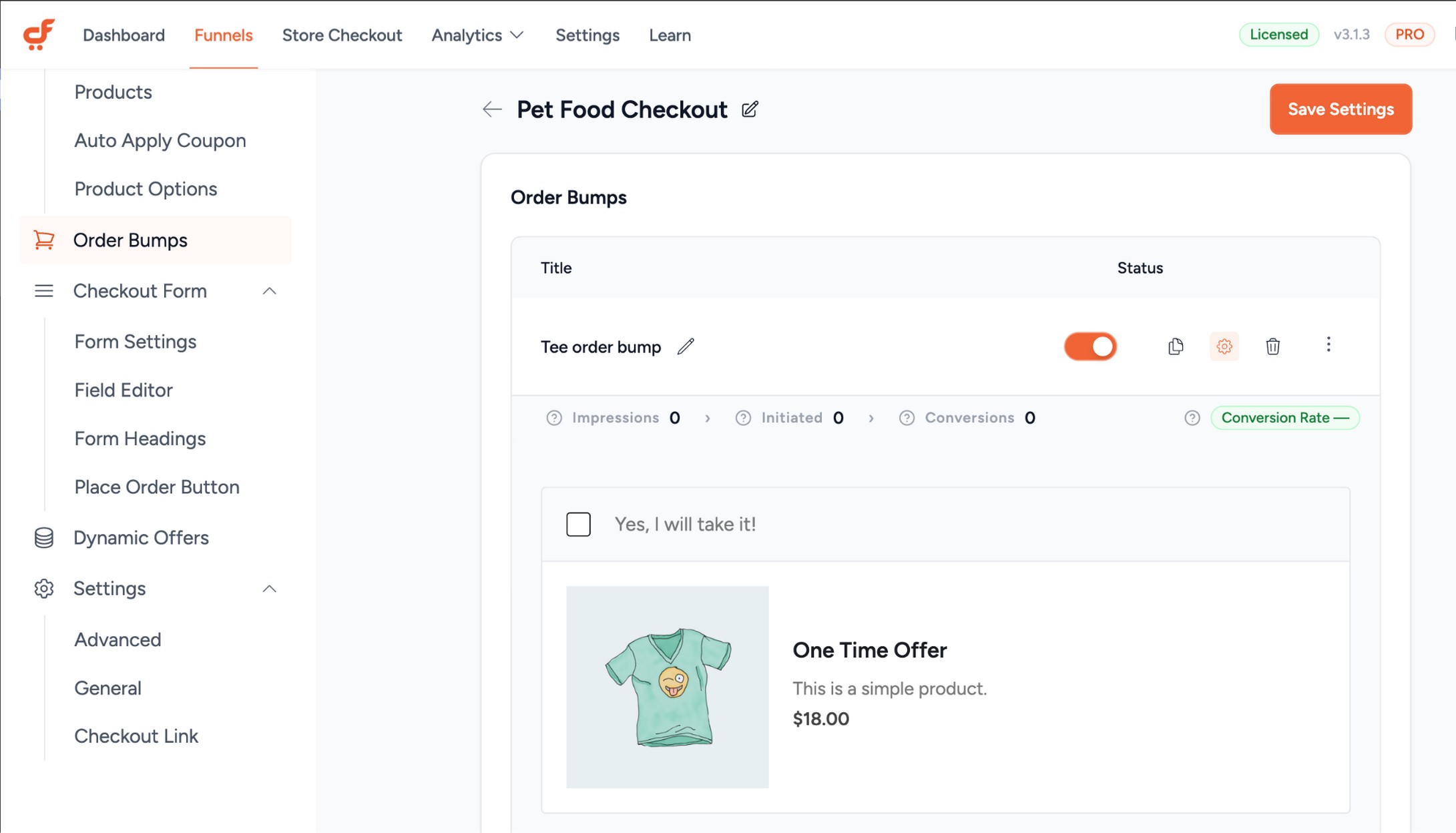
Here’s the practical setup. First, add a checkout order bump: a single relevant add-on shown as a checkbox on the checkout page, so accepting it takes one click and no extra steps.
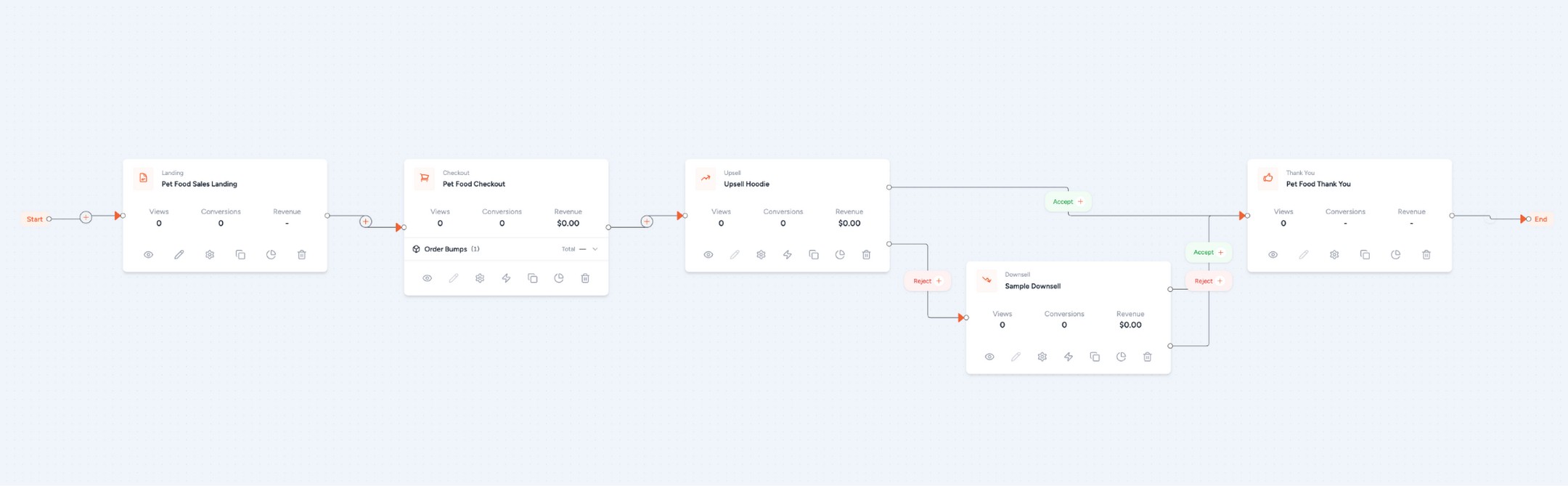
Next, add a one-click upsell after purchase. The customer has already paid, so accepting the offer adds it to the order without asking for payment details again. That frictionless flow is why post-purchase upsells convert so well. It works with the gateways most stores already run, including Stripe, PayPal, and WooCommerce Payments.
To check it’s working, place a test order and confirm the upsell charges to the original payment without a second checkout. If the offer adds to the order in one click, you’re set. If it kicks the buyer back to a payment form, the gateway isn’t wired for one-click charges yet.
Just note that order bumps and one-click upsells are CartFlows Pro features; the free version handles the checkout editor itself. From our experience, the combination is what moves the number: order bumps alone typically lift AOV 10-30%, and stacking a post-purchase upsell on top adds further gains without touching the checkout that’s already converting.
Pro tip. Don’t switch everything on at once. Add one order bump, watch it for a couple of weeks, then layer in the upsell. Relevance beats volume every time.
Common Mistakes That Kill Conversions
Most upsell and cross-sell failures trace back to four errors. Avoid these and you keep the AOV gains without denting your store’s conversion rate.
- Upselling at the checkout. When someone’s ready to pay, don’t ask them to rethink the product. Reserve the checkout for cross-sells and order bumps, and keep upsells earlier or post-purchase.
- Irrelevant cross-sells. Suggesting an office chair with a laptop is noise. Every add-on should have an obvious functional tie to the main item.
- Price jumps that are too big. Push an upsell past a 30-50% jump, or a cross-sell past 25% of the cart, and the easy yes evaporates.
- Too many offers. Stack four upsells and the shopper freezes. But does adding offers hurt conversion? Only when you overdo it. We’ve seen stores pile on offers and watch completed checkouts drop, so we don’t recommend more than one or two well-placed asks per order.
Here’s a quick worked example. Say your store adds three upsell popups plus two checkout bumps to every order. Conversion on the base product slips from 3% to 2.4% because shoppers hesitate, and the extra offers don’t earn enough to cover the lost sales. Trim it to one relevant order bump and one post-purchase upsell, and conversion recovers while AOV still climbs. The math rewards restraint.
The counter-intuitive truth: fewer, sharper offers almost always beat a wall of suggestions.
Alternatives to Upselling and Cross-Selling
When a straight upsell or cross-sell doesn’t fit, a few other tactics still grow order value.
- Downselling: if a shopper hesitates on price, offer a cheaper or simpler option to save the sale instead of losing it.
- Product bundling: package related items into one value-priced set, so the bundle does the cross-selling for you without a separate prompt.
- Cart incentives: a threshold like “spend $75 for free shipping” nudges shoppers to add a little more on their own, no specific product pitch needed.
These pair nicely with upsells and cross-sells rather than replacing them.
Want to see the full funnel build in action? Watch: How to Build a High-Converting Sales Funnel in WordPress
Frequently Asked Questions
Final Thoughts
The real answer to upsell vs cross-sell is that you stop treating it as a versus. Upgrade the shopper before they decide, add companions after they commit, and keep every offer relevant and modestly priced. That sequence is where revenue per order quietly compounds. Our honest take after years of building these funnels: the post-purchase one-click upsell is the most underused lever in WooCommerce, and it’s usually the easiest place to start.