We’ve shipped a lot across CartFlows this year. A rebuilt admin experience, AI that recommends order bump products and helps write the copy, new ways to recover abandoned carts, and an entirely new plugin for running promotions.
When updates arrive week after week, though, it’s easy to miss the bigger ones. You might have clicked update on a plugin without noticing that something you’d have found useful is now sitting in your dashboard, or that a tool you already use does more than it did a few months ago.
So we’ve pulled the significant changes from January through September 2026 into one place, product by product. This is a practical look at what shipped across CartFlows, Power Coupons, Cart Abandonment Recovery and Modern Cart, and what those changes mean for your store.
For context on the scale of it: together, these four plugins have more than 590,000 active installations on WordPress.org, and at the start of the year there were only three.
Each product section ends with a link to its full changelog, so you can read every line if you want the detail.
The Year So Far, in Four Lines
- CartFlows got its biggest rebuild in years, with a redesigned admin, onboarding wizard and Funnel Canvas.
- AI arrived in two forms: assistants that operate CartFlows in plain English, and products that recommend order bumps and companion items.
- Power Coupons launched in February and passed 30,000 active installations by September.
- Cart recovery expanded to four ways: email, SMS, WhatsApp and on-site reminders.
What Changed Across the Whole Suite
Two things happened this year that weren’t confined to one plugin.
AI arrived through a shared foundation. In March, CartFlows and CartFlows Pro, Cart Abandonment Recovery and Power Coupons added support for the WordPress Abilities API within about ten days. In CartFlows and CartFlows Pro, that’s what lets AI assistants read and act on your setup in plain English. CartFlows Pro went further, adding AI that recommends order bump products, writes their copy, and finds companion products from your sales data.
Security was hardened across the board. Patchstack-driven work in CartFlows and Cart Abandonment Recovery, plus further hardening in CartFlows Pro and a WCAG 2.2 accessibility audit in Power Coupons.
The rest of this post goes product by product.
CartFlows
This has been our biggest year of changes since launch. The admin was rebuilt from the ground up, AI arrived in two separate forms, and a run of releases focused on raising average order value and reducing friction at checkout.
A Complete Admin Rebuild
The CartFlows admin had grown one screen at a time over several years. That’s how most software ages, and it’s why we spent the first half of this year rebuilding it.
A Fully Revamped Admin Experience
In April, CartFlows 3.0 replaced the Dashboard, Funnels, Steps, Analytics and Settings screens with a consistent interface. Navigation is faster, screens are less cluttered, and frequently used settings are easier to reach instead of being buried several menus deep.
What that means for you:
- Less time hunting for a single setting when you’re mid-build.
- Faster filtering, bulk actions and pagination when you’re managing a long list of funnels.
- Breadcrumbs that get you back out when you’re deep inside a step or an offer.
A Redesigned Onboarding Wizard
Setting up CartFlows for the first time used to take longer than it should. The new wizard walks you through the essentials without getting in your way. If you’re handing CartFlows to a client or a new team member, this is the difference between a setup call and a link.
Feedback You Can Actually See
Toast notifications now confirm every save, duplicate or bulk action, so you’re never left wondering whether a click registered. An Error Boundary screen replaced the blank page you’d occasionally hit, so when something goes wrong you get a clear message and a way to recover without losing your place or refreshing the whole site.
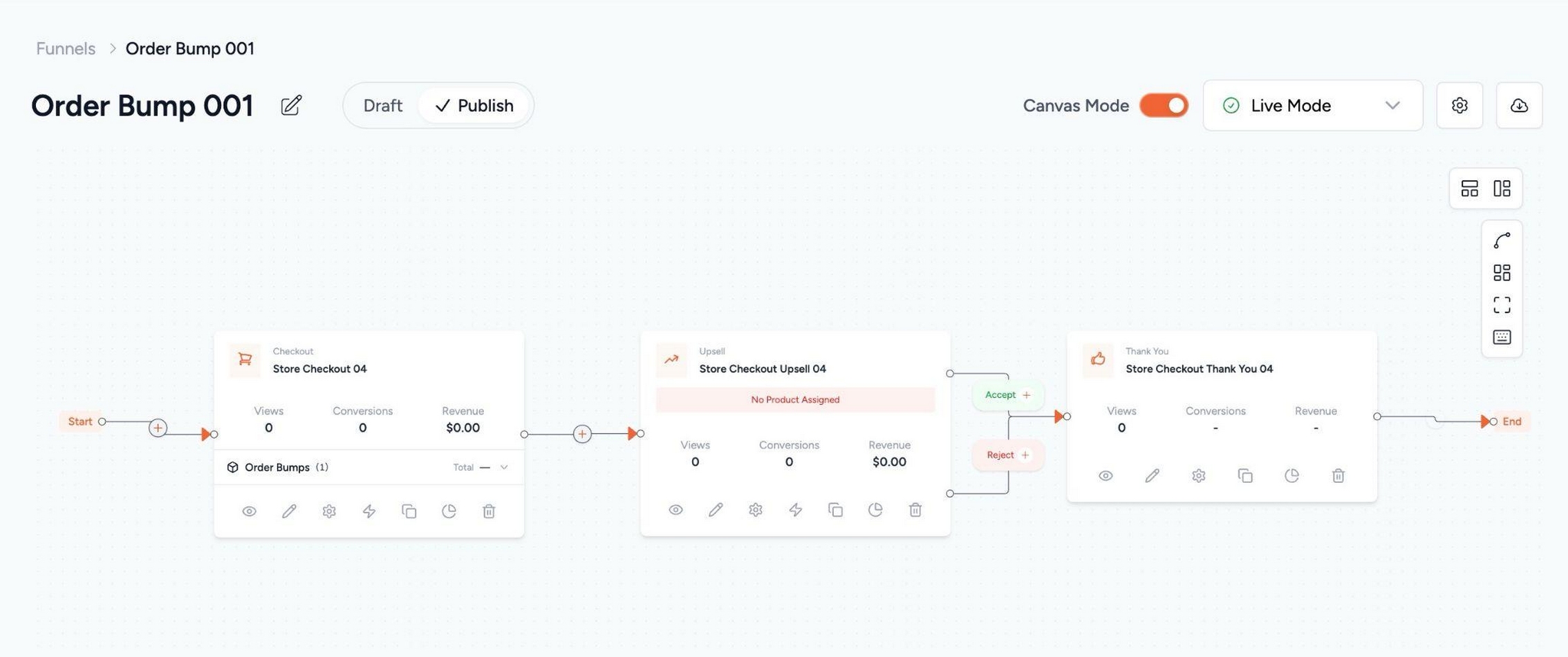
A Cleaner Funnel Canvas
In June, the Funnel Canvas got a full visual refresh with a calmer layout and clearer step connections. Step cards are uniformly sized with clearer hover feedback.
The difference shows up on complex funnels. There’s less visual noise when you’re mapping several branches. Steps, bumps and offers are easier to scan at a glance, and building feels closer to sketching on a whiteboard than wrestling with a tool. If you build with Instant Layouts, the canvas is now a much better place to plan before you design.
Two Kinds of AI
AI showed up in two different ways this year, and it’s worth separating them. The first is store management: asking an assistant to look something up or carry out a supported action in plain English. The second is merchandising: the products themselves using your sales data to decide what to offer.
AI-Assisted Store Management
In March, CartFlows and CartFlows Pro added support for the WordPress Abilities API. That’s the foundation that lets AI assistants like Claude, ChatGPT and Cursor read and act on your CartFlows setup using plain English.
In practice, it means asking for what you want instead of clicking through to find it:
- “Show me my top three flows by conversion this month” gets answered without opening a report.
- “Duplicate my Black Friday flow and rename it for Cyber Monday” is one prompt instead of a dozen clicks.
With the same addition in both the free plugin and Pro, you can handle supported actions across flows, offers and Pro settings through conversation rather than screens. If you already automate with OttoKit, this sits alongside it as a second way to get work done without clicking through screens.
Order Bump AI
In August, CartFlows Pro added Order Bump AI, which is really two tools that work independently of each other.
The first picks the product. AI looks at the bump you’ve set up, or a pool of products you choose, and recommends the one most likely to appeal, with a short reason for the pick. You can accept it, swap it, or ignore it entirely.
There’s also an Auto mode worth knowing about. Instead of one fixed product, you shortlist a few add-ons and CartFlows chooses per shopper based on what’s already in their cart. On our demo store, a customer who bought a $349 espresso machine was offered $14 cleaning tablets. The AI never looked at the cart total. It looked at what customers who bought that machine actually added next. If nothing in the pool fits a particular cart, the bump is skipped rather than showing something irrelevant.
The second tool writes the copy. AI can generate the bump’s title, description, highlight text and checkbox label, giving you a few options to choose between rather than a blank field. That matters more in Auto mode than it sounds, because one line of copy has to read correctly regardless of which product is shown.
What that means for you:
- You get a starting point on both the product and the wording.
- Auto mode makes a single bump work across a varied catalog, which is the whole problem with a store checkout that sells everything you stock.
- It’s configured per order bump, so you can use it on some and leave others exactly as they are.
- Your shoppers never see anything labeled AI. They see a normal order bump, one that’s more likely to be relevant to what they’re already buying.
This short shows the same order bump across three different carts, product and copy changing each time.
Frequently Bought Together with Auto Suggest
Frequently Bought Together puts a companion product bundle on your product page, before the customer ever reaches the cart. Checkboxes, a running total, one Add to cart. It’s the earliest point in the journey where you can influence order value, and until this year it meant deciding which products belong together yourself and maintaining those pairings as your catalog changed.
That work adds up faster than people expect. A store with 50 products has 1,225 possible pairs to check.
Auto Suggest, which arrived in CartFlows Pro in August, does the checking for you, and it reads your store two ways. The AI understands what your products actually are, so it knows a tamper belongs with an espresso machine. Your order history then confirms it with real co-purchases. Every suggestion comes back ranked with a match score, and you approve what fits.
What that means for you:
- Recommendations come from what your customers actually do, not from what you assume they’ll want.
- Large catalogs become manageable, because you’re not hand-pairing hundreds of products.
- A brand new store still gets a useful list, because the AI can write one before your first sale. It sharpens with every order after that.
- You keep the option to pair manually wherever you want editorial control.
This short walks through building a bundle, from an empty tab to a live product page, in 60 seconds.
The bundle box itself is in the free plugin. Edit a product, switch on Enable Widget in the Frequently Bought Together tab, and choose the products yourself. Auto Suggest is the Pro part.
Analytics That Show Where Revenue Leaks
A funnel only helps if you can see which step is losing people. We spent a lot of this year on that.
One View Instead of Several
January brought unified analytics screens to CartFlows, pulling funnel performance into one place instead of spreading it across screens. CartFlows Pro got a revamped Funnel Analytics with new KPIs in the same release, going deeper on how funnels convert rather than just what they earned.
The practical benefit is diagnosis. Revenue tells you something is wrong. Step-level conversion tells you where.
Performance Where You Already Are
In June, a Funnel Performance widget arrived on the WordPress Dashboard with a 30-day snapshot of orders and revenue. You see how funnels are doing the moment you log in, which is also useful for teammates who never open CartFlows itself.
The weekly performance report email got a matching refresh, with a cleaner layout plus new sections for weekly tips, top wins and quick action links. Those links matter most, because spotting a problem in an email and then having to go find the right screen is where most people stop.
Data You Can Trust
Steps Analytics now shows A/B test variations and archived step rows, so retiring a variant no longer means losing sight of how it performed. You can compare this quarter’s test against what you tried six months ago instead of re-running an experiment you’ve already done.
Accuracy got as much attention as presentation. We corrected A/B split test variation conversions that weren’t counting properly, a Revenue Per Visit graph that rendered as a flat line for values under one, a revenue mismatch between the Funnel Listing page and Funnel Analytics reports, and a timezone mismatch that hid the current day’s data in funnel editor step rows. This is the kind of behind-the-scenes work that makes the numbers easier to trust.
More Ways to Raise Order Value
Several releases this year focused on giving you more ways to increase average order value, working with the traffic you already have rather than the traffic you’d need to buy.
A/B Split Testing for Order Bumps
Order Bumps appear to customers who reach that step in your checkout, so small differences in what you offer and how you word it add up across orders.
Until July, testing them meant swapping one bump for another and comparing periods, which is a poor comparison because traffic, season and promotions all move underneath you. CartFlows Pro now extends A/B Split Testing to Order Bumps, so you can create multiple variants directly from the Checkout step and run them against each other at the same time.
What that means for you:
- You can compare variants over the same window, so the result reflects the bump and not the week.
- Performance is tracked per variant, so you can see which one is doing better rather than guessing.
- Setup happens where you already work, inside the Checkout step, instead of in a separate testing tool.
- Variants stay visible in Steps Analytics after the test ends, so the learning outlasts the experiment.
The things worth testing first are usually the offer itself, the price or discount, and the description. A bump that gets ignored at one price may perform differently at another, and comparing variants side by side lets you investigate that with performance data rather than comparisons across different periods.
Smarter Scarcity at Checkout
Checkout Expiry got new order-limit and date-based options in August. Rather than a generic countdown, you can tie the offer to a real constraint: the first fifty orders, or a promotion that genuinely ends Friday.
Scarcity works when it’s true, and shoppers have learned to ignore timers that reset on refresh. Tying an offer to an actual limit gives you urgency you can stand behind.
Support for More Product Types
Variable products became available in Order Bumps in January, which opened bumps up to stores selling anything with a size, color or format option. WooCommerce Product Bundles became supported on Upsell and Downsell offer steps in August, so stores that sell kits and packages can use them as post-purchase offers rather than only as catalog items. Bundle products also now display their correct product type and price range in the funnel product selector.
A new filter also lets you prevent the same product being added more than once on a checkout step, which is useful for digital products, services or anything meant to be one per customer.
Funnels That React to the Bump
Order Bumps became a condition in the Dynamic Offers rule builder in August. The path a customer takes after checkout can now respond to the bump they just accepted.
That unlocks sequencing that makes funnels feel considerate rather than pushy. Someone who took the bump shouldn’t be shown the same category again on the upsell page. Someone who declined it might respond to it framed differently one step later. You can now build both.
Closing the Sale Faster
In June, CartFlows Pro shipped three features that all work on the same problem: getting the right customer through checkout with less friction.
Checkout Link Generator
Build a shareable checkout URL with the product, customer details and coupon already filled in, then send it wherever your conversation is happening. Drop it into an email, a DM or an SMS and the customer lands on a checkout that’s ready for them, with no back-and-forth over which coupon code applies. It fits one-on-one sales conversations, win-back outreach and VIP offers, where sending someone to a generic product page loses the thread.
Smart Login
This replaces the default inline login form at checkout with a focused popup modal. Returning shoppers sign in without leaving the checkout or losing their place, and the page stays focused on completing the purchase instead of hosting a second form competing for attention.
It’s designed for stores with a lot of repeat buyers. If returning customers have to leave checkout to find the login page, they may decide to come back later.
Preferred Countries
Pin your highest-volume countries to the top of the country dropdown instead of leaving them buried alphabetically. If most of your customers live in a handful of markets, they stop scrolling to find themselves at the address form, which is one of the more fragile moments in a mobile checkout.
Integrations and Page Layouts
Native webhook integration landed in March, letting CartFlows notify your other tools when things happen instead of requiring a middleware layer for every connection. Global custom JavaScript and CSS arrived alongside it, applying across all your funnels rather than step by step, with proper code editors replacing the textarea we’d been using.
Tutor LMS compatibility arrived in February, routing non-enrolled users to CartFlows templates so course sellers can put a proper funnel in front of enrollment. Power Coupons became one click away from being live, appearing directly on the CartFlows Addons page in March.
A new Thank You page layout and an Order Pay page template for Store Checkout gave you more control over the two pages that bookend a purchase. A Learn tab with guided setup went into the plugin itself. And CartFlows Pro added a User Login Status condition to Dynamic Conditions, so showing different offers to returning customers versus first-time visitors no longer takes a workaround.
Payments and Performance
- Payment reliability. We fixed upsell failures across Stripe, WooPayments, PayPal Payments and Direct Bank Transfer, including a case where an upsell order could be marked paid using the main order’s charge when the offer payment failed to initialize. We also fixed Apple Pay and Google Pay express payments skipping the upsell step on Store Checkout, and a session expired error that could silently block upsells and downsells.
- Performance at scale. Faster Funnels page loading for sites with many funnels and for sites with heavy order volume.
Order bumps, upsells, A/B testing, Auto Suggest and the Checkout Link Generator are all CartFlows Pro features. You can check every CartFlows update in the full changelog.
Every one of those features works on the order you’re already getting, rather than requiring more traffic to reach it.
Power Coupons
Power Coupons launched in February with auto-apply discounts. BOGO offers followed in March, gift cards in April and URL coupons in June, while Loyalty Rewards developed alongside them. It passed 30,000 active installations by September.
February: Auto-Apply Discounts Arrive
The free plugin launched on 2 February with auto-apply discounts at its core. Set your conditions once and the discount applies automatically when a shopper qualifies, which removes a common reason shoppers leave a checkout to go searching for a code.
Rule logic covers cart subtotal, products, categories, quantities and combinations, so most promotions you’d want to run can be described in rules rather than managed by hand. Discounts update in real time as the cart changes, and eligible promotions show inside the cart so people know what they qualify for before they reach checkout.
March: BOGO Lands in Pro
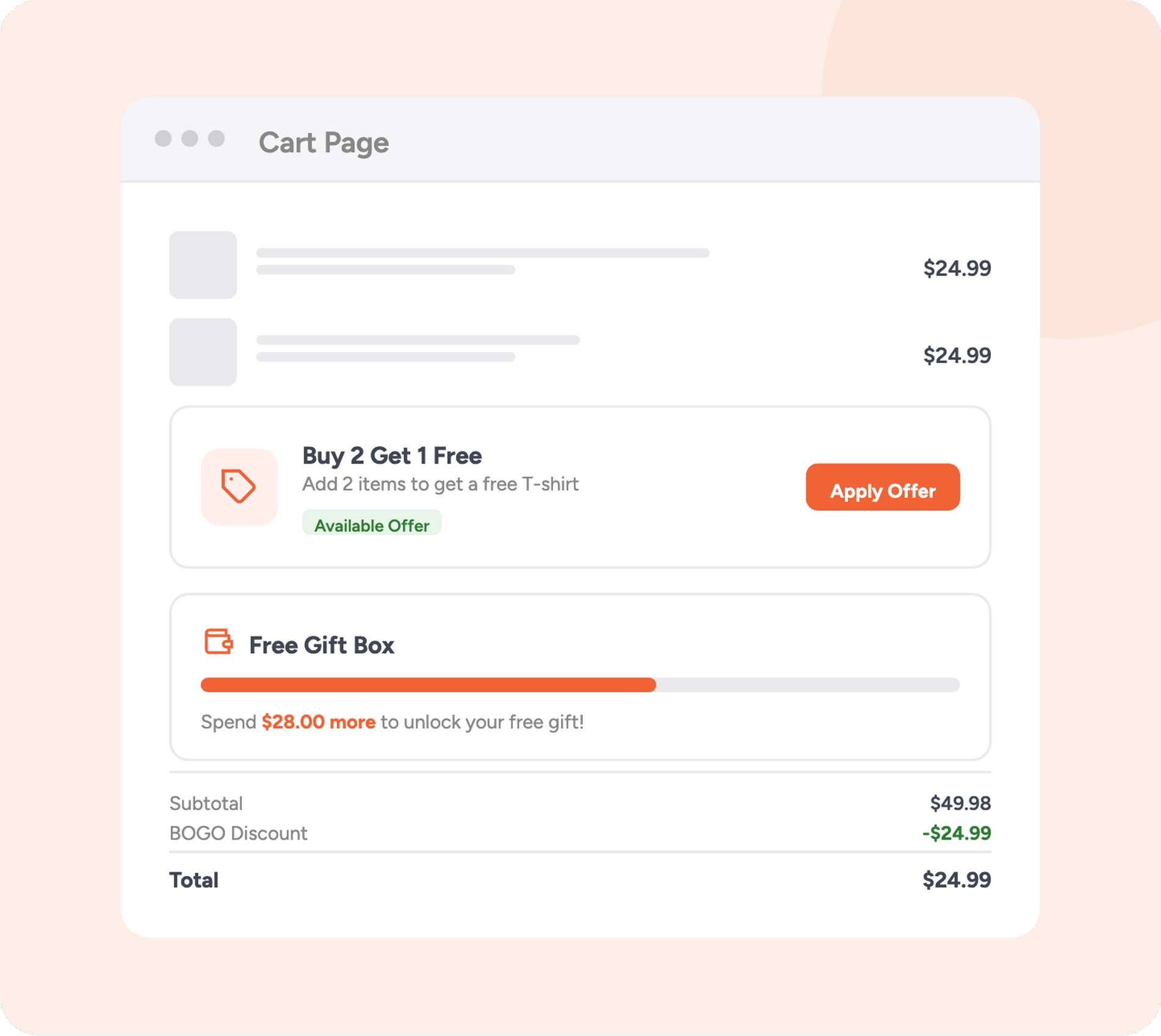
Power Coupons Pro launched with six BOGO offer types: Buy X Get X Free, Buy X Get Y, Buy X Get Y at a percentage off, Spend a set amount and get a product free, Spend a set amount and get a product discounted, and Spend a set amount for free shipping.
Offers can apply automatically or require a code. Smart product targeting controls exactly which products trigger an offer and which get given away. Customers can pick a variation like size or color for a free gift directly in the cart, which matters because a free gift in the wrong size becomes a support ticket.
The cart progress bar is a particularly useful part of the experience. It shows customers how close they are to unlocking a spend-based reward, turning a passive discount into a visible goal.
The free plugin got its own controls in the same period. A new Coupon Display Mode lets you show coupons in a modal instead of the slideout, and you can hide individual coupons from the slideout without affecting where else they apply.
April: Gift Cards and Scheduling
Power Coupons Pro added store-credit gift cards that customers can buy, send, receive and redeem on your store. Gift cards bring in buyers who weren’t shopping for themselves.
BOGO offers got start and end date scheduling in the same release, so seasonal promotions run themselves. You set up a holiday offer in advance and it starts and stops on its own, instead of requiring someone to log in on a Friday night.
The free plugin picked up an onboarding wizard and bulk editing for coupon slideout visibility, which makes managing a large set of coupons practical rather than tedious.
June: URL Coupons
URL Coupons gives you a single link that applies a coupon automatically when a customer visits, with expiry dates, one-time use, UTM passthrough and deep-linking to a specific product or page. Global settings control where customers land after the coupon applies, whether that’s the cart, the checkout, or a page you choose.
This is the campaign-scale counterpart to the Checkout Link Generator in CartFlows Pro. That one builds a prefilled checkout link for a specific customer. URL Coupons applies a discount to anyone who follows the link.
What that means for you:
- Campaign links do the whole job: the discount applies and the customer lands on the right page, in one click.
- UTM passthrough means you can still attribute the sale to the campaign that drove it.
- One-time use and expiry give you control over influencer, affiliate and win-back links that would otherwise get shared publicly.
Loyalty Rewards Throughout
Loyalty Rewards covers Order Earning, Signup Bonus and Product Review programs, and they can all run at the same time rather than forcing you to pick one. That lets you reward the full customer lifecycle with a single system.
September: Power Coupons and CartFlows Get Closer
Applying a coupon or redeeming credits no longer reloads the page, which means CartFlows checkouts no longer restart at step one when a shopper uses a discount. BOGO coupon lookups are now cached as well, reducing database work on cart, checkout and product pages.
BOGO offers, gift cards, URL coupons, loyalty rewards and the cart progress bar are Power Coupons Pro features. Auto-apply discounts, cart conditions and stacking are in the free plugin. You can check every Power Coupons update in the full changelog.
Running BOGO, gift cards and loyalty rewards usually means three separate plugins and three renewal dates. Pro puts them in the one you already have installed.
Cart Abandonment Recovery
Now on more than 300,000 sites, Cart Abandonment Recovery expanded to four ways of recovering a cart this year: email, SMS, WhatsApp and an on-site reminder, each configured separately depending on which ones you want to use. The reason that matters is simple. The customer who ignores your email might read a WhatsApp message, and the one who ignores both might come back to your site on their own.
WhatsApp Follow-Up Sequences
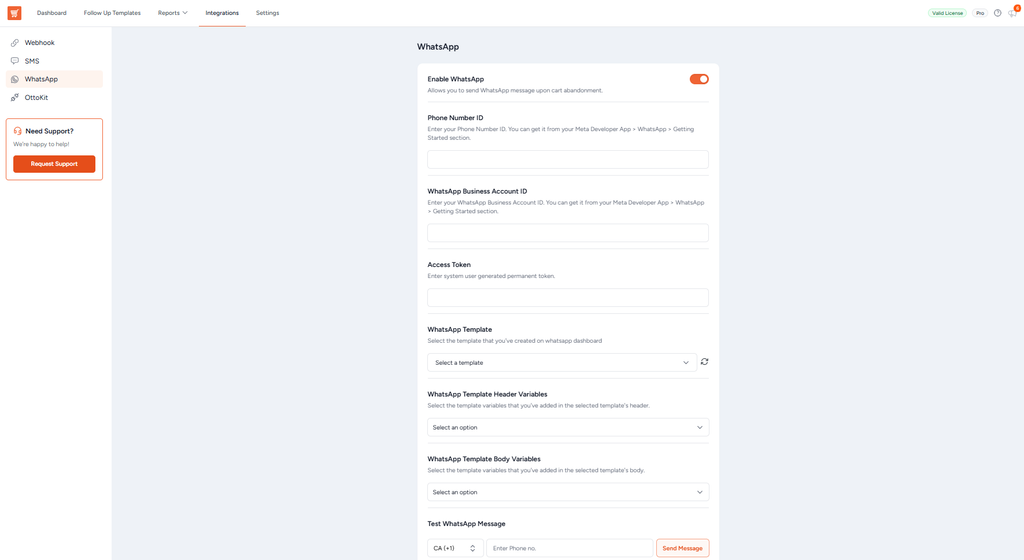
Arriving in February, WhatsApp joins email and SMS in multi-channel recovery. For stores selling into markets where WhatsApp is the default messaging app, this reaches people your email sequence may not.
An On-Site Reminder Banner
This followed in June. It re-engages returning visitors and points them back to the purchase they didn’t finish.
It reaches an audience the messages miss entirely: the shopper who never opened the email but came back to your site anyway. They’ve already shown intent by returning. The banner removes the work of finding their way back to the cart.
Template-Level KPIs
Performance tracking arrived for SMS templates in February and WhatsApp templates in June. You can see which messages recover carts and which don’t, then cut or rewrite the ones that aren’t earning their place in the sequence.
More Control Over Your Emails
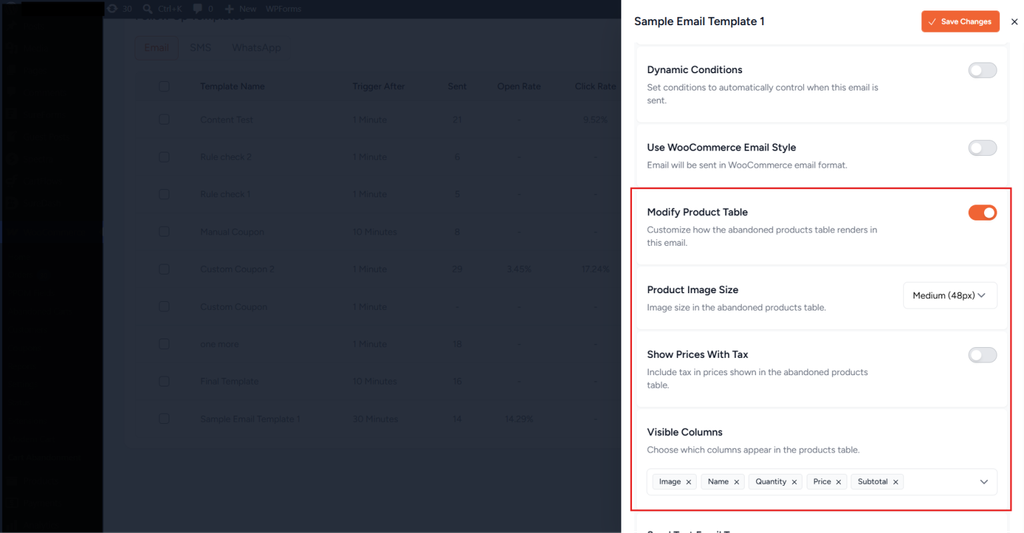
You can now customize the product table individually for each follow-up template, so a first reminder and a final discount email can look and read differently instead of being near-identical. You can also send yourself a CC or BCC copy of every recovery email, which gives you visibility into what customers are receiving without setting up test carts. The Smart Rule Engine also got a cleaner editing experience, with the Dynamic Conditions builder moved into a modal.
Safer Operations
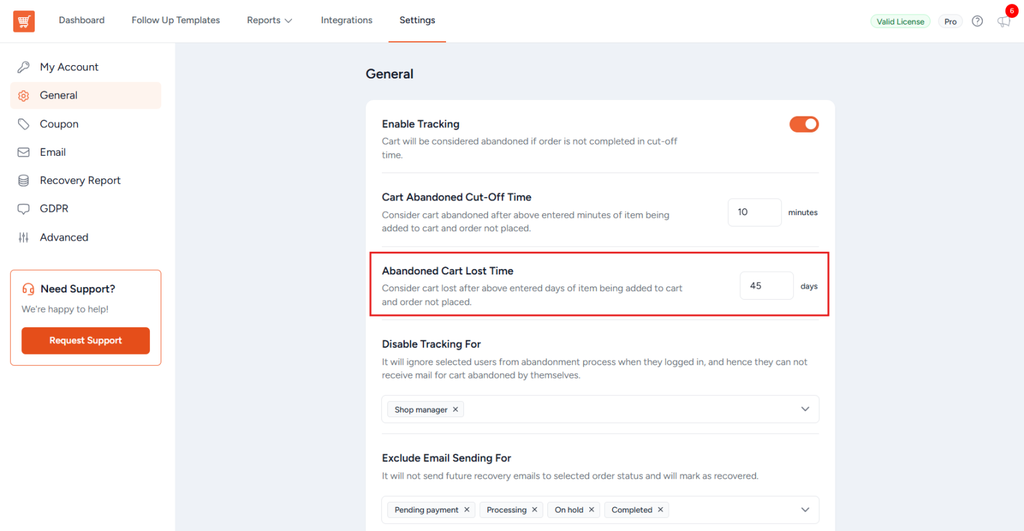
Plugin rollback lets you revert to a previous version if an update causes trouble, which is worth having on a plugin that sends customer-facing messages. A lost-cart timing setting controls when a cart is marked lost, so your reporting matches how your store actually behaves. Domain and email validation with blacklisting keeps junk addresses out of your sequences and protects your sender reputation.
Checkout got tidier too. A Default Country Code setting lets you pick the code that appears at checkout, and the country code field now shows up only when SMS or WhatsApp is actually switched on.
Reporting Accuracy
We fixed a reporting issue that could inflate Recovered Revenue figures through email-only matching and outdated cart totals, so the number you’re reporting to your team is the number you actually recovered.
SMS, WhatsApp, the on-site reminder and template-level KPIs are Cart Abandonment Recovery Pro features. Email recovery sequences are in the free plugin. You can check every Cart Abandonment Recovery update in the full changelog.
Email alone reaches the shoppers who open email. Pro gives you three more ways to reach the rest of the carts you’re already losing.
Get Cart Abandonment Recovery Pro
Modern Cart
Now on more than 60,000 sites, Modern Cart spent most of 2026 on compatibility and stability rather than new features. That’s deliberate. It sits directly in the buying path, so the work that matters most is the work that stops it getting in the way.
Compatibility Fixes
We fixed the header cart icon not updating for themes that use WooCommerce cart fragments, corrected cart quantities and slide-out behavior with WooCommerce Product Bundles, and fixed coupon discount calculations when product prices display including tax. Translations now load correctly on non-English sites, and a TranslatePress issue that put stray HTML into product names in the cart is gone.
Stability Fixes
Tax calculations in the cart total display are corrected, the cart no longer appears empty when navigating back through browser history, and AJAX add-to-cart now respects custom form fields added by third-party plugins. We also resolved a fatal error that could occur when the floating or slide-out cart rendered on admin pages, and cleaned up errors during bot crawls and on 404 pages before WooCommerce initialized the cart.
September: Performance and Express Checkout
The 1.1.0 release in late September brought performance and interface improvements, along with two fixes worth knowing about. Unstyled cart content no longer appears at the bottom of the checkout page when you’re using express checkout options like Stripe or WooPayments. And custom product information added by third-party plugins is no longer lost when products go into the cart via AJAX, which matters if you sell anything with per-item customization.
Smaller Additions
A backend cart preview arrived in March for a quick visual check without leaving the dashboard. April added an option to automatically delete plugin data when uninstalling, which matters if you’re testing on staging sites or handing a site over to a client. Accessibility and error handling both improved in the same period.
Product recommendations, express checkout and the advanced order summary styles are Modern Cart Pro features. The slide-in cart, popup cart and free shipping bar are in the free plugin. You can check every Modern Cart update in the full changelog.
The cart is the last place shoppers stop before checkout, and Pro is what turns it from a summary into a place you can still sell.
What Comes Next
That’s nine months across four plugins. A rebuilt admin you spend less time fighting, AI that picks the order bump and writes the copy that goes with it, a new promotions engine that went from launch to a full feature set in four months, and cart recovery that now reaches people four different ways.
We’re not finished. We’re still listening to what merchants ask for, still refining what’s already there, and still building. If this year so far is any indication, there’s plenty ahead.