


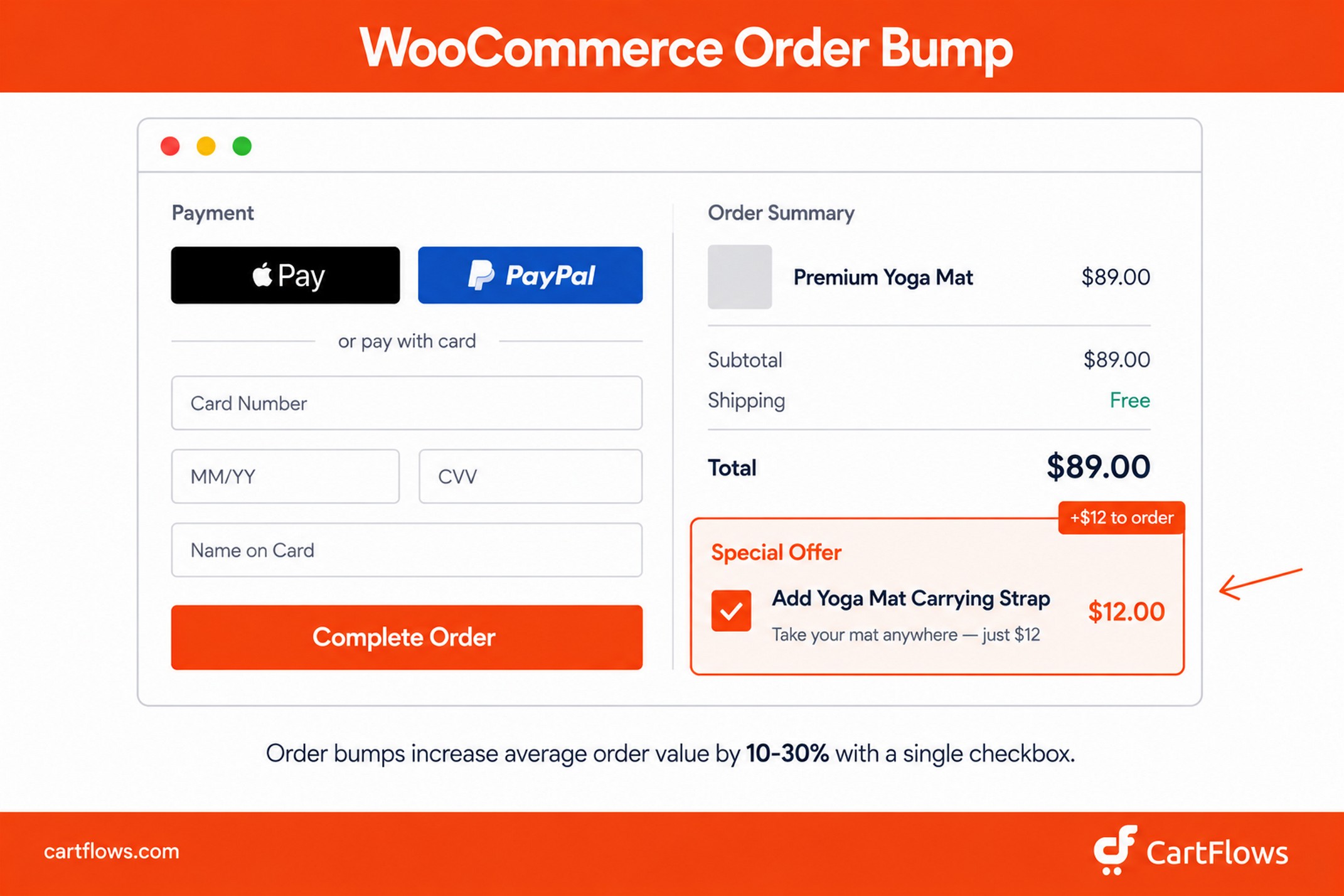
An order bump is a low-cost, complementary product offered on the checkout page that a customer can add to their order with a single click before they pay. It’s a checkbox, a short product description, and a price. Nothing more.
What makes it the highest-converting add-on offer in ecommerce isn’t the design. It’s the timing. The customer is already in the act of buying, which means saying “yes” to the bump feels like a continuation of a decision they’ve already made, not a new one.
Key facts about order bumps:
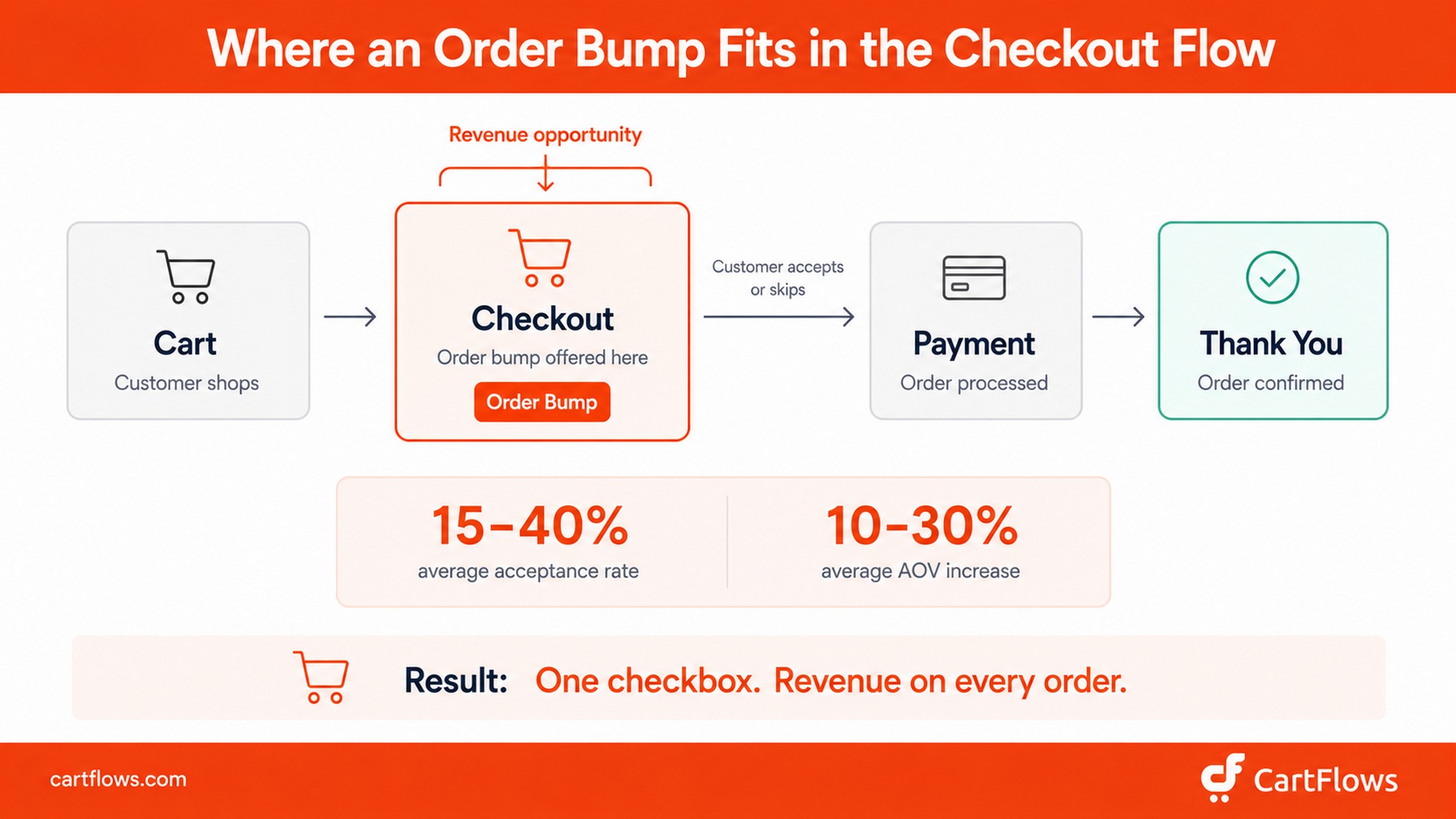
- Order bumps appear during checkout, before the customer pays, not after
- Stores that use order bumps typically see a 10-30% lift in average order value
- The best-performing bumps are priced at 10-25% of the main product’s value
- Acceptance rates range from 15-40% depending on how relevant the bump is to the main purchase
- WooCommerce doesn’t support order bumps natively. You need a plugin like CartFlows to add them
If you’re running a WooCommerce store and not using order bumps at checkout, you’re leaving revenue on the table with every single transaction. We see this constantly when working with store owners who come to us after realizing their checkout page is doing one job when it could be doing two.
TL;DR: An order bump is a checkbox offer on the checkout page that adds a complementary product to the customer’s order in one click. It increases AOV by 10-30% and converts at 15-40%. This guide covers what order bumps are, how they differ from upsells, 7 types of bumps that work, the psychology behind them, and a step-by-step CartFlows setup in WooCommerce.
Is this guide for you? This guide is for WooCommerce store owners who want to increase revenue per transaction without adding complexity to their checkout. Whether you sell physical products, digital downloads, courses, or subscriptions, the strategy and setup apply.
- What is an order bump?
- Benefits of order bumps for WooCommerce stores
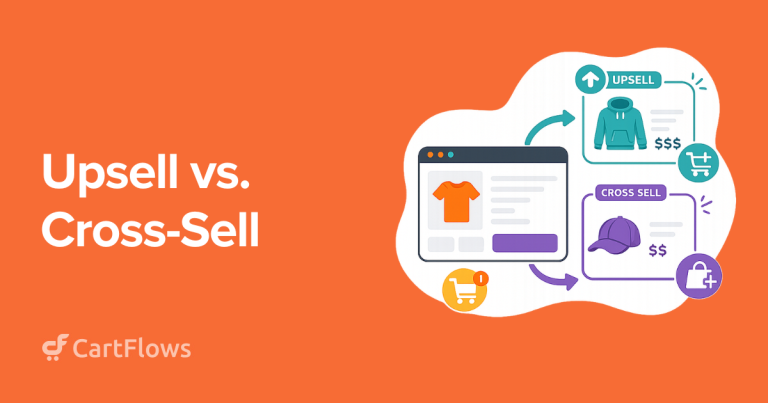
- Order bump vs upsell vs cross-sell: what's the difference?
- Types of order bumps
- The psychology behind order bumps
- Order bump benchmarks: what the data says
- How to create the perfect order bump offer
- Common order bump mistakes to avoid
- Order bump examples in WooCommerce
- How to add a WooCommerce order bump with CartFlows (step by step)
- Going beyond basic bumps: Dynamic (Conditional) Order Bumps
- AI-selected order bumps
- Frequently asked questions
- Final thoughts
What is an order bump?
An order bump is an additional product or service offered to a customer during checkout, right before they click the “Place Order” button. It shows up as a checkbox with a short description and product image, and a single click adds it to the existing order without loading a new page or requiring payment details to be re-entered.
You’ve experienced this in person more times than you realize. Pay at the pump and the screen asks “Add a car wash for $5?” — one tap, no extra transaction, you’re back on the road. Book a flight and the airline offers seat selection for $14 right before payment. McDonald’s “would you like fries with that?” works the same way at the drive-thru window. The mechanics are identical across all of them: a relevant add-on, low cost relative to the main purchase, single decision, presented at the exact moment you’re already paying.
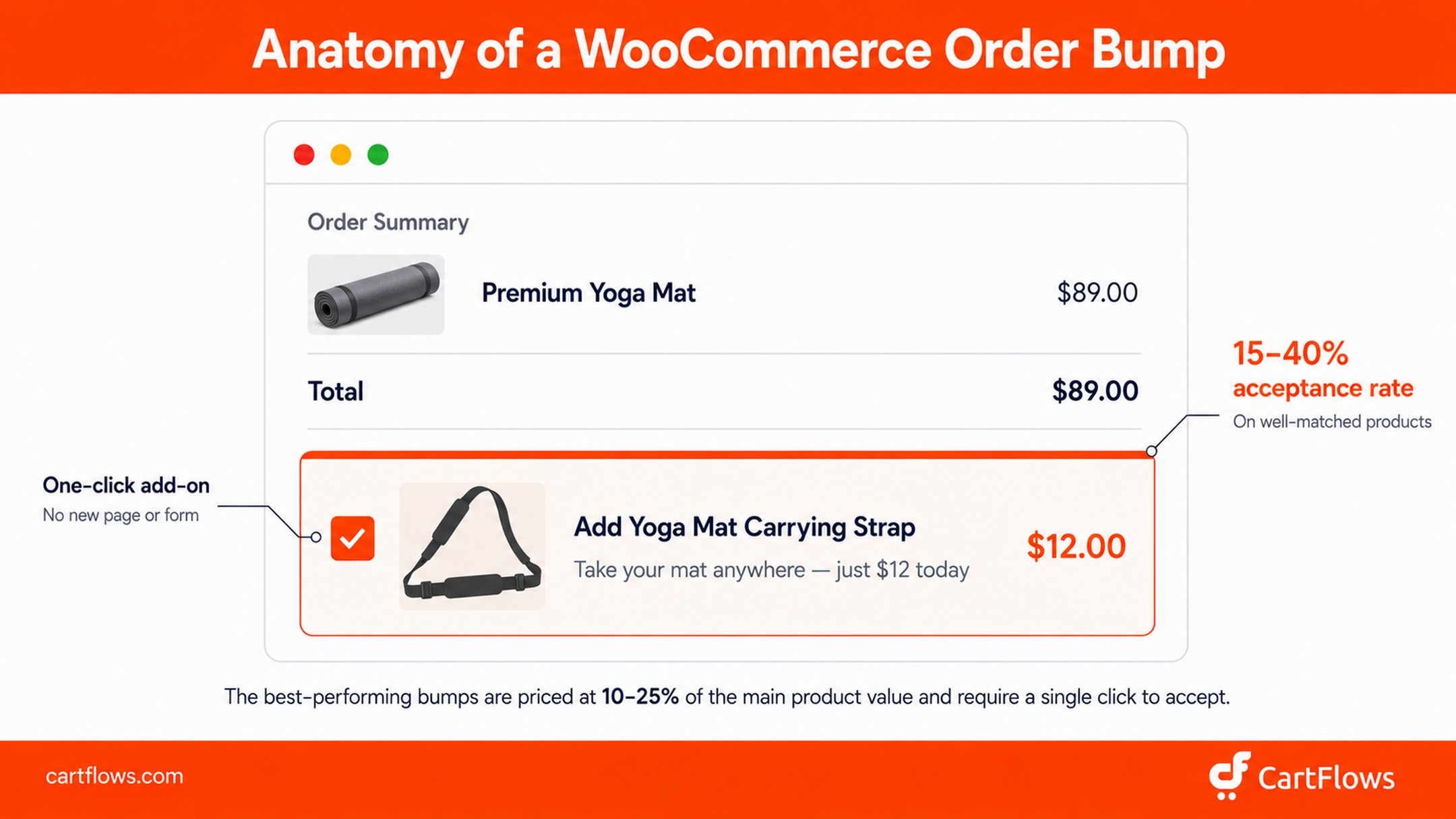
Online order bumps work identically. Instead of a cashier, a small card or checkbox on your WooCommerce checkout page does the asking. The customer spots a relevant offer, spends two seconds deciding, and either ticks the box or scrolls past. Zero disruption to the purchase flow.
What makes an order bump effective:
- It appears on the checkout page, before payment is processed
- It costs less than the main product (typically 10-25% of the cart value)
- It complements what’s already in the cart
- It requires a single click to accept
- It doesn’t redirect the customer or add friction to checkout
Here’s what makes order bumps different from most revenue strategies. You don’t need more traffic to make them work. You’re not paying for new customer acquisition. You’re extracting more revenue from people who are already buying, which means every order bump dollar drops straight to the bottom line. The right WooCommerce addon can make it significantly easier to add revenue-boosting features like order bumps while keeping the checkout process seamless.
That’s why we built order bumps as a core feature in CartFlows.
We’ve helped over 200,000 WooCommerce stores worldwide set up high-converting checkout funnels since 2018, and order bumps are consistently in the top three highest-impact features we recommend to store owners looking to grow revenue without growing traffic.
Benefits of order bumps for WooCommerce stores
Order bumps deliver value across multiple parts of your business, not just revenue.
- Higher average order value. The most direct benefit. A well-placed bump adds 10-30% to the typical order without changing your traffic or ad spend.
- Better profit margins. Because order bumps don’t require new customer acquisition costs, every dollar from a bump is high-margin revenue. You’re not paying ad costs, SEO costs, or content costs for that customer twice.
- Improved customer experience. Done right, a bump feels like a helpful suggestion (the carrying strap with the yoga mat, the warranty with the laptop). Customers leave happier because they didn’t have to come back and order forgotten essentials separately.
- Increased product discovery. Bumps surface products customers might never browse to on their own. Lower-priced accessories, add-ons, and digital extras often get buried on a store. Putting them on the checkout page gives them visibility they wouldn’t otherwise have.
- Stronger customer lifetime value. A customer who accepts a bump has done two transactions instead of one. That second “yes” makes them more likely to come back for future purchases.
- Competitive advantage. Most small WooCommerce stores still run plain checkout pages without bumps. Adding one puts you ahead of competitors on revenue per visitor with very little setup time.
Order bump vs upsell vs cross-sell: what’s the difference?
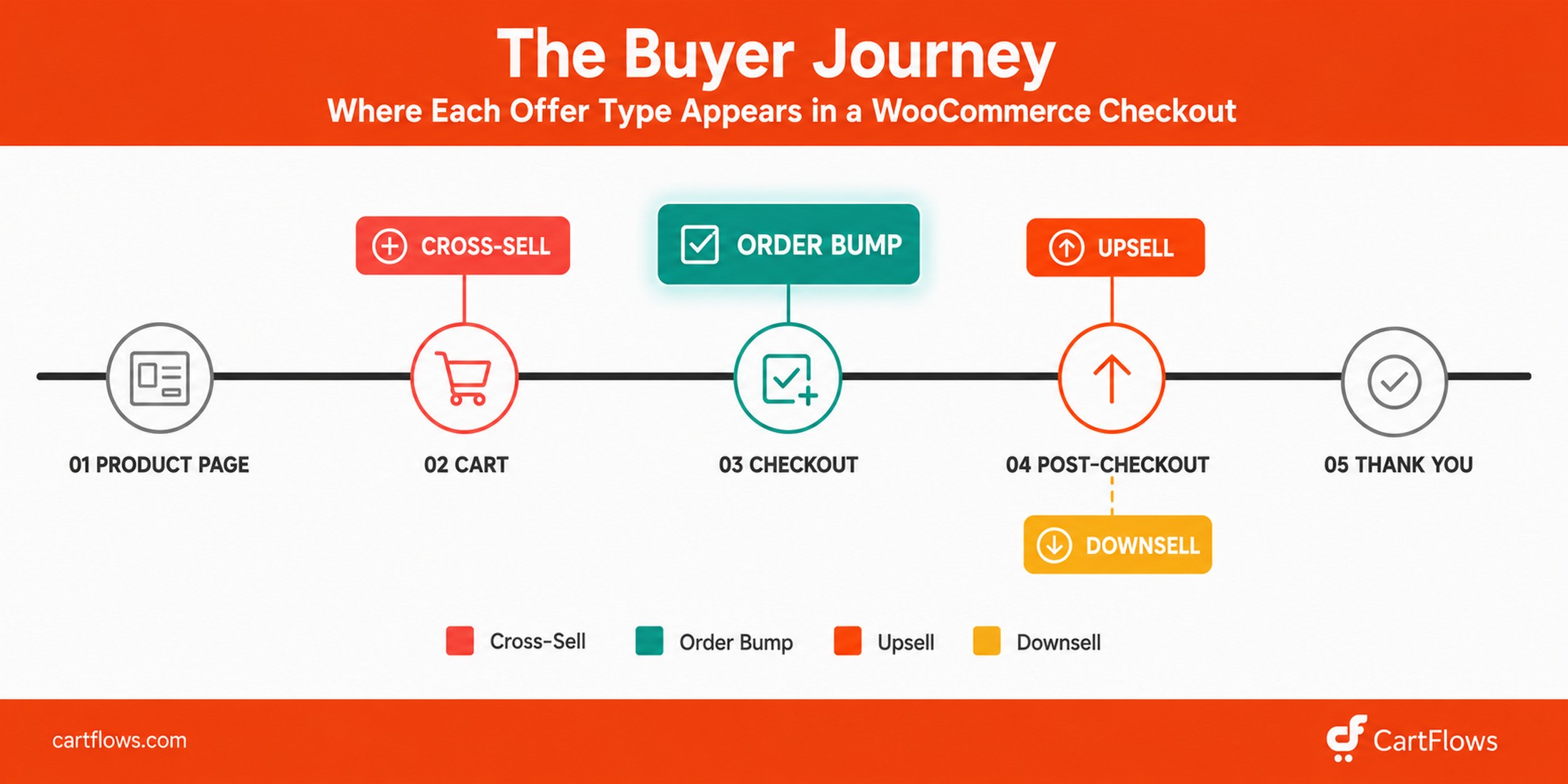
These three terms get thrown around like they mean the same thing. They don’t. The distinction matters because each strategy serves a different goal and shows up at a different point in the buying journey.
Order bump is a low-cost add-on shown during checkout, before the customer pays. It appears as a checkbox on the checkout page that the customer ticks to add the item to their existing order, which increases the current order’s value without changing anything else about the purchase flow.
Upsell is a higher-priced offer shown after the customer has already paid. In WooCommerce with CartFlows, this appears on a dedicated offer page between checkout and the thank you page. The customer’s payment is already secured, and they can accept the one-click upsell without re-entering card details. Upsells typically offer a premium version of what the customer just bought, or a higher-value related product. For a deeper dive on the upsell side specifically, see our complete guide on how to upsell in WooCommerce.
Cross-sell is a related product recommendation that can appear anywhere: product page, cart, checkout, or post-purchase emails. WooCommerce has built-in cross-sell functionality that shows related products on the cart page. Cross-sells are broader and don’t have to be low-cost.
CartFlows adds Frequently Bought Together for the product-page version of this: a bundle box with a checkbox on each companion item, a running total and one Add to cart button.
Downsell is a fallback offer shown after a customer declines an upsell. Someone says no to a $97 premium bundle? You offer a $47 starter kit instead. CartFlows supports downsells as part of the post-checkout funnel.
Here’s a side-by-side comparison:
| Order Bump | Upsell | Cross-Sell | Downsell | |
|---|---|---|---|---|
| When shown | During checkout (pre-payment) | After checkout (post-payment) | Anywhere (product page, cart, checkout, email) | After a declined upsell |
| Price | Lower than main product | Same or higher | Varies | Lower than the declined upsell |
| Customer action | Tick a checkbox | Click accept on offer page | Add to cart | Click accept on offer page |
| Primary goal | Increase AOV | Increase customer lifetime value | Increase cart size | Recover a declined upsell |
| Friction level | Minimal (single click, same page) | Low (one-click, separate page) | Medium (may need cart review) | Low (one-click, separate page) |
| Best for | Complementary add-ons, warranties, digital extras | Premium upgrades, bundles | Related products, accessories | Budget-friendly alternatives |
When to use each: Order bumps work when you have a low-cost item that naturally pairs with the main product. Upsells work when you want to pitch something more expensive after the initial sale is locked in. Cross-sells bring related products to attention earlier in the browsing experience. Downsells catch revenue that would otherwise walk away.
Most high-performing WooCommerce stores use all four. CartFlows lets you configure order bumps, upsells, and downsells within a single checkout flow, so each customer sees the right offer at the right moment. If you’re curious about how this compares to a full funnel optimization strategy, we’ve covered that separately.
Types of order bumps
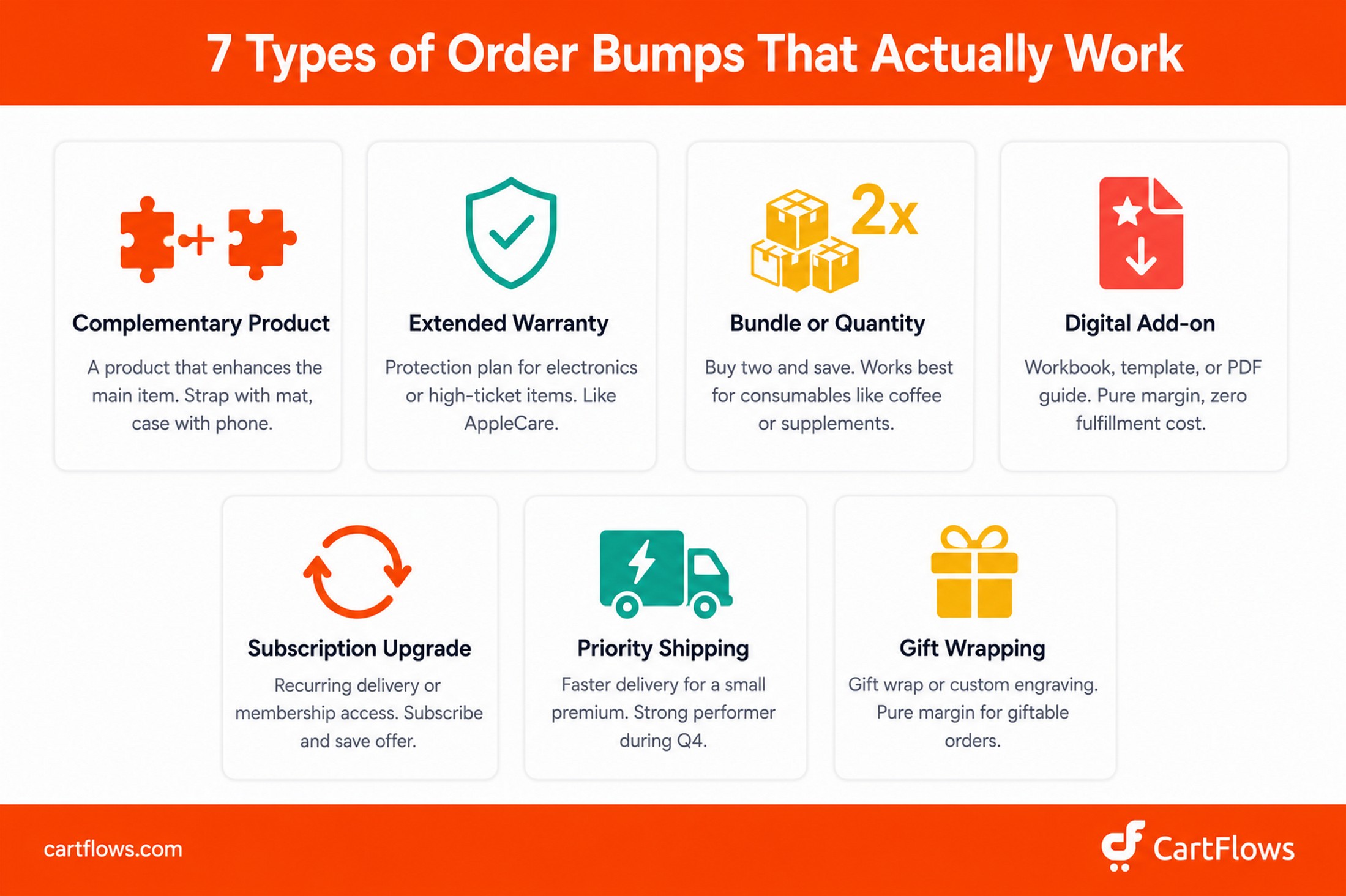
Not all order bumps are the same. The type you pick depends on what you sell, your margins, and what your customers actually need alongside their main purchase. Here are the seven types we see work most consistently across WooCommerce stores.
1. Complementary product bump
This is the most common and most reliable type. You offer a product that directly enhances the main item. A phone case with a phone. A yoga strap with a yoga mat. A shoe care kit with sneakers.
Why it works: the pairing is obvious to the customer. They don’t need to think about whether the add-on is relevant. It clearly is. That removes the biggest barrier to acceptance.
2. Extended warranty or protection plan
Electronics and high-ticket items convert especially well with warranty bumps. Apple does this with AppleCare. The bump is framed as peace of mind, and the cost is small relative to what the customer is already spending.
Why it works: the customer just committed to a significant purchase. The fear of damaging that investment is fresh. A warranty at 5-10% of the product price feels like insurance, not an upsell. WooCommerce stores selling tech, appliances, or furniture can realistically hit acceptance rates above 30% with this type.
3. Bundle or quantity upgrade
“Buy 2, get 15% off” or “Add a second for $X.” Consumable products like supplements, coffee, skincare, and pet food are built for this.
Why it works: the customer already wants the product enough to buy it once. Buying more at a discount feels like a smart financial decision, not an impulse. The discount gives them a reason to act now rather than coming back later.
4. Digital add-on
If you sell courses, software, or services, a digital bump is practically free margin. A printable workbook alongside an online course. A premium template pack with a SaaS subscription. A quick-start PDF guide bundled with a physical product.
Why it works: zero shipping cost, zero inventory, high perceived value. A $17 digital add-on on a $97 course costs you nothing to fulfill. That’s almost pure profit.
5. Subscription or membership upgrade
Offer a recurring delivery option or membership access as a bump. “Subscribe and save 10% on every order” or “Join our VIP program for free shipping on all future orders.”
Why it works: it turns a one-time buyer into a recurring customer without a separate pitch. The checkout moment, when the customer is already entering payment details, is the single best time to ask for a subscription commitment.
6. Priority service or express shipping
Charge a small premium for faster delivery. This works especially well during holiday seasons and for gift purchases.
Why it works: urgency is built into the product. The customer needs it fast, and they’ll pay $5-10 extra without hesitation. During November and December, we’ve seen express shipping bumps hit 40%+ acceptance rates.
7. Gift wrapping or personalization
For stores selling giftable products, a $3-5 gift wrap option or custom engraving adds margin to every order. The customer is already buying a gift. They’re in a generous mindset.
Why it works: the cost is trivial, the benefit is immediate, and it saves the customer a trip to find wrapping paper. Pure convenience purchase.
Order bump ideas by store type
Not sure which type fits your store best? Here’s a quick reference based on what we see working across different WooCommerce categories:
| Store type | Best bump strategy | Example offer |
|---|---|---|
| Fashion & apparel | Complementary accessory | Belt with dress shoes, socks with sneakers ($15-25) |
| Electronics & tech | Extended warranty or protection plan | 2-year coverage, screen protector ($29-49) |
| Beauty & skincare | Bundle / quantity upgrade | Travel size of full-size purchase ($12) |
| Digital products & courses | Digital add-on (PDF, workbook, template) | Companion worksheet, swipe file ($17-27) |
| Food & beverage subscriptions | Priority shipping or trial product | Express delivery, sample size ($4.99-9.99) |
| Home & garden | Maintenance bundle or refill pack | Replacement filters, refill kit ($12-19) |
| Health & supplements | Subscribe & save offer | 10-15% off recurring monthly orders |
| Pet products | Complementary care item | Treats with food, grooming tool with bath kit ($8-15) |
| Coaching & services | Resource pack or fast-track add-on | Templates, priority booking, bonus session ($47-97) |
Start with the strategy that matches your category, then test variations from there.
The psychology behind order bumps
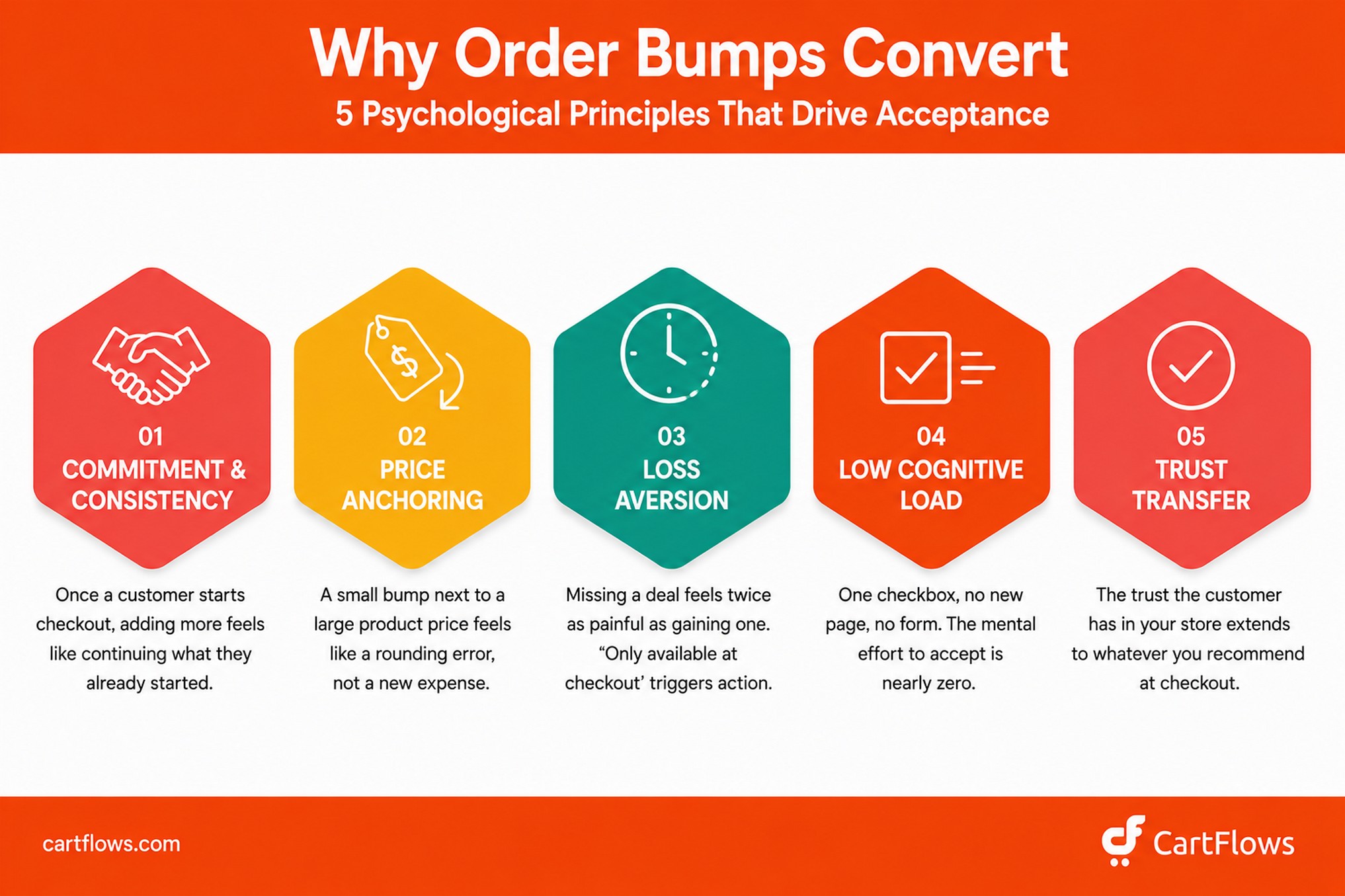
Order bumps convert because they align with how people naturally make decisions at the checkout. Five psychological principles drive this.
Commitment and consistency
Once someone adds a product to their cart and starts entering their payment details, they’ve committed to buying. Robert Cialdini documented this in Influence: The Psychology of Persuasion: when someone makes even a small commitment, they tend to act consistently with it afterward. Adding a $12 add-on doesn’t feel like a new purchase decision. It feels like a natural extension of the one they already made.
Price anchoring
A $12 bump next to a $149 main product looks insignificant. The customer is already anchored to the higher price. The bump feels like a rounding error, not a real expense. This is exactly why the best-performing bumps are priced at 10-25% of the main product. That ratio keeps the bump firmly in the “why not?” zone.
Loss aversion
Smart bump copy frames the offer as something the customer would miss out on. “Add this now and save 20% (only available at checkout)” creates mild urgency. The customer weighs the small cost against the potential regret of missing a limited deal, and loss aversion tips the scale toward adding it. Daniel Kahneman’s research showed that losses feel roughly twice as painful as equivalent gains feel good. A $5 “savings you’d miss” hits harder than a $5 “bonus you’d gain.”
Impulse buying at low cognitive load
The bump is just a checkbox — one click, no new page, no form fields, no variant selection. The cognitive effort needed to accept the offer is nearly zero. This is the same reason candy bars sell at the grocery checkout. You don’t run a cost-benefit analysis on a Snickers when you’re already at the register. You just grab it.
Trust transfer
By the time someone reaches checkout, they’ve already decided your store is trustworthy. They’ve browsed products, read descriptions, maybe checked reviews, and entered their personal information. That trust extends to whatever you recommend at checkout. A bump from a trusted store feels like a helpful suggestion from a knowledgeable friend, not a pushy sales tactic.
Order bump benchmarks: what the data says
Before you set up your first bump, it helps to know what “good” actually looks like. Here are the benchmarks we track.
Order bump statistics at a glance
- Average acceptance rate: 15-40% depending on bump relevance to the main product
- High-performing acceptance rate: 30-40% (SamCart data across $7 billion in processed transactions)
- Average AOV lift from order bumps: 10-30% on stores that implement them well
- Optimal bump price point: 10-25% of the main product’s price
- Average ecommerce cart abandonment rate: 70.22% (Baymard Institute) — order bumps maximize value from the 30% who do complete
- WooCommerce mobile traffic share: Over 65% — every bump must work on mobile first
- Time to set up first order bump: Under 15 minutes with CartFlows
- Stores using order bumps: Still a minority of WooCommerce stores, leaving competitive opportunity
Acceptance rate. Industry data shows order bumps convert at 15-40%, depending on the product, the bump offer, and how well the two pair together. SamCart reports that across $7 billion in processed transactions, their sellers see 30-40% average acceptance rates. That’s roughly 3-4 out of every 10 customers adding a bump to their order.
AOV increase. Stores that implement order bumps typically see a 10-30% lift in average order value. The exact number depends on the bump’s price relative to the main product, the relevance of the pairing, and whether you’re using a discount to sweeten the offer. For other ways to grow average order value beyond order bumps, see our guide on 14 easy tricks to boost WooCommerce AOV.
Optimal bump price point. The sweet spot is 10-25% of the main product’s price. Below 10%, the perceived value drops and customers wonder if it’s worth bothering with. Above 30%, it starts to feel like a second purchase decision rather than a quick add-on.
Run your own numbers
Here’s where order bumps get interesting. Let’s run a hypothetical scenario to show the math. Picture a WooCommerce store processing 500 orders per month with an average order value of $85, adding a single $15 bump to checkout.
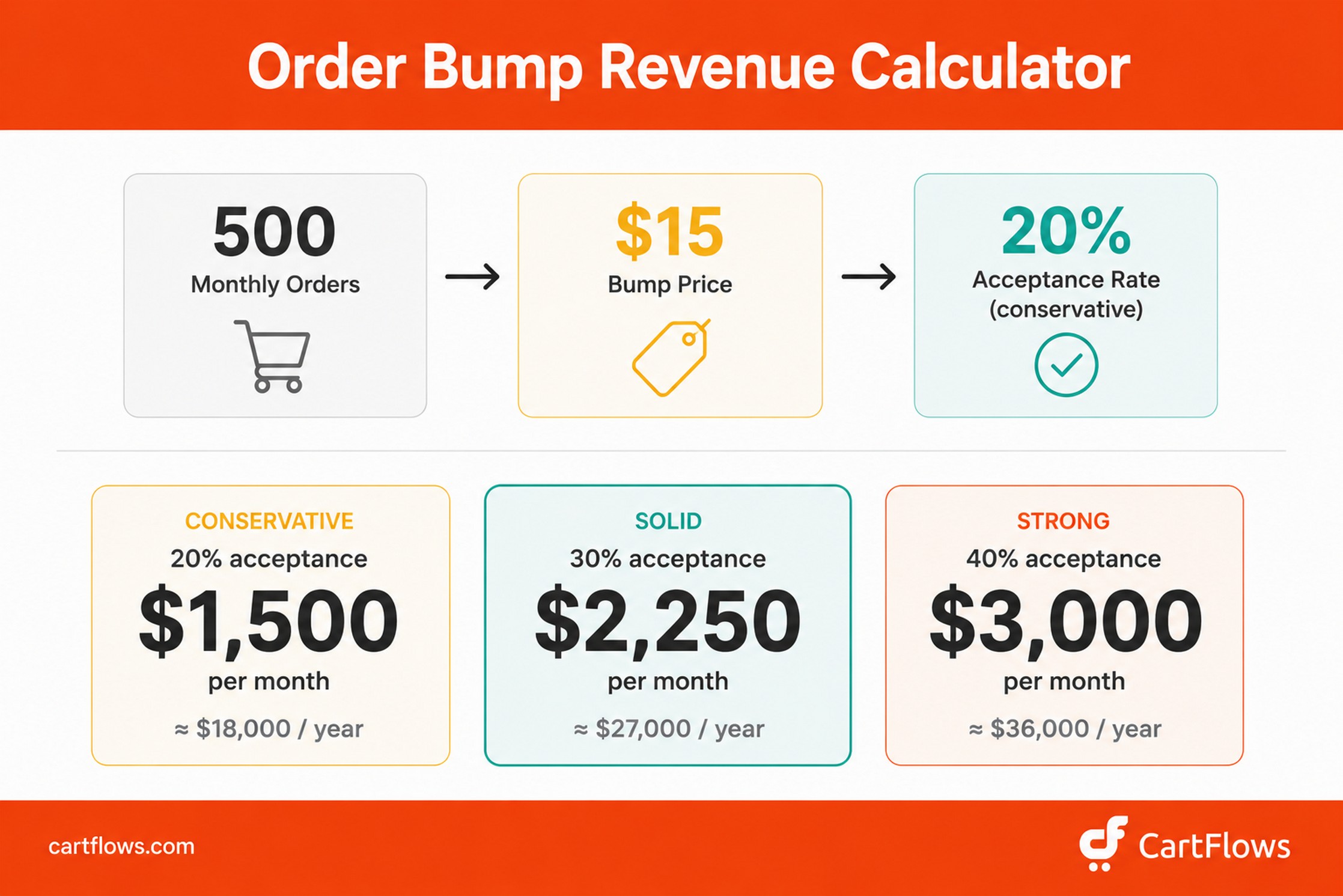
- Bump product price: $15
- Acceptance rate (conservative estimate): 20%
- Orders with a bump added: ~100 per month
- Approximate extra revenue per month: $1,500
- Approximate extra revenue per year: ~$18,000
Real-world numbers will rarely land this cleanly — your bump price, acceptance rate, and monthly order volume will all shift around. But the math shows the shape of the opportunity. At a 30% acceptance rate, that same store is closer to $27,000 a year in incremental revenue. At 40%, it’s around $36,000. Same traffic, same ad spend, same product catalog. The only thing changing is a checkbox on your checkout page.
And here’s the kicker: according to Baymard Institute, the average cart abandonment rate across ecommerce is 70.22%. That means for every 10 people who add something to their cart, only 3 complete checkout. Order bumps don’t fix abandonment, but they make each completing customer worth significantly more. When you can’t easily lift your 30% completion rate, raising the value of what each of those 30% spends becomes the next best lever.
Quick benchmark reference:
| Acceptance Rate | What It Means | What to Do |
|---|---|---|
| Below 10% | Bump isn’t relevant enough, or price is too high | Change the product or lower the price |
| 10-20% | Decent. The pairing works but there’s room to improve | Test different copy, placement, or discount |
| 20-30% | Solid. You’ve found a good combination | Test a slightly higher bump price |
| Above 30% | Excellent. Strong product-market fit for the bump | Scale this pairing across similar products |
How to create the perfect order bump offer
Getting the offer right matters more than getting the design right. We’ve seen plain-looking bumps with the right product outperform beautifully designed bumps with the wrong product every single time.
Start with your sales data. Look at what your customers already buy together. In WooCommerce, check your orders for common product combinations. If customers frequently buy Product A and Product B in the same transaction, Product B is your obvious bump candidate for Product A. Your data already knows what your customers want. Use it.
You don’t have to dig through orders manually. Auto Suggest does this analysis for you, reading your store’s order history to find which products actually get bought together and ranking each pairing with a match score. It powers the Frequently Bought Together widget on your product pages, and the pairings it surfaces are the same ones worth testing as checkout bumps.
For the bump itself, Order Bump AI does the equivalent job at checkout: it proposes the product and explains the pick, and you decide whether to run with it.
Pick a product that’s complementary, not random. The bump has to make sense alongside the main product. A laptop sleeve for a laptop. Replacement filters for an air purifier. A recipe ebook for a kitchen gadget. If you have to explain why the bump is relevant, it’s the wrong product.
Price it at 10-25% of the main product. A $149 product pairs well with a $15-37 bump. A $49 product works with a $5-12 bump. This range keeps the bump in the impulse zone. Customers don’t think twice about adding $12 to a $149 order. They think a lot about adding $60.
Use round-number pricing. $10 converts better than $9.73. Bumps aren’t the place for psychological pricing tricks. The customer is making a split-second decision. Clean numbers reduce the mental math.
Show the original price crossed out where possible. If the bump is being offered at a discount, showing both prices (original struck through, new price highlighted) creates instant perceived value. This is a copywriting and design principle — set it up either in your bump description copy or by configuring discount pricing on the bump product itself in WooCommerce.
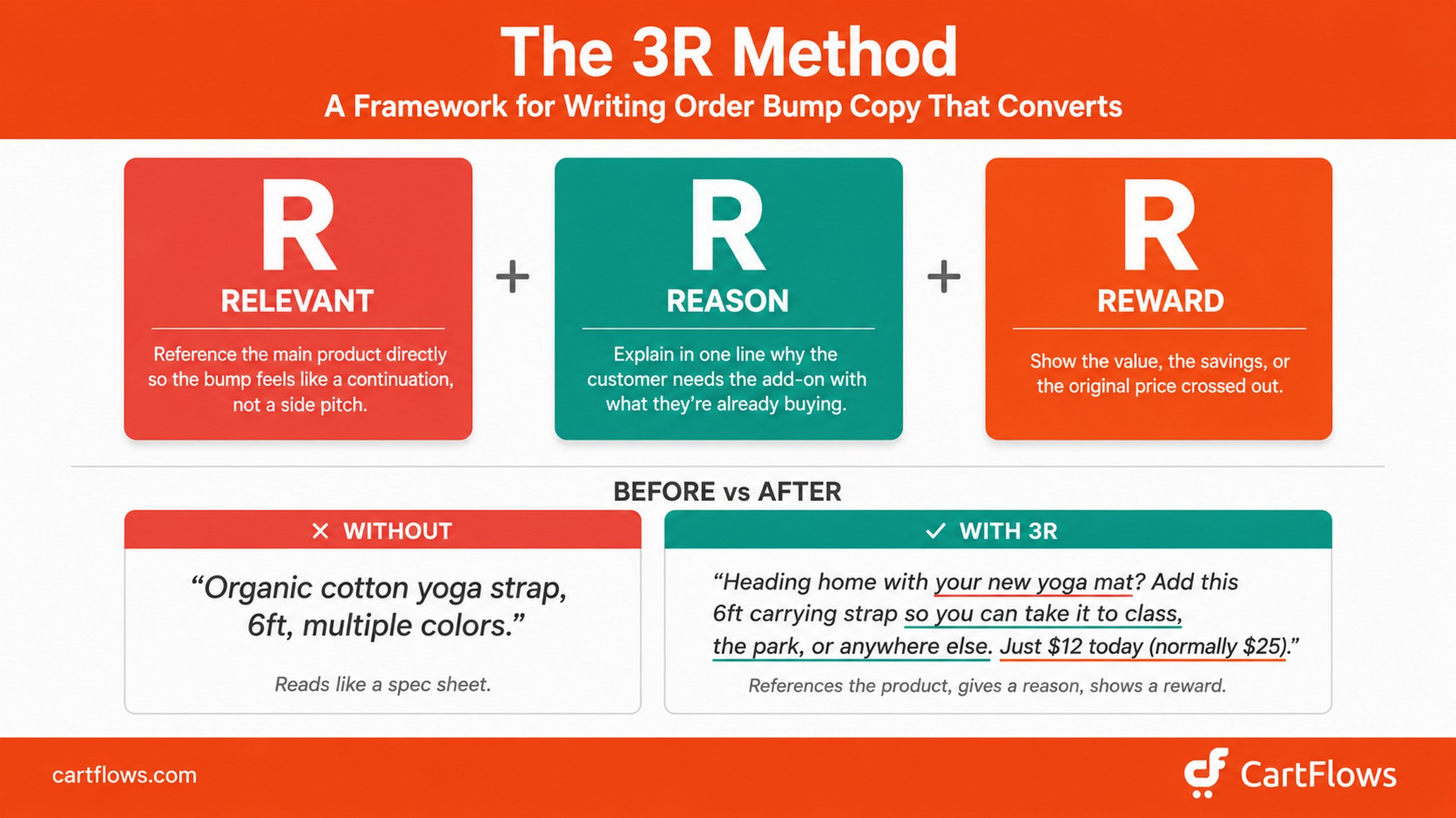
Write copy using the 3R Method. Most order bump copy reads like a product spec or a generic ad. Both lose. The order bumps we see convert highest follow what we call the 3R Method:
- Relevant — Reference the main product directly so the bump feels like a continuation of the purchase, not a side pitch
- Reason — Explain in one line why the customer needs the add-on with what they’re already buying
- Reward — Show the value, the savings, or the original price crossed out
Here’s the same bump written without the framework, then with it:
Without: “Organic cotton yoga strap, 6ft, multiple colors.”
With: “Heading home with your new yoga mat? Add this 6ft carrying strap so you can take it to class, the park, or anywhere else. Just $12 today (normally $25).”
The first version is a spec sheet. The second references the main product (yoga mat), gives a reason (transport), and shows a reward (discount).
Test different placements. CartFlows lets you position the order bump in several spots on the checkout page (under the Styles → Layout tab). Typical options include before the checkout form, after the customer details section, after the order summary, or after the payment section. There’s no universal winner — test each option and track which converts best for your store.
A/B test your offers. CartFlows includes built-in A/B split testing. Test different bump products, price points, and copy. Even small changes, like swapping the highlight text from “Add to order” to “Don’t miss this,” can shift acceptance rates by 3-5 percentage points.
Prioritize if you have a large catalog. If your store has hundreds of products, don’t try to set up bumps for everything at once. Start with your top 5 best-selling products, find the best bump pairing for each, and get those optimized before expanding to the next 10. This approach gets you revenue fastest while keeping the testing manageable.
Common order bump mistakes to avoid
We’ve reviewed hundreds of CartFlows setups over the years. These are the mistakes that show up again and again.
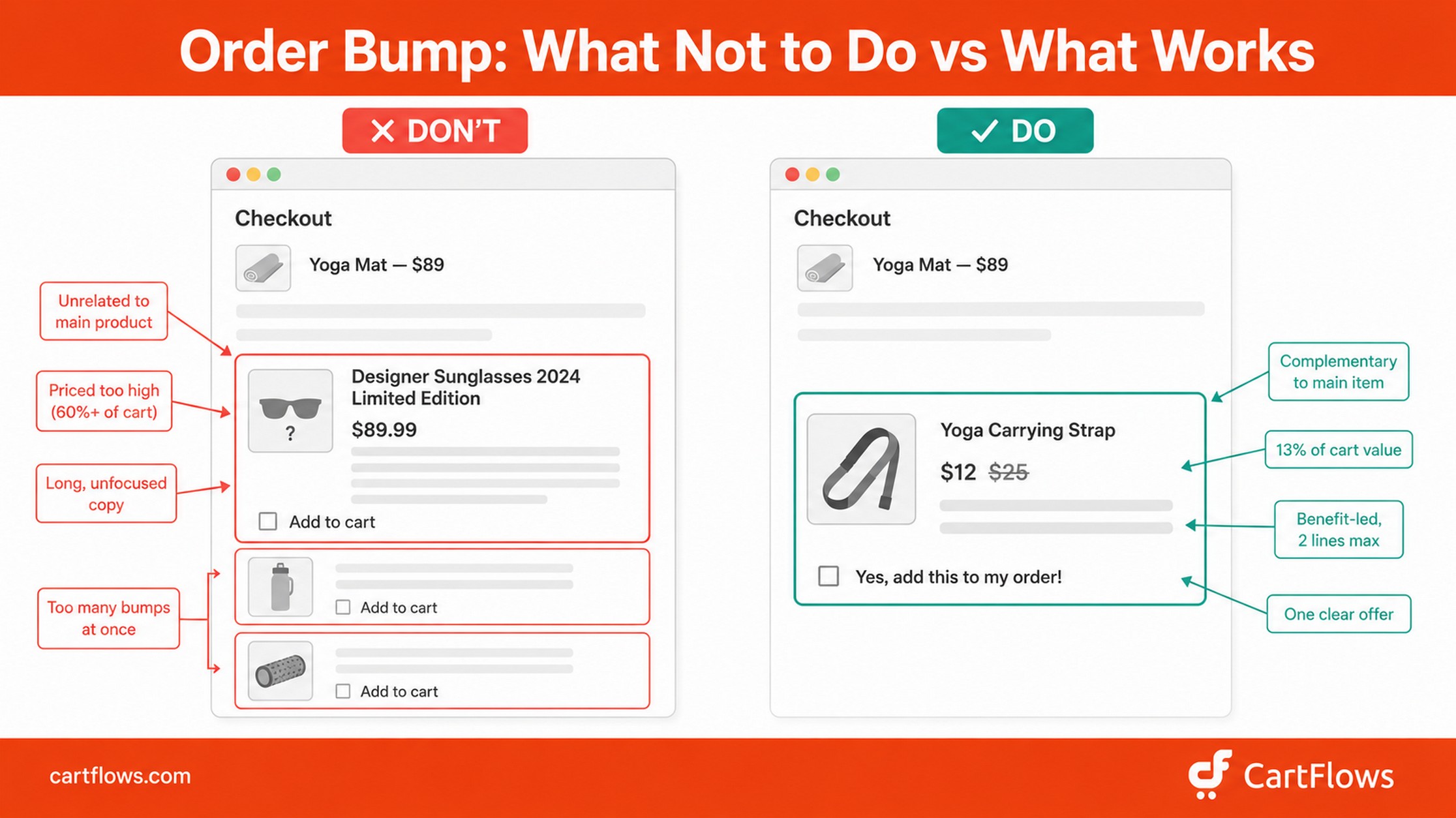
Offering an unrelated product. Sunglasses as a bump for a yoga mat. A cookbook alongside a phone case. If the bump doesn’t logically connect to the main product, it reads as a random ad rather than a helpful suggestion. Customers ignore it, or worse, it makes your checkout feel like a popup-infested landing page. Relevance is everything.
Pricing the bump too high. If the bump is more than 30% of the main product’s price, it stops feeling like an impulse add-on and starts feeling like a second purchase. The customer needs to justify the expense, which means they’ll often say no. Keep it in the 10-25% range.
Writing long, complicated descriptions. The customer is mid-checkout. They’ve already filled out their shipping address and they’re eyeing the “Place Order” button. They’re not reading a product page. Two to three sentences, focused on the benefit, with a clear price. That’s all you need.
Showing too many bumps at once. Decision fatigue is real. Three or four bump options at checkout overwhelm the customer and often result in none being selected. One bump is ideal. Two is the maximum for most stores. CartFlows allows multiple bumps, but use restraint.
Not testing. The first bump configuration you set up is almost never the best one. Try a different product, adjust the pricing, rewrite the copy, change the placement, and compare what happens. CartFlows A/B testing makes this take minutes, not hours.
Forgetting mobile. Over 65% of WooCommerce traffic comes from mobile devices. If your bump card looks fine on desktop but is cramped, cut off, or hard to tap on a phone, you’re losing the majority of potential bump revenue. Always preview every bump on a mobile device before going live.
Order bump examples in WooCommerce
Here are seven order bump scenarios across different WooCommerce store types. The first is a well-known brand pattern you can verify yourself. The rest are anonymized patterns drawn from real CartFlows setups we see across our customer base.
1. Electronics store – warranty bump (the Apple AppleCare model)
When you buy a MacBook on Apple’s site, the checkout flow offers AppleCare+ as an optional add-on before you pay. The bump is priced at roughly 10-15% of the laptop’s cost, framed as protection rather than an additional product, and accepted with a single click.
This is the textbook order bump structure. Apple has used this model for over a decade, and it’s a reliable revenue driver across their hardware line. The same pattern works for WooCommerce stores selling electronics, appliances, furniture, or any high-ticket physical good.
Main product: $1,299 laptop
Bump: $149 2-year protection plan (11% of cart)
Why it works: the customer just committed to a significant purchase, and the warranty feels like insurance, not an upsell.
2. Online course creator – companion workbook bump
A course creator selling a self-paced video course offers a printable workbook as a bump at checkout. The workbook is pure-margin (zero fulfillment cost), and the bump copy focuses on application rather than features: “Put what you learn into practice. This 40-page workbook has exercises for every module.”
Main product: $97 video course
Bump: $17 printable workbook (18% of cart)
Why it works: digital add-ons hit the higher end of acceptance rates (often 25-35%) because the perceived value is immediate, the price feels trivial against the course, and there’s no fulfillment delay.
3. Physical product store – complementary accessory bump
A WooCommerce store selling yoga equipment offers a carrying strap as a bump on their best-selling mat. The strap is functionally necessary for anyone planning to take the mat to a class or studio, and the bump copy highlights the practical benefit: “Take your mat anywhere. This adjustable strap makes transport effortless.”
Main product: $89 yoga mat
Bump: $12 carrying strap (13% of cart)
Why it works: the bump answers a question the customer would ask themselves anyway (“how am I going to carry this?”), which makes it feel like a helpful nudge rather than a sales pitch.
4. Subscription box – fast shipping or trial bump
A specialty coffee company offers a priority shipping upgrade as a bump on their monthly subscription box. The bump is positioned around urgency during Q4: “Get your holiday roast before the rush.”
Main product: $39/month subscription
Bump: $4.99 priority shipping (13% of cart)
Why it works: time-sensitive bumps spike during Q4 because customers are buying for holidays, gifts, or end-of-year deliveries. Some stores see acceptance rates above 40% during November and December.
5. Software / SaaS store — premium template or plugin bump
A WordPress theme store sells a flagship theme and offers a premium template pack as a bump on the checkout page. The bump copy emphasizes time saved: “Skip the design work. Drop in 12 pre-built page templates and launch your site this weekend.”
Main product: $79 WordPress theme
Bump: $19 premium template pack (24% of cart)
Why it works: software customers value time savings highly, and a template pack feels like a productivity multiplier on the main purchase. Margins are nearly 100% since the asset already exists.
6. Service-based business – fast-track or priority bump
A web design agency selling a productized service (“Done-For-You Website Build”) offers a priority delivery upgrade as a bump. Instead of the standard 14-day turnaround, the bump unlocks 7-day delivery. Bump copy: “Need it sooner? Move to the front of our queue and receive your site in 7 days instead of 14.”
Main product: $1,500 website build
Bump: $297 priority delivery (20% of cart)
Why it works: for service businesses, “time” is the highest-leverage thing you can sell as a bump. The customer has already decided they want the service. The only question becomes “how fast?”
7. Health and wellness store – subscribe-and-save bump
A supplement brand selling a $39 monthly bottle of vitamins offers a “Subscribe and save 15%” option as a bump on the checkout page. Selecting the bump converts the one-time order into a recurring monthly subscription, saving the customer money on every future shipment.
Main product: $39 supplement bottle (one-time)
Bump: Subscribe and save 15% (~$5.85 per future order)
Why it works: This converts a one-time buyer into a recurring customer at the exact moment they’re already entering payment details. No separate marketing campaign needed, no follow-up email sequence. Some supplement and consumable stores see 30%+ acceptance on this type of bump.
How to add a WooCommerce order bump with CartFlows (step by step)
WooCommerce doesn’t include order bump functionality out of the box. You need a plugin. CartFlows is purpose-built for this, and it’s what we’ll walk through below. It gives you full control over the bump product, the content, the styling, and conditional display rules.
Here’s the setup, start to finish.
Step 1: Install CartFlows and WooCommerce
You need WordPress with WooCommerce active, plus CartFlows installed. Order bumps are a CartFlows Pro feature, so you’ll need an active Pro license. If you don’t have CartFlows yet, get started here — every plan includes a 14-day money-back guarantee.
Step 2: Edit your funnel
From your WordPress dashboard, navigate to CartFlows > Funnels and edit the funnel where you want to add the order bump. If you don’t have a funnel yet, create a new one that includes a Checkout step.
A funnel is CartFlows’ visual flow that connects checkout, upsells, downsells, order bumps, and the thank you page into a single sequence. Order bumps live on the checkout step.
Step 3: Open the checkout step settings
Locate your Checkout step within the funnel and click the Settings (cog) icon. This opens the checkout step configuration panel.
Step 4: Create your order bump
In the sidebar of the checkout step settings, go to the Order Bump section. Type a name for your order bump (this is just an internal label for your reference) and click Add.
Once added, click the Settings (cog) icon next to the newly created order bump to open its configuration panel.
Step 5: Configure the order bump across four tabs
CartFlows organizes order bump settings into four tabs: Product, Content, Styles, and Conditions. Here’s what to do in each.
Tab 1: Product
Select the product you want to offer as a bump. Type the product name in the search field and pick it from the search results. This must be an existing WooCommerce product in your catalog.
If you’d rather not choose, click Let AI suggest a product. CartFlows recommends one with a short reason for the pick, and you accept it or search for your own instead.
There’s also an AI Auto mode. Instead of one fixed product, you add a pool and CartFlows decides per shopper which one best matches what’s already in their cart. Aim for at least three products in the pool. If nothing fits, the bump is skipped rather than shown irrelevant.
The first time you use either, you’ll be asked to connect your site to your CartFlows account. That’s a free one-time step, separate from your license.
Tab 2: Content
This tab controls the text and image display for the bump card.
- Checkbox Label — Customize the text customers click to add the offer. The default works, but a benefit-driven label like “Yes, add this to my order!” outperforms generic text.
- Highlight Text — A compelling headline at the top of the bump card to grab attention. Use urgency or value framing.
- Description — Your 2-3 sentences of benefit-led copy. Use the 3R Method from earlier: Relevant, Reason, Reward. Each of those three fields has a Write with AI button beside it. It generates options you can apply or regenerate, which is useful when you’re staring at an empty description. The 3R Method above is still the standard to edit against.
- Enable Image Options — Toggle the product image on or off. We strongly recommend keeping this on. A clear product photo increases acceptance rates significantly.
Tab 3: Styles
Customize the appearance of the order bump to match your brand. This tab is organized into four sections:
- Layout — Choose your Order Bump Skin (the visual design style), adjust the Width, and control the Position of the bump on the checkout page.
- Colors — Adjust color settings to match your store’s design.
- Borders — Customize border styles and appearance.
- Shadows — Add or modify shadow effects for visual emphasis.
Keep the styling clean. The bump card should look like a natural part of your checkout, not an advertisement.
Tab 4: Conditions
Toggle Enable Conditional Order Bump to display this bump only when specific conditions are met (e.g., based on cart contents, cart total, or user role). Leave this off for basic bumps that show to every customer. For advanced conditional logic, see the next section on Dynamic (Conditional) Order Bumps.
Step 6: Enable and save
Once you’ve configured all four tabs, make sure the order bump is enabled (toggle it on) and click Save to apply your changes.
Step 7: Preview and test
Open your checkout page on both desktop and mobile to verify the bump appears correctly. Place a test order to confirm the bump product is added properly when the customer ticks the checkbox.
Advanced option: Replace first product on checkout. CartFlows also lets you replace the first product in the cart with the order bump product when the customer accepts the offer. This is useful when the bump is an upgraded version of the main product (e.g., a premium edition replacing the standard edition). See the Replace First Product docs for setup.
Once live, monitor performance in CartFlows analytics. Give it at least 100 orders before drawing conclusions. If the acceptance rate is below 10% at that point, revisit the product selection, pricing, or copy.
For the complete technical reference, see the official Adding Order Bumps to WooCommerce Sales Funnel doc.
Going beyond basic bumps: Dynamic (Conditional) Order Bumps
The setup above shows the same bump to every customer. That works as a starting point, but it leaves money on the table. A yoga store doesn’t need to show a carrying strap to a customer who already has one in their cart. A digital course store can offer a different bump for first-time buyers versus returning customers.
This is where CartFlows’ Dynamic Offers (Rule Engine) comes in. With Dynamic (Conditional) Order Bumps, you can set conditions that decide when (and to whom) a bump or upsell appears. Examples:
- Show a specific bump only when the cart contains a particular product
- Show different bumps based on cart total (under $50 vs over $100)
- Hide bumps from customers who already bought the bump product before
- Trigger different offers based on user role (subscriber, customer, guest)
- Show seasonal bumps only between specific dates
Conditional bumps consistently outperform static ones because the offer matches what the customer actually needs at that moment. Here’s a short walkthrough showing how to set up rules for both order bumps and upsells:
For the full configuration walkthrough, see the official CartFlows docs on Dynamic (Conditional) Order Bumps.
If you’re just starting out, get one basic bump live first using the steps above. Once it’s running, layer in conditional rules to push acceptance rates higher.
AI-selected order bumps
Conditional rules work when you know the pairings. AI Auto is for when you don’t.
Rather than writing conditions, you give the bump a pool of eligible products and CartFlows matches one to each shopper based on what’s in their cart. Two customers checking out at the same moment can see different offers, without you having built a rule for either of them.
This scales differently from conditional rules. Rules are precise but you write one per scenario, which gets unwieldy past a few dozen products. A pool covers a wide catalog with one setup.
Most stores end up using both: rules where the pairing is known and commercially important, AI Auto across the long tail.
Frequently asked questions
Final thoughts
Order bumps are one of the highest-leverage changes you can make to a WooCommerce store. The setup takes 15 minutes. The ongoing maintenance is minimal. And the revenue impact compounds with every order.
The math is hard to argue with. If your store processes even a few hundred orders per month, a well-placed bump at a 20% acceptance rate adds thousands of dollars in annual revenue, from a single checkbox.
The right place to start is your top-selling product. Find the most logical complementary item, set it up as a bump, give it a few weeks of live traffic, and then expand to your next best seller once you’ve seen what works.
If you don’t have CartFlows yet, start here. Every plan is backed by our 14-day money-back guarantee, so you can build, test, and launch your first order bump risk-free. If you already have CartFlows, the order bump settings are waiting for you at CartFlows > Funnels > [Your Funnel] > Checkout Step (cog icon) > Order Bump.
The revenue is sitting there. Go get it.