Most course creators lose thousands of dollars every year. Not because their course is bad, but because they are selling on the wrong platform.
Teachable and Kajabi are easy to start with. But when you do the math, their transaction fees, product limits, and lack of funnel control quietly eat into every sale.
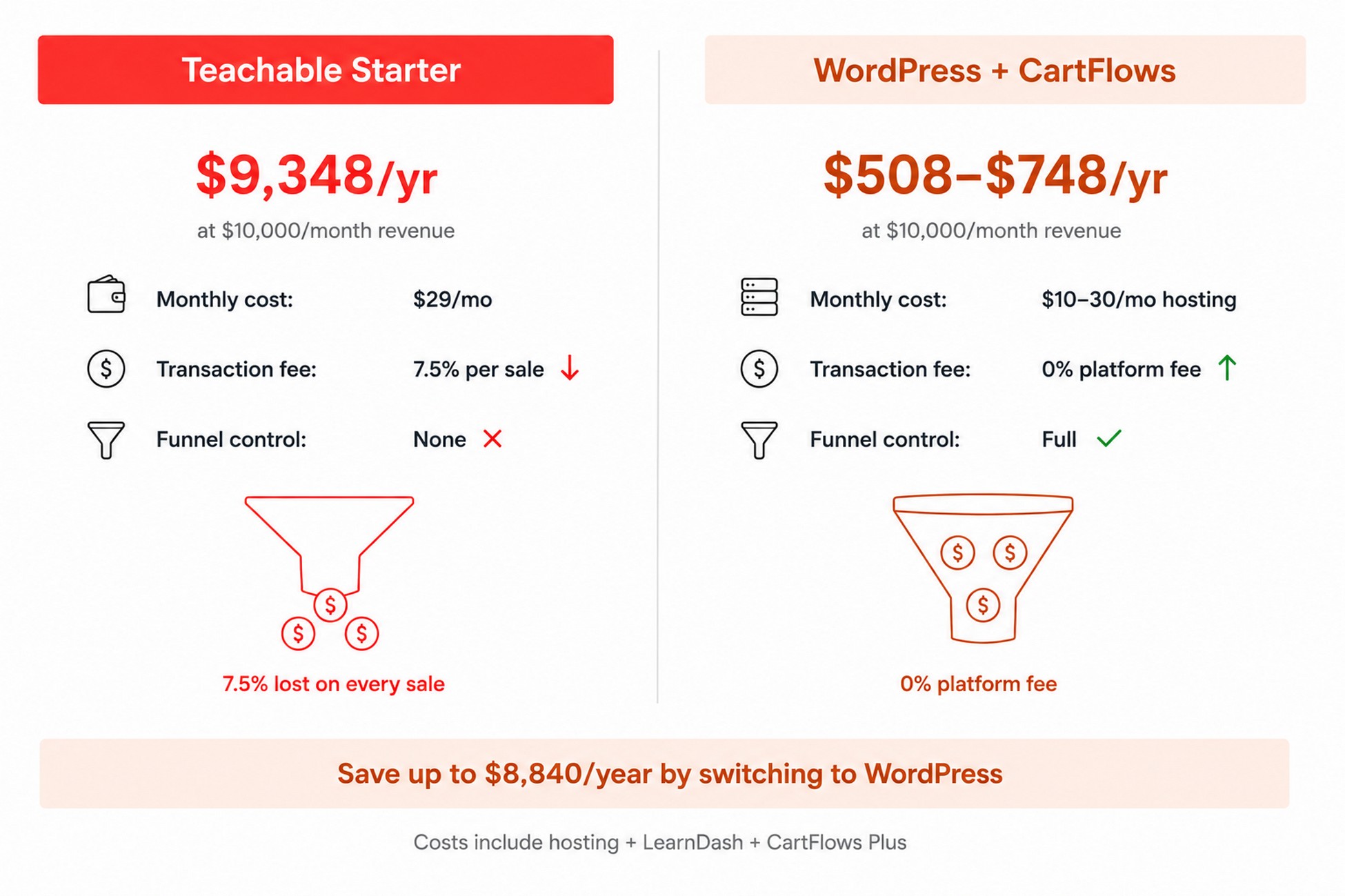
A course creator doing $10,000/month on Teachable’s Starter plan hands over $9,348 a year in fees before paying for anything else.
WordPress changes that equation. You keep your revenue, own your student data, and with the right plugin stack you can build a checkout funnel that makes every sale worth more.
This guide walks you through the exact setup: LearnDash as your learning management system, WooCommerce for payments, and CartFlows to turn a basic course checkout page into a high-converting digital product funnel with order bumps, one-click upsells, and automated student enrollment.
Is this guide for you?
Teachable and Kajabi are genuinely good platforms. If you want to launch a course this weekend with zero technical setup, they are a reasonable starting point. You get a hosted site, a checkout, and student management out of the box.
This guide is for a different moment: when you have outgrown that simplicity, or when you are starting out and already know you want full control over your checkout, your data, and your revenue.
This guide is for you if:
- You are on Teachable or Kajabi and the transaction fees or platform limits are becoming a real cost
- You already have a WordPress site and want to add a course with a proper sales funnel
- You want order bumps, one-click upsells, and automated enrollment without custom development
- You are comfortable installing and configuring WordPress plugins, or willing to learn
This guide is not the right fit if:
- You are just validating whether anyone will pay for your course idea (Teachable’s free trial is a faster first step)
- You want everything managed for you: hosting, security, updates, and support in one subscription
- You are selling through a marketplace like Udemy or Coursera and do not need your own checkout
There is no wrong answer here. WordPress gives you more control and lower costs at scale. Teachable gives you less friction at the start. Many course creators use both: Teachable to validate, WordPress to scale.
TL;DR
If you want to create online courses with WordPress and keep more revenue per sale, here is the short version:
- Use LearnDash to build your course ($199/year)
- Use WooCommerce to handle payments (free)
- Use CartFlows to replace the default checkout with a high-converting funnel ($199/year for order bumps and upsells)
- Add an order bump at checkout and a one-click upsell after payment
- Automate student enrollment so no manual work is needed
The full setup takes a few hours. The revenue difference vs Teachable or Kajabi is significant from day one.
- Is this guide for you?
- TL;DR
- Why create online courses on WordPress instead of Teachable or Kajabi?
- What you need to create courses with WordPress (The Course Revenue Stack)
- 1. Set up your course in LearnDash
- 2. Connect LearnDash to WooCommerce
- 3. Build a high-converting course checkout with CartFlows
- 4. Add an order bump to increase average order value
- 5. Set up a one-click upsell for your next course
- 6. Build a thank-you page that actually starts the student journey
- 5 mistakes that kill course sales on WordPress
- How to drive traffic to your course funnel
- CartFlows plans: what do you actually need?
- FAQ
- Final thoughts
What you will need before starting
- A self-hosted WordPress site (SiteGround, Cloudways, or similar)
- A LearnDash license ($199/year)
- WooCommerce (free)
- CartFlows (free to start; Plus plan at $199/year for order bumps and one-click upsells)
Why create online courses on WordPress instead of Teachable or Kajabi?
The global online education market is projected to reach $221 billion in 2026, growing at roughly 6.8% annually (Statista, Digital Market Outlook). The question is not whether to create courses. It is where.
When you build on Teachable or Kajabi, you are renting. One pricing change, one policy update, and your economics shift overnight. Teachable proved this in June 2025 when they eliminated their free plan and restructured fees across all tiers.
The cost difference is not marginal
| Teachable Starter | WordPress + CartFlows | |
|---|---|---|
| Monthly cost | $29/mo (annual) | $10–30/mo hosting |
| Transaction fee | 7.5% per sale | None beyond Stripe/PayPal processing |
| Product cap | 5 products | Unlimited |
| Funnel control | None | Full |
| Data ownership | Teachable’s servers | Your database |
| Annual cost at $10k/mo revenue | $9,348/year | $518–$758/year |
💡 Stat: On a $200 course selling 50 units/month, Teachable’s 7.5% transaction fee alone costs $750/month ($9,000/year) before the $348 annual subscription. (Teachable pricing)
Teachable’s Builder plan ($89/mo, $69/mo annual) drops the fee to 0% but costs $828/year and still gives you no funnel control, no order bumps, and no A/B testing on your checkout.
On WordPress, your student data lives in your database. Your course checkout page can be redesigned, tested, and optimized at any time. And instead of a “buy” button, you get a complete digital product funnel: landing page, optimized checkout, order bump, one-click upsell, custom thank-you page, and automatic student enrollment.
📌 Key takeaway: The cost gap widens with every sale you make. And the funnel control gap means every sale is worth less on Teachable than it could be on WordPress.
Further reading: WordPress Sales Funnel Guide (CartFlows)
What you need to create courses with WordPress (The Course Revenue Stack)
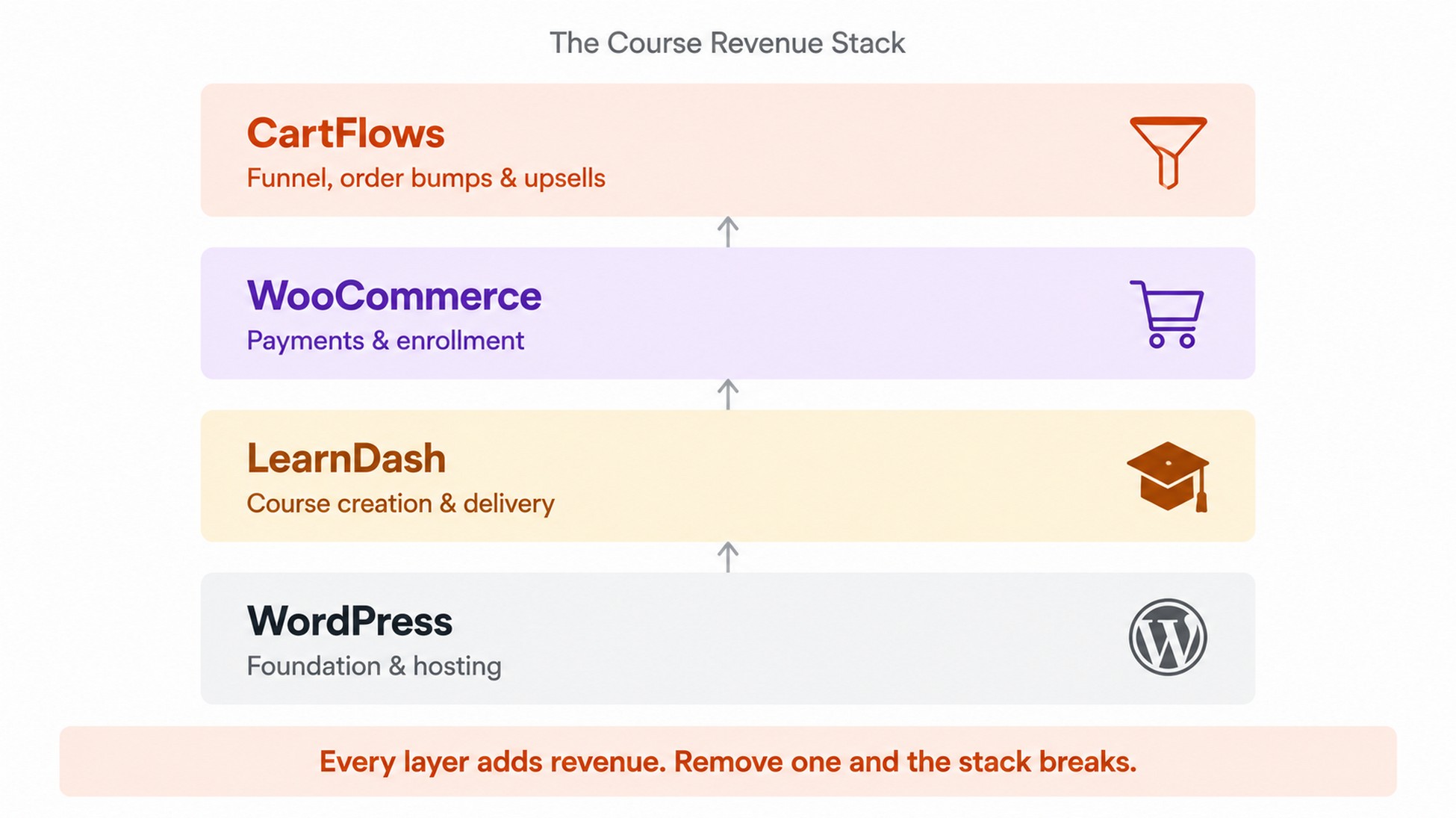
Selling courses on your online course website requires four pieces working together. We call this the Course Revenue Stack. Each layer handles one job, and they connect without custom code.
The 4-plugin stack
1. WordPress is your foundation. Self-hosted on any decent hosting provider (SiteGround, Cloudways, or similar). If you are already running a WordPress site, you are set. For theme, Astra is the most-installed non-default WordPress theme, built by the same team as CartFlows, and the two work together without any configuration.
2. LearnDash is your learning management system. It handles course creation, lesson sequencing, quizzes, certificates, drip scheduling, and student progress tracking. Trusted by Fortune 500 companies and major universities including the University of Michigan, it has the deepest WooCommerce integration of any WordPress LMS plugin available.
3. WooCommerce is your ecommerce and payments layer. It connects to Stripe, PayPal, and 100+ payment gateways, handles tax calculations, and manages order records. It is free.
4. CartFlows is your funnel layer. It turns a basic WooCommerce checkout into a high-converting course sales funnel with custom checkout pages, order bumps, one-click upsells, and A/B testing. CartFlows has 200,000+ active installs on WordPress.org and a 4.8-star rating.
“I use CartFlows to customize and supercharge the purchase process for coaches selling online courses and memberships. If you use WooCommerce, you need CartFlows.” — CartFlows user via cartflows.com
What about alternatives? FunnelKit and WPFunnels also work with WooCommerce. CartFlows is the better fit here because it integrates natively with LearnDash without bridge plugins and is built by Brainstorm Force, the same team behind Astra.
How to choose the best LMS plugin for WordPress
LearnDash is not the only WordPress LMS plugin, and it is not always the right choice. Here is a breakdown for building an online learning website on WordPress:
| WordPress LMS plugin | Best for | Free version | Price for full features | WooCommerce integration |
|---|---|---|---|---|
| LearnDash | Professional course sellers, multi-course sites | No | $199/yr (1 site) | Native, deepest |
| LearnPress | Budget-conscious creators, simple courses | Yes | Bundles from ~$299/yr | Via free add-on |
| TutorLMS | Visual builders, marketplace-style platforms | Yes | Pro from $199/yr (1 site) | Via Pro add-on |
| LifterLMS | Membership + course combos, coaching | Yes | Bundles from $149/yr | Via paid add-on |
| MemberPress | Membership-first sites that also sell courses | No | From $199.50/yr + 4.9% fee | Own checkout (not WooCommerce) |
| Sensei LMS | WooCommerce-native, simple course delivery | Yes | From $179/yr | Built-in, native to WooCommerce |
A few honest notes on each:
LearnDash is the choice for this guide because all three pricing tiers include identical core features. The only difference is how many sites you can install it on. If you are building one serious course business, $199/yr gets you everything.
TutorLMS has grown significantly with version 3.0. It now includes native payments (no WooCommerce required), AI course generation, and subscriptions. Worth evaluating if you want fewer plugins.
MemberPress is strong if you want to combine courses with paid membership tiers. A $97/month membership that includes access to all your courses is a natural fit. Its WooCommerce integration is limited though; it uses its own checkout instead.
Sensei LMS is built by Automattic (the company behind WordPress.com and WooCommerce) and integrates directly with WooCommerce without a bridge plugin. A reasonable alternative to LearnDash if you want something closer to the core WordPress ecosystem.
If budget is tight, LearnPress or TutorLMS Free are worth testing before committing.
Further reading: LearnDash + WooCommerce: 9 reasons to use them together
1. Set up your course in LearnDash
Most course creators build their course first and plan their funnel later. That ordering costs them money. The structure of your course directly affects how you price it, what you can offer as an order bump, and whether students finish it and come back to buy the next one. For courses with substantial reading or study material, an AI flashcard generator can turn key concepts and notes into review materials that students can use alongside the lessons. Get the structure right before you connect anything to WooCommerce.
Install LearnDash and build your first course
Install the LearnDash plugin from your WordPress dashboard, activate it, and go to LearnDash LMS > Courses > Add New. Give your course a title and description, then click the Builder tab.
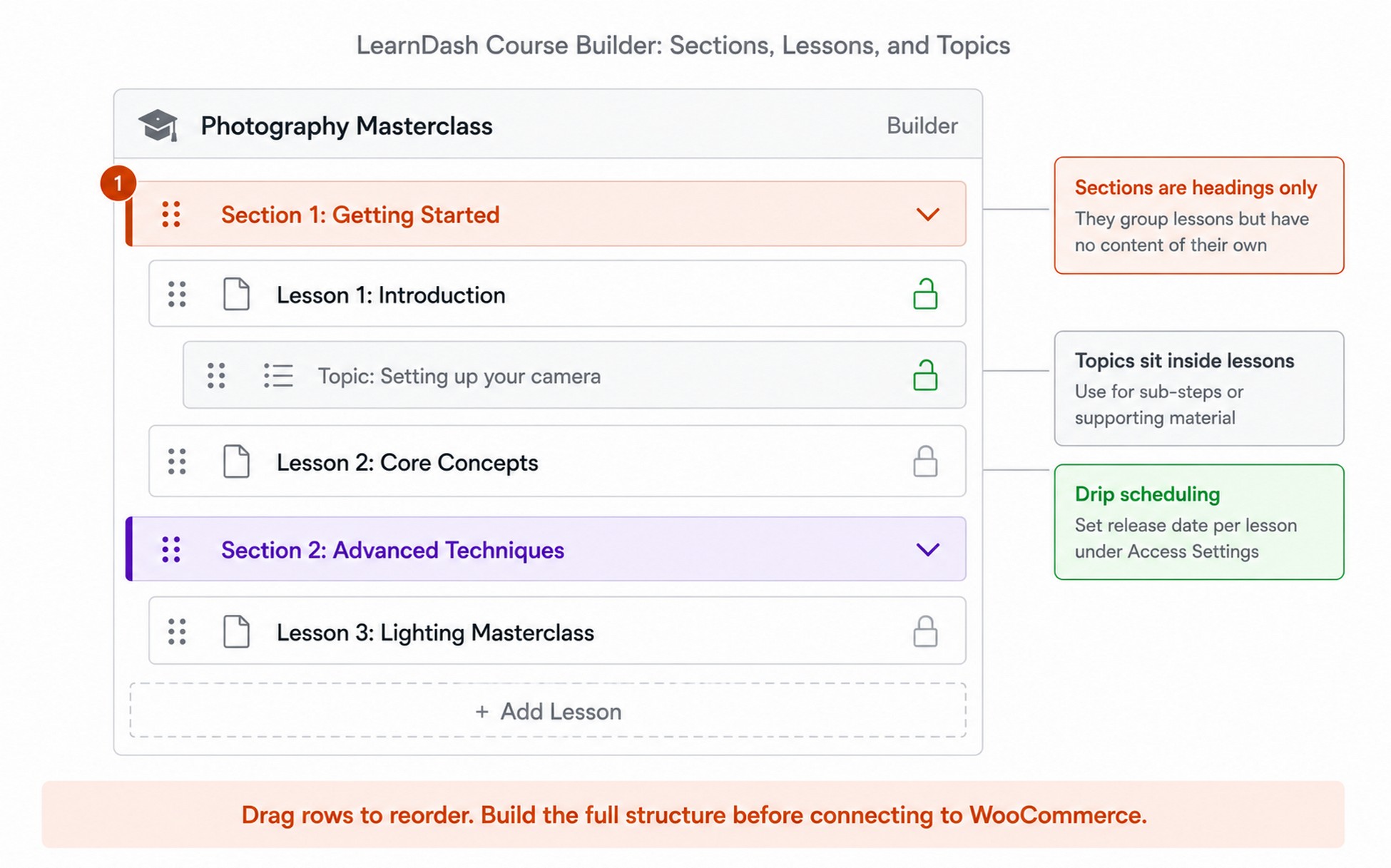
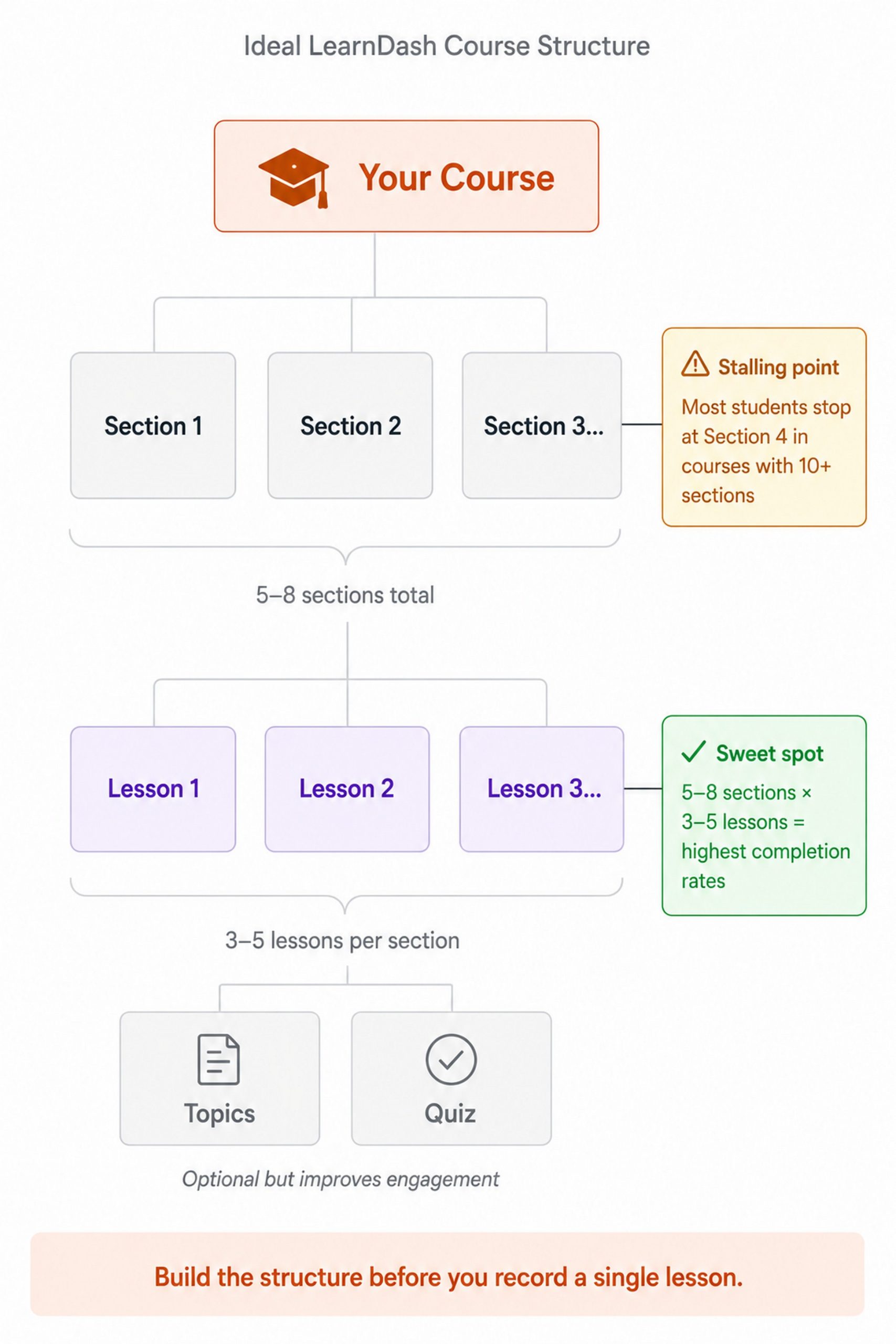
The course builder uses a drag-and-drop interface. The content hierarchy is: Lessons, Topics, Quizzes. Sections are optional text-only headings you can place between lessons to group content visually. They do not contain content themselves. Each lesson and topic can include text, video embeds, downloadable resources, and assignments.
Structure your course for completion, not just enrollment
Most course creators dump 40+ lessons into a single course and wonder why completion rates are low. The problem is not the content. It is the structure.
Courses with 5 to 8 sections of 3 to 5 lessons each tend to have significantly higher completion rates. Go past 10 sections and most students stall around the fourth, regardless of how long the course actually is.
Pro tip: Use LearnDash’s Lesson Release Schedule (under each lesson’s Access Settings) to drip lessons on a timed schedule, for example one new lesson every 7 days. This creates a “next lesson drops Tuesday” effect that consistently improves completion vs open-access courses.
The course is built. Now let’s make it purchasable.
2. Connect LearnDash to WooCommerce
LearnDash has basic built-in payment options, but they do not support order bumps, upsells, or funnel control. WooCommerce adds all of that, plus access to 100+ payment gateways and the full ecommerce infrastructure a serious course business needs.
Install WooCommerce and the LearnDash add-on
Install WooCommerce from your WordPress dashboard (Plugins > Add New Plugin, search “WooCommerce”, Install Now, Activate). Run through the setup wizard to configure your store location, currency, and payment processors. Stripe and PayPal are the standard choices.
Next, install the WooCommerce for LearnDash add-on. Go to LearnDash LMS > Add-ons, find it under the Available tab, and install it from there. This is the bridge that links WooCommerce purchases to LearnDash course enrollment.
⚠️ Critical setting: Go to WooCommerce > Settings > Accounts & Privacy and enable “Allow customers to create an account during checkout.” LearnDash needs a user account to grant course access. If a student checks out as a guest, automatic enrollment will not work.
Create a WooCommerce product and link it to your course
Go to Products > Add New. Give the product a title, description, and price.
In the Product Data section:
- Check the Virtual box (no shipping needed for a digital course)
- Open the product type dropdown and select Course to activate the LearnDash integration fields
- In the LearnDash Courses field, search for and select your course
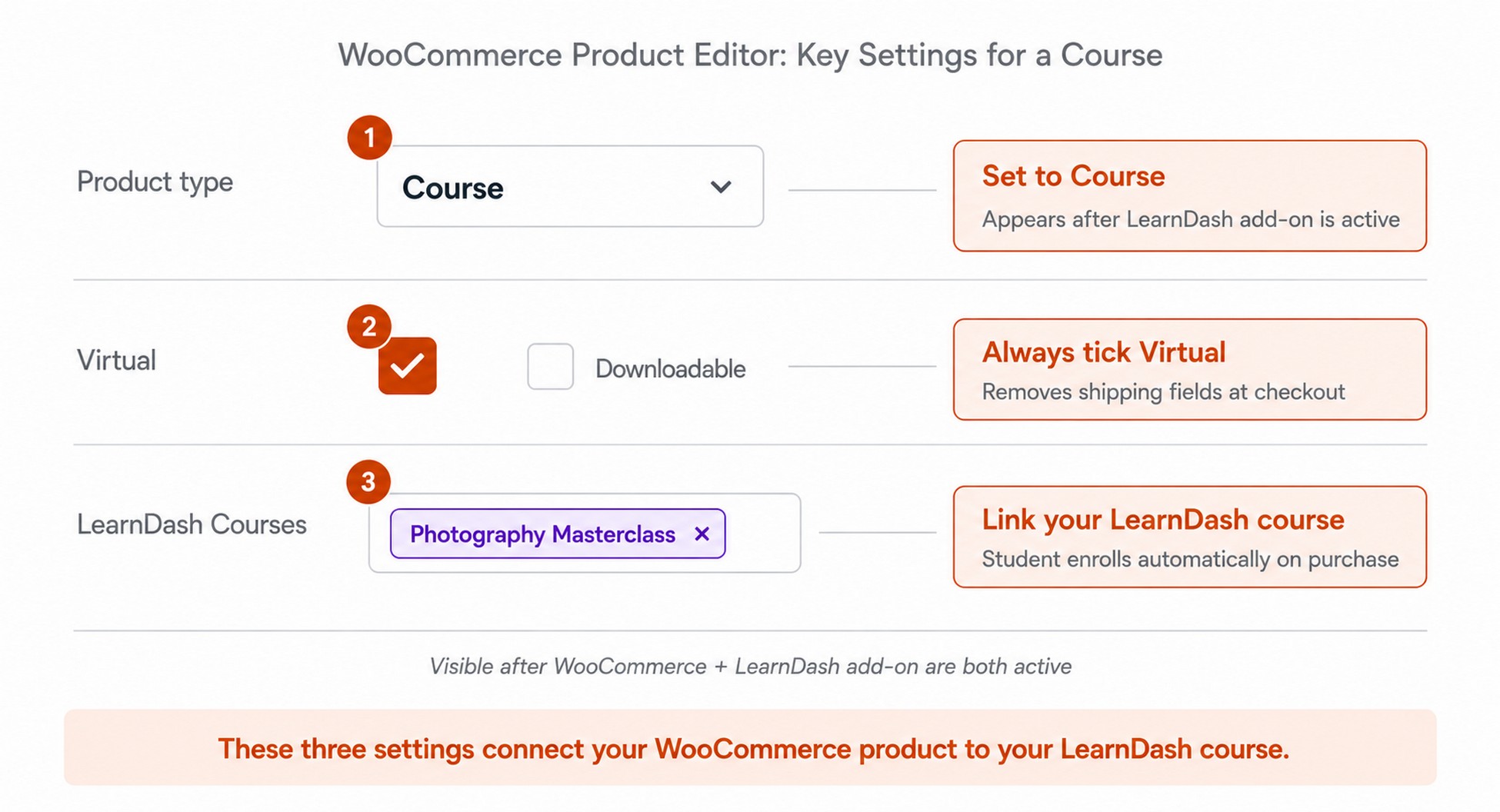
When someone buys this product, WooCommerce triggers automatic enrollment in the linked LearnDash course. No manual work. No “check your email for access” delays.
Sidenote: If orders stay on “Processing,” students will not get enrolled until you manually update the status. Fix this by installing the free “WooCommerce Auto Complete Orders” plugin. It marks virtual orders complete on payment, which triggers LearnDash enrollment instantly.
You now have a course and a working WooCommerce checkout. But the default checkout page is leaving money on the table with every single sale.
3. Build a high-converting course checkout with CartFlows
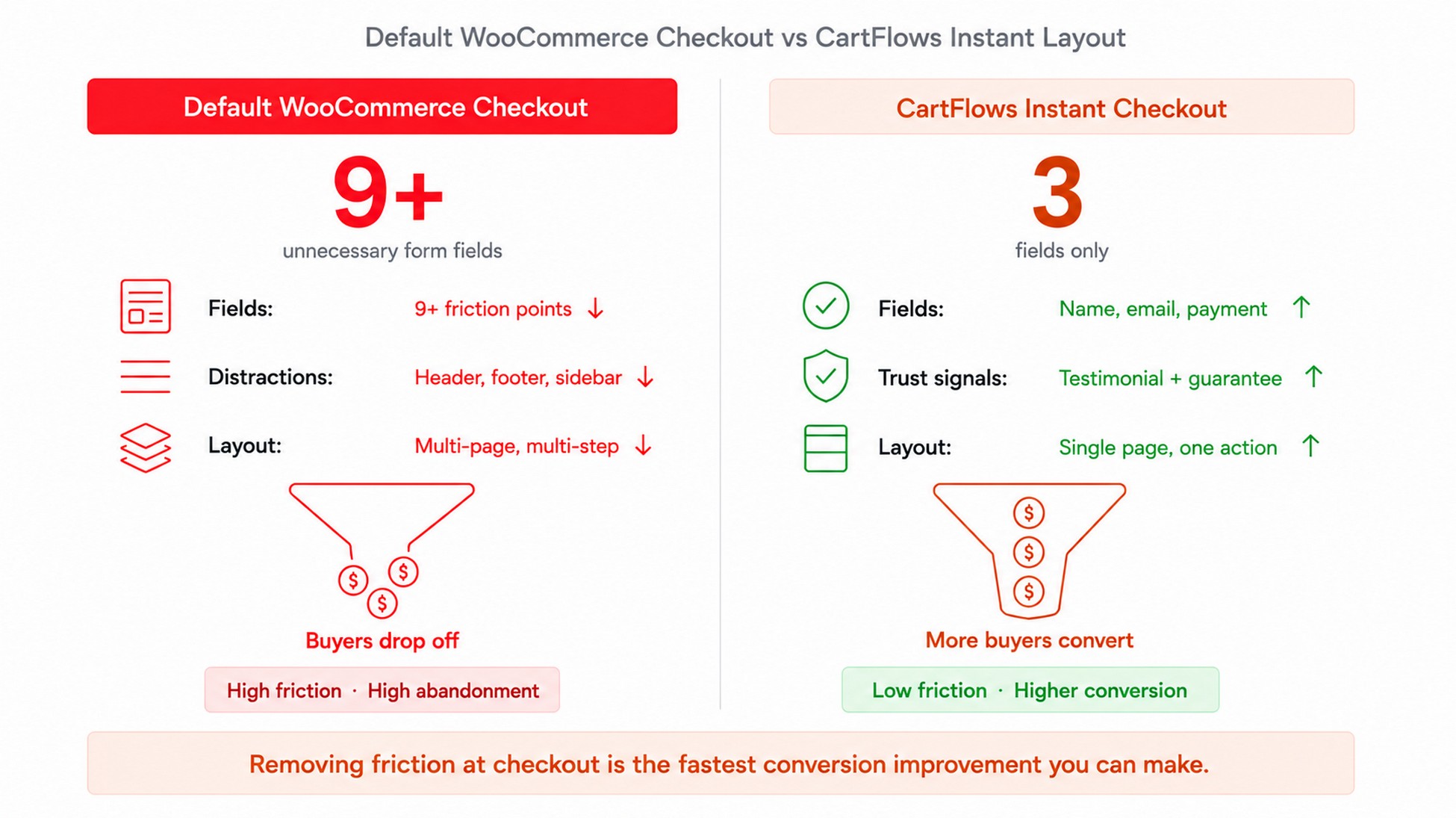
The default WooCommerce checkout was built for physical products: shipping fields, billing addresses, a cluttered multi-column layout. For a single digital course purchase, every unnecessary field is friction. And friction costs you sales.
CartFlows replaces that default WooCommerce checkout with a distraction-free page built for conversions. Remove everything that is not the payment form. Add trust signals. Guide the student to one action.
Install CartFlows and create your first funnel
Install CartFlows (Plugins > Add New Plugin, search “CartFlows”, Install Now, Activate).
- Starter ($99/year): Instant Checkout Layouts, modern checkout styles, custom checkout fields, Google address autocomplete, real-time email validation, custom thank-you pages, order details display, and email capture forms
- Plus ($199/year): adds order bumps, one-click upsells, multi-step checkout, two-step checkout layout, product options, product variation selection, product quantity controls, instant upsell layouts, dynamic upsell templates, and smart funnel routing
- Pro ($299/year): adds A/B split testing, advanced funnel analytics, custom form fields, dynamic offer conditions, and premium readymade templates
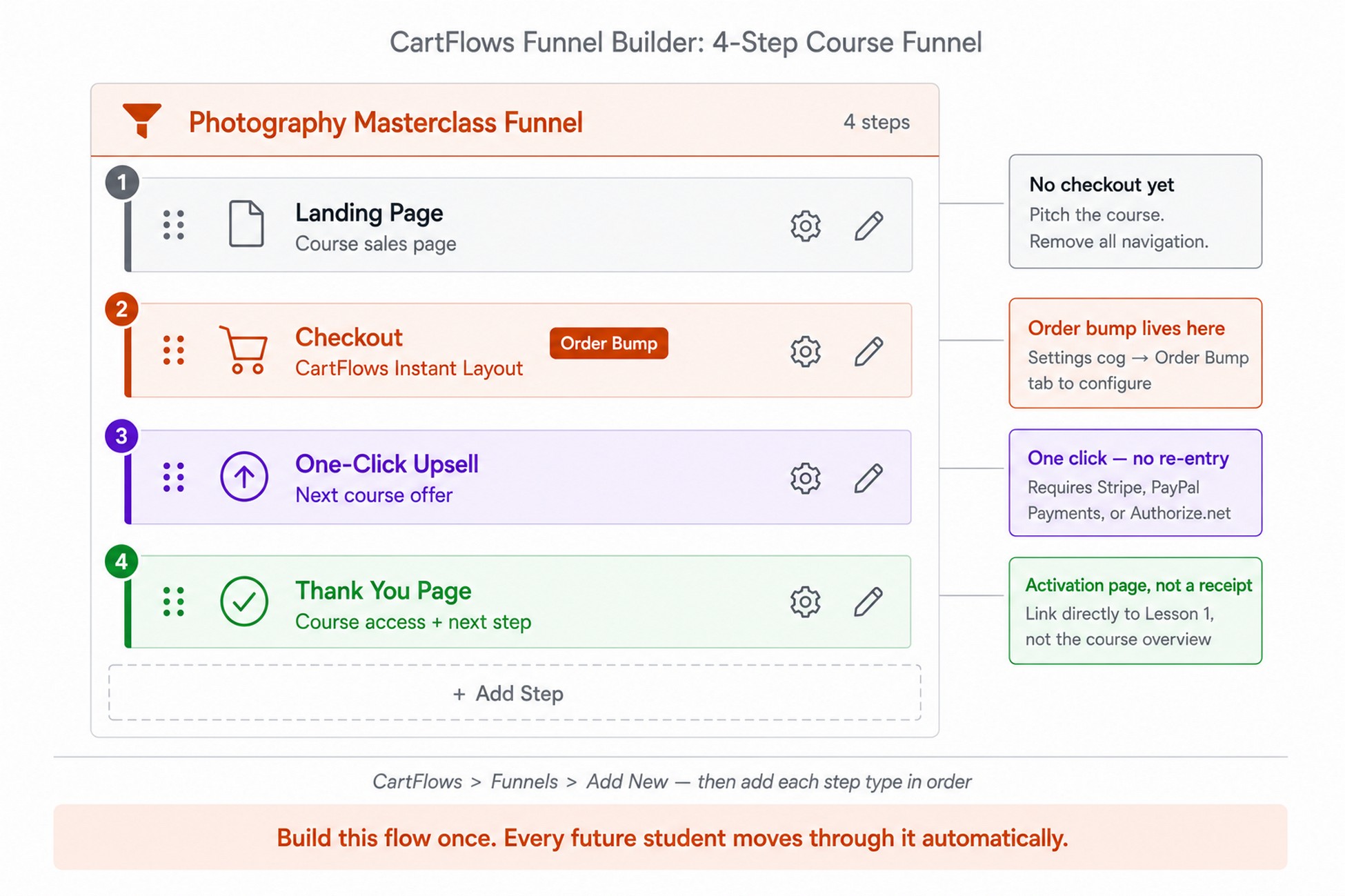
Once activated, go to CartFlows > Funnels > Add New.
CartFlows offers pre-built checkout templates optimized for digital products. Pick one, import it, and customize for your course. Or build from scratch with these steps:
- Landing Page (optional, where students arrive from ads or SEO)
- Checkout Page (where the student enters payment details)
- Upsell Page (one-click offer shown after checkout)
- Thank You Page (confirmation, course access, next steps)
Optimise your course checkout page for conversions
CartFlows’ Instant Checkout Layout strips away menu links, footer widgets, and sidebar content. What is left is the course summary, trust signals, and the payment form.
Beyond switching the layout, apply these WooCommerce checkout optimization changes:
- Remove all shipping fields (it is a digital course, no address needed)
- Add a student testimonial directly above the payment button
- Add a money-back guarantee badge next to the price
- Display payment logos (Stripe, PayPal) for trust
- Reduce form fields to name, email, and payment details only
Pro tip: According to CartFlows’ order bump documentation, you can position your bump after customer details, after the order summary, or before payment. “After Customer Details” typically outperforms the others. Test before locking in.
The checkout is live. The next step is where course creators leave the most money behind.
4. Add an order bump to increase average order value
An order bump is a small, complementary offer shown directly on the checkout page. It is a single checkbox the student ticks to add it to their purchase. No second checkout. No new page. No friction.
The reason it works: the student has already made the buying decision. Their credit card is out. Adding a relevant, low-priced companion offer at that exact moment is the lowest-resistance revenue opportunity in your entire digital product funnel.
What to offer as a course order bump
The strongest order bumps are priced at 10–25% of the main course price. For a $197 course, that means:
- Companion workbook or templates ($27–$47)
- Private community access for 3 months ($37)
- Extended resource library or bonus lessons ($27)
- Certificate of completion bundle ($27)
- Lifetime access upgrade if the base course is time-limited ($47)
The key rule: the bump must feel like a natural extension of the course. A workbook that follows the exact lesson structure converts. A “VIP membership” with no clear connection to the course does not.
Set up the order bump in CartFlows
In your CartFlows funnel, click the Settings icon (cog) next to the Checkout step, then go to the Order Bump tab (available on CartFlows Plus at $199/year or any CartFlows Suite plan).
Add your bump product, set the price, write a short one-line description, and choose your display position.
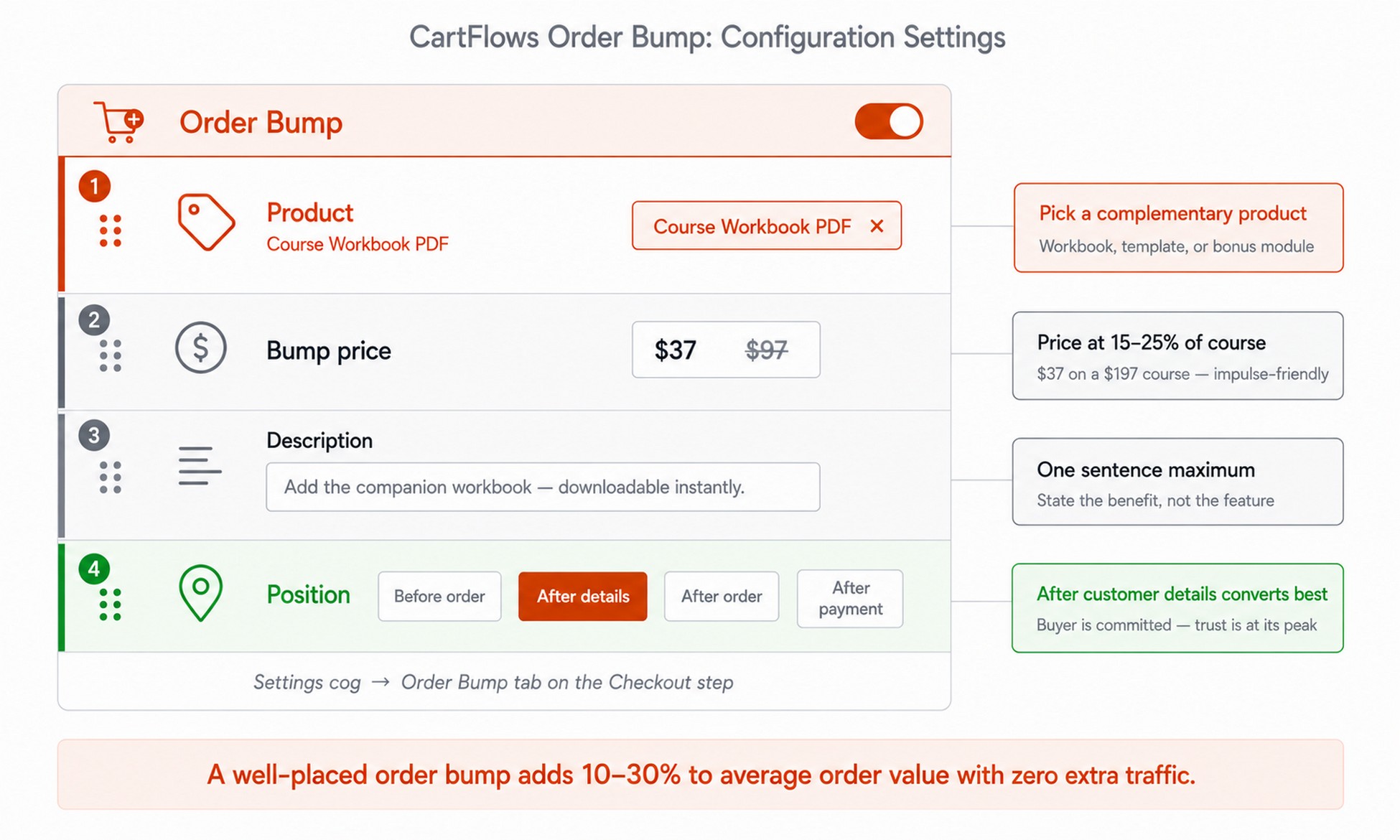
Order bumps typically see acceptance rates of 15–40% depending on offer relevance, though results vary based on how closely the bump matches the main product. Here is what that looks like:
| Scenario | Monthly revenue |
|---|---|
| Without order bump: 50 students x $197 | $9,850 |
| With $37 bump at 20% acceptance | $10,220 |
| With $37 bump at 30% acceptance | $10,405 |
💡 Stat: That is $370–$555 in extra monthly revenue from a single checkbox. Over a year: $4,440–$6,660 in additional income from buyers who were already checking out.
📌 Key takeaway: Order bumps are often one of the highest-ROI features in a CartFlows funnel. They add revenue without adding traffic, ads, or complexity. Enable them before your first sale.
The moment after they complete their purchase is where most course funnels leave the most money behind.
5. Set up a one-click upsell for your next course
This is where the Course Revenue Stack separates from every standard WooCommerce setup.
After a student completes checkout, CartFlows shows a one-click upsell page before the thank-you page. When using a supported gateway such as Stripe, the student does not re-enter payment details. One click charges the additional course and adds it to their order instantly.
Why this moment converts
The student just committed to learning from you. Their trust is at its highest point. Their wallet is already out. This is the highest-intent moment you will ever have with this customer, and it costs nothing in ad spend to reach them.
Example upsell sequence:
- Student buys Beginner Photography ($197)
- CartFlows shows: “You’re in! Add the Advanced Lighting Masterclass for $97 (normally $297)” with one-click accept
- Student clicks “Yes, add to my order” and is enrolled in both courses instantly
Many course businesses see one-click upsells convert at 10% or more when the offer closely matches the original purchase, adding meaningful revenue with zero additional traffic.
Configure the upsell in CartFlows
Click Add New Step, then choose Upsell from the step types. Place it after the Checkout step and before the Thank You page. Select your upsell product, set the discounted offer price, and customize the page.
The highest-converting course sales page upsells share four elements:
- A momentum headline: “You’re in! Want to go deeper?”
- 2–3 specific bullet points on what the advanced course covers
- The discounted price with the original crossed out
- A “Yes, add to my order” button paired with a plain-text “No thanks” decline link
Sidenote: You can also add a downsell step. If the student declines the $97 upsell, CartFlows can show a $47 offer for the first module only. The full chain: Checkout, Upsell, Downsell, Thank You. Each is a separate step type. Add them individually and CartFlows routes the student based on what they accept or decline.
Most course creators stop here. The next page is the one they overlook entirely.
6. Build a thank-you page that actually starts the student journey
Most course creators treat the thank-you page as a receipt. “Thanks for your purchase. Check your email.” That is a missed opportunity at the exact moment a student is most excited and most likely to take action.
The thank-you page is not an afterthought. It is the first step of the learning journey.
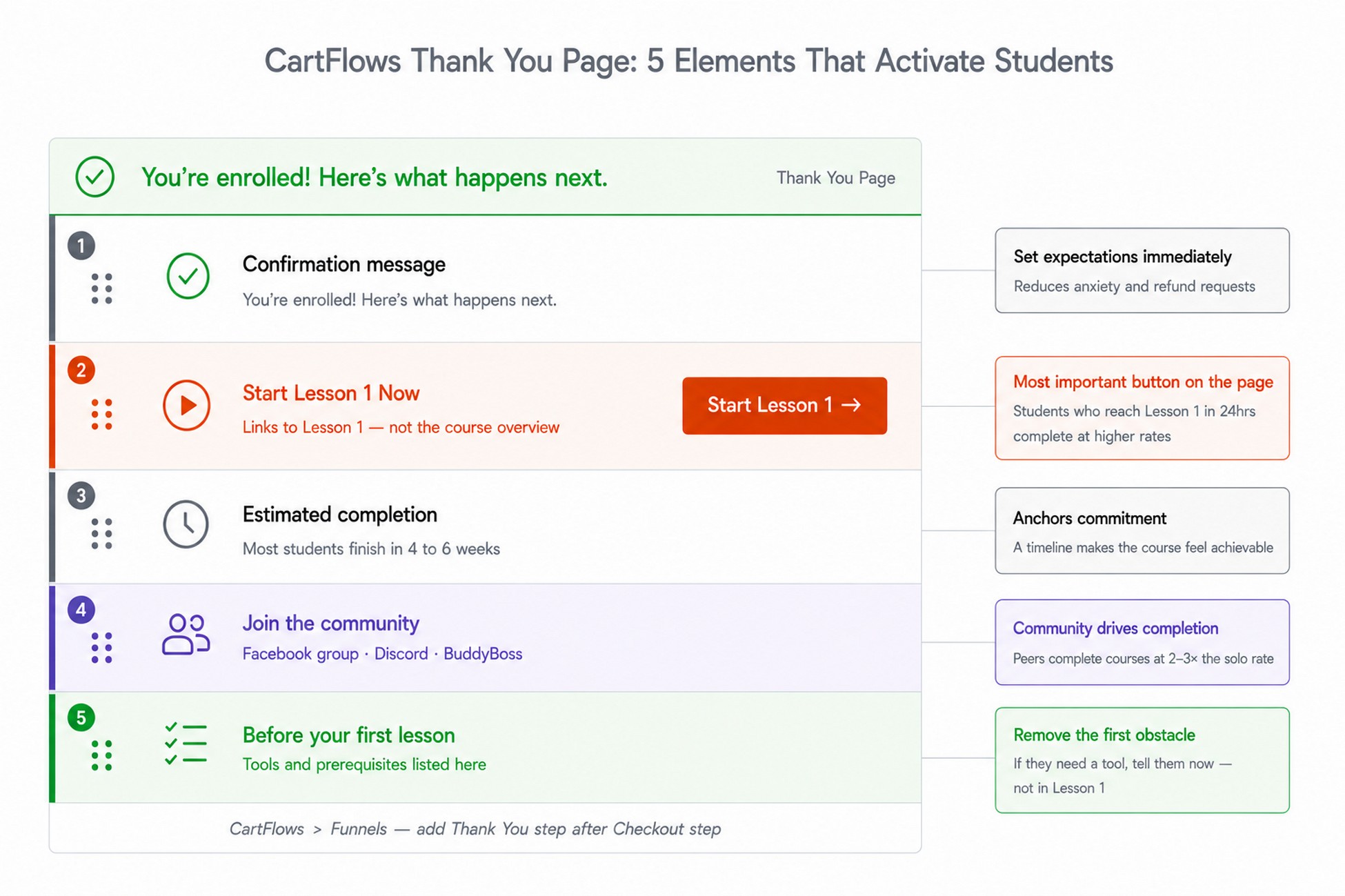
What your CartFlows thank-you page should include
Students are more likely to start their course when they see a clear next step immediately after purchase, rather than a generic confirmation message and a wait for email.
Include these five elements:
- Confirmation message: “You’re enrolled! Here’s what happens next.”
- Direct course access button: “Start Lesson 1 Now” linking to the first lesson, not the course overview
- Estimated completion time: “Most students complete this course in 4 to 6 weeks”
- Community invite: link to your Facebook group, Discord, or BuddyBoss community
- Quick-start checklist: “Before your first lesson, make sure you have [tools/prerequisites]”
Set up automated welcome emails
The thank-you page handles the first 60 seconds. Your email sequence handles the first 7 days, which is the window when most students either commit to a course or quietly abandon it.
Set up a WooCommerce-triggered automation using SureContact, FluentCRM, or your email tool of choice:
- Day 0: Welcome email with course login link and “Start Lesson 1” CTA
- Day 2: Check-in asking if they have started yet, with a tip for their first lesson
- Day 7: Progress nudge noting that students who complete their first two lessons in week one are far more likely to finish
Further reading: LearnDash tutorial: creating your first course on WordPress
Your funnel is built. Let’s make sure you are not undercutting it with avoidable mistakes.
5 mistakes that kill course sales on WordPress
These are not technical mistakes. They are decisions that seem fine at the time and only show their cost in your revenue report three months later.
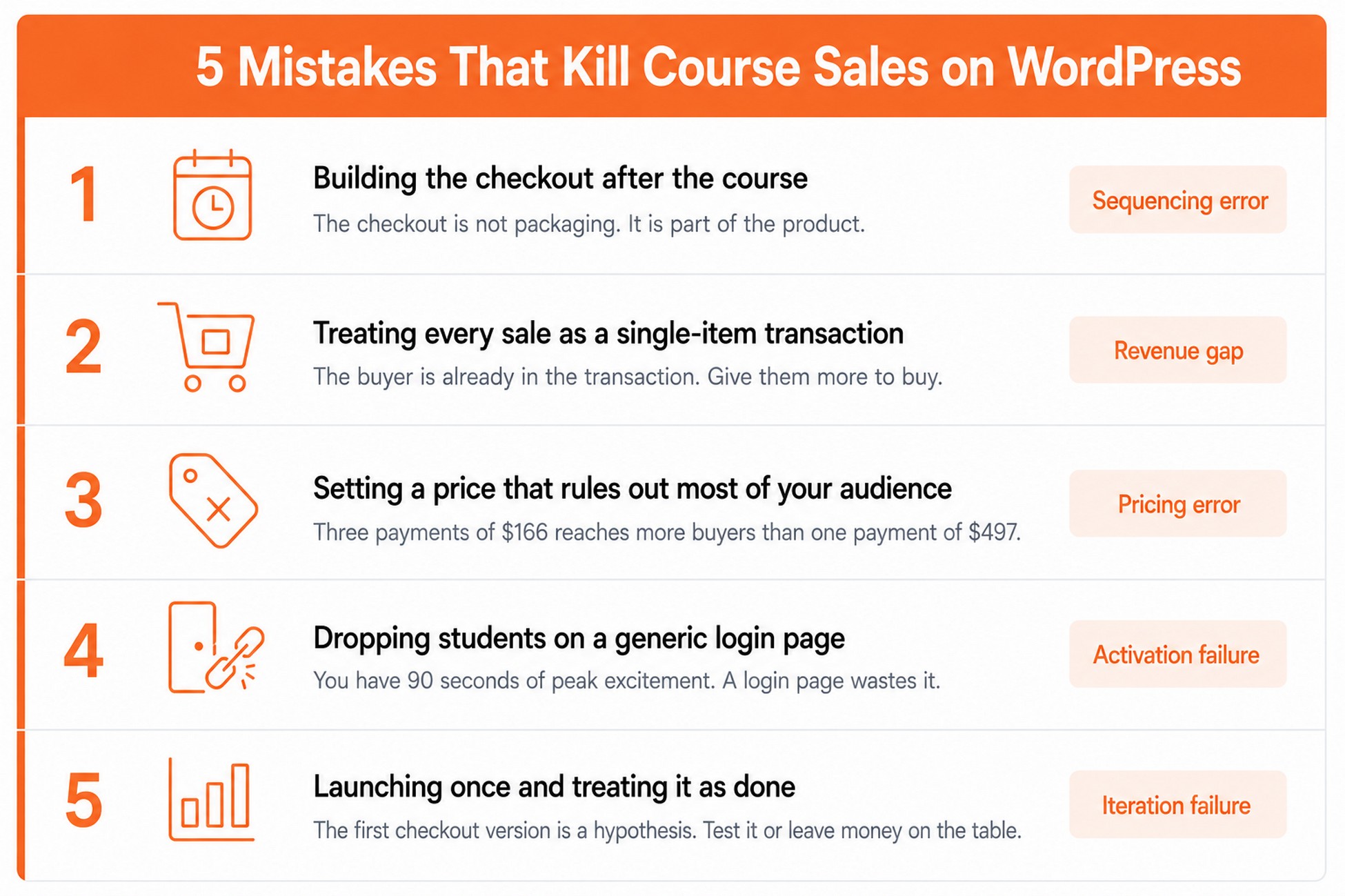
1. Building the checkout after the course instead of alongside it
Most course creators finish the course, then think about how to sell it. The result is a checkout page bolted onto the end of the production process: default WooCommerce layout, no testimonials, shipping fields on a digital product, no thought given to what should happen after the sale.
The checkout is not packaging. It is part of the product. A student who abandons a confusing checkout never sees the course they were ready to buy. Build the funnel structure, checkout, upsell, thank-you page, before you record your first lesson, not after.
2. Treating every course sale as a single-item transaction
When a student arrives at checkout to buy a $197 course, they have already decided to spend money with you. That is the highest-trust moment you will have with them. Most WordPress course setups do nothing with it.
A companion workbook at $37. A community access pass at $47. A 1:1 session at $97. Any of these, offered at the right moment, adds revenue from a buyer who is already in the transaction. The mistake is not the absence of CartFlows. It is the absence of any adjacent offer at all. Most course creators never build one.
3. Setting a price point that rules out most of your audience
A $497 course sounds premium. It also rules out every potential student who cannot absorb a $497 charge in one hit, which is most people. Three payments of $166 is the same revenue, a larger addressable audience, and no meaningful difference in completion rates.
Payment plans are not a discount. They are a different entry point to the same course. Set them up with WooCommerce Subscriptions alongside your standard price from day one, not as an afterthought when sales slow down.
4. Dropping students on a login page the moment they buy
You just convinced someone to invest in their own learning. Their excitement is at its peak for exactly the next 90 seconds. What they do in that window, whether they click through to Lesson 1 or close the tab, predicts whether they will finish the course.
Sending a new student to WordPress’s default wp-login.php page with no context or direction is the single most common cause of low course completion rates on self-hosted sites. A properly built thank-you page (covered in Step 6) turns that 90-second window into a genuine activation moment.
5. Launching once and treating it as done
The first version of a checkout page is a hypothesis. The headline you wrote, the testimonial you chose, the button copy, the price display: all of it is your best guess about what converts. Some of it will be right. Some will not.
The problem is not that the first version is imperfect. The problem is treating it as final. Course creators who run even one A/B test on their checkout, a different headline, a testimonial moved above the payment button, a guarantee badge added next to the price, consistently find a version that outperforms their launch. The ones who never test permanently leave that difference on the table.
How to drive traffic to your course funnel
The best course funnel generates zero revenue without traffic. These four approaches work consistently at different stages.
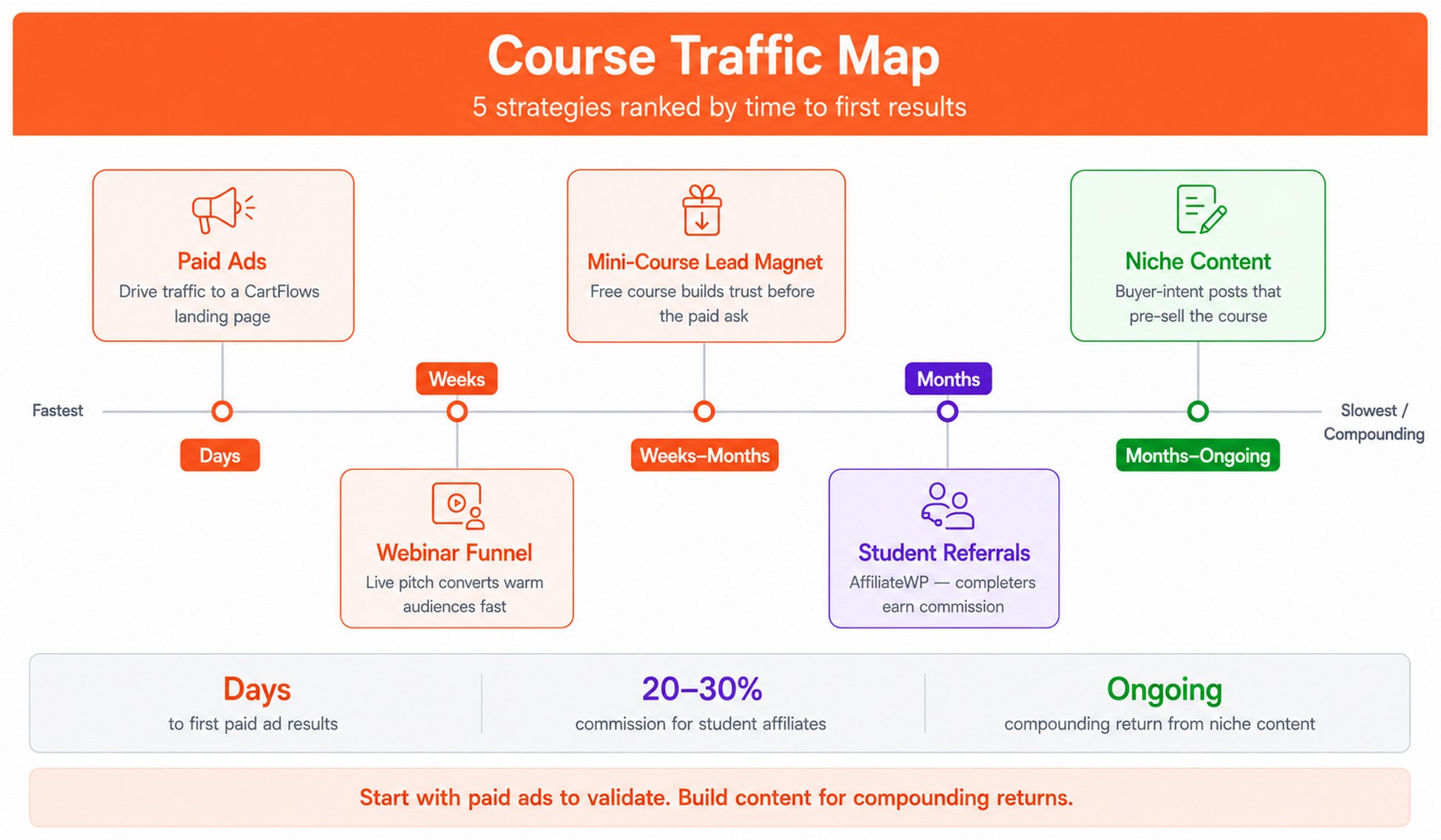
Free mini-course as a lead magnet
Build a free 3–5 lesson mini-course covering the fundamentals of your topic. Use CartFlows to create an opt-in funnel: landing page, free course enrollment, email sequence, paid course offer.
A yoga instructor offering a free “5-Day Morning Stretch” mini-course, then upselling to a $197 “Yoga Teacher Certification” program, is not asking anyone to buy blind. The student already knows what they are getting. CartFlows handles the full flow: the opt-in page captures their email, WooCommerce enrolls them in the free LearnDash course, and email automation sequences them toward the paid offer.
Webinar to course funnel
Host a live webinar teaching one specific, immediately useful concept from your course. At the end, offer a limited-time discount to attendees.
CartFlows landing page templates work well for webinar registration. Set up a time-sensitive coupon via Power Coupons (included in the CartFlows Suite) to auto-apply at checkout for attendees.
Niche content that pre-sells the course
The most cost-efficient long-term traffic source for a course business is not ads or email. It is specific content that answers the exact question a potential student has the week before they would buy your course.
The mistake most course creators make with content is writing about their topic broadly. A photography course creator writes “best cameras for beginners.” That attracts people who want to buy a camera, not a course.
The better approach: write about the problem your course solves at the moment someone is ready to pay for help. “Why my photos look flat even in manual mode” or “how to get consistent results in difficult lighting” are searches made by people who already know the basics and are frustrated. Those are your buyers.
Then the post ends with a natural transition: “If you keep running into this, my [Course Name] walks through exactly how to fix it in Module 3.” The course checkout page linked from that post is a CartFlows page, distraction-free, with a testimonial from a student who had the same frustration. The conversion rate from that specific traffic is meaningfully higher than from generic “photography tips” content.
This works in any niche. A bookkeeping course creator gets more buyers from “how to categorise mixed-use expenses in QuickBooks” than from “bookkeeping for small businesses.” A yoga instructor gets more from “what to do when your lower back hurts in forward folds” than from “beginner yoga poses.”
Further reading: WordPress Sales Funnel Guide (CartFlows)
Paid ads directly to a CartFlows landing page
Facebook and Google ads driving to a CartFlows landing page, not your course’s WordPress page, is the fastest path to revenue. Landing pages in CartFlows have no site navigation, which removes the biggest distraction between a visitor and a checkout.
Start small, test landing page copy, then scale what converts.
Student referrals with AffiliateWP
Your best salespeople are students who already finished your course and got results. AffiliateWP lets you set up an affiliate program so existing students earn a commission for every referral that converts. A 20–30% commission on a $197 course is a strong incentive, and referral traffic from a genuine student recommendation converts at a significantly higher rate than cold ad traffic.
This is the lowest-cost traffic source available once you have your first cohort of completers.
Ready to build your course funnel? CartFlows has a free plan to get started. The Plus plan at $199/year unlocks order bumps and one-click upsells for your first course. Start free with CartFlows
CartFlows plans: what do you actually need?
CartFlows comes in two product lines: standalone plans and the CartFlows Suite, which bundles five plugins under one license (CartFlows Pro, Cart Abandonment Recovery, Modern Cart, Power Coupons, and OttoKit Pro).
CartFlows standalone plans
CartFlows has four tiers. The differences between them are straightforward:
Free — basic funnel builder only. No checkout polish, no order bumps, no upsells. Good for testing the interface.
Starter ($99/yr, renews $129/yr) — 1 site Checkout-focused. Includes Instant Checkout Layouts, modern checkout styles, custom checkout fields, Google Address Autocomplete, real-time email validation, custom thank-you pages, order details display, and email capture forms. No order bumps or upsells.
Plus ($199/yr, renews $249/yr) — 3 sites Everything in Starter, plus order bumps and one-click upsells. This is where the revenue optimisation starts. Also adds multi-step checkout, two-step checkout layout, product options, product variation selection, product quantity controls, instant upsell layouts, dynamic upsell templates, and smart funnel routing. This is the minimum for a full course funnel.
Pro ($299/yr, renews $399/yr) — 30 sites Everything in Plus, plus A/B split testing, advanced funnel analytics, custom form fields, dynamic offer conditions (AND/OR), and premium readymade templates. The right choice if you are running paid ads and need to test your checkout.
See full feature breakdown: cartflows.com/cartflows-new-pricing-plans
CartFlows Suite: the better value for most course creators
The Suite bundles all five plugins under one license: CartFlows Pro ($299/yr), Cart Abandonment Recovery ($99/yr), Modern Cart ($79/yr), Power Coupons ($99/yr), and OttoKit Pro ($108/yr). Bought separately that is $684/yr. The Suite starts at $449/yr.
| Plan | Price | Renews at | Sites |
|---|---|---|---|
| Grow | $199/year | $299/year | 1 |
| Scale | $299/year | $429/year | 3 |
| Agency | $449/year | $649/year | 30 |
Every Suite plan includes the full CartFlows Pro feature set: order bumps, one-click upsells, A/B split testing, advanced analytics, and smart funnel routing. It also includes:
- Cart Abandonment Recovery: email, SMS, and WhatsApp sequences to recover students who left checkout without buying. See how cart abandonment recovery works
- Modern Cart: floating slide-out cart with in-cart upsells and one-click payments for returning customers
- Power Coupons: auto-apply discounts, BOGO offers, and dynamic coupon rules
💡 Stat: The CartFlows Suite starts at $449/year (30 sites) and includes five plugins worth $684/year if bought separately, a saving of $239/year, with everything working under a single license.
The Suite is priced at $449/year on the standalone pricing page (30 sites). If you need a smaller site count, the Suite is also available in Grow (1 site, $199/yr), Scale (3 sites, $299/yr), and Agency (30 sites, $449/yr) tiers on the Suite pricing page.
If you only need funnel and checkout features, the standalone Plus plan ($199/year, 3 sites) makes sense.
See current pricing: CartFlows standalone plans | CartFlows Suite plans
Not sure which plan fits your course business? Start with the CartFlows pricing page for a side-by-side plan comparison.
FAQ
The CartFlows Suite ($449/year, 30 sites) includes the full Pro feature set plus Cart Abandonment Recovery, Modern Cart, Power Coupons, and OttoKit Pro. It is also available in smaller site-count tiers on the Suite pricing page. For a single-site course creator, compare Suite vs standalone Pro before deciding.
Final thoughts
There are two ways to sell online courses with WordPress.
The first: install LearnDash, connect it to WooCommerce, and call it done. That works. Students buy, enroll, and learn.
The second: treat every step of the buying journey as a revenue opportunity. A course checkout page that removes friction. An order bump that adds value without pressure. An upsell that reaches the student at the exact moment their trust is highest. A thank-you page that turns a transaction into the first moment of a learning relationship.
The Course Revenue Stack (LearnDash, WooCommerce, and CartFlows) gives you both paths. The setup takes a few hours. The compounding effect from each revenue layer adds thousands of extra dollars annually from the same traffic you are already sending.
Most of that compounding does not happen at launch. It happens in the first 90 days after, when you have real data on which order bump offer converts, which upsell headline lands, and which email in your welcome sequence gets students to open Lesson 1. That is when the funnel stops being a setup task and starts being an asset.
If you have built a course funnel with CartFlows and have a result worth sharing, drop it in the comments.