An ecommerce funnel is a structured sequence of pages that guides a visitor from first discovering your store to completing a purchase and coming back for more. Unlike a standard website where customers choose their own path, a funnel controls every step of that journey.
TL;DR: An ecommerce sales funnel replaces a scattered website with a guided buying path from first click to repeat purchase. For WooCommerce stores selling physical products, a complete ecommerce conversion funnel includes a dedicated landing page, an optimized checkout with an order bump, a one-click upsell, and a post-purchase email sequence. Stores that implement this structure see checkout completion rates climb significantly and average order value lift by around 23% from order bumps alone, without spending more on traffic.
Key things to know:
- The average ecommerce conversion rate sits between 1.6% and 2.5%, according to Statista and Smart Insights, meaning up to 97 out of 100 visitors leave without buying.
- Physical products carry friction that digital products don’t: customers can’t touch them, shipping costs trigger nearly half of all cart abandonments (Baymard Institute), and delivery wait times create hesitation.
- A well-built ecommerce funnel addresses these friction points at every stage: awareness, interest, consideration, conversion, and loyalty.
- Stores using order bumps and one-click upsells in their funnels see a 15-30% lift in average order value.
This guide covers the full picture. Start with the 5 ecommerce funnel stages, then follow the step-by-step WooCommerce build.
This guide is for WooCommerce store owners selling physical products including apparel, skincare, supplements, home goods, food, and accessories who want to stop sending traffic to generic product pages and start guiding buyers through a structured path that increases conversions and average order value. If you sell digital products or online courses, start with our tripwire funnel guide for WooCommerce instead.
Here’s something that still surprises store owners when we share it: across the WooCommerce stores we work with, adding a single order bump to the checkout page consistently lifts average order value by around 23% with zero extra ad spend.
That number captures the whole point of an ecommerce funnel. You don’t need more traffic. You need a better path for the traffic you already have.
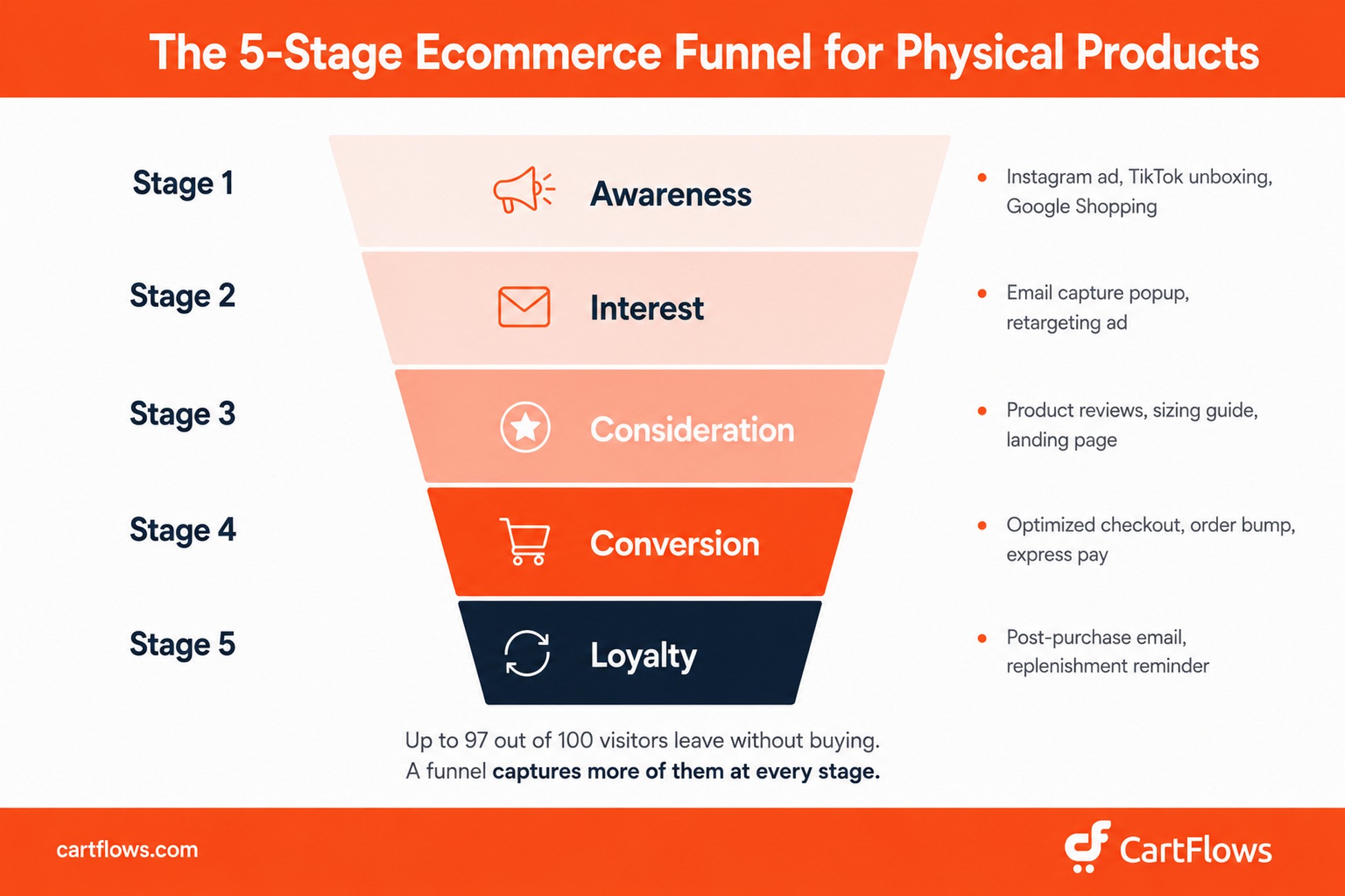
Most physical product stores still send paid traffic to a product page and hope for a sale. The result is a conversion rate between 1.6% and 2.5% (Statista, Smart Insights) and 70% cart abandonment (Baymard Institute). That’s as many as 97 visitors out of every 100 leaving your store empty-handed.
An ecommerce sales funnel fixes this by replacing hope with structure: a guided buying journey from first click to repeat purchase, designed specifically for how people actually decide to buy physical products.
In this guide, you’ll learn:
- What an ecommerce funnel is and why physical products need a different approach
- The 5 stages of an ecommerce conversion funnel, with tactics and KPIs for each
- How to increase average order value with order bumps, upsells, and downsells
- How to build a complete sales funnel for physical products in WooCommerce, step by step
- Which funnel model works best for your specific product type and price point
- The best tools for building a WooCommerce funnel
Why Your Physical Product Store Needs a Dedicated Ecommerce Funnel
There’s a difference between having a website and having a funnel. Your website is a collection of pages. Your funnel is the deliberate path you build through those pages to turn a visitor into a buyer.
Most WooCommerce stores don’t have a funnel. They have a homepage, some product pages, and a default checkout. That’s a catalog, not a conversion path.
Physical products make this harder because they carry friction that digital products don’t. Customers can’t try the product before buying. They can’t receive it instantly. And the moment they see an unexpected shipping cost at checkout, nearly half of them leave.
Here are the numbers that explain why this matters:
- 48% of shoppers abandon carts because of unexpected costs like shipping and taxes (Baymard Institute)
- 70.19% is the average documented cart abandonment rate across all ecommerce (Baymard)
- 26% of shoppers abandon because the site required account creation before purchase
- 1.6%-2.5% of ecommerce visitors convert on average, depending on methodology (Statista, Smart Insights)
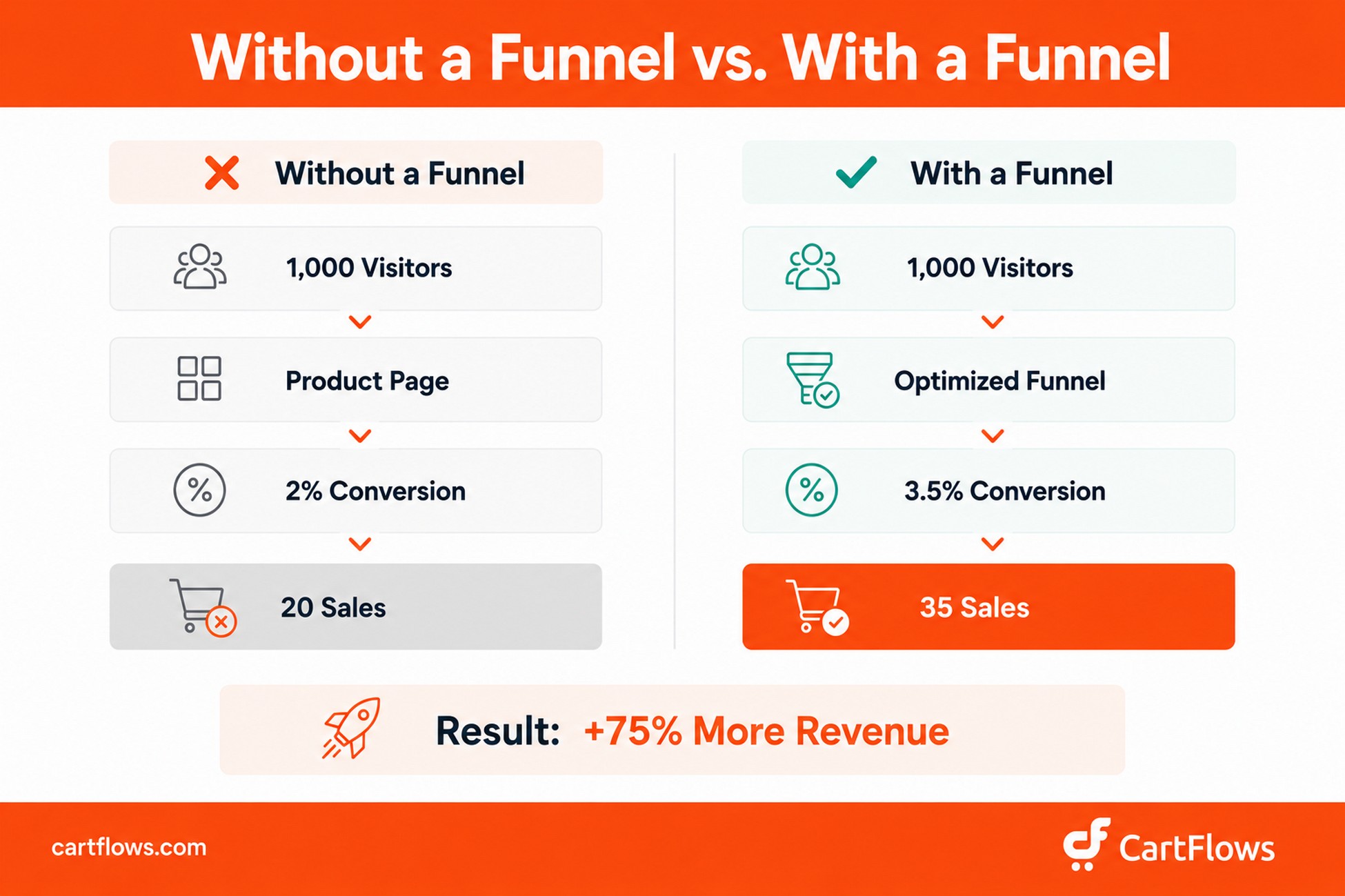
What this means for your store: If you send 1,000 visitors to a standard product page at a 2% conversion rate, you get 20 sales. Run those same 1,000 visitors through a dedicated funnel with an optimized checkout, and a 3.5% rate gives you 35 sales. That’s a 75% revenue increase from the same traffic budget.
A funnel addresses each friction point at the stage where it actually occurs. It doesn’t ask first-time visitors to buy immediately. It builds trust first. It doesn’t surprise shoppers with shipping costs at checkout. It communicates shipping costs upfront on the landing page. And it doesn’t stop at the purchase. It turns one-time buyers into repeat customers through post-purchase sequences and loyalty programs.
Think of it this way: a physical retail shop doesn’t dump every product in a pile and hope customers figure it out. Designers arrange products, guide the flow, place impulse buys near the register, and train staff to recommend add-ons. An ecommerce funnel does the same thing, digitally.
The 5 Stages of an Ecommerce Conversion Funnel
Every ecommerce conversion funnel moves customers through five stages: Awareness, Interest, Consideration, Conversion, and Loyalty. The labels matter less than the principle: you need a deliberate plan for every step between “never heard of you” and “buying from you again.”
Here’s what each stage looks like for physical products specifically, and what to prioritize at each one.
Stage 1: Awareness – Getting Found
This is where a potential customer discovers your store exists. They don’t know your brand, haven’t seen your products, and aren’t looking to buy anything yet.
For physical products, visual platforms drive the most awareness. Instagram, TikTok, and Pinterest work exceptionally well because tangible goods photograph and film better than software dashboards or digital downloads. A 15-second TikTok of someone unboxing your product can generate more first-touch awareness than a $5,000 Google Ads campaign at a fraction of the cost.
What works at this ecommerce funnel stage:
- Paid social ads. Short-form video ads on Meta and TikTok with strong hooks. Meta’s performance benchmarks show video ads generate 30% more purchases than static image ads for ecommerce.
- SEO content. Blog posts targeting informational keywords in your product category. A skincare brand ranking for “best ingredients for dry skin” attracts readers who will eventually need a moisturizer and already trust the brand before they buy.
- Micro-influencer partnerships. Creators with 10k-50k followers in your niche. Research from Influencer Marketing Hub found this tier generates 60% higher engagement rates than macro-influencers.
- Organic social content. Lifestyle photography, behind-the-scenes reels, and user-generated content. UGC provides social proof at zero cost while building community simultaneously.
Glossier built a $1.2 billion brand almost entirely through Instagram and UGC. They didn’t run traditional ads for years. They turned customers into the marketing team, which is a playbook any physical product store can replicate at any scale.
KPIs to track: reach, impressions, new users, click-through rate, social engagement rate.
Sidenote. Awareness is where most stores overspend and under-measure. Last-click attribution in Google Analytics doesn’t capture awareness-stage value. Track assisted conversions and view-through metrics for awareness campaigns, not direct sales alone.
If Google Shopping is part of your awareness mix, your WooCommerce product feed quality is your awareness infrastructure. Poorly optimized titles, missing attributes, and low-quality images in the feed limit reach before an ad even runs.
Stage 2: Interest – Building Curiosity
The visitor knows your store exists. They clicked an ad, a friend mentioned you, or they found your blog post. Now they’re browsing: curious, but not ready to buy.
Your job at this stage: capture their contact information and give them a reason to return.
For physical products, high-quality product photography does the heavy lifting here. Lifestyle shots showing the product in real use consistently outperform white-background studio shots. Shopify’s ecommerce research found 75% of online shoppers rely primarily on product photos when making purchase decisions.
What works at this ecommerce funnel stage:
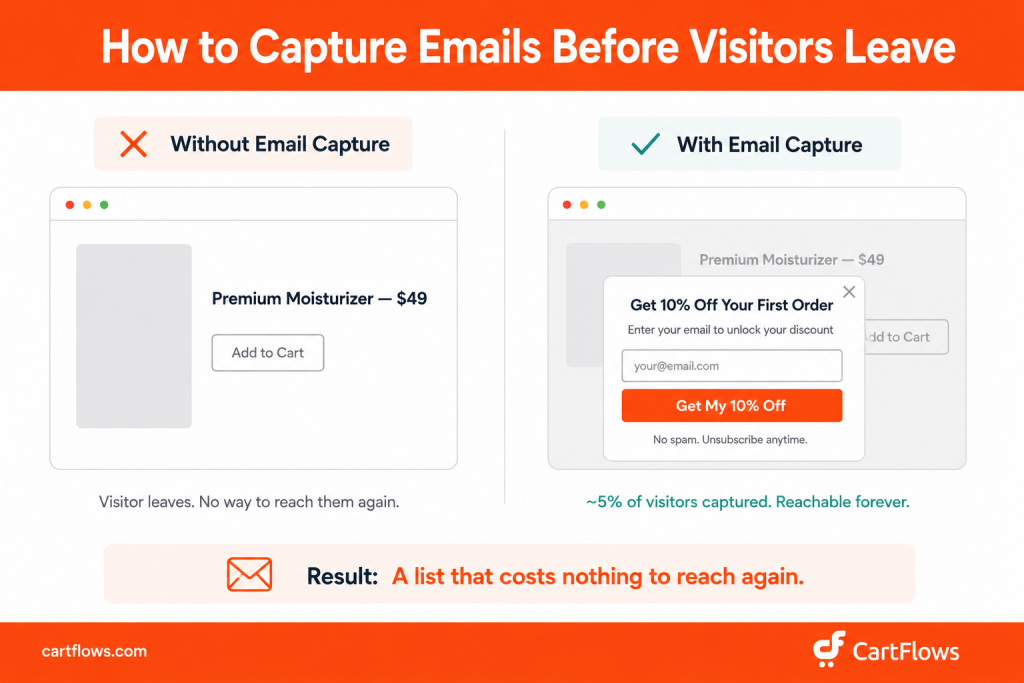
- Email capture popups. Offer 10-15% off the first order in exchange for an email. This is the highest-ROI tactic for physical product stores at this stage. A well-timed popup with a clear discount offer typically captures around 5% of site visitors. Higher for stores with strong product photography, lower for generic storefronts. That list costs nothing to reach again.
- Retargeting ads. Show your products to people who visited but didn’t buy. Retargeting audiences typically convert at 2-3x the rate of cold traffic because the visitor already has brand familiarity.
- Product comparison guides. “How to choose the right [product category]” content educates without hard-selling and ranks for high-intent informational queries at the same time.
- Lifestyle and unboxing content. Show the product in the real world and let potential customers visualize owning it before they’ve decided to buy.
Gymshark built its following by combining athlete-influencer content with aggressive retargeting. Their social channels showcase real people in real use, which builds both interest and social proof simultaneously.
KPIs to track: email signup rate, returning visitors, time on site, pages per session, add-to-wishlist rate.
WooCommerce doesn’t include a native email capture tool. Most stores at this stage use a dedicated popup plugin (Mailchimp for WooCommerce, Klaviyo, or a CartFlows-connected form) to trigger the discount offer and pass the email directly into their email platform. The technical setup matters: a popup that doesn’t sync to your email tool in real time means captured emails that never enter a sequence.
Stage 3: Consideration – Evaluating Options
Now the customer is comparing you to alternatives. They’re reading reviews, checking sizing guides, reviewing your return policy, and asking: is this the right product from the right brand at the right price?
This is where physical products face their biggest structural disadvantage. Customers can’t touch the fabric, try the fit, smell the fragrance, or test the durability. You have to bridge that gap digitally, and the stores that do it best win this stage consistently.
What works at this ecommerce funnel stage:
- Detailed product pages. Multiple angles, zoom functionality, short video demos, material specs, and sizing guides. Every unanswered question at this stage becomes an exit point.
- Customer reviews and UGC. According to PowerReviews, 99.9% of consumers read reviews before buying online and 98% consider them an essential resource. For physical products, reviews bridge the gap between browsing and trusting.
- Comparison content. “Our [product] vs. [competitor product]” pages that address objections directly and credibly. These intercept buyers already in decision mode and convert at high rates.
- Dedicated landing pages. Rather than sending consideration-stage traffic to a generic product page, use a purpose-built page that addresses objections, highlights proof points, and has a single clear CTA. CartFlows landing page templates let you build these inside WooCommerce without code.
Allbirds dedicates an entire section of each product page to materials, sustainability certifications, and detailed customer reviews. They turned the main disadvantage of online footwear (you can’t try on shoes before buying) into a category-defining trust signal.
KPIs to track: add-to-cart rate, product page engagement time, review reads, comparison page views.
Further reading: What Is a Downsell? How to Use Downsells in Your WooCommerce Funnel
Stage 4: Conversion – The Purchase
The customer is ready to buy. Your only job at this stage: don’t get in the way.
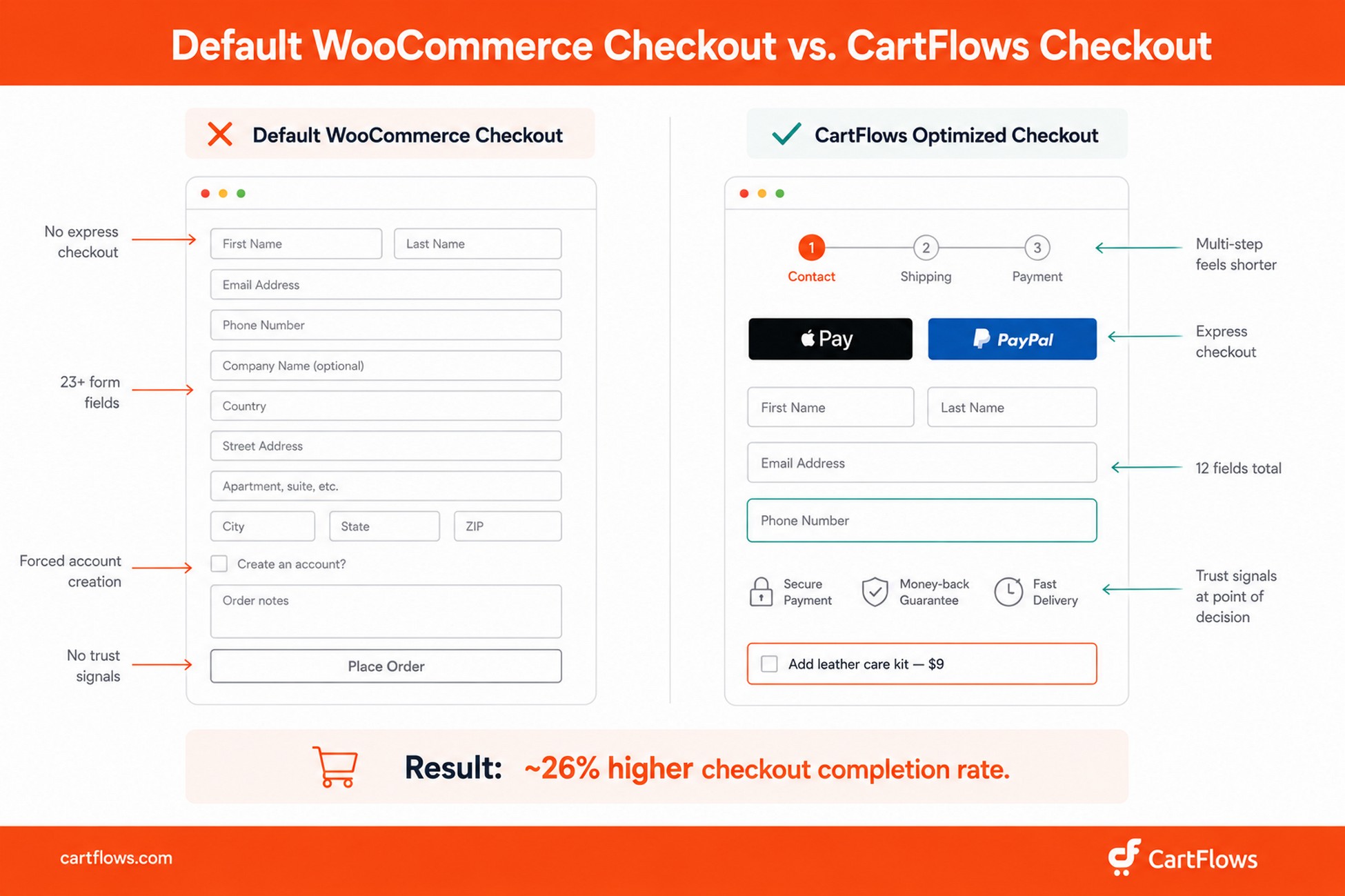
This is where most physical product stores lose money, not because the product is wrong, but because the checkout is broken. The default WooCommerce checkout is functional, but it isn’t optimized. It’s long, it forces account creation, and it lacks the express payment options modern buyers expect.
As Christian Holst, co-founder of Baymard Institute, has noted in their checkout UX research:
“The checkout experience is often where the best-laid marketing plans go to die. You can have perfect ads, a beautiful product page, and a compelling brand, but if your checkout has unnecessary friction, none of it matters.”
Here’s what kills conversion rates at checkout for physical products specifically:
- Unexpected shipping costs – the single biggest abandonment trigger (48% of abandonments, Baymard)
- Forced account creation – 26% of shoppers abandon for this reason alone
- Too many form fields – Baymard’s UX research shows the average checkout has 23+ form elements; the optimal number is 12-14
- Limited payment options – checkouts without Apple Pay, Google Pay, or buy-now-pay-later lose mobile shoppers consistently
A checkout optimizer like CartFlows replaces the default WooCommerce checkout with a conversion-optimized page: multi-step forms that feel shorter, express payment buttons, address autocomplete, and trust badges placed where customers need them. In our internal testing, switching from the default WooCommerce checkout to a CartFlows-optimized checkout improved checkout completion rates by around 26% on average, though the lift varies depending on how broken the original checkout was.
What works at this ecommerce funnel stage:
- Free shipping thresholds. “Free shipping on orders over $50” removes the leading abandonment trigger while lifting average order value simultaneously.
- Express checkout. Apple Pay, Google Pay, and PayPal Express reduce checkout time from 3 minutes to under 30 seconds for returning customers.
- Trust badges. Secure payment icons, money-back guarantee language, and estimated delivery dates near the buy button reduce last-moment hesitation.
- Abandoned cart recovery emails. A 3-part sequence at 1 hour, 24 hours, and 72 hours after abandonment. Klaviyo data shows abandoned cart flows generate the highest revenue per recipient of any automated ecommerce email series.
KPIs to track: conversion rate, cart abandonment rate, checkout completion rate, average order value (AOV).
Stage 5: Loyalty – Post-Purchase and Retention
The funnel doesn’t end at the thank-you page. In fact, the post-purchase stage is where the most profitable stores separate themselves.
Research from Smile.io on ecommerce repeat purchase behavior shows a clear compounding pattern: customers who make a first purchase have roughly a 27% likelihood of returning for a second. After a second purchase, the probability of a third rises to around 45%. And customers who have made three or more purchases are far more likely to keep buying. The arithmetic is simple: your most cost-efficient growth isn’t acquiring new customers. It’s bringing existing ones back.
Physical products have one post-purchase advantage that digital products don’t: you ship something. A box arrives at someone’s door. That’s a tangible touchpoint, and most stores waste it completely.
What works at this ecommerce funnel stage:
- Post-purchase email sequences. Order confirmation → shipping update with tracking → product care tips (day 3) → review request (day 7-14) → replenishment or cross-sell reminder (day 30-60). See our guide on post-purchase email sequences for WooCommerce for ready-to-use templates.
- Packaging inserts. A handwritten-style thank-you note, a discount code for the next order, or a “share on Instagram for 15% off” card costs pennies per shipment and consistently drives repeat purchases and UGC.
- Loyalty programs. Point-based systems that reward repeat purchases. Dollar Shave Club built loyalty through a subscription model so convenient and affordable that customers had no reason to leave. Their entry offer ($1 for the first month of razors) acquired buyers at minimal cost, and the subscription economics behind it justified a $1 billion acquisition by Unilever.
- Replenishment reminders. For consumable products (skincare, supplements, food), automated emails timed to the expected re-order date outperform cold acquisition campaigns in cost per purchase.
Casper includes a mini sleep guide insert in every mattress shipment. It’s not a sales pitch. It’s genuinely useful, and it positions Casper as a sleep authority rather than just a mattress seller. That’s how a one-time purchase becomes a brand relationship worth returning to.
KPIs to track: repeat purchase rate, customer lifetime value (CLV), referral rate, Net Promoter Score (NPS), review submission rate.
Further reading: Tripwire Funnel: How to Build One in WooCommerce
How to Increase Average Order Value at Every Ecommerce Funnel Stage
Understanding the five stages is half the picture. The other half is what most guides skip entirely: how to make every transaction more valuable without acquiring a single extra customer.
Three mechanics do this: order bumps, one-click upsells, and downsells. If you sell physical products and aren’t using at least one of these, you’re leaving revenue on every order.
Order Bumps – The Checkout Add-On
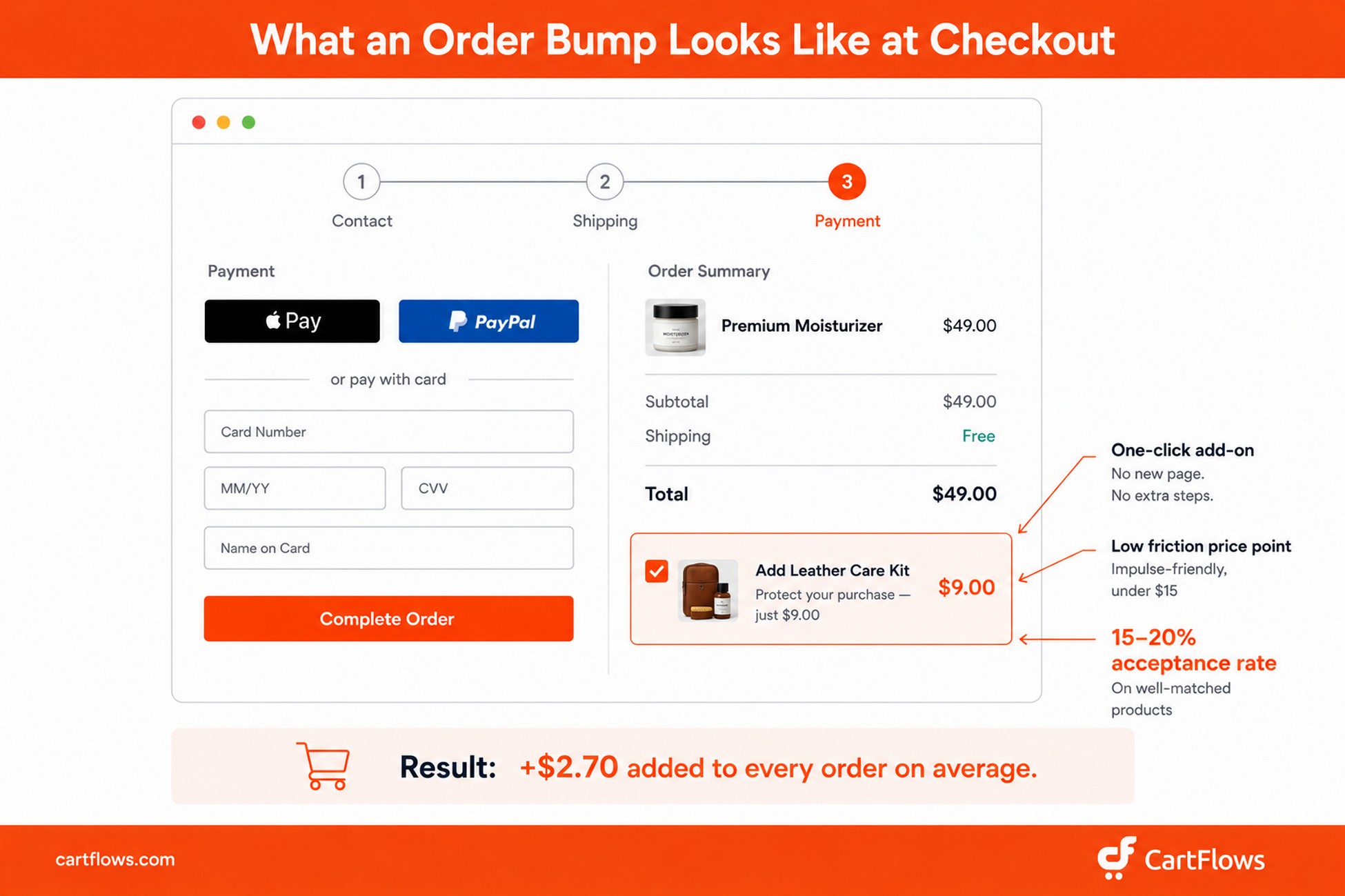
An order bump is a small, relevant add-on product offered as a one-click checkbox on the checkout page. Think of it as the candy bar at the grocery register: low-cost, impulse-driven, zero additional friction.
For physical products, the best order bumps are accessories or consumables that complement the main item:
- Buying a leather bag? Add a leather care kit for $12.
- Buying running shoes? Add performance socks for $8.
- Buying a skincare set? Add a travel-size pouch for $6.
Across WooCommerce stores selling physical products, well-matched order bumps typically convert around 15-20% of checkout visitors. Bump acceptance drops significantly when the add-on isn’t closely related to the main product (a phone case added to a clothing checkout converts at a fraction of a matching belt or care kit). Your average order value increases without any extra selling, discounting, or ad spend.
CartFlows lets you add order bumps directly to your checkout page. Choose the product, write a 2-3 line benefit description, set the price, and it appears as a one-click checkbox below the order summary. Customers don’t leave the page and don’t re-enter payment details. They just check the box.
Further reading: What Are Order Bumps and How Do They Work in WooCommerce
One-Click Upsells – The Post-Checkout Offer
A one-click upsell appears after checkout is complete but before the thank-you page. Payment is already processed. The card is on file. Accepting the upsell takes a single click with no re-entering of any information.
This is especially powerful for physical products because you can offer:
- A bundle upgrade: “You bought 1 – get 3 for 40% off.”
- A complementary product: “Complete the look: add matching earrings.”
- A subscription conversion: “Love it? Switch to auto-ship and save 20%.”
In practice, a relevant post-purchase upsell with a genuine discount converts around 12% of buyers, meaning roughly 1 in 8 customers who just checked out adds a second product without re-entering any payment information. On a store processing 500 orders per month, that’s 60 additional purchases every month at zero acquisition cost.
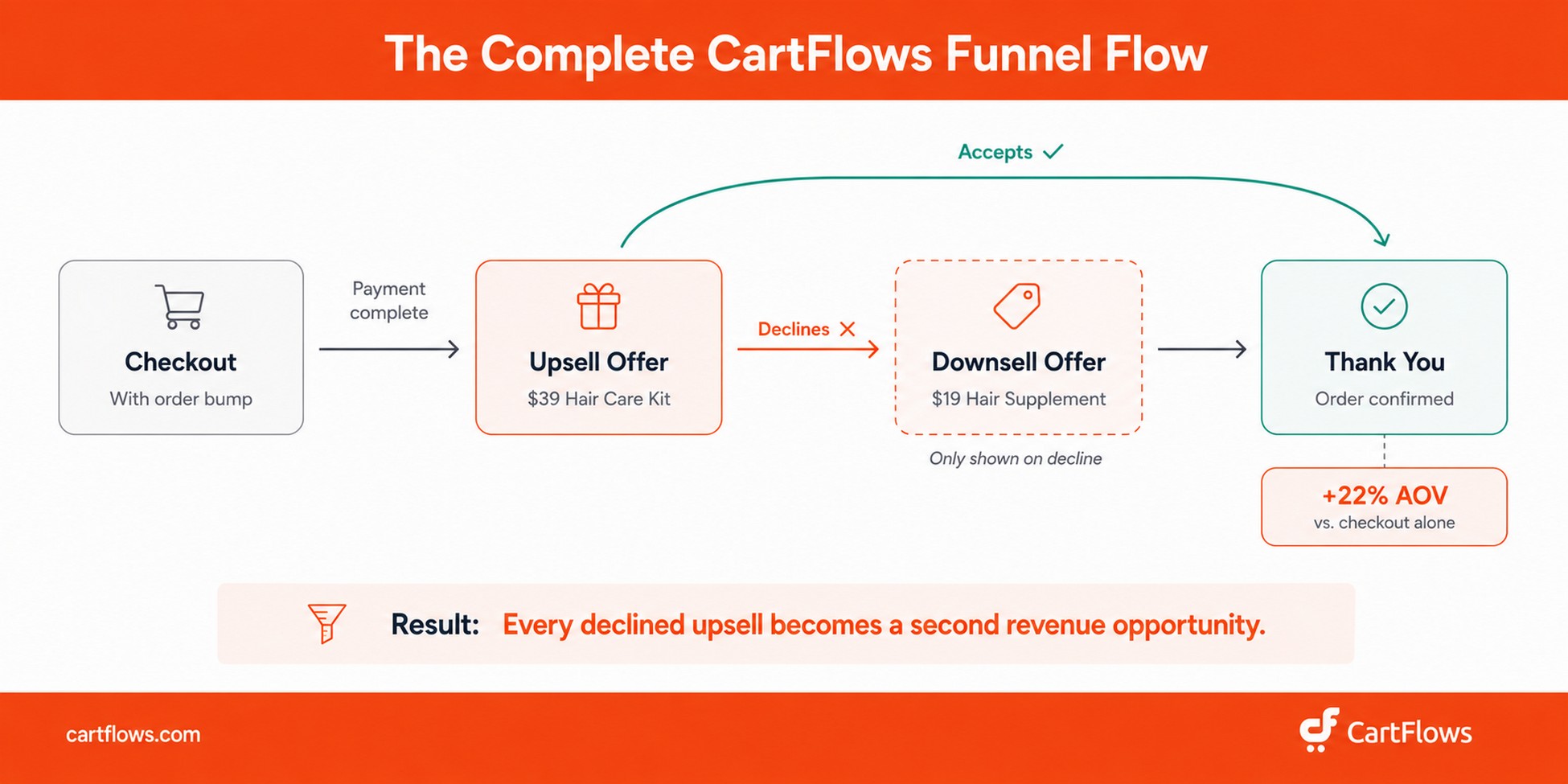
With CartFlows, you configure the upsell as an Offer step between your checkout and thank-you steps. Customers click “Yes, add this to my order” and it’s done. If they decline, CartFlows can automatically show a downsell instead.
Downsells – The Recovery Offer
A downsell is a lower-priced alternative shown when the customer declines the upsell. It’s the safety net that catches revenue that would otherwise walk away entirely.
If the customer declines a $49 full-size bundle, you show a $19 single-product offer instead. The customer who wasn’t ready for $49 may be completely happy spending $19, and that’s $19 in revenue that would have been lost with no downsell in place.
CartFlows lets you chain the entire flow in a visual editor: checkout (with order bump) → upsell → downsell → thank-you page. Set the logic once, and the funnel runs automatically. See: What Is a Downsell? How to Use Downsells in Your WooCommerce Funnel
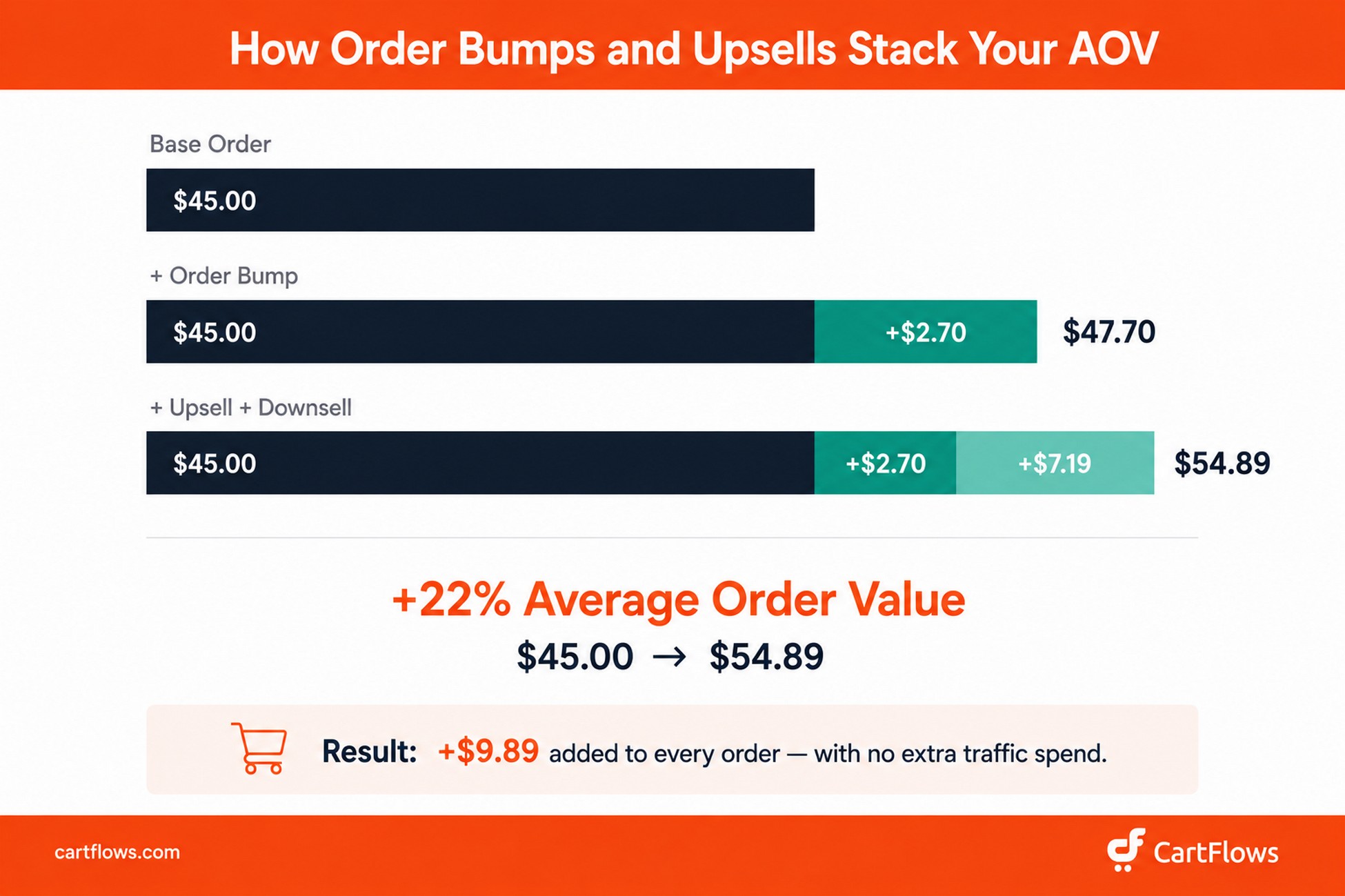
The compound math: Say your average order value is $45. A $9 order bump at 30% acceptance adds $2.70 per order average. A $39 upsell at 12% acceptance adds $4.68. A $19 downsell accepted by 15% of upsell decliners adds $2.51. That’s $9.89 added per order, taking your AOV from $45 to $54.89, a 22% increase with no additional traffic spend.
We’ve tracked this pattern across hundreds of CartFlows stores selling physical products. Results vary by product type and offer relevance, but the compounding effect is consistent.
How to Build an Ecommerce Sales Funnel for Physical Products in WooCommerce
You understand the stages. You know where order bumps and upsells fit. Now let’s build the actual funnel. We’ll use WooCommerce as the ecommerce foundation (it powers over 4.5 million active online stores worldwide, StoreLeads 2026) with CartFlows as the funnel layer on top.
You could customize WooCommerce’s native checkout manually, but CartFlows gives you pre-built templates, a visual flow editor, and Pro-tier conversion features (order bumps, one-click upsells, A/B testing) that would otherwise require four or five separate plugins to replicate.
Step 1: Map Your Funnel Before You Build
Before you open a screen, sketch the flow on paper:
- Entry point. Where does traffic come from? Ad, blog post, social media, or email.
- Landing page. What’s the first dedicated funnel page they see? Not your homepage.
- Main offer. Which product? At what price?
- Order bump. What’s a relevant $5-$15 add-on?
- Upsell. What’s a higher-value offer for buyers who want more?
- Downsell. What’s the lower-priced fallback if they decline the upsell?
- Thank-you page. What happens immediately after purchase?
For example, a skincare brand’s funnel might look like: Instagram ad → dedicated landing page for a $24 bestseller moisturizer → checkout with an $8 travel-size serum bump → $59 full skincare bundle upsell → $18 single serum downsell → thank-you page with a review request.
Step 2: Install and Configure CartFlows
Install CartFlows (free version available on WordPress.org) on your WooCommerce site. The setup wizard connects your store and helps you choose your first funnel template.
CartFlows integrates directly with Elementor, Spectra, Bricks, Divi, Beaver Builder, and the native WordPress block editor, so you work in the page builder you already know. No new tool to learn.
Once installed, go to CartFlows → Flows → Add New. Choose a pre-built template designed for physical products, or start from a blank flow.
Step 3: Build Your Landing Page
Your landing page is the first funnel-specific page the customer sees. It is not your product page. It’s a purpose-built page designed to convert a specific audience on a single offer.
Key elements every physical product landing page needs:
- Headline that names the customer’s problem, not the product’s features
- Product imagery or video – lifestyle shots showing real use, not just studio white backgrounds
- Benefit bullets – what the customer experiences, not what the product does technically
- Social proof – reviews, testimonials, and customer count credibility markers
- Single CTA – one button, one action. “Get Yours for $24” consistently outperforms “Shop Now”
Step 4: Optimize Your Checkout
Replace the default WooCommerce checkout with a CartFlows checkout page and configure these elements:
- Multi-step layout. Break checkout into Contact → Shipping → Payment. The same fields feel faster when staged across steps.
- Express checkout. Enable Apple Pay, Google Pay, and PayPal Express through your payment gateway.
- Address autocomplete. Google Address Autocomplete reduces form friction and order errors caused by typos.
- Order bump. Add your planned bump product with a 2-3 sentence benefit description and the price.
- Trust elements. Secure payment icons, money-back guarantee language, and estimated delivery dates near the checkout button reduce last-moment hesitation.
Step 5: Set Up Your Upsell and Downsell Offers
In CartFlows, add an Offer step after your checkout step:
- Select your upsell product
- Apply any discount
- Write a short headline and 2-3 benefit bullets
- Set the Yes path to your thank-you page
- Set the No path to a downsell offer
- Set both downsell Yes and No paths to your thank-you page
The entire sequence is visual. Every step appears as a connected card in CartFlows’ flow editor. No code, no conditional logic plugins, no guesswork.
Step 6: Build Your Post-Purchase Email Sequence
Customize your CartFlows thank-you page beyond the default order confirmation:
- Confirm order details and show estimated delivery date
- Add a “share your purchase” social prompt
- Include a “customers also bought” cross-sell section
Then configure post-purchase automation through OttoKit (CartFlows’ native automation integration) or your preferred WooCommerce email tool:
- Immediately: Order confirmation with tracking info
- Day 3: Shipping update and product care tips
- Day 7-10: Review request: “How are you liking your [product]?”
- Day 30: Cross-sell or replenishment reminder
- Day 45: Loyalty offer or referral invite
Ecommerce Funnel by Product Type: What Works Best
Not all physical products need the same ecommerce funnel. A $12 coffee bag has a very different buying psychology than a $499 standing desk. Here’s the right funnel model for each price tier.
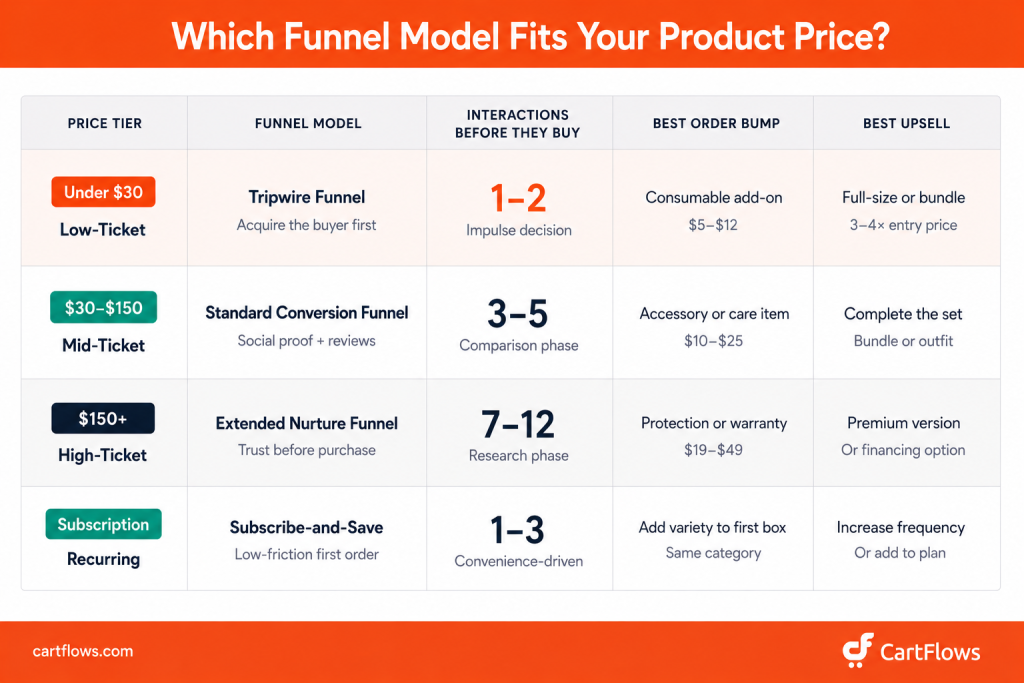
Low-Ticket Consumables (Under $30)
Best ecommerce funnel model: Tripwire funnel
A $9 sample pack, a $7 trial size, or a $14 bestseller at 40% off. The goal isn’t profit on the first transaction. It’s acquiring a buyer, someone who trusts you enough to enter their card details.
Dollar Shave Club’s original funnel is the textbook example: $1 for the first month of razors. The razors lost money. The subscription model that followed made the company worth $1 billion.
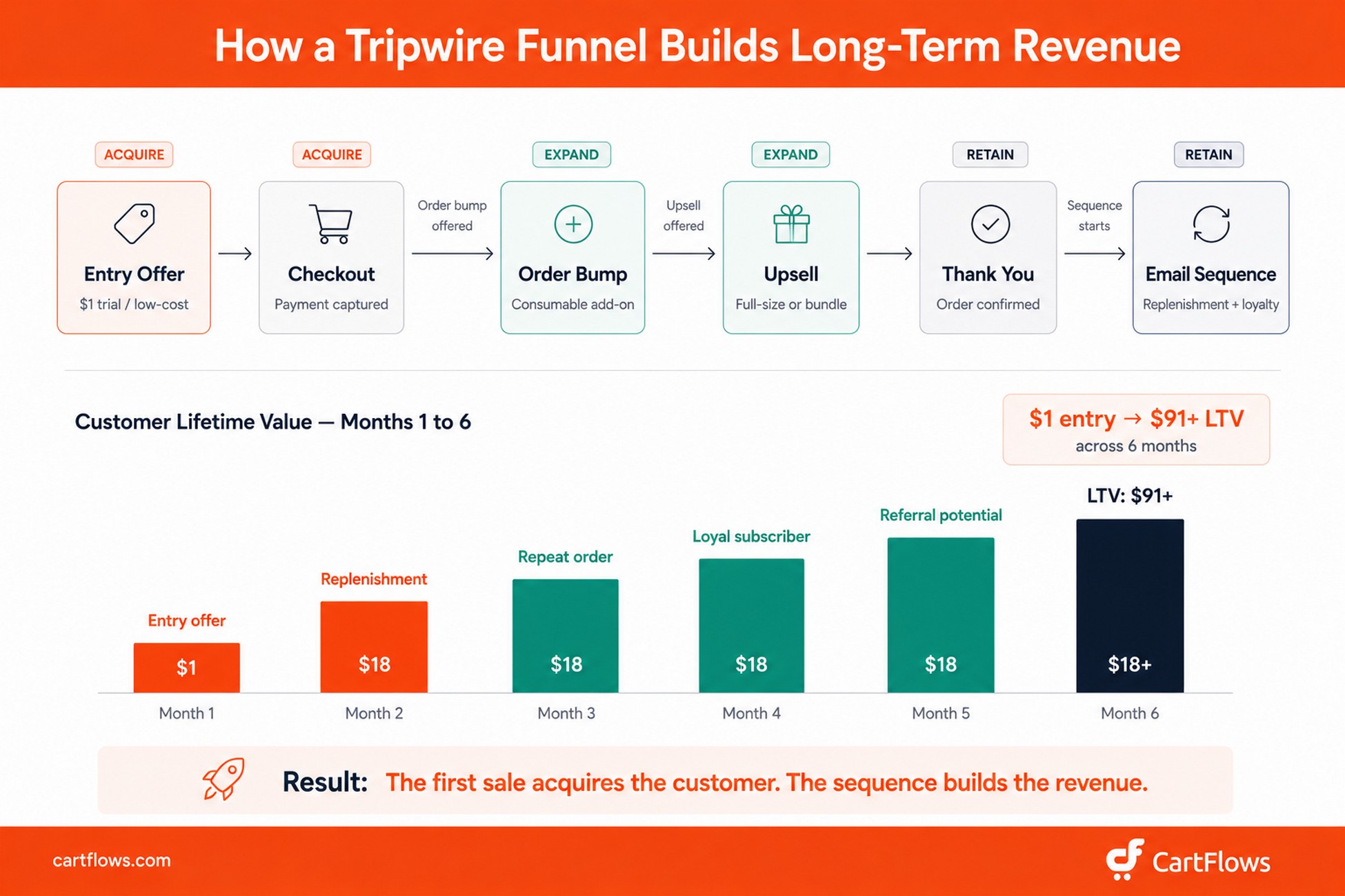
Your bump should be another consumable at a low price point. Your upsell should be the full-size product or a bundle. Your lifetime value comes from the subscription or replenishment sequence that follows, not the first sale.
See: Tripwire Funnel: How to Build One in WooCommerce
Mid-Ticket Products ($30-$150)
Best ecommerce funnel model: Standard ecommerce conversion funnel with strong consideration-stage content
At this price point, customers need more persuasion. Sizing guides, detailed reviews, lifestyle photography, comparison content, and clear return policy language all move the needle. The checkout experience needs to feel premium and trustworthy.
Allbirds sells shoes at $98-$135. Their funnel includes detailed material breakdowns, sustainability certifications, and a 30-day return policy, all designed to reduce the perceived risk of buying footwear you can’t try on first.
Your bump should complement the product with an accessory or care item. Your upsell should bundle or upgrade: “complete the outfit for 25% off.”
High-Ticket Products ($150+)
Best ecommerce funnel model: Extended nurture funnel
High-ticket physical products need time and trust before the sale. A free resource, a multi-email nurture sequence, a comparison page, and potentially a quiz or consultation step before checkout. The funnel is longer, but margins at this price point support the investment.
Casper used sleep guides, blog content, and mattress comparison pages to educate buyers for weeks before they purchased a $1,000+ mattress. The checkout included financing options, a 100-night trial, and free returns, every element reducing the perceived risk of a large, untestable purchase.
Your bump could be product protection or accessories. Your upsell might be a premium version or a bundle with complementary items.
Subscription and Replenishment Products
Best ecommerce funnel model: Subscribe-and-save with a low-friction first order
Make the first order feel like a no-brainer: first month at 50% off, free shipping on subscriptions, and prominent cancel-anytime messaging. Acquire the subscriber first; let the recurring revenue do the rest.
Your bump should add variety to the first shipment. Your upsell should increase order frequency or add products to the subscription plan.
Best Tools for Building an Ecommerce Funnel in WooCommerce
WooCommerce doesn’t include a funnel builder natively. You need at least one plugin to add landing pages, an optimized checkout, order bumps, and upsell flows. Here’s how the main options compare.
| Tool | Order Bumps | One-Click Upsells | A/B Testing | Landing Pages | Best For |
|---|---|---|---|---|---|
| CartFlows | Yes | Yes | Yes (Pro) | Yes | Full WooCommerce-native ecommerce funnel |
| FunnelKit | Yes | Yes | Yes (Pro) | Yes | WooCommerce stores with heavy automation needs |
| WPFunnels | Yes | Yes | No | Yes | Lightweight funnels, lower budget, free version includes up to 3 funnels |
| ClickFunnels | Yes | Yes | Yes | Yes | Standalone platform (not WooCommerce-native) |
CartFlows is the only option in this list built to run inside WooCommerce natively, which means your products, inventory, taxes, and fulfillment all stay in one place with no external platform sync required. The free version on WordPress.org covers modern checkout styles, pre-built funnel layouts, and page builder integration. Order bumps, one-click upsells, downsells, and A/B testing require CartFlows Pro.
If you already run WooCommerce and want the fastest path to a working ecommerce funnel without rebuilding your store on an external platform, CartFlows is the most direct route.
CartFlows is active on over 200,000 WooCommerce stores and holds a 4.8-star rating on WordPress.org.
Get CartFlows Free on WordPress.org | Explore CartFlows Pro
7 Common Ecommerce Funnel Mistakes (and How to Fix Them)
These are the mistakes that show up most consistently across WooCommerce stores, regardless of product category or store size.
1. Sending paid traffic directly to a product page. Product pages are designed for browsing. They’re not optimized for converting cold traffic from an ad. A dedicated landing page with a single offer, targeted messaging, and social proof will outconvert a product page 2-5x for cold traffic. If you’re running paid ads, build a dedicated landing page for each campaign.
2. Hiding shipping costs until checkout. This is the leading conversion killer in ecommerce. Baymard’s research consistently shows roughly half of cart abandonments happen because of unexpected costs revealed at checkout. Display shipping costs, or a “free shipping over $X” message, on the product page and landing page, not just at checkout.
3. Skipping order bumps and upsells. You’ve already paid to acquire the customer. Failing to offer a relevant bump or upsell leaves revenue on every single order. A $9 add-on at a 25% acceptance rate adds $2.25 to each order. Across 500 monthly orders, that’s $1,125 in monthly revenue that required no additional spend to generate. Any funnel builder worth using makes this a 10-minute setup, not a development project.
4. Offering only one payment method. Card-only checkouts lose customers who prefer Apple Pay, PayPal, or buy-now-pay-later options like Klarna or Afterpay. Studies consistently show that stores offering three or more payment methods see meaningfully higher conversion rates than those with a single option.
5. No post-purchase email sequence. The sale is the beginning of the customer relationship, not the end. Without a post-purchase email flow covering confirmation, shipping, a review request, and a cross-sell, you’re relying entirely on memory to bring customers back.
6. Never A/B testing funnel pages. Your first headline, price point, or bump product is almost certainly not your best-performing version. Pick one element (the landing page headline, the order bump copy, the upsell price) and run two variants. Small improvements at each stage compound significantly across the whole funnel. Most WooCommerce funnel builders include built-in split testing; use it. See: A/B testing for WooCommerce funnels
7. Treating mobile as an afterthought. Over 70% of ecommerce traffic now comes from mobile devices (Statista). If your checkout isn’t thumb-friendly (large tap targets, minimal typing, express payment prominent) you’re losing the majority of your visitors before they complete a purchase. Test your entire funnel on a phone before launch and retest after every significant change.
How to Measure Your Ecommerce Funnel Performance
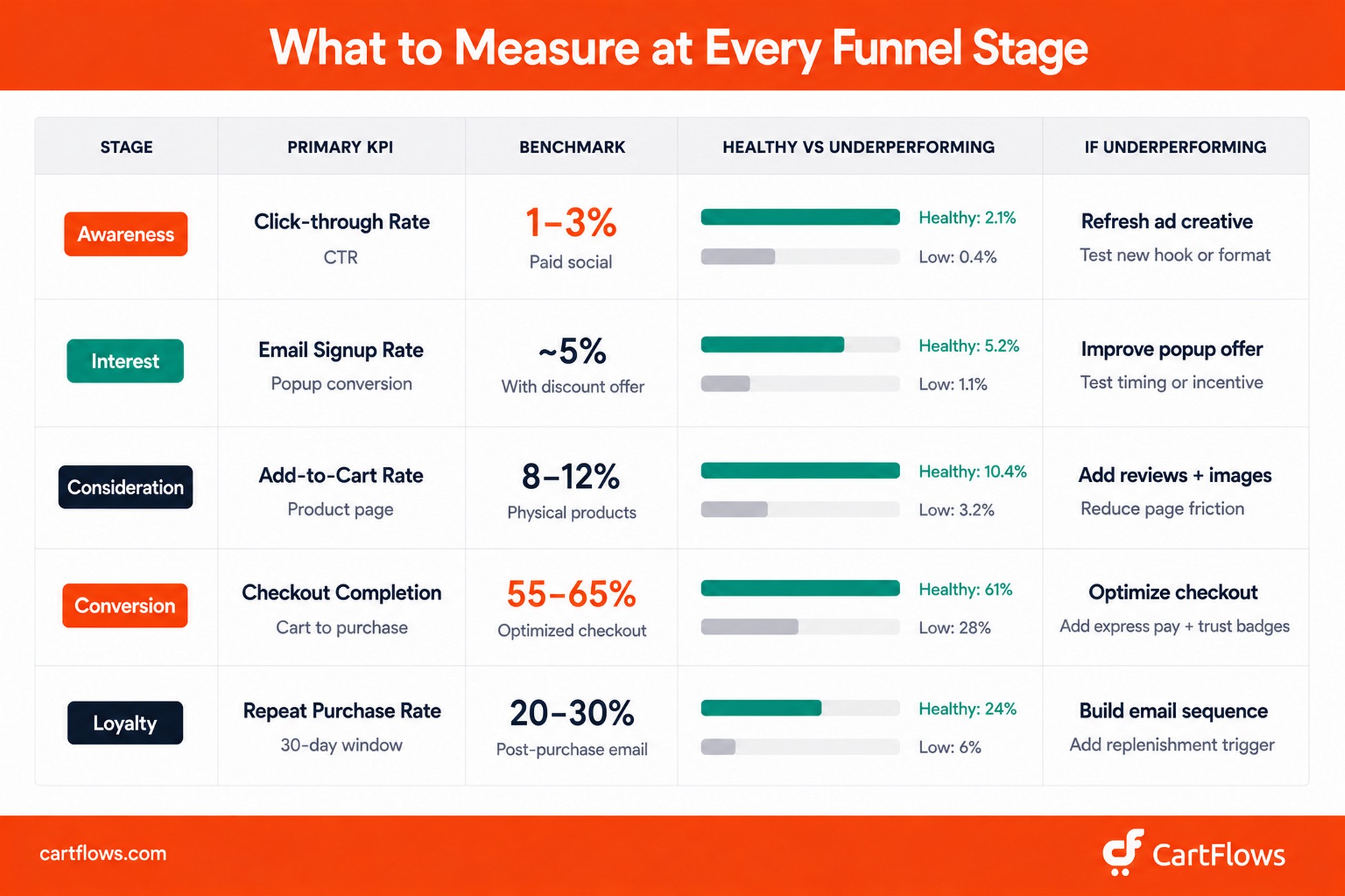
You can’t improve what you don’t measure. The simplest framework: track one or two KPIs per funnel stage, review them weekly, and focus on improving one metric at a time.
| Funnel Stage | Primary KPI | Secondary KPI | Target Benchmark |
|---|---|---|---|
| Awareness | New users / reach | Click-through rate (CTR) | CTR: 1-3% (paid social) |
| Interest | Email signup rate | Returning visitor rate | Signup: 3-8% via popup |
| Consideration | Add-to-cart rate | Product page time on site | Add-to-cart: 8-12% |
| Conversion | Checkout completion rate | Cart abandonment rate | Completion: 55-65% |
| Loyalty | Repeat purchase rate | Customer lifetime value | Repeat rate: 20-30% |
CartFlows includes funnel analytics that show conversion rates, revenue, and drop-off points at each step of your flow inside your WordPress dashboard. You don’t need a separate analytics platform to see where customers leave and where they convert.
For full-funnel visibility, connect Google Analytics 4 and configure the standard ecommerce events: view_item, add_to_cart, begin_checkout, purchase. This gives you the complete picture from first click to repeat order.
Benchmark note. These numbers are starting points, not fixed targets. Your funnel’s performance depends on your product category, traffic source, price point, and audience. The only benchmark that truly matters is whether your own numbers improve week over week.
Start Building Your Ecommerce Funnel Today
CartFlows is the ecommerce funnel builder built natively for WooCommerce. It’s active on over 200,000 stores and rated 4.8 stars on WordPress.org.
Add order bumps, one-click upsells, an optimized multi-step checkout, and A/B testing to your store. No code required, no external platform needed.
Get CartFlows Free on WordPress.org | Explore CartFlows Pro
Final Thoughts
The common thread through everything in this guide is structure. Building an ecommerce funnel doesn’t require better marketing instincts or more creative copy. It requires you to stop leaving the customer journey to chance and start designing it with intention.
Start with the minimum viable funnel: a dedicated landing page, a CartFlows-optimized checkout, and one order bump. That’s a complete ecommerce sales funnel. Measure it for two weeks. Review what the numbers tell you. Then iterate: add an upsell, test a different bump product, try a new headline on the landing page.
Most WooCommerce stores that see significant revenue lifts didn’t find a better product or a cheaper traffic source. They stopped treating their store as a catalog and started treating it as a system. Every page in the funnel has a job. Every step moves the customer forward. When that’s true across the whole flow, the numbers change, not because of magic, but because the math of a guided path is fundamentally different from the math of hoping someone finds their own way to checkout.
Build the system. The traffic you already have will do the rest.