You’re sitting on revenue you don’t even know exists yet.
Every page in your funnel has hidden optimization potential. A headline change here. A button color there. A streamlined checkout flow.
Each tweak could increase conversions for the same traffic you already have. The question is, how can you make changes without risking a conversion loss?
A/B testing solves this problem.
Instead of deleting a functional page to test a new one, you run two versions of a page head-to-head, split your traffic as required and let real customer behavior show you the winner.
Whether you’re getting barely any conversions or are already converting well and want to push higher, A/B testing shows you exactly where the opportunities are.
Let’s see how you can test funnels, find issues, and fix them.
- What Is A/B Testing and Why Does It Matter?
- What To A/B Test in Your E-Commerce Funnel?
- How CartFlows Simplifies A/B Testing for WooCommerce
- Split Testing Best Practices: Setting Up Your First Test with CartFlows
- What Not to Do: Common Testing Mistakes
- A/B Testing Your eCommerce Funnel
- Frequently Asked Questions
What Is A/B Testing and Why Does It Matter?
A/B testing puts two versions of your page head-to-head to see which one converts better.
Version A (your control) runs against Version B (your variation), traffic splits evenly between them and the winner reveals itself through actual customer behavior.
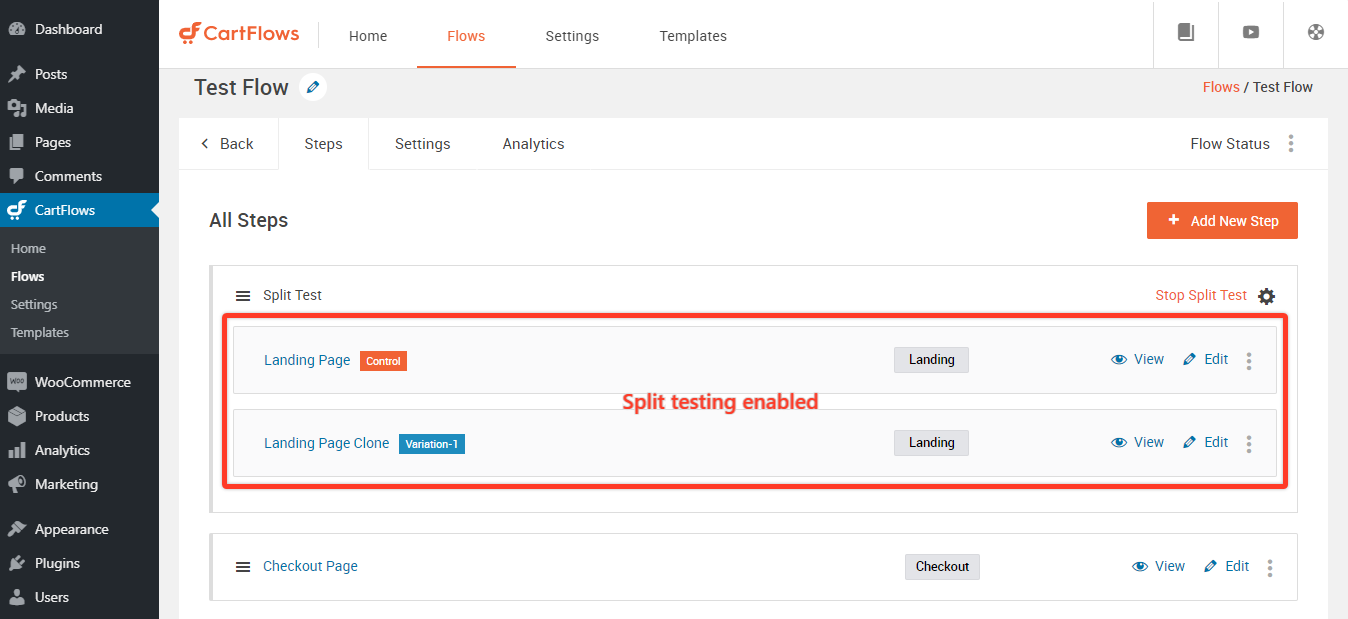
With A/B tests, you no longer rely on gut instincts to decide what changes to make for better conversions.
You let your customers tell you what they like best.
And fortunately, the improvements compound faster than you’d expect.
For instance, three successful 10% improvements don’t give you 30% better performance. You get 33.1%. And the momentum keeps building up as you go alone.
A/B tests provide statistically significant data to help you make decisions.
Calling a winner after 50 conversions might feel decisive, but you’re probably looking at noise rather than signal.
Industry research consistently shows you need minimum sample sizes of 100 conversions per variation before drawing conclusions.
The global average ecommerce conversion rate sits at 1.62% according to 2025 data from IRP Commerce, while top performers reach 5% or higher.
That gap represents the difference between struggling stores and thriving ones.
What To A/B Test in Your E-Commerce Funnel?
Now that you understand what A/B testing is, let’s look at what you should A/B test on your eCommerce store.
1. Product and Landing Pages
Good products and landing pages rely on a few reliable elements, a headline that sets expectations, a call to action that guides the next step, social proof that builds trust, and clear information around costs.
Each one plays a role, but the headline usually makes the strongest first impression. A small wording shift can change how valuable the product feels.
For example, calling a print-on-demand item a “bespoke print” signals more care than “custom print,” even when nothing else changes.
After that first impression, visitors look for direction. The phrasing of your primary button influences how committed the step feels.
Some audiences prefer neutral language like “Add to Cart,” while others respond better to more direct prompts like “Buy Now.”
Social proof supports the decision quietly in the background. Moving reviews higher or lower on the page can affect how quickly people feel comfortable continuing.
Finally, clarity around shipping helps prevent hesitation.
Free shipping or a threshold that matches typical order values encourages people to keep moving, while thresholds that feel unrealistic often pushes them away.
Small adjustments here can make the overall experience feel much smoother.
Learn more about optimizing product recommendations for higher AOV.
2. A/B Testing Cart and Checkout
Once shoppers reach the cart or checkout, every extra step becomes more noticeable.
Long forms often slow people down, so it helps to test which fields you truly need.
Baymard Institute’s 2024 research reveals the average checkout contains 11.3 form fields when stores need only 8.
That extra complexity drives 18% of users to abandon.
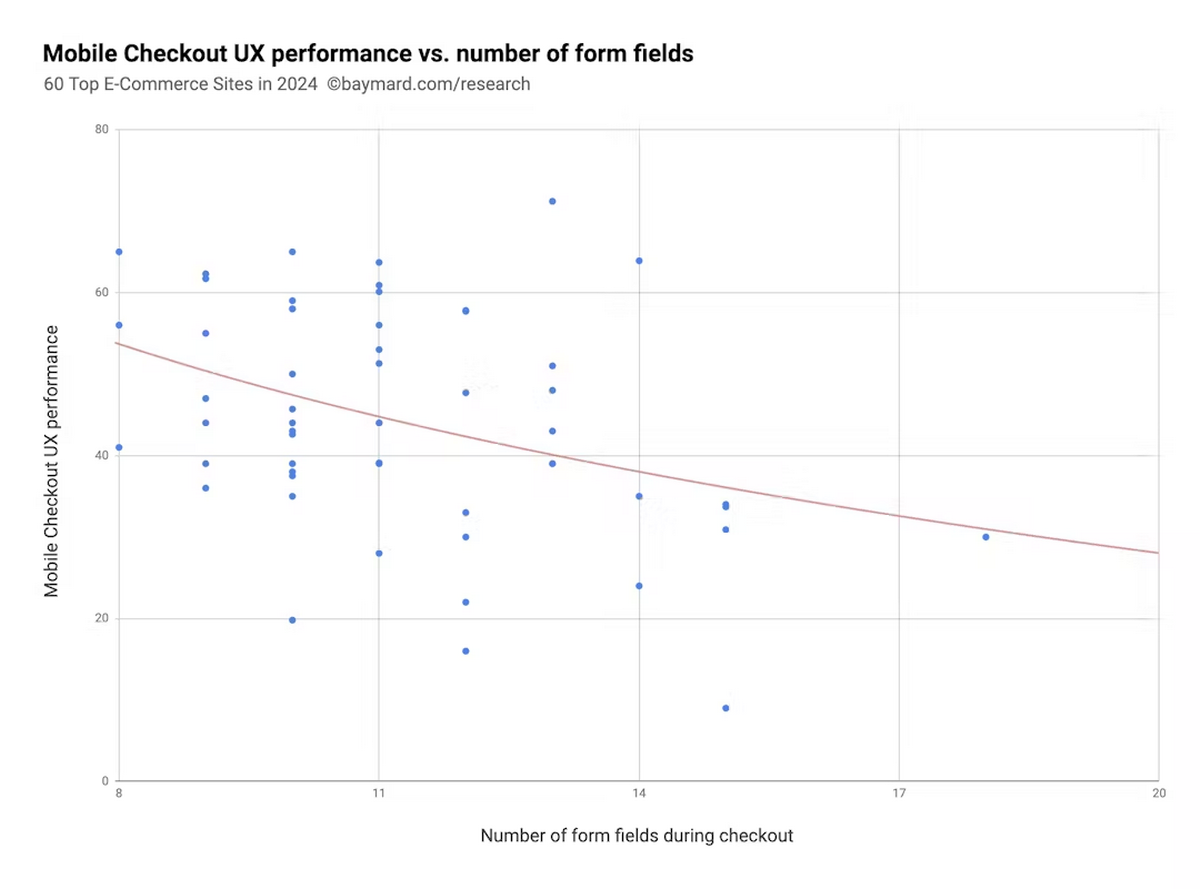
Removing details like company name or phone number often reduces friction, especially for simple consumer orders.
Clear payment options also support momentum.
Shoppers want to know if their preferred method will work, so showing your available options early can prevent hesitation.
Even small cues like familiar credit card icons or wallet buttons help visitors feel more certain about completing the order.
Some stores experiment with extras such as small addons or order bumps.
These can work well when they fit naturally with the original purchase, but the placement and size of the offer matter.
Subtle changes often determine whether an add-on feels helpful or distracting.
Guest checkout is another factor worth testing.
Many visitors prefer finishing the purchase without creating an account, and offering that option often keeps the flow feeling light and manageable.
Discover 19 checkout plugins that improve WooCommerce conversion rates.
3. Mobile eCommerce Testing
Data shows that desktop converts at 3.9% versus mobile’s 1.8%. That 2.1% gap represents a massive opportunity.
Clear, persistent CTAs help here. A button that stays visible while scrolling makes it easier for people to click on when they’re ready, rather than search for the next step.
This is particularly helpful on longer product pages.
Mobile layouts also benefit from simple, thumb-friendly interactive elements.
Clean spacing, readable text and easy access to menus or filters help visitors keep moving without feeling cramped.
Page speed delivers outsized returns on mobile. Deloitte’s research analyzing millions of sessions proves 0.1-second improvements drive 8% conversion increases for retail sites.
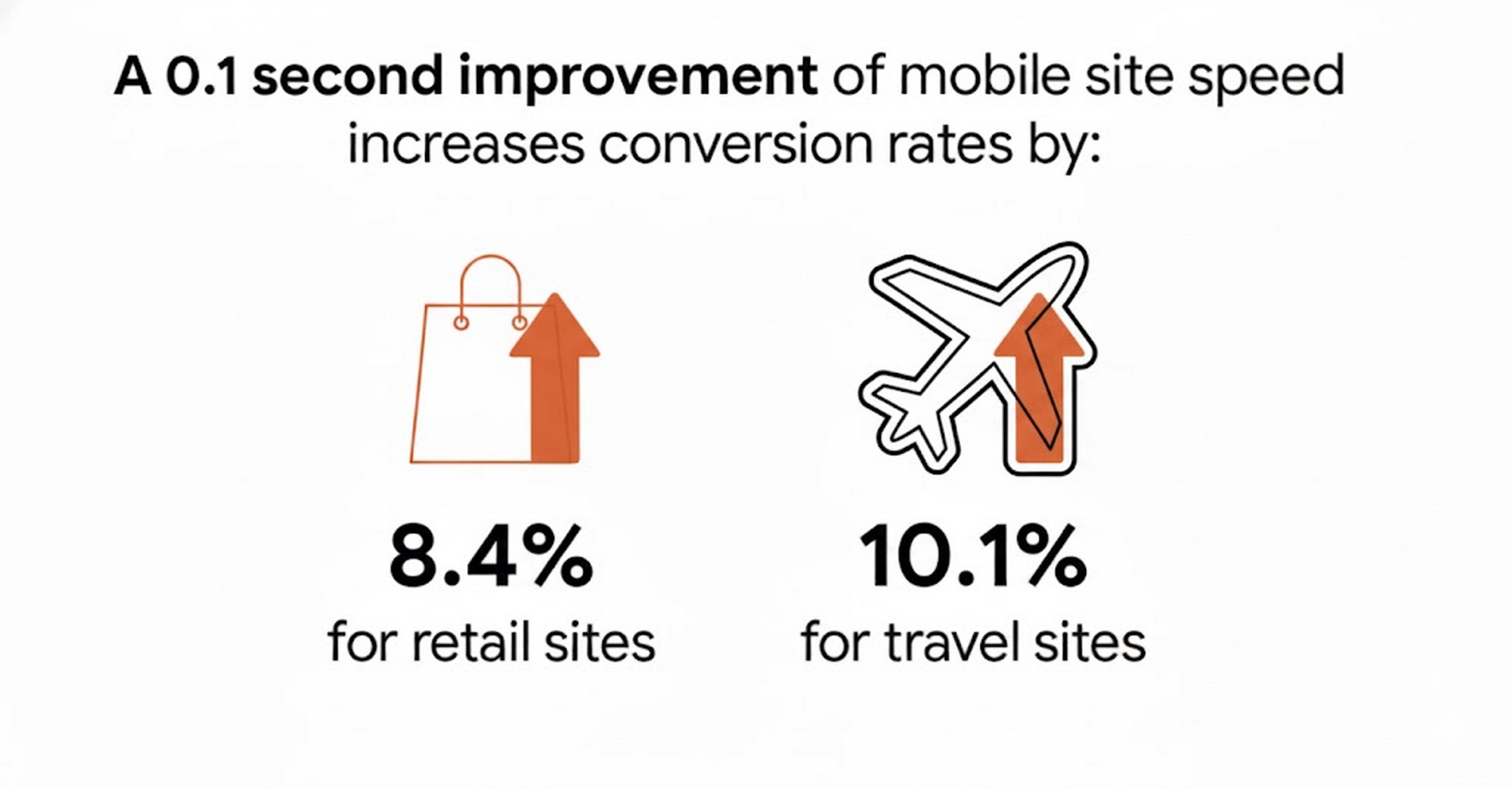
Nearly half of visitors abandon mobile sites that load slower than 3 seconds.
With mobile traffic exceeding 60% of all ecommerce visits, speed optimization is one thing you should absolutely do.
Explore proven ways to speed up your WooCommerce store for better mobile performance.
4. Post-Purchase
The moment right after a purchase is often the easiest time to introduce related offers or helpful next steps.
Customers who have just completed an order are still engaged and a well-chosen suggestion can feel natural.
For example, someone who buys running shoes may appreciate an offer for socks or care accessories.
Thank you pages also offer opportunities beyond selling.
Some stores test adding order tracking signups, loyalty program invitations, or simple prompts to follow the brand on social platforms.
Each option helps maintain the momentum of the purchase without overwhelming the customer.
Email follow-ups deserve testing as well. Different subject lines, sending times, and message styles influence whether customers stay connected.
A welcome email for a first-time buyer might focus on reassurance and simple next steps, while a message to a repeat customer might lean on familiarity.
Read our complete guide on how to upsell without being pushy.
How CartFlows Simplifies A/B Testing for WooCommerce
Most external testing tools sound appealing until you start using them. They come with monthly fees, extra dashboards to learn and integrations that slow you down.
CartFlows avoids all of that by placing the entire testing workflow directly inside your WordPress dashboard.
No separate logins, no scripts to maintain, and no juggling between platforms.
Setting up a test is simple.
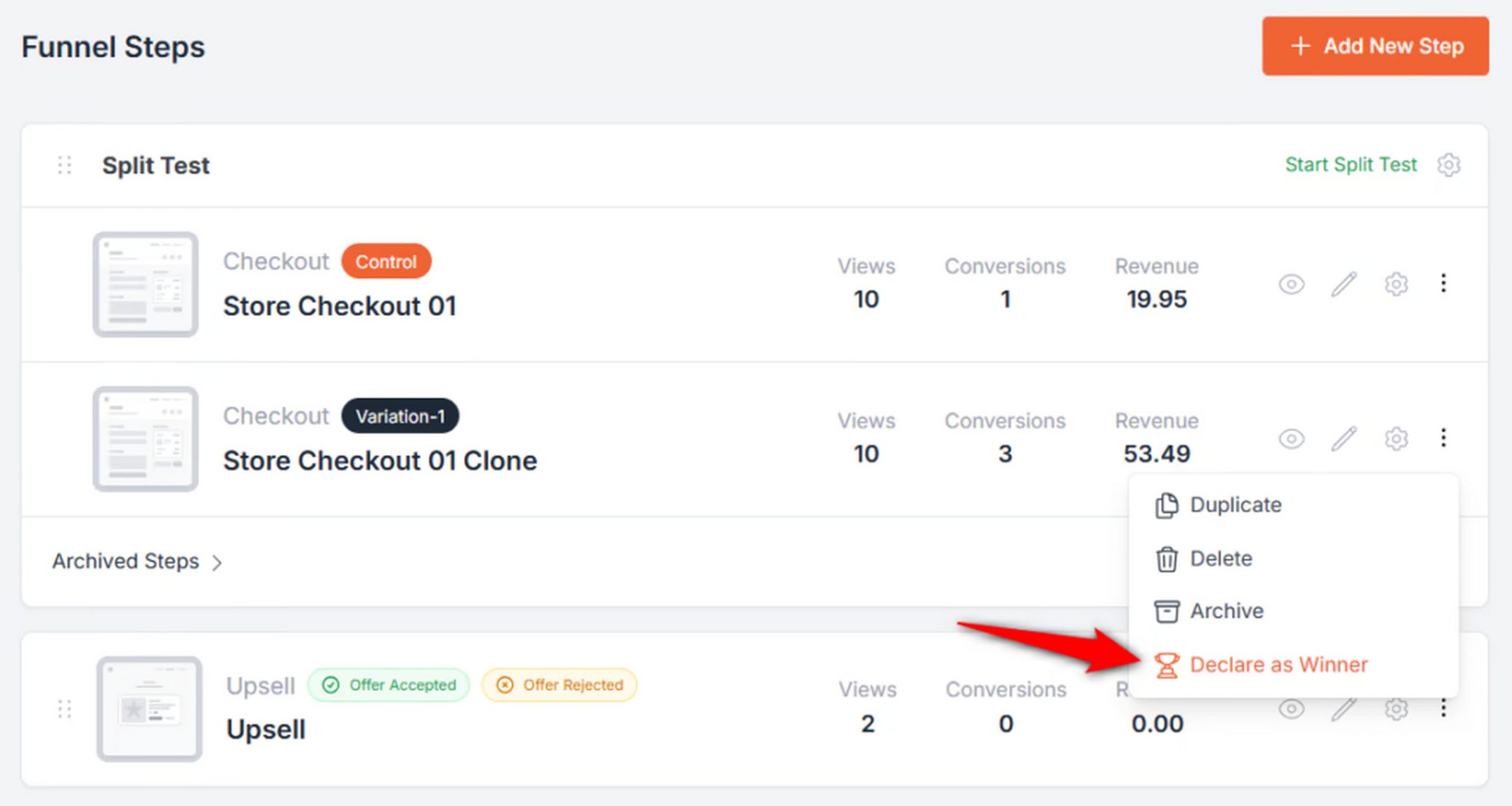
Go to the flow you want to A/B test click the options to enable split testing.
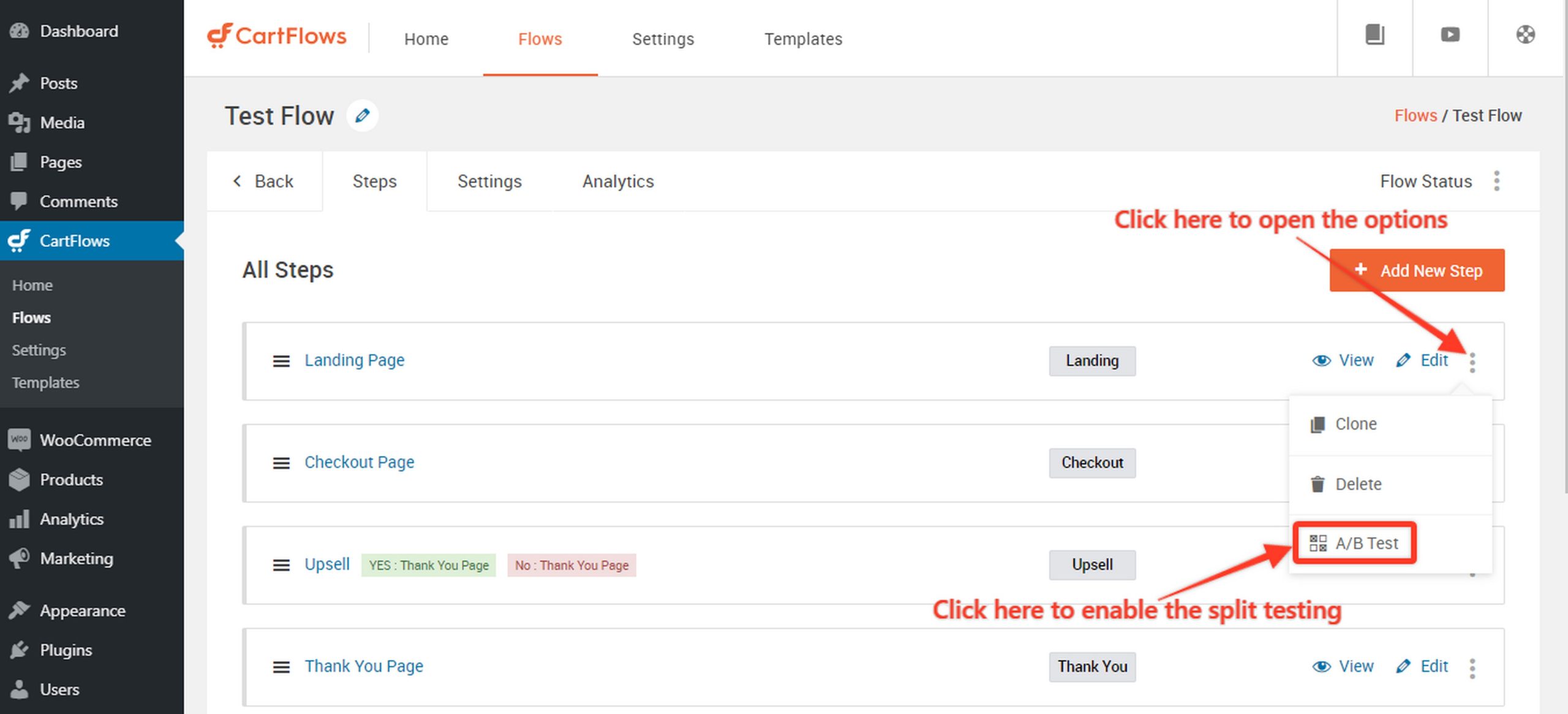
CartFlows automatically creates a clone of the page so you can get started.
If you want to create multiple variations instead of just two, you can clone the variation page by clicking on Options > Clone.
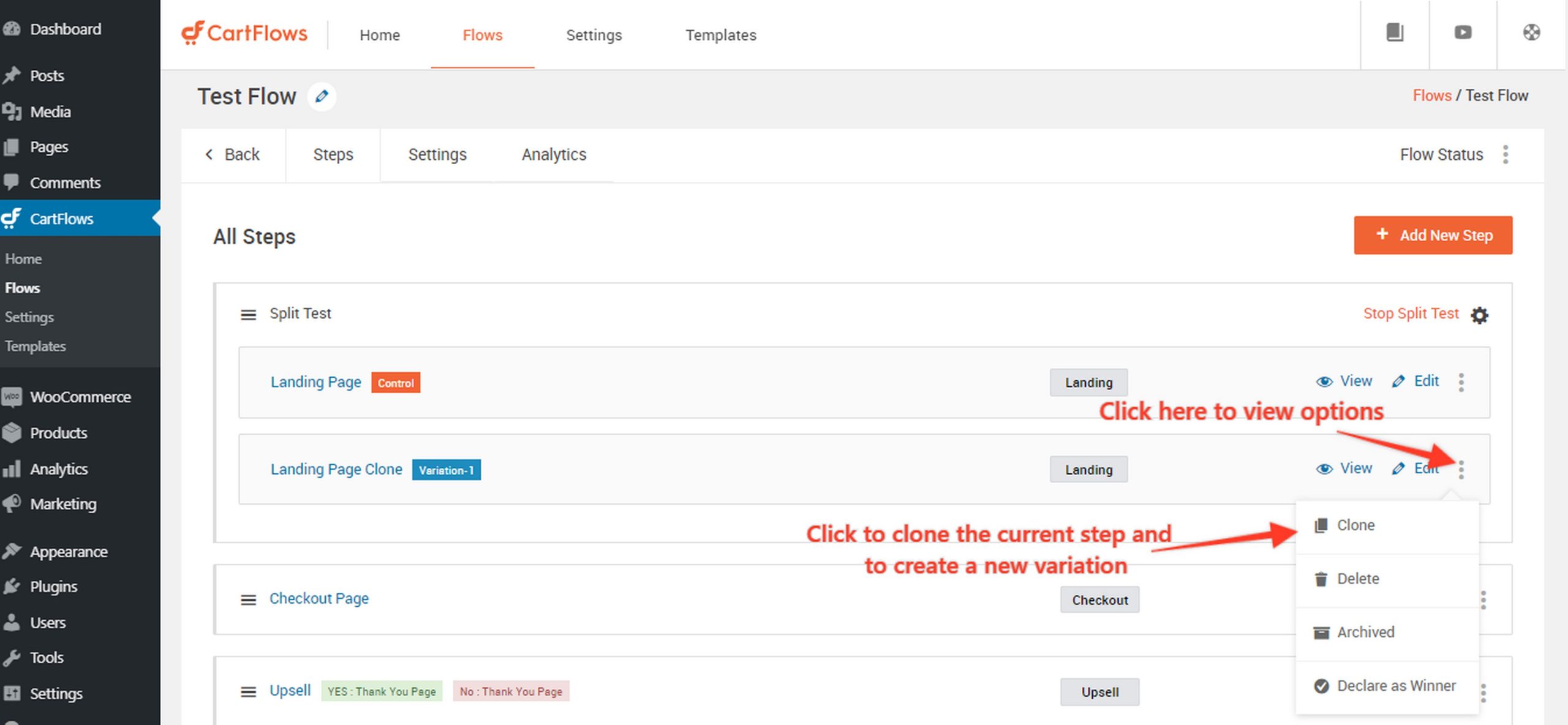
You can click into each of the cloned variants and edit the page to test headings, CTAs, colors or even completely revamp the page.
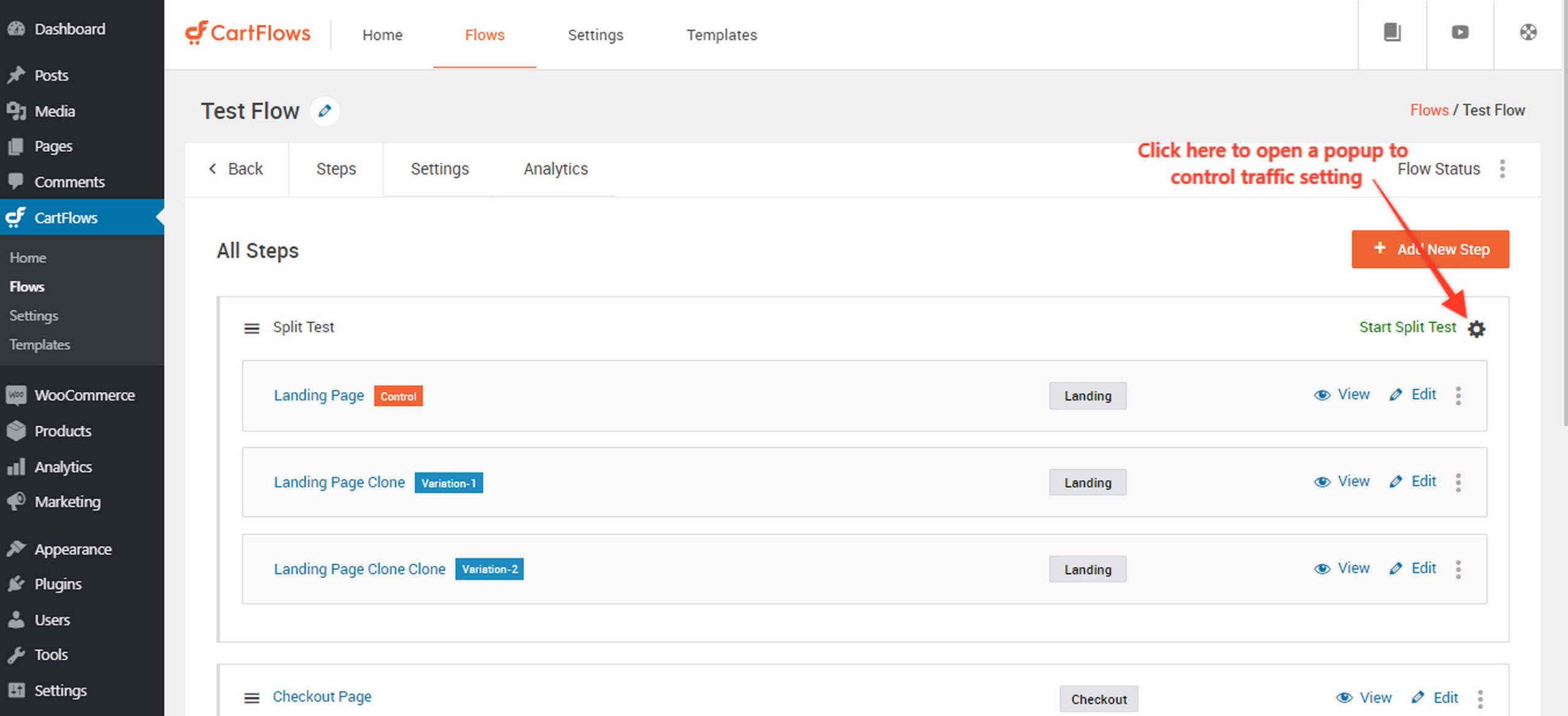
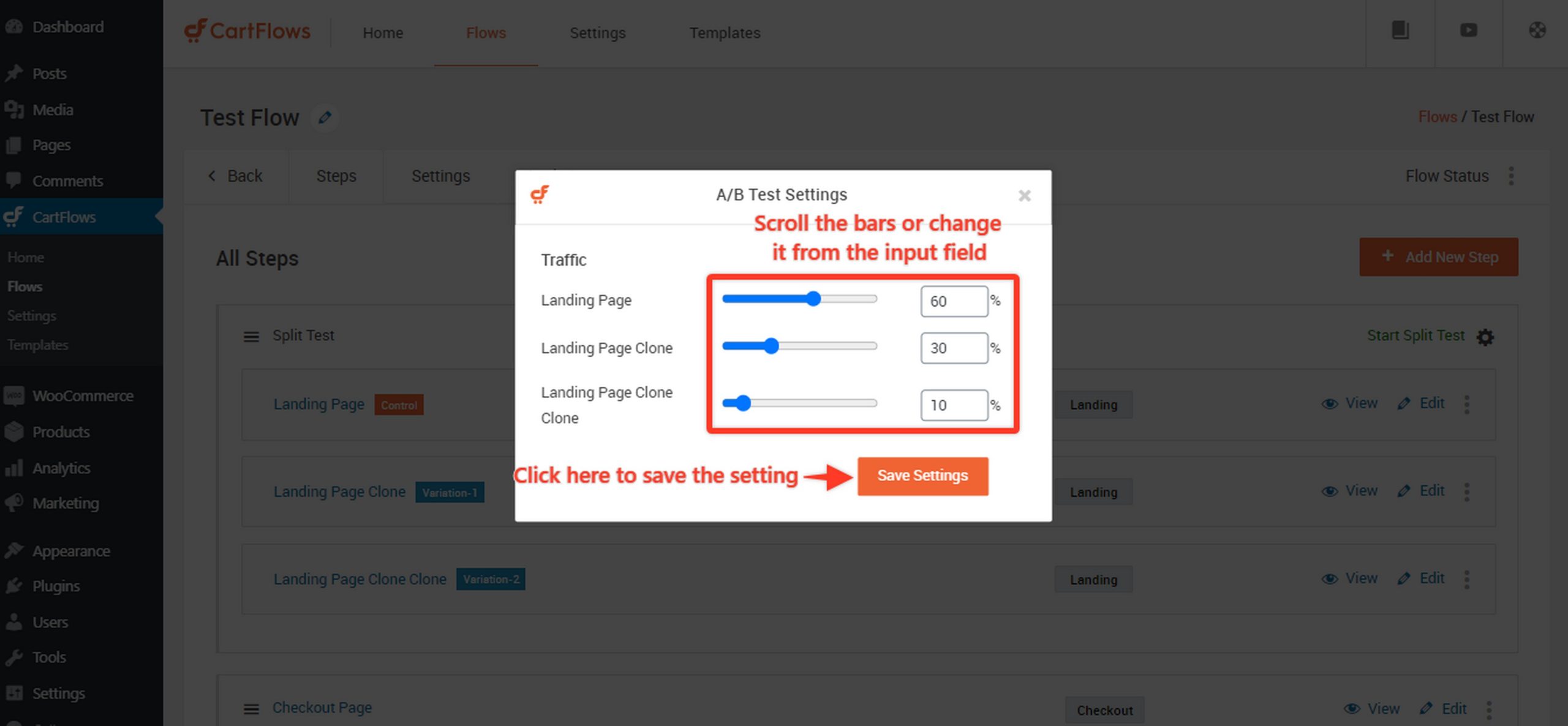
Once you’re satisfied with the variations, set the split test traffic limits for each variant by clicking on the settings icon on the top right of the split testing card.
Set the percentage traffic using the sliders.
Once everything is set, click the Start Split Test link beside the settings icon.
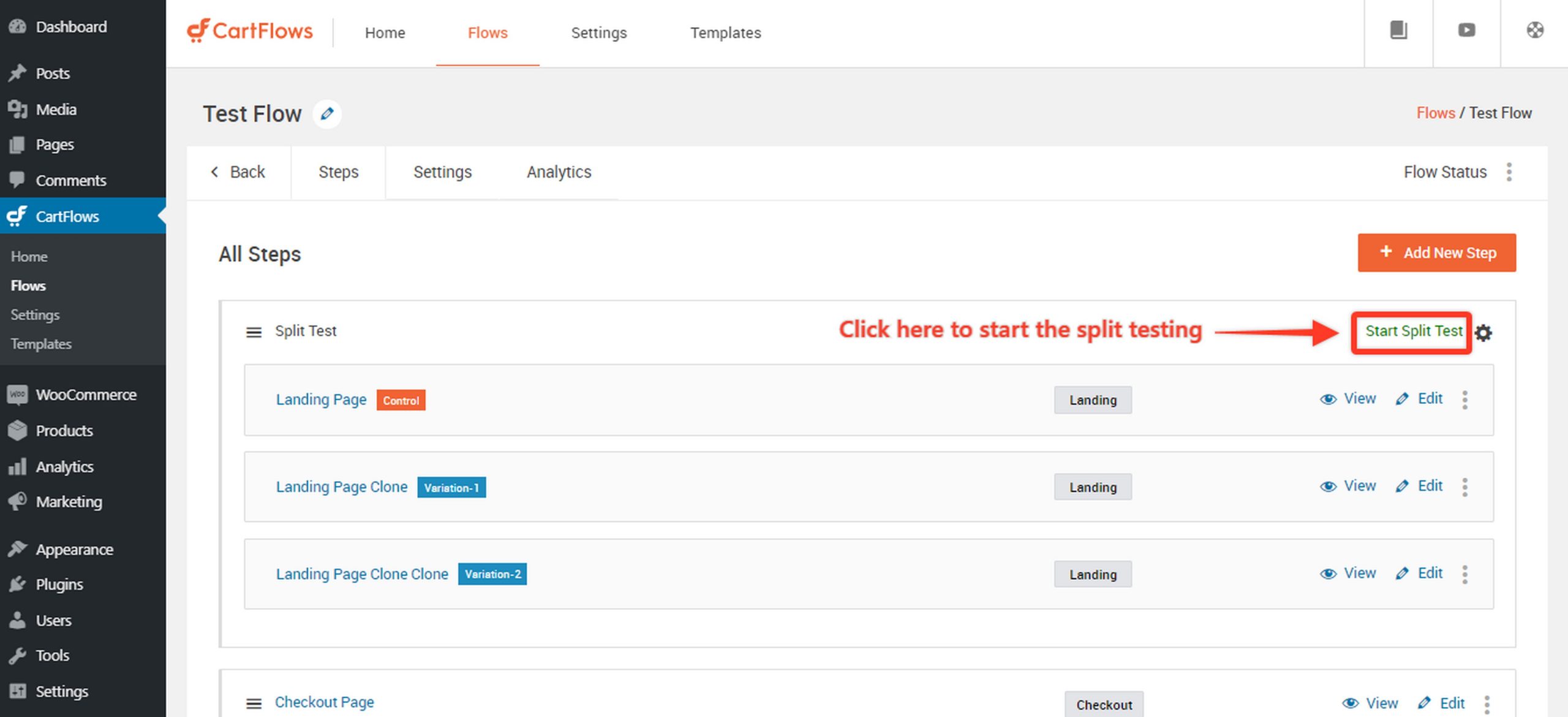
That’s it. You have created a split test for your website!
Now, it’s a waiting game. You’ll begin seeing conversion rates, revenue per variation, and confidence levels for all the pages start accumulating right away.
Once you find a variant converts better, just declare it as a winner and that becomes the default variant for all visitors.
CartFlows works with your existing page builders and plugins. So Spectra, Elementor, Bricks, Beaver Builder, Divi, and others function as usual.
Since it relies on WooCommerce payment gateways, you can safely test checkouts, order bumps, and upsells without worrying about breaking transactions.
CartFlows costs just $37/month with no limits except for how many sites you can run it on. So you can run as many tests as you need without having to upgrade.
Split Testing Best Practices: Setting Up Your First Test with CartFlows
If CartFlows powers your funnel, here’s how to introduce disciplined A/B testing and make it count.
1. Start Where It Matters Most
Pick a popular page first. It may be tempting to start with a quiet, low-risk page, but you need volume to get answers.
If you test a page with barely any traffic, you’ll be waiting months for the results.
Instead, go straight to your high-traffic areas like the main checkout, a popular product page, or your primary landing page.
These are the places where even a small percentage improvement makes a tangible difference to your bottom line.
2. Know Why You’re Testing
Before you set up a test, you need to know exactly what you’re trying to learn. Randomly changing button colors is just guessing.
Write down a clear hypothesis, such as changing the headline to focus on “urgency” rather than “features” to see if it drives faster decisions.
This turns the A/B test from a simple experiment to a strategic lesson. Whether the variation wins or loses, you walk away understanding your customers better.
3. Change One Variable at a Time
There is a strong urge to overhaul a page completely, but you have to resist it. If you change the headline, the image, and the layout all at once, you will never know which change actually worked.
You might get a conversion boost, but you won’t know if the new headline helped or if the new image actually hurt performance.
By changing one element at a time, you get a clean answer that you can replicate elsewhere.
4. Keep the Traffic Balanced
The best way to get reliable data quickly is to keep the playing field even. Set your test to split traffic 50/50 between the original page and the new variation.
This helps you reach statistical significance faster than an uneven split.
Once the test is live, try to leave the rest of your funnel alone. If you change other variables in your store while the test is running, you risk muddying the data.
5. Give the Test Time to Breathe
Patience is the hardest part of this process. You need to let the test run for at least two full weeks, even if you see a clear winner earlier.
This duration is important because shopping behavior changes depending on the day of the week.
You need to capture the full cycle of weekday and weekend traffic to establish a reliable baseline.
Stopping early often leads to false positives that disappear once the initial excitement wears off.
6. Look Deeper Than the Top Line
A higher conversion rate is great, but it is not the only metric that matters. You need to check customer segments.
A new design might look fantastic on a desktop monitor but completely break the user experience on a phone.
If you don’t separate the data, you might miss that red flag.
You should also watch Revenue Per Visitor. It is possible to increase conversions while accidentally lowering the average order value, so make sure your “winner” is actually making you more money.
7. Turn Wins Into a Playbook
When you find a winning variation, don’t just implement it and move on. Document the win. Write down what you changed, why you thought it would work, and what the actual result was.
Over time, this documentation becomes an institutional playbook for your business.
It prevents you from running the same tests twice and helps new team members understand what resonates with your specific audience.
What Not to Do: Common Testing Mistakes
- Resist the urge to stop tests early. Stopping too soon produces more bad decisions than any other mistake. You might see a variation jump ahead by 8% in the first three days, but results can flip just as quickly.
- Avoid testing too many elements at once. If you change the headline, image, button, and layout simultaneously, you create confusion. Even if conversions go up 15%, you won’t know which specific change drove the success. Sticking to single-variable testing gives you clear answers regarding what actually works.
- Don’t miscalculate your sample size. Running a test on a page with only 100 monthly visitors means you’ll be waiting months for meaningful data. Always calculate the required sample size before launching. Keep in mind that low-traffic pages require much bigger changes to detect a difference.
- Pay attention to mobile versus desktop differences. Ignoring device segmentation often leads to failed implementations. A variation that performs beautifully on desktop might tank your mobile conversion rates. Always segment your results by device so you don’t miss these distinctions.
- Stop tracking the wrong metrics. Looking solely at conversion rate can lead to bad conclusions. Revenue per visitor tells a much better story. A variation might increase your conversion rate by 10% but decrease your average order value by 15%, meaning you actually lose money. Track both metrics to be safe.
- Plan for implementation before you launch. Don’t wait for a winning variation to emerge before thinking about the next steps. Some changes require developer time or design work. Having those resources lined up in advance prevents frustrating delays between learning the results and implementing the winner.
Learn 7 funnel optimization strategies that actually work.
A/B Testing Your eCommerce Funnel
You don’t need perfect conditions to begin. Even small tests reveal more about your audience than waiting for a high-traffic scenario that may never arrive.
Start with the biggest friction points, not tiny details. Fixing long checkout forms, unclear costs, or confusing layouts beats experimenting with button colors every time.
Set a simple testing cadence to stay consistent.
Two tests a month for six months is enough to build momentum and replace “we should test that” conversations with actual results.
Keep your expectations grounded. A modest 5 percent lift compounds quickly across a year and makes a real difference to revenue.
If you want to explore CartFlows, the 14-day refund window gives you time to set up a funnel, run a test, and see whether the workflow fits your store.
The free Sales Funnel Building Checklist also helps you spot improvement areas beyond testing, so both tools work well together.
Most importantly, launch your first test soon.
Duplicate a checkout page, change the headline, split the traffic, and learn from what happens. One real test will teach you more than another month of planning.